
AI Nose Piercing Filter




How to Use the Nose Piercing Filter Online?
Upload Your Portrait
Select a clear, front-facing photograph. High-quality images with good lighting yield the most realistic results.
Apply the Filter
Click the generate button and the filter will place the piercing automatically, blending it naturally with your photo.
Preview and Download
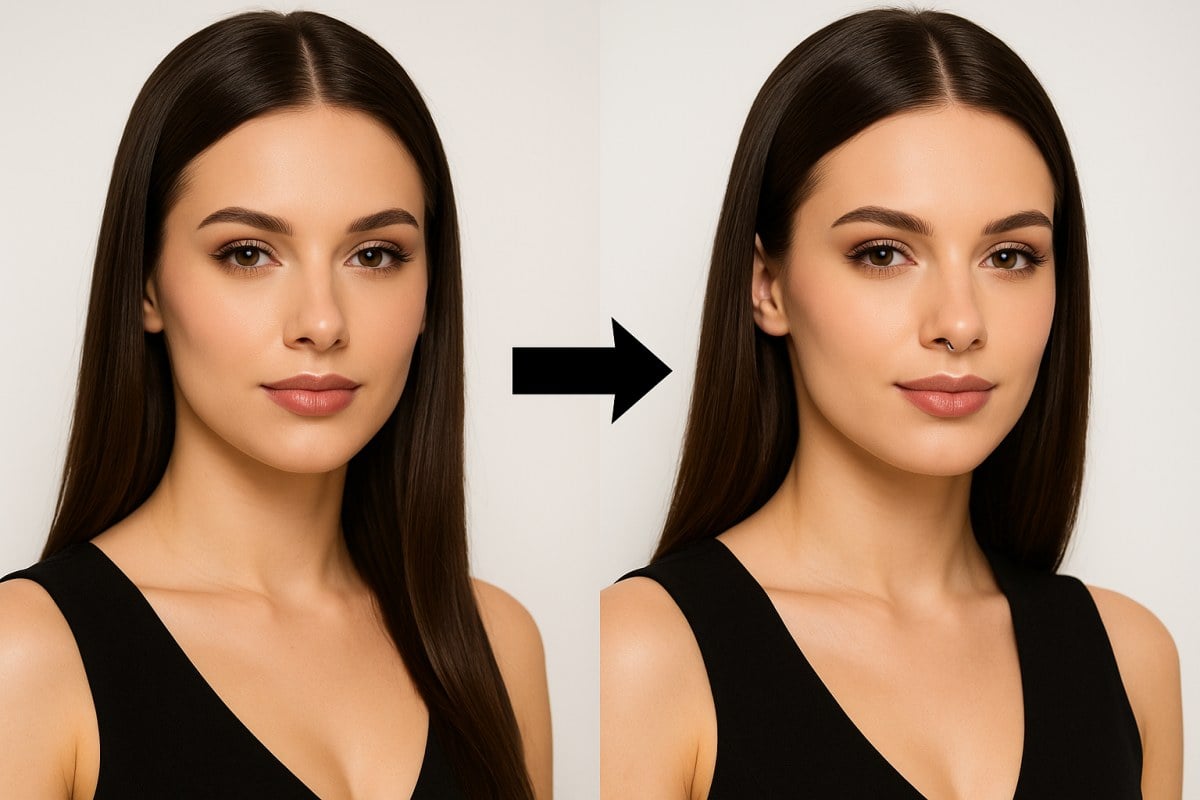
The AI will generate the piercing on your photo in seconds. Download the result or try different styles to find the perfect look.
Key Features of Nose Piercing Filter
Realistic Nose Piercing for Virtual Try-Ons
Explore how different nose ring styles might suit you without any permanent decisions. Our advanced nose piercing simulator offers a photorealistic preview, moving far beyond basic filters that simply overlay an image. It analyzes your facial structure, lighting, and skin tone to render a piercing that looks genuinely part of the photo, whether it's a subtle stud or a bold septum ring.
This level of detail is powered by our core AI image generator technology, giving you a reliable and accurate answer to the question, 'how would I look with a nose ring?' before you ever step into a studio.
Why Choose Nose Piercing Generator?
Virtual Try-On Experience
Photorealistic Rendering
Personalized Style Options
Instant Generation
No Commitment Needed
High-Quality Downloads
What Our Users Say?
FAQs
How does the AI ensure the nose piercing looks realistic?
Can this AI tool simulate different types of nose jewelry?
Will the AI work correctly on any photo?
Can I specify the material or color of the piercing for the AI?
What makes this AI piercing simulator better than other filters?
Is the AI nose piercing filter free to use?
Try Your Piercing Look Now
Instantly see how nose rings or studs would look on you without the pain. A safe and fun way to test styles before making them real.
Try Free OnlineDiscover more:
- AI Photo Trends
- One Piece Wanted Poster Maker
- Headshot Background Changer
- AI Age Progression
- Fisheye Lens Filter
- Add Suit to Photo
- AI Coloring Page Generator
- World Cup AI Football Image Generator
- AI Statue Generator
- Face Shape Detector
- AI Wedding Photo Generator
- Celebrity Look Alike Finder
- Funny Face Filter
- AI Product Photo Generator
- Black and White Filter
- AI Chibi Generator
- AI Tan Filter
- AI Passport Photo Maker
- 2D to 3D Image Converter
- AI Lingerie
- AI Christmas Photo Generator
- AI Clothes Changer
- AI Couple Photo Maker
- Pixel Art Generator
- Mount Rushmore Generator
- Halloween Costume Generator
- AI Halloween Avatar Generator
- Oil Painting Filter
- AI GTA Filter
- Angry Face Filter
- Funko Pop Maker
- Van Gogh Filter
- AI Barbie Filter
- Gender Swap Filter
- AI Barbie Box Generator
- AI Makeup Generator
- AI Headshot Generator
- AI PS2 Filter
- AI Album Cover Generator
- Eyebrow Filter
- Magazine Cover Generator
- Short Hair Filter
- Add Glasses to Photo
- AI Fat Filter
- Ghibli AI Generator
- Disney Pixar AI Generator
- Watercolor Filter
- Photo to Digital Art
- AI Hairstyle Changer
- AI Sticker Generator
- AI Silhouette Maker
- Photo to Painting
- Black Eye Filter
- Red Hair Filter
- Photo to Line Drawing
- Eye Color Filter
- Polaroid Photo Generator
- AI Crying Filter
- AI Hair Color Changer
- AI Dread Filter
- No Beard Filter
- Wavy Hair Filter
- AI Bangs Filter
- AI Skinny Filter
- Long Hair Filter
- Curly Hair Filter
- AI Buzzcut Filter
- AI Braids Filter
- Bob Haircut Filter
- Blue Eye Filter
- AI Clay Filter
- Blonde Hair Filter
- AI Braces Filter
- AI Aging Filter
- AI Beard Filter
- AI JoJo Filter
- AI Mirror Selfie Generator
- AI Caricature Generator
- AI Simpsons Filter
- AI Six Pack Abs Photo Editor
- Pregnant AI Generator
- Photo to Sketch
- Photo to Emoji Generator
- AI South Park Character Creator
- Snoopy Filter
- Selfie with Celebrity Generator
- AI Pokemon Generator
- AI Mugshot Generator
- AI Minecraft Generator
- AI Manga Filter
- AI Lego Generator
- AI Cartoon Generator
- AI bald filter
- AI Baby Filter
- AI Action Figure Generator