Akool Review: Features, Pricing, Pros and Cons (2026)

Emily Carter
AIGC Product & Content Specialist
Emily Carter works with GoEnhance AI’s product and content teams, focusing on generative image and video workflows, AIGC models, and creator use cases. She turns product research and hands-on testing into practical guidance for creators exploring generative AI.
- Akool Review: TL;DR
- What Is Akool?
- How Akool Fits Into a Marketing Workflow
- What Are Akool’s Best Features?
- Akool Pricing and Credits
- What Are Akool’s Pros and Cons?
- Where Does Akool Fall Short?
- Is Akool Right for You?
- Akool vs. GoEnhance AI
- Final Verdict: Is Akool Worth It?
Akool is easiest to recommend when you already know the video task: make a presenter-led explainer, localize a speaker video, or create a face-swap variation. Its appeal is the range of focused tools in one account. The tradeoffs are a credit-based plan structure, feature limits that vary by plan, and outputs that still need a careful human review.
For marketers, educators, and creators who regularly adapt existing videos, Akool is a practical toolkit. If the priority is exploring video models, animating images, or applying stylized effects, a platform built around broader creative generation may be a closer fit.
Akool Review: TL;DR
| Review area | Verdict |
|---|---|
| Best for | Marketers, creators, educators, and teams producing presenter videos or localized clips |
| Strongest use case | Translating an existing speaker video with subtitles, voice options, and lip sync |
| Also useful for | Avatar explainers, face-swap variations, and personalized outreach assets |
| Main tradeoff | Credits, model access, resolution, and other limits vary by subscription |
| Starting price | The listed Starter plan is $12 per seat per month, billed yearly, for 200 credits |
| Consider another option if | You mainly want open-ended video generation, image animation, or creative effects |
Akool is most compelling when it helps reuse a script, presenter, or source clip. Before subscribing, check the limits for the exact feature you plan to use and estimate how many credits a typical finished asset will consume.
What Is Akool?
Akool is an AI content platform with separate workflows for avatar video, video translation, face swap, and image or video creation. It is organized around production tasks rather than one all-purpose generation prompt.
That task-first setup can help a small team move from a source asset to a few useful versions. A presenter clip can be translated for another audience; a script can become an avatar-led explainer; a face-swap or motion variation can support a creative test. The tools sit under the same product, but access and limits are not identical across them.
Akool is therefore best understood as a collection of AI production utilities. It can speed up particular steps, while campaign strategy, scriptwriting, brand review, and final editing remain part of the job.
How Akool Fits Into a Marketing Workflow
A simple workflow starts with the deliverable, not the tool:
- Choose the format. Decide whether the project needs an avatar presenter, a translated version of an existing video, or a visual variation.
- Prepare the source. Use a short, clearly spoken script for an avatar. For translation or face swap, start with clean footage, visible faces, steady lighting, and understandable audio.
- Generate a first version. Select the relevant avatar, voice, language, or swap type. Keep the first pass narrow so it is easy to review.
- Review before publishing. Check names, pronunciation, subtitles, facial movement, voice tone, identity consistency, and any consent or usage requirements.
This is where Akool’s tool set makes sense: several common production jobs are available in one place. It does not automatically turn those separate assets into a complete campaign. Teams still need to plan the message, adapt it for each channel, and decide which version is ready to publish.
What Are Akool’s Best Features?
1. AI Avatar Videos
Akool’s avatar workflow is designed for explainers, training videos, product introductions, and other presenter-led content. The public page describes a library of avatars, more than 500 voice options, templates, and a storyboard timeline that pairs script lines with shots. Users can start from a template or build a video from a script and selected voice.

An example presenter avatar shown on Akool’s avatar video page.
This format is most useful when the message is short and the presenter’s role is clear. A product walkthrough or onboarding explanation is easier to judge than a long script that depends on emotional range, natural pauses, or nuanced delivery. Custom avatar options also sit at different levels of the product, so check the plan details if a consistent, brand-specific presenter is important.
2. Video Translation and Lip Sync
Video translation is Akool’s clearest fit for teams adapting existing presenter content. Its feature page lists support for more than 155 languages, AI voice options, subtitles, SRT and ASS uploads, a proofreading editor, voice dictionaries, multi-speaker detection, and optional lip sync.
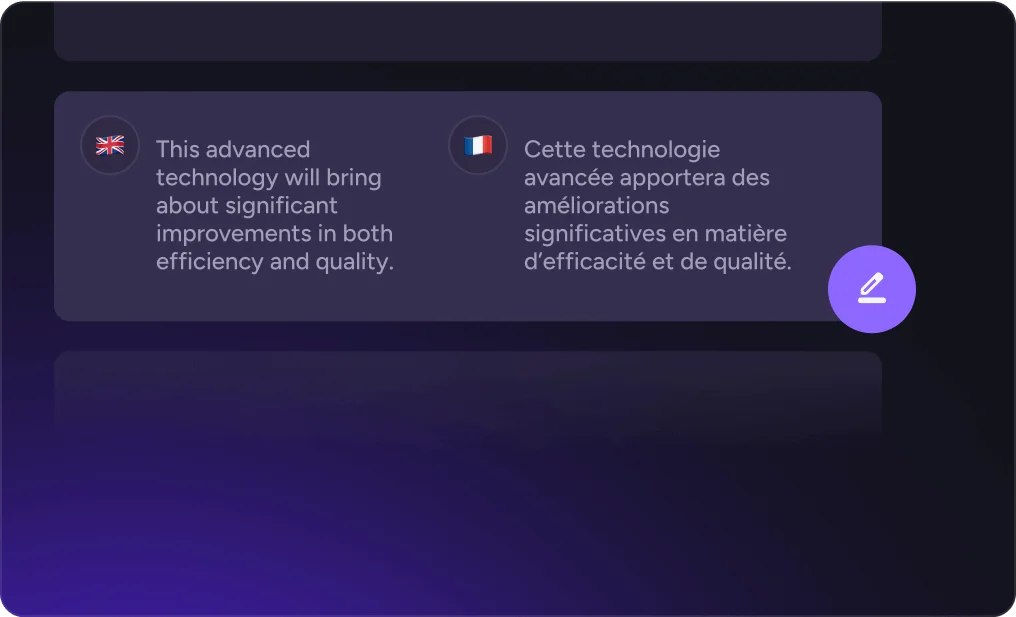
Akool’s translation editor and localized video preview.
The workflow is practical when the original video is already useful and only needs to reach another language audience. A translated clip can save a new recording session, while subtitles and proofreading controls give the team a chance to catch wording issues before export.
Review the output closely. Names, product terms, humor, and calls to action can lose their intended tone in translation. Lip sync can also be less convincing when the speaker moves quickly, turns away, or shares the scene with other people. Akool’s own guidance says the feature works best with a single speaker, clear audio, and good lighting, which is a useful standard for choosing source footage.
3. Face Swap and Motion Variations
Akool’s swap studio groups several related tools: face swap, character swap, motion swap, head swap, hair swap, and clothing swap. The face-swap workflow supports both images and video, with multi-face options for group material. The public page lists common video formats such as MP4, MOV, AVI, MKV, and WebM, plus JPG, PNG, and WebP images.
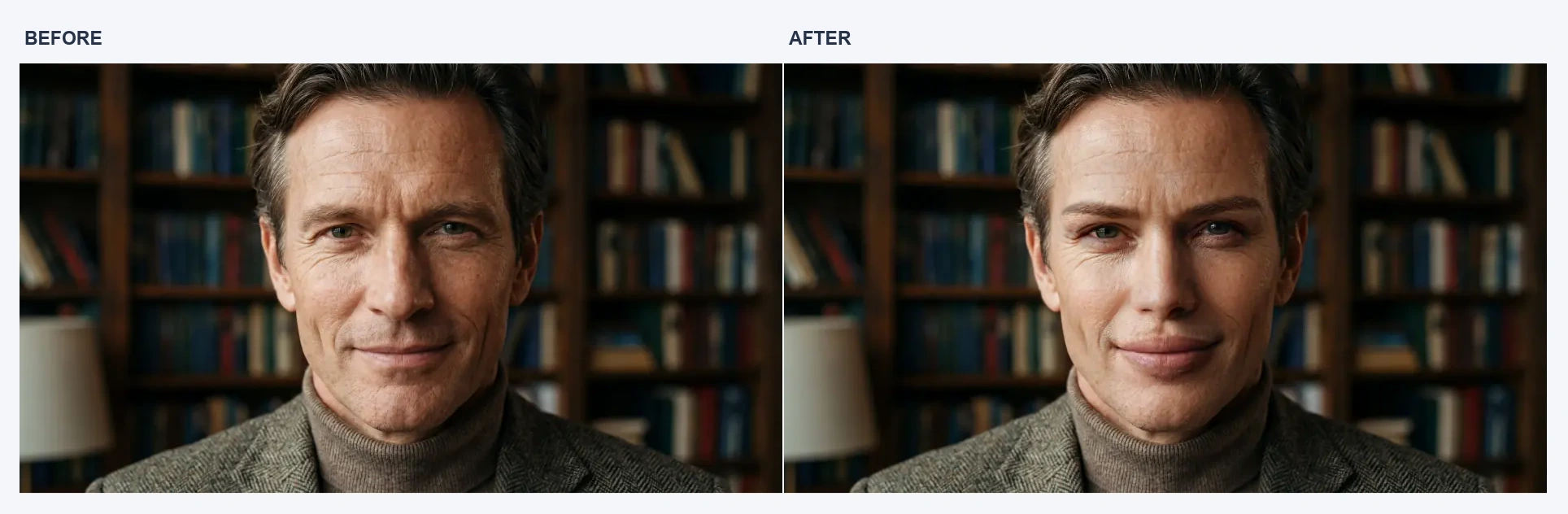
Before-and-after examples published in Akool’s face-swap gallery.
The feature is useful for creative tests and visual variations, especially when the source face is clear and the movement is manageable. Akool’s current face-swap page lists a free-video limit of 30 seconds and 150 MB, with longer videos available on paid plans. Resolution and generation limits can depend on the plan and the specific workflow.
Use this feature only with the rights and consent needed for the faces and footage involved. For brand work, the final clip should also make its context clear so viewers are not misled about who appeared in it.
4. Personalized Marketing Videos
Akool’s avatar, translation, and swap tools can support personalized outreach, localized introductions, and short product messages. For example, a team could adapt one presenter script into several language versions or create different visual treatments for a campaign test.
The advantage is faster asset production. The limitation is that Akool supplies the production tools, not the campaign decisions. It will not determine the strongest offer, write a persuasive script, select the right audience, or tell a team which variation performed best. Those parts still need a marketing plan and a review process.
Akool Pricing and Credits
Akool’s pricing page currently presents annual-billing rates per seat. The listed promotional prices and included monthly credits are:
| Plan | Listed price per seat/month | Credits per month | Notable limits |
|---|---|---|---|
| Starter | $12, billed yearly | 200 | Up to 1080p video; personal license |
| Pro | $21, billed yearly; page shows $30 before promotion | 600 | Up to 4K; more model access and translation proofreading |
| Pro Max | $41.30, billed yearly; page shows $59 before promotion | 1,200 | Up to 8K; API and workspace collaboration |
| Business | $174.30, billed yearly; page shows $249 before promotion | 6,000 | Up to 16K; business license and higher concurrency |
The advertised prices can change, and the credit cost depends on the tool and model. A low monthly price is not enough to compare plans: estimate the cost of the avatar, translation, or video task you will actually run, then check the output length, resolution, concurrency, and license you need. The plan page also lists a free tier, but individual tools show their own limits, so confirm those inside the feature you intend to use.
What Are Akool’s Pros and Cons?
| Pros | Cons |
|---|---|
| Brings avatars, translation, face swap, and other content tools into one account | Credit use and feature access vary by plan |
| Video translation includes subtitles, proofreading, voice options, and lip sync | Translation tone and mouth movement still need review |
| Avatar workflow offers templates, voices, and a script-based timeline | Avatar delivery may feel controlled on long or emotionally complex scripts |
| Swap studio includes several types of image and video variations | Source quality and movement affect the result |
| Can help reuse existing scripts and footage for new audiences | It does not provide a complete campaign strategy or performance workflow |
Where Does Akool Fall Short?
Plan Choice Takes More Checking
Akool’s credit system covers different models and tools, so the monthly credit count does not tell you how many finished videos you will get. A short avatar clip, a translated video, and a high-resolution generation may consume credits differently. Compare the specific workflow and output limit before choosing a tier.
The annual-billing prices also make the displayed monthly amount easy to misread. Check the billing term, promotional rate, license, and any extra credit costs before subscribing.
The First Output Still Needs Review
A generated presenter clip can still need script edits. A translated voice can sound fluent while missing the original tone. A face swap can look convincing in a still frame and weaker during movement. These are manageable issues for drafts and internal tests, but they matter for public-facing campaigns.
It Is a Production Toolkit, Not a Campaign System
Akool can help create individual assets, but campaign planning still happens outside the generation step. Teams need to decide the offer, write and approve the message, adapt it for each channel, and compare performance after publishing. If the main requirement is one place to explore many models and creative directions, Akool’s task-specific structure may feel narrow.
Is Akool Right for You?
| You are… | Akool is a fit when… |
|---|---|
| A marketer or sales team | You need presenter-led outreach, localized messages, or quick content variations |
| An educator or trainer | You need repeatable explainers or training clips based on a clear script |
| A creator | You want to test avatars, face swaps, or localized versions of existing content |
| A brand team | You can review the output and have the rights and approvals needed for the source material |
| A video creator focused on open-ended generation | You need broad model exploration, image animation, or more stylized video effects |
Akool is worth considering when the brief is specific and the team already has a script or source video. It is less suitable when you expect one tool to handle the creative concept, production, campaign variations, and performance review from start to finish.
Akool vs. GoEnhance AI
Akool is a stronger fit for presenter videos, translation, and task-specific swaps. GoEnhance AI is more relevant when the goal is to create or transform visual content across different video workflows.
The GoEnhance AI video generator supports text-to-video, image-to-video, and video-to-video workflows, with multiple models and creative effects. Its face-swap tool is a closer match when a project needs face swapping across video, images, or GIFs. For animating a still portrait into a short motion clip, AI Dance offers a more focused creative workflow.
Choose based on the output you need. Akool is worth comparing for localized presenter content and avatar-led messages. GoEnhance AI is worth exploring when you want to animate images, try different video models, or apply creative effects across a clip.
GoEnhance AI Examples
The examples below show two different creative workflows: a face-swap transformation and an AI Dance character image. They give a more concrete sense of the visual work GoEnhance is designed to support, alongside Akool’s presenter and localization tools.

GoEnhance AI face-swap example, shown on its official face-swap page.

An AI Dance character example from GoEnhance’s official page.
Final Verdict: Is Akool Worth It?
Akool is a practical option for teams with a clear video task and source material ready to use. Its most convincing workflows are video translation, avatar explainers, and face-swap variations. The credit system and feature-specific limits make plan selection important, while the outputs still need review for tone, realism, and brand fit.
For a team producing localized presenter content every week, Akool may save repeated production steps. For occasional experiments or open-ended video creation, compare its credit costs and workflow with a platform that offers a broader set of models and effects before committing to a plan.
Want a broader generation workflow? Try the GoEnhance AI video generator.
You might also like
View moreFreepik AI Image Generator Review: My Honest Take After Testing It
I tested Freepik AI Image Generator to see if it is worth using. Here is my honest review, key problems I found, and why I prefer GoEnhance AI.
Google Flow Review: I Tested Its AI Video Features, Credit Costs, and Real Limits
I tested Google Flow for AI video, image-to-video, storyboards, and creative workflows. Here’s what works, what costs credits, and who should use it.
Deevid AI Review: I Tried Deevid AI to See If It’s Really Worth It in 2026
Deevid AI review: See how this multi-model AI video platform compares on features, pricing, output quality, refund policy, and best alternatives in 2026.
I Reviewed Higgsfield AI—Cinematic Control, Not For Everyone
Higgsfield AI reviews: I tested its cinematic controls and multi-model workflow—powerful for shot-style results, but credits and consistency can slow you down.