
Veo 3.1 Lite
Veo 3.1 Lite is built for creators who want short-form video generation to feel practical, not heavy. It is a lighter, faster, high-value option for visual storytelling, product clips, and social content, especially when you want a Veo 3.1 Lite video model that stays easy to use inside a real workflow.
Explore What Veo 3.1 Lite Does Best
A Lighter Model Built for Fast, Practical Output
Veo 3.1 Lite stands out for turning short-form video generation into something more practical and repeatable. It is designed for creators who want clear scene output, flexible short durations, and a smoother path from idea to result without moving into a heavier production flow. Inside GoEnhance, this kind of everyday workflow fits naturally with an AI video generator experience that feels simple to use but still capable enough for real creative work.
Stronger Image-Led Control for Short Video Creation
One of the most useful strengths of Veo 3.1 Lite is how well it works when you already have a clear starting frame. Instead of relying only on text, creators can use an image to anchor composition, subject presence, and visual direction, which makes short clips feel easier to steer and refine. That is why Veo 3.1 Lite fits especially well in workflows that already involve image to video creation and reference-based generation.
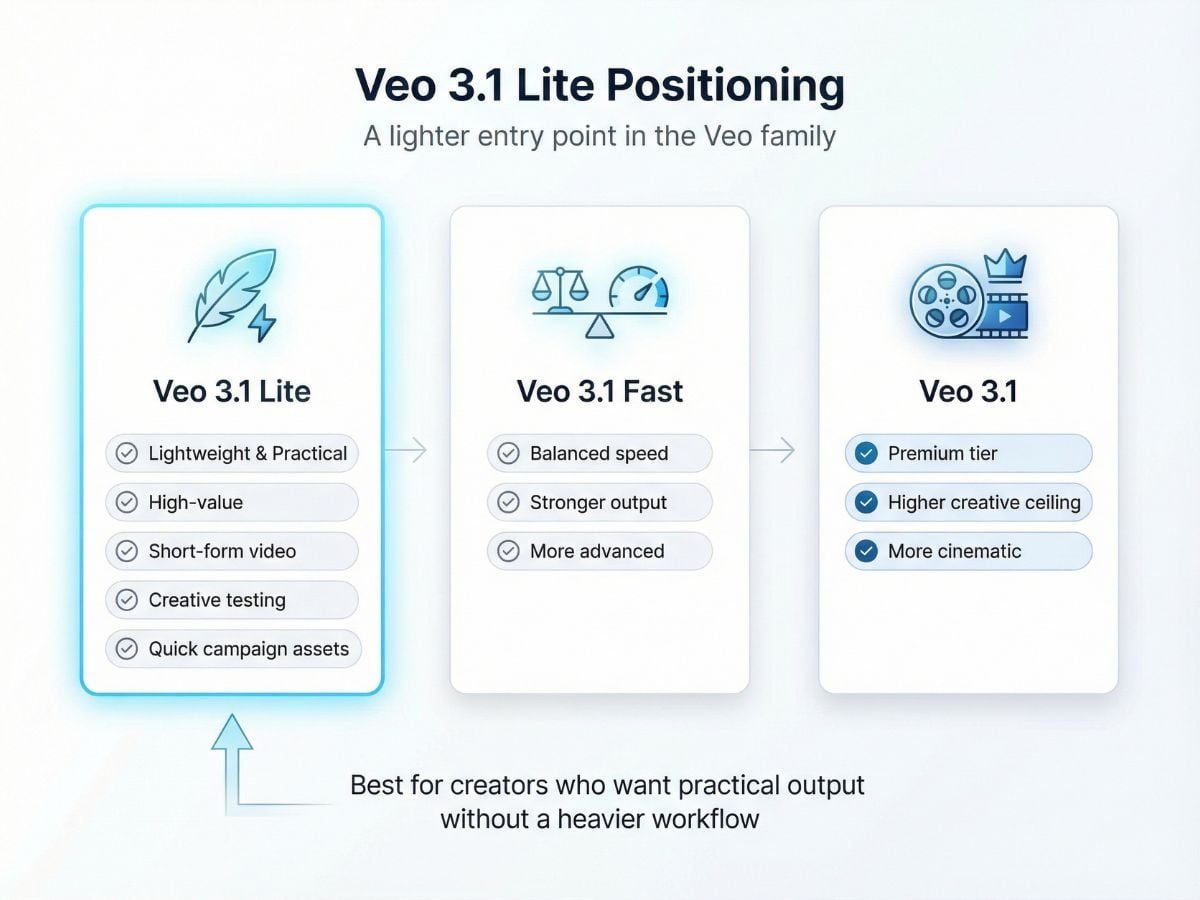
A Lighter Option Within the Veo Family
The main appeal of Veo 3.1 Lite is not flashy positioning. It is that it gives you a more cost-efficient path into the broader Veo 3.1 family when your job is to make social clips, creative tests, quick ads, or simple visual explainers. If you want to verify the model background directly, Google’s official Veo 3.1 Lite preview page is the most reliable starting point.
Useful for Vertical and Horizontal Content
This model fits the kind of production work many teams actually do every week: vertical promos, horizontal explainers, quick campaign variants, mood tests, and visual story drafts. It is especially practical when speed, clarity, and repeatability matter more than chasing the most premium output tier.
How To Use GoEnhance?
Open GoEnhance AI Video Generator
Start inside GoEnhance and open the AI video generator workflow workspace to begin your Veo 3.1 Lite project.
Choose Your Settings
Set the prompt, duration, aspect ratio, and other creative parameters. If you want a more directed result, prepare a still frame or reference image before generating.
Add References and Generate
Upload a reference image when needed, review your prompt one more time, and click generate. This is the simplest way to turn a clear idea into a short clip without adding unnecessary steps.
Veo 3.1 Lite Key Parameters
Why Choose Veo 3.1 Lite?
High-value for real content work
Less friction, more usable value
Useful for both prompt-led and reference-led creation
Good match for social formats
A more cost-efficient entry into the Veo 3.1 family
A smart high-value choice when speed matters
Veo 3.1 Lite vs Other Veo 3.1 Series Options
FAQs of Veo 3.1 Lite
What is Veo 3.1 Lite best used for?
Does Veo 3.1 Lite support image to video?
Is Veo 3.1 Lite a high-value choice?
What makes Veo 3.1 Lite different from Veo 3.1?
Does Veo 3.1 Lite support 4K output?
Is Veo 3.1 Lite good for social media content?
How do I get better results with Veo 3.1 Lite on GoEnhance?
Where can I verify the official Veo 3.1 Lite capability notes?
More Video Models
Create with Veo 3.1 Lite Now
Use GoEnhance to turn prompts and reference images into short, useful video clips with less friction. Whether you are testing concepts, making campaign assets, or building everyday social content, Veo 3.1 Lite gives you a practical and high-value place to start.
Explore All Video Tools