goenhance logo

Wan 2.7

Wan 2.7 is a major step forward for AI video creation, with stronger visuals, motion, audio, style control, and consistency. This Wan 2.7 AI video model is especially useful for creators who want a more controllable workflow instead of simple prompt-only generation.

Try Wan 2.7
Case 1
Case 1
Case 2
Case 2
Case 3
Case 3
Case 4
Case 4
By uploading a file, you agree to GoEnhance's
Terms of Use and Privacy Policy

Wan 2.7 Parameters Overview

ParameterWan 2.7What It Means
Model PositioningA more complete professional video workflow modelBuilt for stronger control, editing, and multi-step creation rather than one-shot generation only
Output ResolutionUp to 1080PTargets cleaner, more commercial-looking video output
Clip LengthAbout 2–15 secondsSuitable for short-form storytelling, ads, product demos, and social clips
AudioNative audio-capable workflowCombines visuals with ambience, music, and voice more naturally
Core StrengthsVisuals, Motion, Audio, Style, ConsistencyThese five areas define the main upgrade directions of Wan 2.7
Input ModesText, image, first frame + last frame, 9-grid storyboard, video reference, voice referenceSupports more guided and structured generation workflows
Reference SupportSubject + voice reference and up to 5 video referencesUseful for identity consistency, remake workflows, and controlled scene design
Editing DirectionInstruction-based editing and video recreationLets creators revise or rebuild footage with natural language and reference-driven control

How To Use Wan 2.7?

01

Enter a Prompt or Upload a Reference

Open GoEnhance’s AI video generator, then type your prompt or upload a reference image to guide the video. You can describe the subject, action, style, camera movement, or overall mood to get a result closer to what you want.

02

Choose Wan 2.7 and Adjust Settings

Select Wan 2.7 as your video model, then set the format, duration, and any available creative options. If needed, refine your prompt or use a clearer reference image for better motion, style consistency, and scene control.

03

Generate, Preview, and Export

Click generate and let GoEnhance create your video. Once the result is ready, preview the clip, check the motion and visual quality, and export the final video when it matches your idea.

Key Features of Wan 2.7

First-and-Last Frame Control

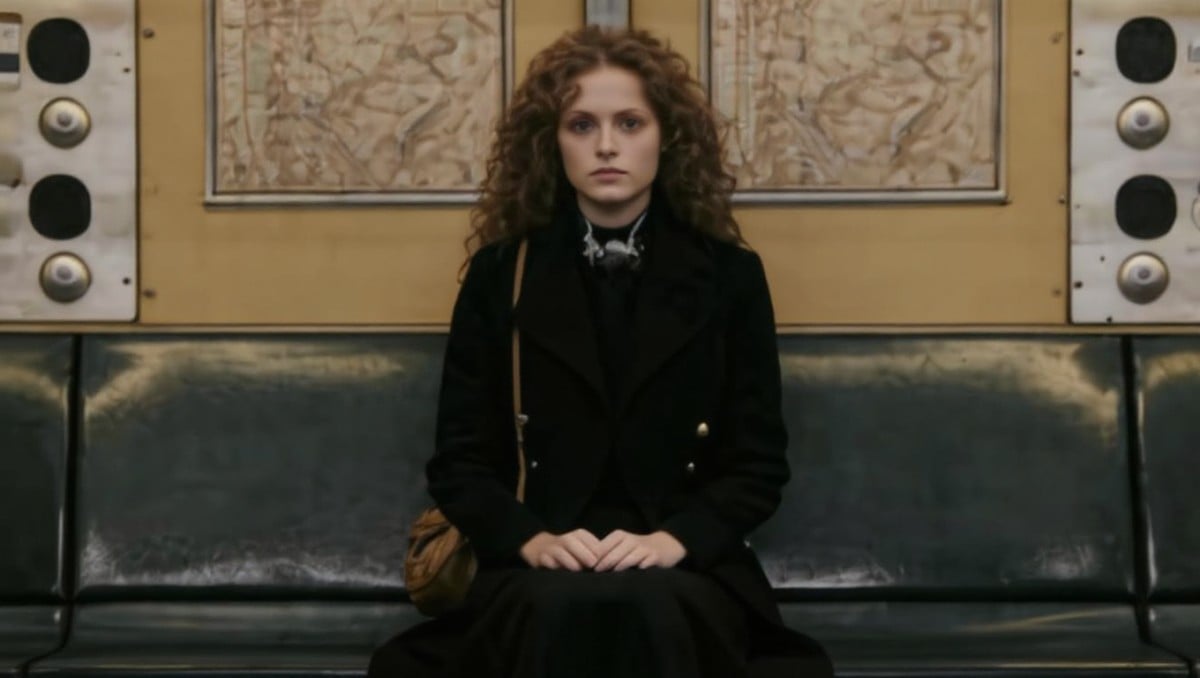
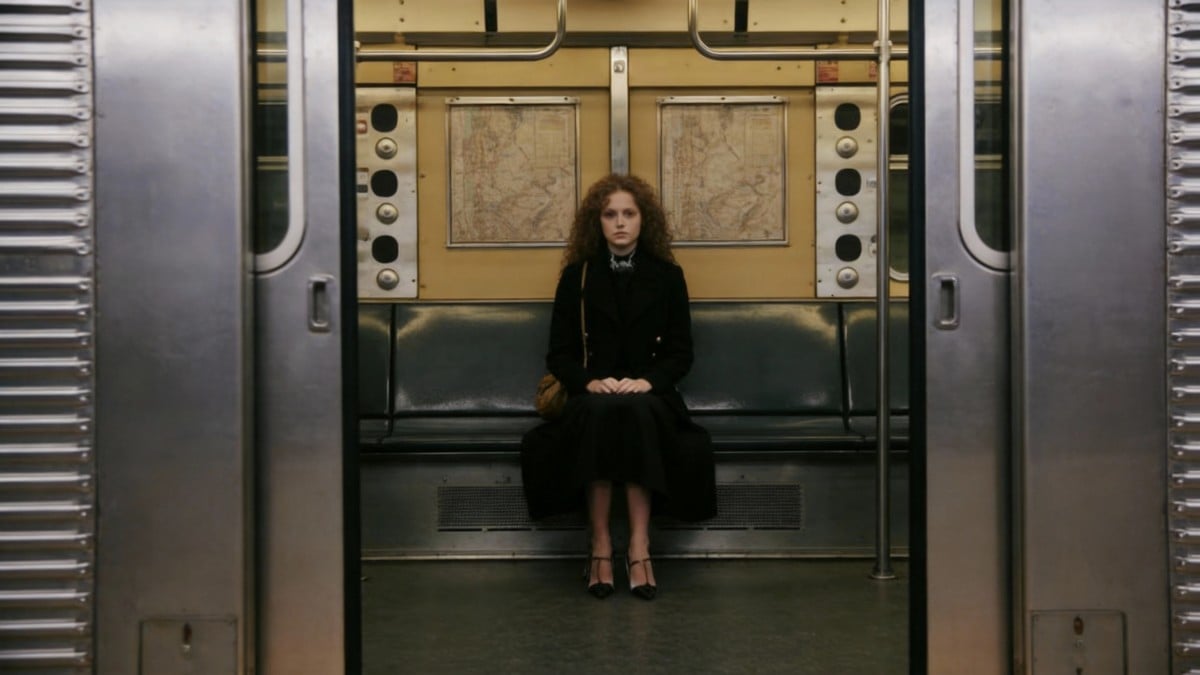
One of the most talked-about Wan 2.7 upgrades is first-and-last frame control. Instead of hoping a clip lands where you want, you can guide both endpoints and let the model fill the motion in between. That makes this workflow more useful inside a serious AI video generator pipeline where timing, transformation, and scene progression matter.
PromptFirst FrameLast FrameGenerated Clip
5-second cinematic shot, first image as start frame and second image as end frame. Centered camera outside an open vintage subway car, perfectly symmetrical composition. A young curly-haired woman in a long black coat and black dress with a brown shoulder bag sits at the center of the bench, hands on knees, looking straight at the camera with a calm, distant expression. The camera slowly pushes inward through the doorway from a wide full-body shot to a closer upper-body shot. She stays nearly still, with only subtle breathing and slight hair movement. Warm vintage lighting, faint train vibration, clear metal and old map details. Keep the same person, outfit, hairstyle, bag, posture, and scene throughout. No cuts, no extra people, no sudden zoom, no flicker or distortion. Real cinematic texture, shallow depth of field, smooth camera movement.first framelast frame

9-Grid Storyboard to Video

Wan 2.7 image to video workflows go beyond single-image animation. The 9-grid setup introduces a storyboard-like method where multiple frames guide pacing, scene order, and visual continuity. For creators building concept clips, ads, or short narratives, this makes image to video generation feel less random and much more production-friendly.

Native Audio and Subject + Voice Reference

Wan 2.7 brings stronger audio integration, plus subject and voice reference control for more believable talking-character or presentation clips. That direction follows the broader Wan model trend toward richer multimodal workflows.
PromptGenerated Clip
duration: 10s, 80s–90s Shaw Brothers and early Hong Kong wuxia TV drama style, nostalgic Chinese wuxia film look, warm high-saturation color palette, vintage TV quality, 35mm film grain, soft focus, slight chromatic aberration, retro studio backdrop feel, soft stage lighting, subtle flicker and highlight bloom. A young woman with classic 80s period-drama makeup, braided hair with pink ribbons and floral accessories, wearing a light blue-white Hanfu with floral embroidery, looks lovingly at a black-and-white cow cat sitting on a wooden table and says, “If only you could turn into a handsome guy.” The cat licks its paw, then a burst of retro low-budget white smoke erupts with an old TV transformation effect. As the smoke clears, a handsome young wuxia scholar in a pure white robe appears, with long hair tied by a white ribbon, sideburns, and a clean-shaven face. The woman leans in, pleasantly surprised, lightly touches his shoulder, and says, “Wow, you really became a handsome guy!” Then the man looks serious, raises an orchid finger, and says in an enchanting old TVB dubbing tone, “Have you forgotten you already had me neutered? I’ve changed now, I’m your sister!” The woman freezes in shock: “Ah!?” Add retro poof sound, nostalgic Hong Kong TV drama background music, old TVB-style dubbing, slight tape hiss, and vintage broadcast audio texture.

Instruction-Based Editing and Video Recreation

Another major reason Wan 2.7 stands out is controllable post-generation work. You can modify scenes with natural-language instructions or recreate a reference clip while preserving the original motion rhythm, shot flow, and timing. For users already comparing model families, this gives Wan AI a much more workflow-oriented angle than a simple one-prompt video tool.
PromptGenerated Clip
Rebuild the same action three ways: cinematic realism, glossy anime, and painterly illustration, while keeping the same character silhouette and camera rhythm.

Sharper Visuals, Smoother Motion, Better Consistency

Across Wan 2.7, the biggest upgrade is the combination of cleaner detail, more stable lighting, more natural motion, stronger style following, and less flicker across longer shots. That direction also fits the broader Wan roadmap, including the open-source Wan2.1 and Wan2.2 projects plus Wan2.2 Animate for character-driven control. See the Wan2.2 GitHub repository and Wan2.2 Animate overview for more background.

Wan 2.6 vs Wan 2.7

AreaWan 2.6Wan 2.7Why It Matters
Overall PositioningStrong cinematic video generation with audio and dialogue directionA broader workflow upgrade with more control and editing depthMoves from strong generation toward stronger production control
Visual QualityHigh-quality multi-shot outputSharper textures, lighting transitions, and depthBetter fit for polished ads, trailers, and presentation clips
MotionSolid cinematic movementMore natural motion continuity and fewer awkward physics issuesHelps reduce the artificial feel in action and camera transitions
AudioNative audio and reliable A/V sync are already part of the Wan 2.6 directionStronger ambience, music, voice integration, and tighter syncMore complete sound-on output can reduce extra post work
Style ControlGood instruction following for cinematic scenesMore precise style adherence across realism, anime, and illustrationUseful when a project needs a consistent look from shot to shot
ConsistencyImproved compared with older generationsStronger identity, object, and scene stability across longer clipsLess flicker and drift means fewer reruns and fewer manual fixes
Shot ControlPrompt-led generation and current Wan feature setFirst-and-last frame control and 9-grid storyboard guidanceGives creators more deliberate control over story beats and transitions
Editing WorkflowGeneration-first model family with expanding creation toolsInstruction-based editing and video recreationMakes the model more practical for revision-heavy creative work
Frequently Asked Questions

You May Want to Know

What is Wan 2.7?

Wan 2.7 is an advanced AI video model focused on stronger visuals, smoother motion, richer audio integration, better style control, and more stable sequence consistency. It is designed for creators who want more than one-shot prompt generation and need a workflow that feels closer to real video production.

What are the most discussed Wan 2.7 upgrades?

The standout Wan 2.7 upgrades include stronger visuals, smoother motion, richer audio integration, better style control, and more stable consistency across a clip. In practice, that means sharper frames, more natural action, better sound alignment, more reliable style following, and fewer identity or scene shifts.

Does Wan 2.7 support first-and-last frame control?

Yes. Wan 2.7 first-and-last frame control is one of its most practical workflow upgrades. You can define the opening and ending states of a shot, and the model handles the motion between them with much more direction.

Can Wan 2.7 do 9-grid image to video generation?

Yes. Wan 2.7 supports a 9-grid image-to-video workflow that works like a lightweight storyboard. Instead of relying on one input frame, creators can guide sequence order, transitions, and shot logic more directly.

Does Wan 2.7 generate audio too?

Yes. Wan 2.7 supports a native audio-capable workflow, combining visuals with ambience, music, and voice more naturally. That makes it more useful for sound-on social clips, talking-character videos, and short presentation content.

What resolution and duration are associated with Wan 2.7?

Wan 2.7 supports up to 1080P output and roughly 2–15 seconds per clip, making it suitable for short-form storytelling, stylized ads, product demos, and character-driven sequences.

How is Wan 2.7 different from Wan 2.6?

Wan 2.6 already delivers high-quality audio-video generation, while Wan 2.7 takes a bigger step toward a more complete workflow. The difference is not just a single quality upgrade, but stronger control, better editing flexibility, and more stable sequence-level consistency.

Is Wan 2.7 suitable for professional video work?

Yes. Wan 2.7 is well suited for previsualization, ad concepts, stylized social clips, character-driven shorts, and fast iteration workflows. Its value comes not only from image quality, but also from stronger shot control and more practical editing options for real creative work.

Where can I verify the current Wan model family background?

You can review the public Wan references that are already live, such as the Wan 2.6 official introduction, the Wan2.1 GitHub repository, and the Wan2.2 GitHub repository. These sources give helpful background on the broader Wan model family and its development direction.

Explore Wan 2.7 Now

Wan 2.7 points toward a more controllable AI video workflow, not just another prompt-to-clip model. If you want better motion, stronger scene consistency, richer audio direction, and more useful editing options, this is the kind of model evolution worth watching closely.

Explore Wan 2.7 Workflows