goenhance logo

FireRed-Image-Edit v1.1

FireRed-Image-Edit v1.1 is an image editing model focused on stronger ID consistency, smoother multi-element fusion, OOTD editing, portrait beauty work, and creator-friendly text style transfer.
Try It Free Now

How To Use FireRed-Image-Edit v1.1?

01

Open AI Image Generator

Go to GoEnhance and open the AI Image Generator workspace to start your editing flow.

02

Choose FireRed-Image-Edit v1.1

Select FireRed-Image-Edit v1.1 as your model, then upload your image and any reference images you want to use.

03

Start Editing

Write your edit instruction, generate the result, and refine the image until the look feels right.

Use Cases of FireRed-Image-Edit v1.1

Built for real editing tasks, not just demos

Why Choose FireRed-Image-Edit v1.1?

Stronger ID Consistency

A major strength of FireRed-Image-Edit v1.1 is identity preservation. When you change clothing, background, or pose, the subject is more likely to still look like the same person.

Better Multi-Element Fusion

It handles more complicated edits with less visual conflict. Clothing, bags, pets, props, and new environments can be blended into one frame with more natural placement and more unified lighting.

Useful for OOTD Editing

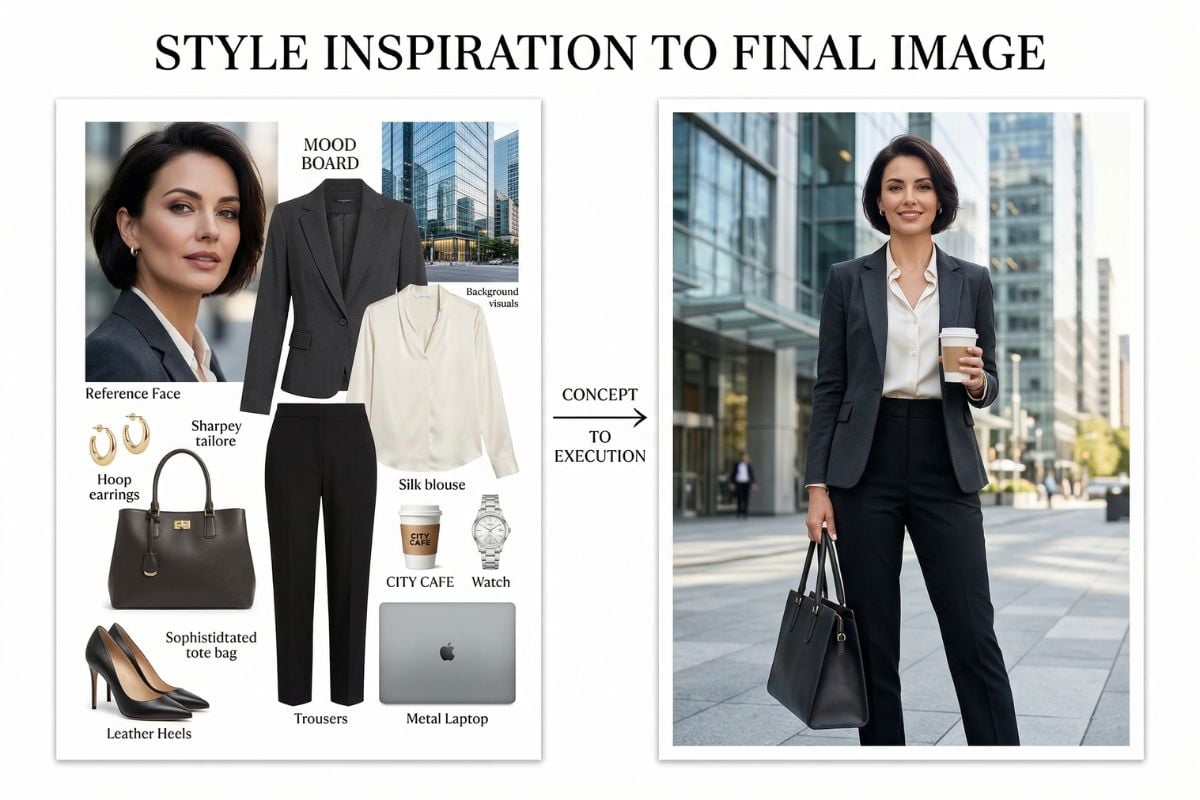
FireRed-Image-Edit v1.1 fits fashion edits especially well. It can combine jackets, shoes, bags, hats, and styling references into one cleaner, more believable image.

Portrait Beauty Control

It works well for portrait cleanup, makeup transfer, and beauty-focused adjustments. This makes it practical for creator portraits, polished profile shots, and social-first visuals.

Reference-Based Text Styling

The model is strong at following headline style, text hierarchy, and cover-like layout references. It is useful when you want a finished image to feel closer to social content rather than a plain edit.

Fast, Practical Workflow

Beyond image quality, FireRed-Image-Edit v1.1 feels built for repeated use. It is designed for faster editing cycles, which matters when you need to test multiple looks or content directions.

What FireRed-Image-Edit v1.1 Does Well

OOTD and Fashion Element Editing

FireRed-Image-Edit v1.1 is especially good at outfit-based edits. You can keep the person, then swap jackets, shoes, hats, bags, and other styling pieces with a more unified final look. For creators who also explore AI image generator workflows or use image to image tools for visual iteration, this makes fashion editing feel much more practical.

FireRed-Image-Edit v1.1 of OOTD and Fashion Element Editing

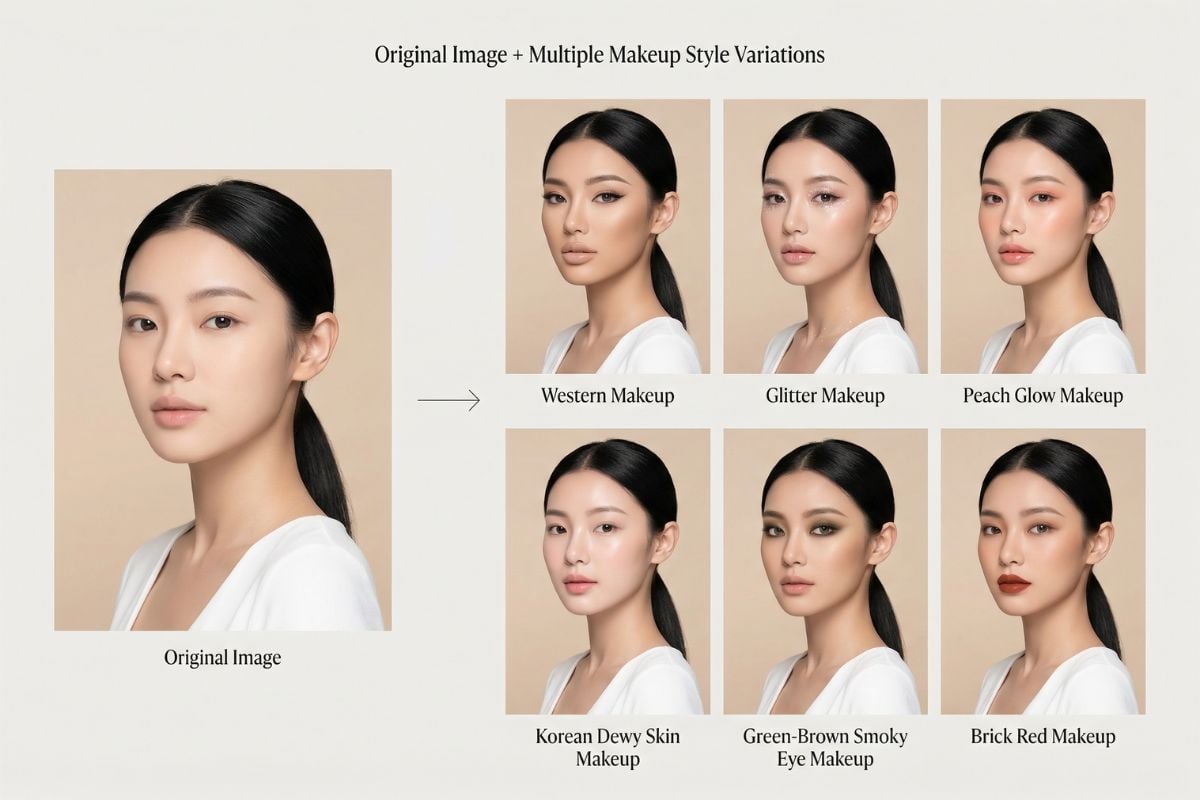
Portrait Makeup and Beauty Retouch

The model supports detailed portrait edits such as skin cleanup, makeup transfer, highlight and contour adjustments, and stylized beauty looks. It is useful when you want a polished portrait without fully changing the person’s identity.

Portrait Makeup and Beauty Retouch function

Text Style Reference for Covers

A standout strength of FireRed-Image-Edit v1.1 is style-referenced text rendering. It can follow the visual feel of a reference cover and recreate headline layouts, subtitle hierarchy, and decorative text styles more naturally than many general editing models.

Text Style Reference for Covers of FireRed-Image-Edit v1.1

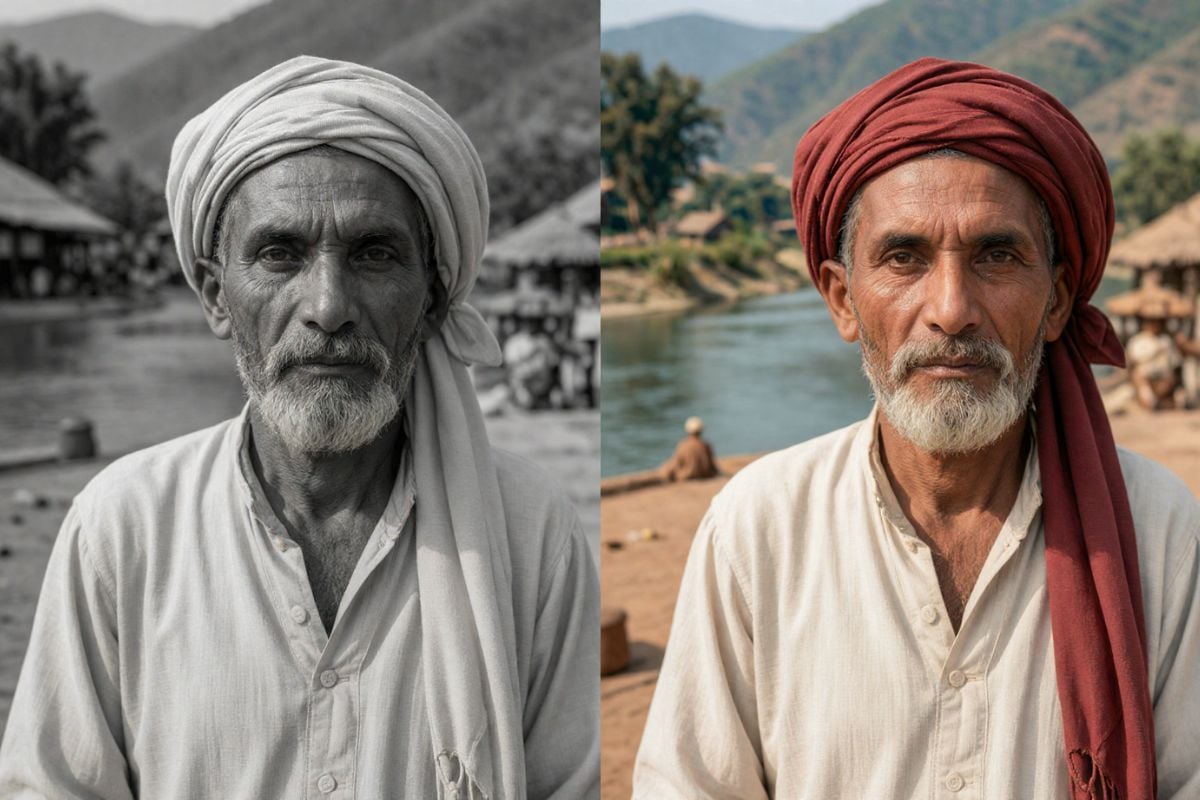
Old Photo Repair and Detail Recovery

FireRed-Image-Edit v1.1 also performs well on restoration tasks. It can repair damaged areas, improve clarity, and bring back useful detail in older images, which makes it relevant for family photos, archival images, and nostalgic content projects.

Old Photo Repair and Detail Recovery

FireRed-Image-Edit v1.1 vs Qwen-Image-Edit-2511

FeatureFireRed-Image-Edit v1.1Qwen-Image-Edit-2511Practical Take
Single-Person ID ConsistencyUsually stronger at keeping the same face and overall identity after outfit, background, or style editsAlso strong, but FireRed v1.1 is often more convincing in this specific caseFireRed has the edge for solo portrait edits
Multi-Person ConsistencyImproved over v1.0, but group photos can still become less stableOften more reliable when several people appear in the same frameQwen is the safer choice for group shots
Multi-Element FusionVery good at blending clothing, props, pets, bags, and scene elements into one imageCan handle complex edits too, but FireRed feels more tuned for these combination-heavy tasksFireRed stands out in OOTD and composition-heavy edits
Makeup and Beauty EditingSolid portrait beauty performance, especially for polished social-style editsIn some tests, Qwen-Image-Edit-2511 paired with LoRA gives better makeup resultsQwen can be stronger for demanding makeup transfer
Text Style and Cover EditingA clear strength, especially when following headline style, layout rhythm, and cover-like text referencesCapable, but usually less memorable in this areaFireRed is more appealing for title and cover design work
Old Photo RestorationOften performs better on repair, detail recovery, and damaged photo cleanupGood overall, but FireRed v1.1 is usually rated higher hereFireRed is the better fit for restoration tasks
Global Semantic ChangeSometimes prioritizes identity retention, which can make large semantic changes feel more conservativeOften better at bigger meaning-level changes requested in the promptQwen may feel more flexible when the instruction changes the scene heavily
Overall PositioningFeels especially suited to creator workflows like outfit edits, portrait refinement, text styling, and restorationFeels more balanced for broader editing needs, especially when scene understanding mattersFireRed is more creator-scene focused, while Qwen is more general-purpose
Frequently Asked Questions

You May Want to Know about FireRed-Image-Edit v1.1

What is FireRed-Image-Edit v1.1 best known for?

Its strongest reputation comes from better ID consistency and multi-element fusion. In plain terms, it is good at keeping the main subject recognizable while still making meaningful edits to clothing, props, background, and layout.

Is FireRed-Image-Edit v1.1 better than the previous version?

From the examples shared by users and reviewers, v1.1 shows a clear improvement over v1.0 in identity preservation, composition quality, and more practical creator scenarios such as outfit replacement and stylized cover editing.

Does it work well for single-person portrait edits?

Yes. Single-subject portrait editing is one of the areas where FireRed-Image-Edit v1.1 feels most reliable. It tends to hold facial identity better when the edit involves clothing changes, background replacement, or beauty adjustments.

How good is it for group photos or multi-person scenes?

It can handle them, but multi-person identity consistency is usually harder than single-person editing. For serious production use, it is smart to test a few real examples before depending on it for large batch workflows.

Can it be used for OOTD and virtual try-on style content?

Yes. This is one of its most practical use cases. FireRed-Image-Edit v1.1 is well suited for combining clothing, shoes, bags, hats, and scene references into one image while keeping the overall style more coherent.

Does FireRed-Image-Edit v1.1 support text style transfer?

Yes. It is particularly useful for cover-style edits where you want the new image to borrow the typography feel, layout rhythm, or decorative text style from a reference image.

Is it useful for portrait makeup editing?

Yes. It supports portrait beauty edits such as foundation, lip color, eye makeup, blush, and other cosmetic changes. The result quality still depends on the source image, prompt clarity, and the exact workflow you use.

Can it restore old photos?

It has shown strong results in old photo repair, especially for recovering damaged regions, improving detail, and enhancing overall readability. It is a good option when restoration matters more than heavy artistic stylization.

What kind of hardware does it need?

A major selling point is that it aims to balance performance and deployment cost. The project highlights an efficient setup that can run with around 30GB of VRAM, which lowers the barrier compared with heavier image editing systems.

Is it suitable for production workflows?

It can be, especially if your workflow depends on identity-preserving edits, fashion composition, or cover design tasks. That said, production readiness always depends on testing with your own prompts, assets, quality standards, and review process.

Who should pay attention to FireRed-Image-Edit v1.1?

It is relevant for creators, prompt-based designers, social content teams, AI tool builders, and developers who want an image editing model with a practical balance of edit quality, creator-focused features, and lower deployment friction.

Why does FireRed-Image-Edit v1.1 stand out in image editing?

Because it is not only trying to edit images well. It is also focused on real creator use cases such as OOTD image editing, portrait refinement, reference-based title design, and deployable performance, which makes it feel closer to practical content workflows than many model releases.

What is the main difference between FireRed-Image-Edit v1.1 and a general image editor?

A general editor may handle simple cleanup or small adjustments, but FireRed-Image-Edit v1.1 is built for instruction-based edits that involve identity preservation, reference-driven styling, and multi-element composition in a single workflow.
Get Started Today

Join thousands of creators using our AI tools

Start Creating