goenhance logo

Seedance 2.0

Seedance 2.0 is designed to make AI video feel less like a stitched-together demo and more like a finished scene. Create clips that keep pacing, motion, and performance coherent—so your voice, timing, and on-screen action land together instead of drifting apart.
Try It Free Now

Explore Seedance 2.0 Generation Features

Consistency That Stays Put: Faces, Products, Small Text, and Style

The most frustrating failures in video generation usually aren’t about beauty—they’re about drift: a character’s face changes, product details vanish, tiny text turns to mush, scenes jump, or the visual style suddenly shifts mid-sequence. Seedance 2.0 is built to hold those anchors more reliably—from facial features and wardrobe to materials, logos, and typography—so multi-shot work feels steadier and more usable.

Ideal for product ads, character-driven shorts, multi-shot edits, text-forward scenes, and any workflow where continuity matters.
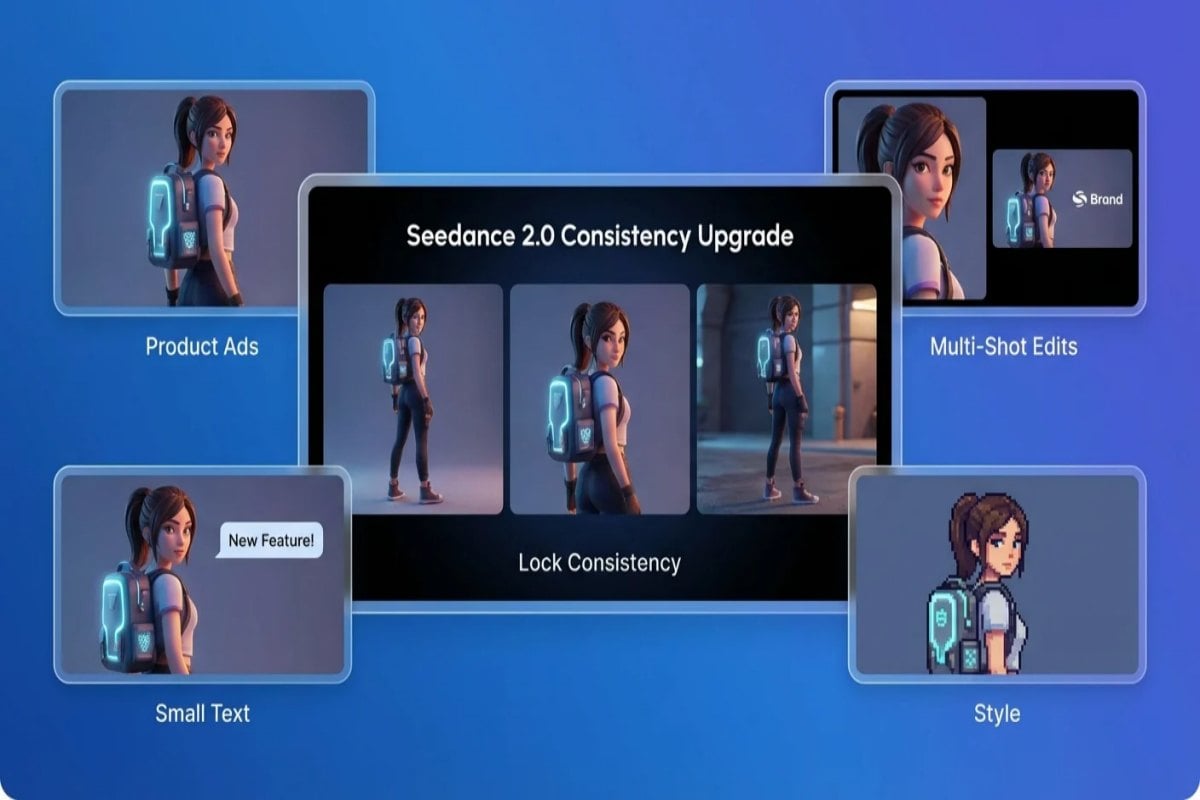
Seedance 2.0 consistency upgrade showcase

Truer Voices, Better Audio

Seedance 2.0 doesn’t just aim for better frames—it aims for more believable sound. Voices land closer to the intended character, with more natural phrasing and emotional dynamics, while music and ambience can sit in the scene without that obvious “template” feel. The result is audio that supports the performance instead of distracting from it.

Use it for talk-to-camera clips, dialogue scenes, narration, comedic banter, and music-led edits where timing and tone carry the story.

Precise Camera + Action Replication: Film-Style Blocking Made Practical

In the past, getting a model to mimic cinematic blocking, camera language, or complex choreography meant writing a wall of prompt details—or giving up. With Seedance 2.0, a single reference clip can do the heavy lifting: motion rhythm, camera moves, and action cadence stay closer to the source. Just state what to follow and what to change, and you’ll get shots that feel directed instead of “accidental.”

Great for tracking shots, push-ins and pull-backs, orbit moves, fast pans, fight choreography, dance beats, and any moment where you want to recreate a specific cinematic feel.
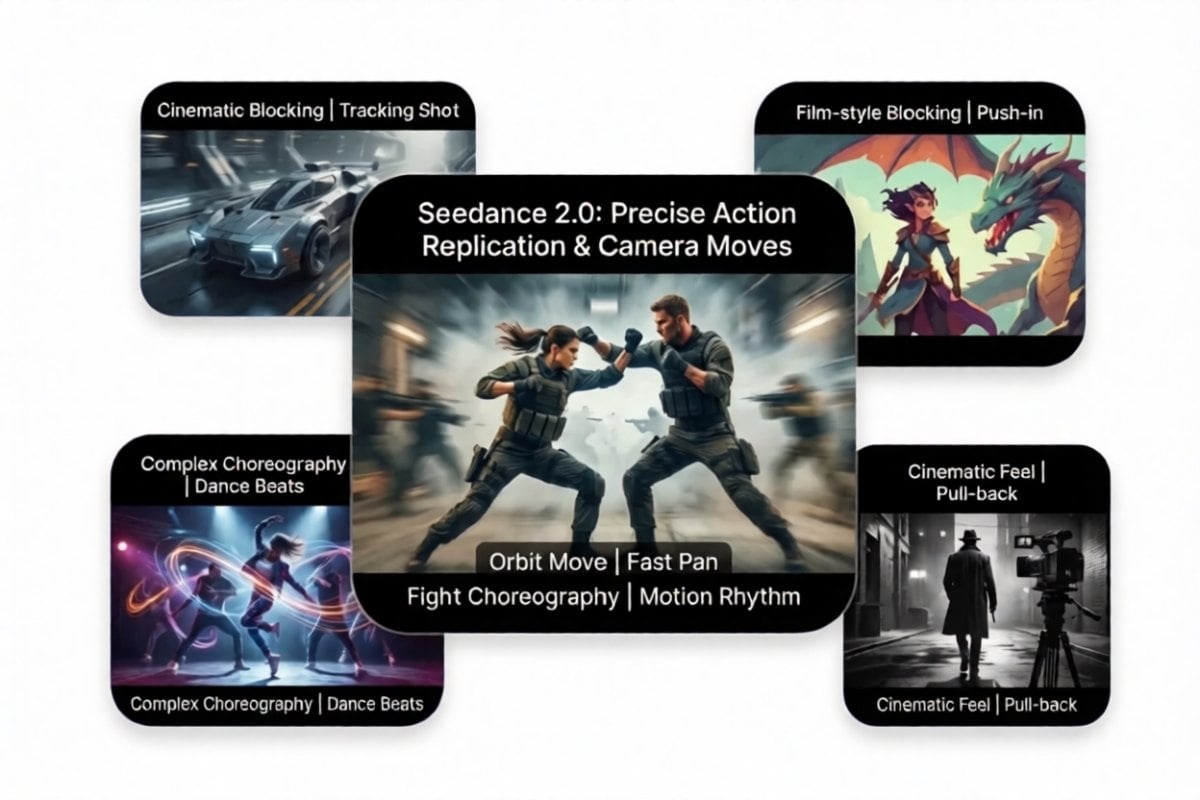
Seedance 2.0 precise camera and action replication showcase

Audio-Visual Sync That Holds Up in Real Dialogue

Make dialogue scenes feel intentional: pacing, micro-pauses, and on-screen motion stay aligned, so shots don’t slip into that familiar “AI dub” vibe. Seedance 2.0 keeps performance readable—mouth shapes, facial tension, and small gestures track the delivery instead of drifting mid-shot.

Use it for talk-to-camera clips, explainers, character monologues, and any scene where believability comes from rhythm and timing—not just pretty frames.

Cinematic Motion, Cleaner Cuts, Less “AI Weirdness”

Seedance 2.0 is built for creators who want fewer takes, fewer patches, and more first-pass usable shots—especially when you’re working with multi-shot pacing and cinematic beats.

If you’re comparing the Seedance lineup, jump into our AI video generator and see how Seedance 2.0 relates to Seedance 1.5 Pro, Seedance Pro, and Seedance Lite—so you can pick the right balance of quality, speed, and control for your workflow.

Key Features of Seedance 2.0

More Believable Performance

Seedance 2.0 is built for on-camera performance—expressions register, facial tension looks intentional, and lip shapes stay locked to the rhythm of the line. Instead of drifting mid-shot, gestures and timing stay motivated—so dialogue scenes feel directed, not stitched together.
PromptGenerated Video
A cinematic close-up of a presenter in a softly lit studio. The camera slowly pushes in as they deliver a short, emotional line. Their facial micro-expressions change naturally with the pacing, and the mouth movement stays consistent across the full shot.

Precise Camera + Action Replication

Complex motion used to mean over-explaining every beat in text. With Seedance 2.0, a reference clip can carry the intent: camera moves, pacing, and action cadence stay closer to the source. You describe what to preserve and what to change, and the result feels controlled rather than “randomly animated.”
PromptReference VideoGenerated Video
Use **@Image 1** as the main subject (the female celebrity). Follow **@Video 1** for the camera style with rhythmic push-ins, pull-backs, pans, and moves. The celebrity’s performance should also follow the dance actions from the woman in **@Video 1**, delivering an energetic, lively stage show.

Creative Templates, Plus Complex Effects That Duplicate Cleanly

Seedance 2.0 supports “build your version of this.” With a reference image or video, it can pick up rhythm, camera language, and visual structure—then reproduce the effect in a new scene. You don’t need technical terms; just specify what to follow (e.g., “match @video1 pacing and camera moves, keep @img1 character styling”) and it can deliver a high-quality variant.
PromptReference ImageReference VideoGenerated Video
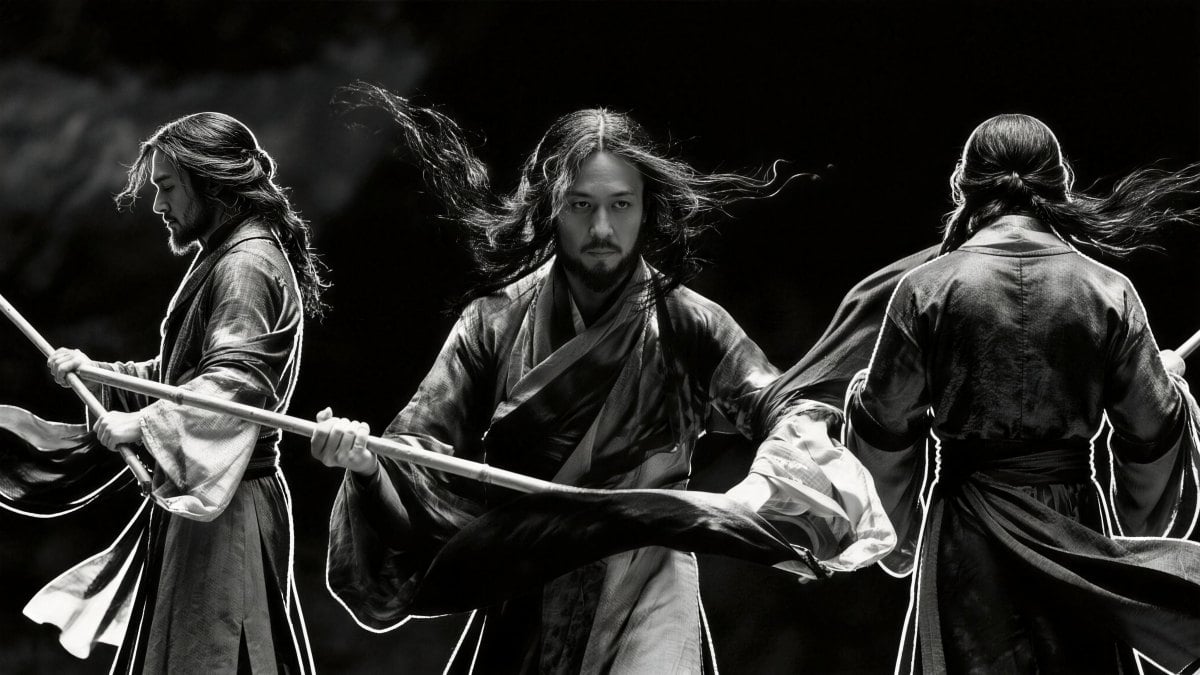
Ink-wash black-and-white style. Use the character in @Image 1 as the main subject, and follow @Video 1 for the effects and movements to perform an ink-painting Tai Chi kung fu sequence.

Stronger Creativity + Story Completion

When your inputs describe the setup but not every micro-beat, Seedance 2.0 is better at completing the moment: bridging actions, finishing gestures, and carrying emotional intent forward. It helps clips feel like a coherent beat—not just a pretty moving frame.
PromptReference ImageReference VideoGenerated Video
A cinematic close-up of a presenter in a softly lit studio. The camera slowly pushes in as they deliver a short, emotional line. Their facial micro-expressions change naturally with the pacing, and the mouth movement stays consistent across the full shot.

Consistency That Stays Put

Common continuity problems—faces changing, product details disappearing, small text blurring, background swaps, and style shifts—are handled more reliably in Seedance 2.0. From facial features and wardrobe to typography and fine material detail, anchors stay steadier so multi-shot edits feel like one world.
PromptReference VideoGenerated Video
Replace the woman in **@Video 1** with a **traditional Chinese opera *huadan*** character. Set the scene on an elegant, ornate stage. Follow @Video 1 for camera movement and transitions, using the camera to closely match the performer’s actions. Aim for a refined, theatrical aesthetic with strong visual impact.

Extend and Continue Without a Hard Reset

Need a shot to keep going? Seedance 2.0 supports smoother extension and continuation, so you can add time to a moment without rebuilding the entire clip. Describe what happens next, keep the visual language consistent, and maintain the scene’s rhythm for cleaner pacing and endings.
PromptGenerated Video
Extend @Video 1 by 15 seconds: from 0–5s, light and shadow pass through window blinds and slowly glide across a wooden table and the surface of a cup while tree branches outside sway gently like a soft breath; from 6–10s, a single coffee bean floats down from the top of the frame and the camera pushes in toward it until the image fades to black; from 11–15s, English text gradually appears in three lines.

More Natural Motion + Audio That Feels Truer

Seedance 2.0 prioritizes controlled motion timing—less wobble, fewer rubbery artifacts, and smoother arcs from subtle gestures to full-body movement. Audio also lands more naturally: more believable voice tone, clearer emotional dynamics, and music/ambience that sits in the scene instead of feeling pasted on.

Seedance 2.0 vs Seedance 1.5 Pro

Seedance 2.0 is positioned around more controllable results: steadier continuity, stronger reference-driven replication, and more usable first passes—especially when you care about camera direction, cinematic rhythm, and coherent edits. Seedance 1.5 Pro remains a strong option for fast drafts and everyday generation when you want a simpler baseline.
FeatureSeedance 2.0Seedance 1.5 Pro
What you'll feel firstA mature baseline with strong sync and solid stability across everyday dialogue scenes.More film-like pacing and performance nuance for dialogue-heavy scenes
Prompt interpretationReliable for straightforward prompts and quick iterations.More consistent with camera-language prompts and shot intent
Motion qualityReliable motion for general scenesCleaner motion arcs and fewer odd micro-jitters in close shots
Performance consistencyGood identity stability in short clipsSteadier facial detail and less expression drift across a shot
Best use caseBest for: fast social drafts, simple explainersBest for: cinematic promos, scripted talk-to-camera, story beats
Where it sitsPreviously released generationSeedance 2.0 generation

Seedance 2.0 Parameters

FeatureSeedance 2.0
Image Input≤ 9 images
Video Input≤ 3 videos, total length ≤ 15s (reference video may cost more)
Audio InputMP3 supported, ≤ 3 files, total length ≤ 15s
Text InputNatural language
Generation Duration≤ 15s, selectable 4–15s
Audio OutputBuilt-in sound effects / background music
Interaction LimitMixed input total limit: ≤ 12 files. Recommended: prioritize assets that most affect visuals or rhythm and allocate file counts across modalities.
Everything you need

Features of the Seedance 2.0 Video Model

Audio-Visual Coherence First

Improves watchability by prioritizing audio-visual alignment, natural pacing, and motion clarity—so the result feels like a scene, not a stitched demo.

Stabler Frames & Fewer Artifacts

Keeps facial detail, lighting, and background elements more stable across a shot, reducing flicker, drift, and sudden object swaps.

Better Cinematic Prompt Control

Handles camera direction like push-ins, tracking shots, and mood pacing more reliably—useful for cinematic promos and narrative beats.

Flexible Formats for Real Work

Supports creator-friendly outputs that work for landscape, portrait, or square formats—ideal for social, product, and educational content.

More Expressive Acting

Aims for more expressive delivery: micro-expressions, gesture timing, and emotional tone that reads naturally on first watch.

Faster Iteration Loop

Built to reduce the “long render, one take” pain by making iteration faster and results more usable per generation.

Discussion on Twitter

Frequently Asked Questions

You may want to know

What is Seedance 2.0?

Seedance 2.0 is an AI video model focused on creating more watchable, production-ready clips—especially for dialogue, performance, and cinematic pacing. It aims to reduce common issues like awkward lip-sync, jittery motion, and drifting scene details.

Why is Seedance 2.0 different from other AI video tools?

Seedance 2.0 is built for creators who ship: steadier scene continuity, tighter motion timing, and more deliberate camera language you can actually direct. The goal is fewer “fix it in post” moments and more first-pass usable shots.

Why does audio-visual alignment matter so much for AI video?

When a shot depends on rhythm—pauses, emphasis, and delivery—small mismatches become obvious. Seedance 2.0 tightens the link between audio cues and visual action, so the result reads as intentional direction—not uncanny luck.

How do I prompt Seedance 2.0 for cinematic results?

For best results, describe the shot like a director: subject, setting, camera movement, pacing, and emotion. Simple additions like “slow push-in,” “soft rim light,” or “gentle pause before the last line” help guide timing and tone.

What are the best use cases for Seedance 2.0?

Seedance 2.0 works well for talk-to-camera clips, product promos, educational explainers, scripted scenes, and short narrative beats—anywhere performance clarity and pacing matter more than flashy effects.

Seedance 2.0 vs Seedance 1.5 Pro: which should I pick?

Seedance 1.5 Pro stays consistent for everyday prompts, making it ideal for quick drafts and iterations. Seedance 2.0 pushes further on performance nuance, camera-language control, and overall watchability—useful when you want a more film-like result.

How can I reduce artifacts and improve consistency in my video?

Start with shorter shots, keep scenes simple, and iterate. If you see odd text or signage, avoid asking for readable labels and instead focus on visuals. If a background object disappears mid-shot, tighten the prompt to keep the set consistent.

Up to what duration can Seedance 2.0 generate a video?

Seedance 2.0 supports clips up to 15 seconds per generation. If you need a longer scene, generate in story beats and extend or continue the clip with a clear “what happens next” prompt to keep pacing consistent.

What inputs can I use with Seedance 2.0 (text, image, video, audio)?

You can guide Seedance 2.0 with natural-language prompts and, depending on your workflow, reference assets such as images, videos, and audio. A practical rule: use images to lock style/identity, reference videos for camera language and motion, and audio for rhythm and mood.

How do I use reference videos without over-constraining the result?

Be specific about what you want to copy: camera movement, pacing, transitions, or action rhythm—then clearly state what should change (subject, setting, wardrobe, props). This keeps the model from blindly mirroring everything and helps you retain creative intent.

How do I maintain character consistency across multiple shots?

Anchor the identity with the same key reference image(s) and keep wardrobe, hairstyle, and lighting consistent in your prompt. Avoid frequent scene changes in a single clip, and use fewer, stronger references rather than many weak ones.

How do I get cleaner camera moves (push-in, pan, orbit) and avoid jitter?

Use one clear camera instruction at a time (e.g., “slow push-in” + “steady handheld off”). Keep the scene simple, avoid rapid subject swaps, and aim for shorter takes. If jitter appears, reduce motion complexity and re-run with a tighter camera direction.

Can Seedance 2.0 replicate complex transitions or template-style edits?

Yes—template-like transitions and complex effects are easiest when you provide a reference clip or a clear description of the effect you want to mimic. Describe what to match (timing, camera language, visual structure) and what to replace (subject, text, product, scene).

How can I add more seconds to a clip without breaking continuity?

Treat extensions as a continuation beat: describe the next 3–10 seconds of action, keep the environment consistent, and avoid introducing new props or locations mid-extension. If you need a new scene, generate a separate clip and connect them in edit.

Can I edit an existing video instead of generating from scratch?

In many workflows, yes. If you already have a base clip, you can focus the prompt on the change you want—swap a character, adjust a moment, add a detail, or refine pacing—while keeping everything else consistent. Start with small edits first, then iterate.

How do I avoid text issues like blurry signage or unreadable labels?

If text accuracy isn’t the goal, avoid requesting readable signage. Use “abstract label,” “no readable text,” or “text intentionally blurred” and focus on the visual intent. If you need typography, keep it short, high-contrast, and placed on a clean surface.

How should I handle sensitive or restricted real-person face inputs?

If the platform restricts realistic real-person face uploads, use non-identifiable or stylized references (illustrations, avatars, back shots, partial angles, or faces without clear identity). This keeps your workflow compliant and reduces upload failures.

What’s a good workflow for production teams (consistency + speed)?

Work in beats: storyboard 3–5 short shots, lock a shared visual style (same references and lighting notes), then iterate per shot. Keep a simple naming system for references and reuse prompts with small changes—this reduces drift and speeds up revisions.

Try Seedance 2.0 Now

Turn prompts or images into cinematic clips with clearer motion, steadier scenes, and more natural performance.

Start Creating