What Is MiniMax H3? My Complete Review & Use Cases
- 1. Introduction
- 2. Quick Verdict: Is MiniMax H3 Worth Trying?
- 3. What Is MiniMax H3?
- 4. How I Tested MiniMax H3
- Test 1: Creating a Character Video From Image References
- Test 2: Motion Transfer and Camera Control
- Test 3: AI Video Editing and Scene Modification
- Test 4: Audio Generation and Voice Reference
- 5. Key Features of MiniMax H3
- 7. MiniMax H3 Use Cases
- 8. MiniMax H3 Pros and Cons
- 9. MiniMax H3 vs Traditional AI Video Models
- 10. Who Should Use MiniMax H3?
- 11. Final Verdict: Is MiniMax H3 the Future of AI Video Creation?
- 12. Frequently Asked Questions
1. Introduction
AI video generation is entering a new stage.
In the early days of AI video tools, the main goal was simple: turn a text prompt into a short video clip. While these models could create impressive visuals, creators soon discovered a bigger challenge — keeping characters consistent, controlling movement, matching camera direction, and making audio feel connected to the scene.
A beautiful single frame is no longer enough.
Modern creators need more control over the entire video production process, including character design, acting performance, camera movement, sound effects, dialogue, and editing.
This is where MiniMax H3 comes in.
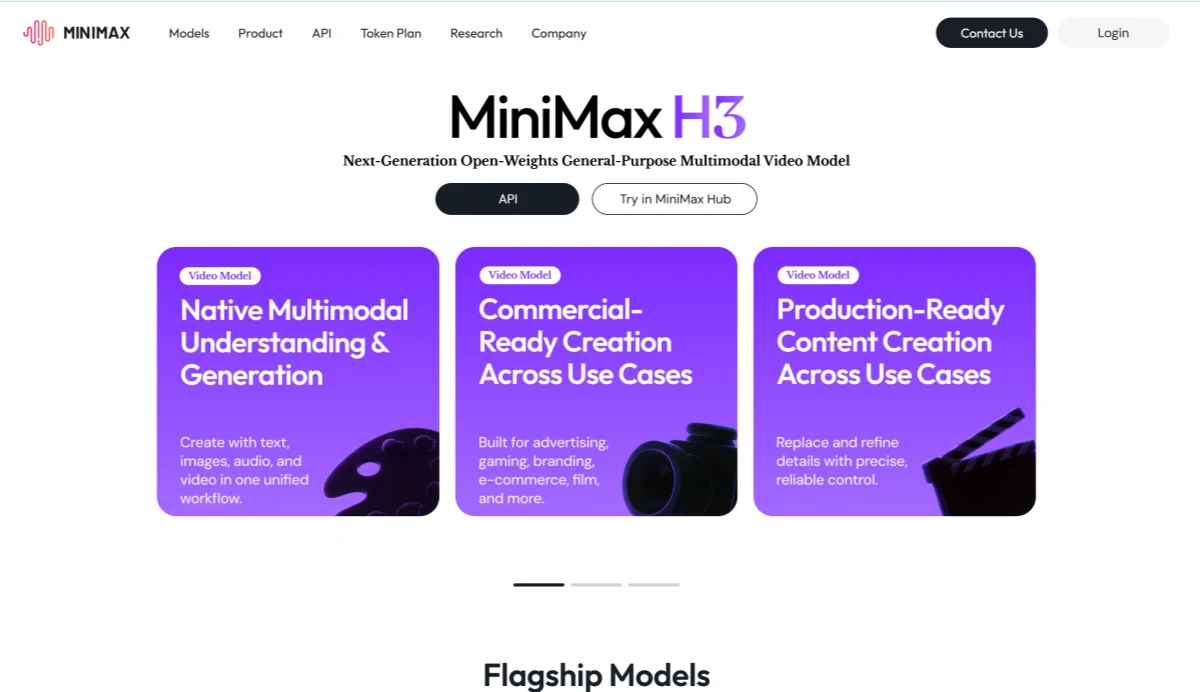
MiniMax H3 is a multimodal AI video generation and editing model that can understand text, images, videos, and audio references in a single workflow. Instead of only generating visuals from prompts, it combines character references, motion information, audio elements, and editing instructions to create more complete video content.
I tested MiniMax H3 across several practical workflows, including character animation, motion transfer, audio generation, and video editing. What impressed me most was not only the visual quality, but the amount of creative control it provides.
In this guide, I’ll explain what MiniMax H3 is, how it works, its key features, my testing experience, and whether it is a useful tool for modern AI video creation.
2. Quick Verdict: Is MiniMax H3 Worth Trying?
After testing MiniMax H3, my overall impression is that it feels less like a traditional AI video generator and more like an AI-assisted video production system.
Many AI video models focus on generating visually impressive clips from prompts. MiniMax H3 focuses more on helping creators control the entire creative process.
What impressed me:
✓ Strong multimodal reference understanding
✓ Better character consistency with image references
✓ Native audio generation
✓ Motion and camera reference support
✓ AI video editing capabilities
Things to keep in mind:
✗ Video generation is limited to 5–15 seconds per clip
✗ Output is fixed at 24 FPS
✗ Complex scenes require carefully structured prompts
✗ Longer projects still require multiple generations and editing
My conclusion:
MiniMax H3’s biggest advantage is not simply generating better-looking videos. Its real strength is combining visual creation, motion control, audio generation, and editing into one workflow.
For creators working on short films, advertisements, social media content, game concepts, product videos, or AI characters, MiniMax H3 provides a more complete creative experience compared with traditional prompt-only video generators.
3. What Is MiniMax H3?
MiniMax H3 is a multimodal AI video generation and editing model designed to create short videos using different types of creative input.
Unlike traditional AI video models that mainly depend on text prompts, MiniMax H3 can process multiple forms of information together:
- Text descriptions
- Character images
- Style references
- Motion videos
- Audio samples
This allows creators to guide the generation process with more precision.
For example, when creating a character video, a creator can provide:
- An image to define the character appearance
- A clothing reference to control outfit details
- A motion video to guide movement
- An audio sample to guide voice style
- A prompt describing the story and camera direction
MiniMax H3 combines these elements into a unified generation process.
This approach is closer to how traditional video production works.
Instead of starting with a blank prompt, creators can build a video by controlling different creative elements.
A typical workflow looks like this:
Character Reference + Motion Reference + Audio Reference + Prompt
↓
MiniMax H3 Understanding
↓
Video Output With Visuals, Movement, and Sound
This makes MiniMax H3 different from simple text-to-video tools. It focuses not only on creating a scene, but also on maintaining creative consistency throughout the video.
4. How I Tested MiniMax H3
To understand how MiniMax H3 performs in practical situations, I tested it with several workflows that represent common creator needs.
Instead of only testing basic text prompts, I focused on areas where AI video models usually struggle:
- Maintaining character identity
- Generating natural movement
- Following camera instructions
- Synchronizing visuals and audio
- Editing existing video content
The goal was to see whether MiniMax H3 could support a realistic creative workflow rather than just produce a one-time visual demo.
Test 1: Creating a Character Video From Image References
The first test focused on character consistency.
Character consistency is one of the biggest challenges in AI video generation. A model may create an impressive first frame, but the character can change when the video starts moving.
For this test, I provided:
- A character reference image
- A scene description
- Camera movement instructions
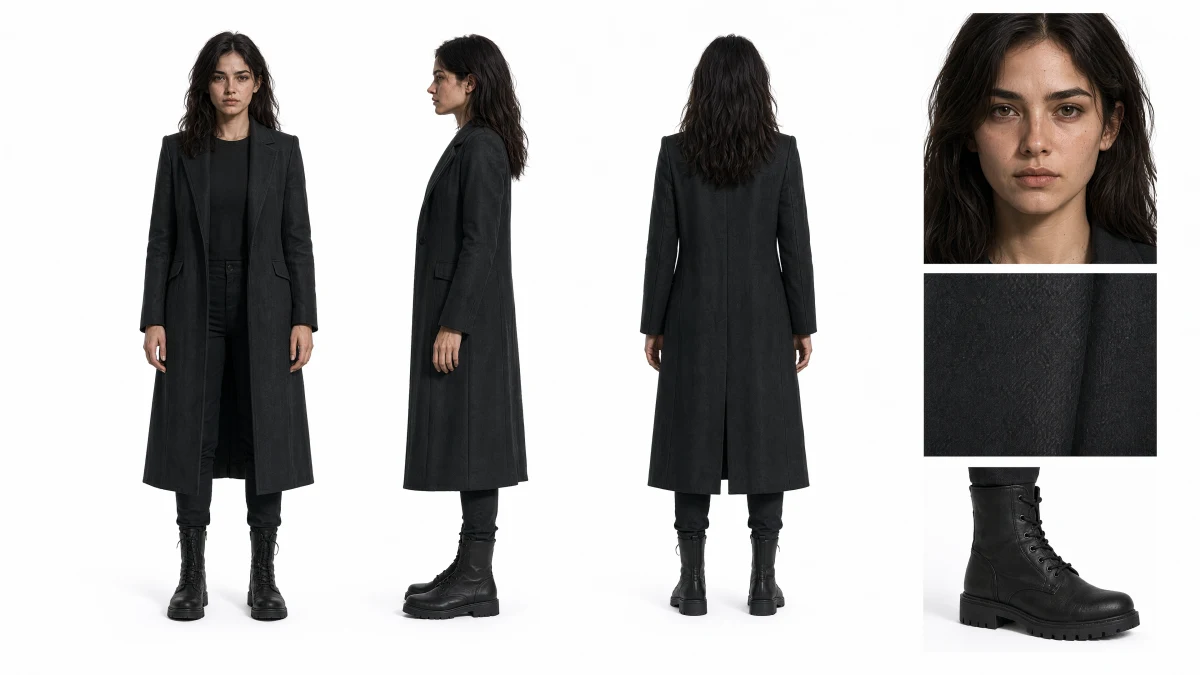 Character reference image
Example prompt:
Realistic cinematic style with high-contrast lighting and a fast-paced atmosphere. Use Image 1 as the overall mood and visual style reference, and Image 2 as the main character reference. Create an extreme wide establishing shot where a massive circular cosmic gate dominates almost the entire frame, with the character appearing as a tiny silhouette standing in front of the gate at the lower right of the composition. The ground is wet and reflective, while the center of the gate is filled with deep darkness. The camera slowly pushes forward toward the gate. A large title gradually emerges from the edge of the darkness, appearing blurred at first before becoming sharp: "THE STARS WERE LISTENING". The typography is extremely narrow, heavy, fully uppercase, with a dark red and rusty crimson color palette, subtle film grain texture, and soft foggy edges. Add deep low-frequency pulses, distant metallic vibrations, and a subtle impact hit when the title becomes fully visible. End with a hard cut.
The result showed that MiniMax H3 was able to maintain important visual elements from the reference image.
The character’s:
- Appearance
- Clothing style
- Overall visual identity
remained more consistent compared with a standard text-only generation workflow.
The biggest difference was predictability.
Instead of hoping the model would understand the exact character design through words, the reference image provided a stronger visual foundation.
This workflow is especially useful for:
- AI character creation
- Virtual influencers
- Animated stories
- Game character previews
For creators building recurring characters, this type of consistency is much more valuable than generating a single impressive clip.
Test 2: Motion Transfer and Camera Control
The second test focused on movement.
Generating a good-looking static image is relatively easy. Creating natural movement while maintaining character identity is much harder.
For this workflow, I used a reference video containing:
- Character movement
- Body motion
- Camera direction
The goal was to see whether MiniMax H3 could understand motion information and transfer it into a new scene.
Example prompt:
First-person perspective, eye-level camera, handheld FPS gameplay style. The scene simulates a player controlling a modern military warfare FPS game, holding an assault rifle with both hands while slowly advancing along the outer area of a military base. The player moves forward along a road beside concrete barriers and defensive structures, scanning the corridor ahead with the weapon sight, briefly pausing to observe the surroundings, then firing a few shots toward a distant target point before continuing to push forward like a realistic player-controlled gameplay sequence. The environment features a modern military base with cool natural lighting mixed with smoke and battlefield fire effects. The visuals are highly realistic, with sharp details, premium AAA game quality, including detailed metal weapon textures, realistic dust, smoke, and atmospheric battlefield elements. The camera follows the player's movement with subtle handheld motion, slowly moving forward at first, making slight left and right observational movements, adding small recoil shakes when firing, and finally continuing with a steady forward advance.
Compared with prompt-only generation, motion reference provided much stronger control.
The model was able to capture:
- General movement rhythm
- Action timing
- Character motion
- Camera direction
This approach is useful for creators who need specific performances.
For example:
A filmmaker can provide an acting reference.
A game developer can provide an animation example.
A content creator can provide a dance movement reference.
Instead of explaining complex movements through text, creators can show the model the type of action they want.
This is one of the areas where MiniMax H3 feels closer to a professional creative assistant rather than a simple generation tool.
Test 3: AI Video Editing and Scene Modification
The third test focused on one of MiniMax H3’s most practical features: video editing.
Many AI video models are good at creating new clips, but editing an existing video is often much harder. When changing one element, other parts of the scene can easily become inconsistent.
For this test, I started with an existing video and asked MiniMax H3 to make specific modifications.
The editing tasks included:
- Replacing a character
- Changing the background
- Modifying visual elements
- Adjusting dialogue and voice style
The most impressive part was that H3 attempted to preserve the parts of the video that were not requested for changes.
For example, when modifying a character, the model tried to maintain:
- Camera angle
- Scene composition
- Lighting conditions
- Overall movement
This approach is much closer to real video production.
In many professional workflows, creators do not need to completely remake a video. They usually need to adjust specific elements, such as replacing a product, changing a character outfit, or creating different versions of an advertisement.
MiniMax H3’s editing ability makes it useful for:
- Updating marketing videos
- Creating localized content
- Improving existing footage
- Adding new visual effects
Instead of starting from zero, creators can continue developing an existing video.
Test 4: Audio Generation and Voice Reference
The fourth test focused on MiniMax H3’s audio capabilities.
One of the biggest differences between H3 and many AI video tools is that it does not treat audio as a separate step.
The model can generate videos with:
- Dialogue
- Environmental sounds
- Action effects
- Background audio
I tested a character dialogue scene to see whether the visual performance and audio elements could work together.
The result showed that combining visual references with audio guidance created a more complete video experience.
For example, a character was not only visually consistent but could also maintain a more unified relationship between:
- Facial expression
- Scene emotion
- Voice style
This capability is especially useful for:
- AI character series
- Virtual presenters
- Short dramas
- Brand storytelling videos
For creators producing multiple episodes or recurring characters, consistent voice style can be just as important as consistent appearance.
5. Key Features of MiniMax H3
After testing different workflows, several features stand out as the main strengths of MiniMax H3.
5.1 Multimodal Reference Understanding
The biggest difference between MiniMax H3 and traditional AI video models is its ability to understand multiple types of input together.
Instead of separating character design, motion control, and audio creation into different tools, H3 combines these elements into one workflow.
Creators can provide:
- Character references
- Style references
- Motion references
- Audio references
The model uses these materials together to understand the overall creative direction.
This is especially valuable when creating content that requires consistency.
For example, a creator developing an AI character can maintain:
- The same appearance
- The same visual style
- Similar movement patterns
- A consistent voice identity
5.2 Text-to-Video Generation
MiniMax H3 supports traditional text-to-video generation.
Creators can describe:
- Characters
- Environments
- Actions
- Camera movements
- Visual styles
For example:
A futuristic city at night, a robot walking through neon streets, cinematic camera movement, dramatic lighting.
The model can generate a scene based on the description.
This workflow works well for:
- Creative concepts
- Story previews
- Advertisement ideas
- Visual experiments
However, the strongest results usually come from combining text prompts with additional references.
Text provides the creative direction, while images and videos provide stronger control.
5.3 Image-to-Video and First/Last Frame Control
MiniMax H3 can transform static images into dynamic video content.
Creators can provide:
- A starting image
- A starting and ending image
- Visual references for characters or products
This is useful for creating:
- Character animations
- Product transitions
- Cinematic scene changes
- Visual storytelling clips
The first/last frame workflow provides more control over how a video begins and ends.
For example:
A product can transition from a simple image into a complete commercial scene.
A character can transform from one appearance into another.
A still illustration can become a moving story moment.
5.4 Native Audio-Visual Generation
One of the strongest features of MiniMax H3 is native audio generation.
Many AI video workflows require separate tools for:
- Video generation
- Voice creation
- Sound effects
- Music
H3 combines these elements together.
Generated videos can include:
- Character dialogue
- Environmental sounds
- Action effects
- Background audio
This reduces the number of separate production steps and makes the workflow more efficient.
For social media creators and marketers, this can significantly speed up content production.
5.5 Motion and Camera Reference
MiniMax H3 can understand movement information from reference videos.
It can analyze:
- Character actions
- Performance rhythm
- Object movement
- Camera movement
This makes it possible to create more controlled dynamic scenes.
For example:
A dance video can provide movement guidance.
A cinematic clip can provide camera inspiration.
An action sequence can guide the pacing of a new scene.
Compared with models that only rely on text descriptions, motion reference gives creators a more direct way to communicate their ideas.
5.6 AI Video Editing
The editing capability is one of the most production-focused parts of MiniMax H3.
Creators can modify existing videos by changing:
- Characters
- Objects
- Clothing
- Backgrounds
- Lighting
- Visual effects
- Dialogue
The key advantage is targeted modification.
Instead of generating an entirely new video, creators can focus on the specific parts that need adjustment.
This workflow is valuable for:
- Marketing teams
- Video creators
- Brand campaigns
- Content localization
It changes the AI video workflow from:
Create → Regenerate
into:
Create → Edit → Improve
6. MiniMax H3 Technical Specifications
For creators, the most important specifications are not only resolution or file limits, but how much control the model provides during the creative process.
Here are the key specifications of MiniMax H3:
| Feature | MiniMax H3 |
|---|---|
| Video Duration | 5–15 seconds |
| Frame Rate | 24 FPS |
| Resolution | Up to 1440p |
| Input Types | Text, images, videos, audio |
| Image References | Up to 9 images |
| Video References | Up to 3 videos |
| Audio References | Up to 3 audio files |
| Prompt Length | Up to 7000 characters |
| Aspect Ratios | 21:9, 16:9, 4:3, 1:1, 3:4, 9:16 |
The flexible input system is one of the most important advantages.
Instead of only describing a scene through text, creators can combine different references to guide the model.
For example:
- A character image controls appearance
- A motion video controls movement
- An audio sample controls voice style
- A prompt controls story direction
This makes MiniMax H3 better suited for structured creative workflows.
7. MiniMax H3 Use Cases
After testing MiniMax H3, I found that it performs best in scenarios where creators need more control than a simple generated clip.
Because it combines visual generation, motion understanding, audio creation, and editing, it can support a variety of creative projects.
7.1 AI Short Films and Storytelling
One of the most natural applications for MiniMax H3 is AI storytelling.
Creating a short film requires multiple elements to work together:
- Character appearance
- Acting performance
- Camera direction
- Dialogue
- Sound design
Traditional AI video tools often focus mainly on visuals.
MiniMax H3 can combine these different elements into a single workflow.
A creator can provide:
- Character reference images
- Voice references
- Scene descriptions
- Motion examples
Then generate short narrative clips with a stronger sense of consistency.
This makes it useful for:
- AI short films
- Animated stories
- Character-based content
- Concept trailers
For creators building fictional worlds or recurring characters, maintaining identity across different scenes is one of the biggest challenges. H3’s reference workflow helps solve this problem.
7.2 Social Media Content Creation
Short-form video creators need to produce content quickly while maintaining quality.
MiniMax H3 fits well into workflows for:
- TikTok videos
- YouTube Shorts
- Instagram Reels
- Viral creative content
The model can help generate:
- Character clips
- Visual effects
- Short stories
- Promotional videos
The built-in audio generation is especially useful because social media content usually depends on multiple elements working together:
- Visual hook
- Voice
- Sound effects
- Background audio
Instead of creating each element separately, creators can generate a more complete video concept in one workflow.
7.3 Advertising and Brand Videos
Marketing teams often need multiple creative versions of the same campaign.
For example, a brand may need:
- Different product scenes
- Multiple advertising concepts
- Different social media formats
- Localized versions
MiniMax H3 can help speed up this process.
A typical workflow could include:
Input:
- Product image
- Brand style reference
- Marketing message
Output:
- Product showcase video
- Lifestyle advertisement
- Cinematic promotional clip
This allows teams to test creative ideas before investing in full production.
7.4 Product and E-commerce Videos
Product marketing is another area where MiniMax H3 can be useful.
Many online stores rely on static product images, but video content often creates stronger engagement.
With H3, creators can transform product images into dynamic scenes.
Examples include:
- Product rotations
- Feature demonstrations
- Lifestyle scenes
- Promotional advertisements
For example, a simple product image could become:
A cinematic close-up showing material details.
A lifestyle scene showing how the product is used.
A commercial-style video highlighting key features.
This provides more creative options for e-commerce campaigns.
7.5 Game and Animation Development
MiniMax H3 can also support game and animation workflows.
Developers can use it for:
- Character trailers
- Game concept videos
- Animation previews
- Story scenes
The reference-based workflow is especially valuable.
A development team can provide:
- Character designs
- Environment references
- Animation examples
Then explore different visual directions before moving into final production.
This can help reduce the time needed for early creative exploration.
8. MiniMax H3 Pros and Cons
Like every AI video model, MiniMax H3 has both strengths and limitations.
Understanding these differences helps determine whether it fits a specific workflow.
Pros
Strong Multimodal Control
MiniMax H3 can understand multiple input types together, including text, images, videos, and audio.
This gives creators much more control compared with simple prompt-based generation.
Better Character Consistency
Reference images help maintain:
- Character appearance
- Clothing details
- Visual style
This is important for creators producing recurring characters or episodic content.
Native Audio Generation
H3 generates videos with audio elements instead of requiring separate sound production.
This creates a more complete video creation workflow.
Powerful Editing Workflow
The ability to modify existing videos is one of the biggest advantages.
Creators can adjust specific elements instead of rebuilding everything from scratch.
Suitable for Commercial Creative Work
The combination of:
- Visual control
- Motion reference
- Audio generation
- Editing capability
makes H3 suitable for advertisements, branded content, and professional creative projects.
Cons
Short Video Duration
MiniMax H3 currently creates videos between 5 and 15 seconds.
For longer stories or advertisements, creators still need to combine multiple clips during editing.
Fixed 24 FPS Output
The output frame rate is fixed at 24 FPS.
This works well for cinematic content but may not fit projects requiring higher frame rates.
Complex Scenes Need Careful Prompting
Because H3 supports many creative controls, complicated scenes require clear instructions.
A prompt with too many unrelated requirements may reduce consistency.
Not a Complete Replacement for Traditional Production
MiniMax H3 can accelerate creative workflows, but professional projects may still require:
- Human editing
- Story planning
- Final quality control
- Post-production adjustments
9. MiniMax H3 vs Traditional AI Video Models
The biggest difference between MiniMax H3 and traditional AI video models is the level of creative control.
Many earlier AI video tools are built around a simple workflow:
Text Prompt → Video Generation
This approach is useful for quickly creating ideas, but it can become difficult when creators need specific characters, consistent scenes, or controlled movements.
MiniMax H3 introduces a different workflow:
Text + Image + Video + Audio References → AI Understanding → Video Creation
This makes the generation process closer to traditional video production.
| Feature | Traditional AI Video Models | MiniMax H3 |
|---|---|---|
| Input Method | Mainly text prompts | Text, images, videos, and audio |
| Character Control | Limited | Reference-based consistency |
| Motion Control | Mostly prompt-based | Motion video guidance |
| Audio Creation | Often separate | Integrated audio generation |
| Editing Ability | Usually regenerate | Modify existing content |
| Creative Workflow | Generate clips | Create, edit, and refine |
The difference becomes especially clear in professional workflows.
For example, if a creator wants to make a character-based short film, a traditional model may require repeated generations until the character looks similar.
With MiniMax H3, creators can provide:
- Character references
- Motion examples
- Voice guidance
- Scene descriptions
This creates a more controlled production process.
MiniMax H3 is not only focused on creating a visually attractive result. It focuses on helping creators guide the entire video.
10. Who Should Use MiniMax H3?
MiniMax H3 is most suitable for creators who need more control over AI-generated videos.
Content Creators
For creators producing:
- Short-form videos
- Social media content
- AI characters
- Storytelling clips
MiniMax H3 can help reduce the time required to create visual content.
The combination of video generation and audio creation makes it easier to produce complete content ideas.
Filmmakers and Story Creators
For filmmakers exploring concepts, MiniMax H3 can be useful during early production stages.
Creators can quickly test:
- Camera ideas
- Character concepts
- Scene designs
- Story moments
Instead of spending significant time creating a complete production setup, they can explore different creative directions first.
Brands and Marketing Teams
Marketing teams can use MiniMax H3 for:
- Advertisement concepts
- Product videos
- Campaign experiments
- Social media variations
The ability to modify existing videos is especially useful when creating multiple versions of the same campaign.
Game Developers and Animation Teams
For game and animation projects, H3 can help visualize ideas before final production.
Useful applications include:
- Character trailers
- Animation tests
- Story previews
- Visual concept development
The reference workflow makes it easier to maintain a consistent artistic direction.
11. Final Verdict: Is MiniMax H3 the Future of AI Video Creation?
After testing MiniMax H3, the biggest difference I noticed was not simply the quality of the generated videos.
The real advantage was control.
Many AI video tools can create impressive visuals, but creators often face the same problems:
- Characters change between scenes
- Motion is difficult to control
- Audio requires separate production
- Editing requires regeneration
MiniMax H3 approaches these problems differently.
By combining:
- Text understanding
- Image references
- Video motion guidance
- Audio generation
- Video editing
it creates a workflow that feels closer to AI-assisted video production.
However, it is not a complete replacement for traditional filmmaking.
The short generation length means longer projects still require editing and assembly. Complex scenes also require careful planning and clear instructions.
But for creators producing:
- Short films
- Advertisements
- Social media videos
- Product content
- Game visuals
- AI characters
MiniMax H3 provides a powerful and flexible creative workflow.
Its biggest contribution is changing how creators interact with AI video models.
Instead of simply asking AI to generate a video, creators can now guide AI with characters, movements, sounds, and existing footage.
12. Frequently Asked Questions
What is MiniMax H3?
MiniMax H3 is a multimodal AI video generation and editing model that can understand text, images, videos, and audio references to create short videos.
Unlike traditional text-to-video models, it focuses on combining multiple creative inputs into one workflow.
Does MiniMax H3 generate audio?
Yes.
MiniMax H3 can generate audio together with video, including dialogue, environmental sounds, action effects, and other audio elements.
How long can MiniMax H3 videos be?
MiniMax H3 supports video generation between 5 and 15 seconds.
For longer content, creators can generate multiple clips and combine them during editing.
Can MiniMax H3 edit existing videos?
Yes.
MiniMax H3 can modify existing videos by changing elements such as:
- Characters
- Objects
- Backgrounds
- Clothing
- Lighting
- Dialogue
while attempting to preserve unchanged parts of the original video.
How many references can MiniMax H3 use?
MiniMax H3 supports multiple reference inputs, including:
- Up to 9 images
- Up to 3 videos
- Up to 3 audio references
These references can be combined to guide the generation process.
What makes MiniMax H3 different from normal AI video generators?
The main difference is multimodal understanding.
Instead of relying only on text prompts, MiniMax H3 can combine visual references, motion information, and audio guidance to create more controlled results.
Is MiniMax H3 suitable for commercial video creation?
Yes.
Its capabilities make it suitable for:
- Brand advertisements
- Product videos
- Social media campaigns
- Game content
- Creative marketing projects
However, professional productions may still require human editing and final review.