Seedance 2.5 Review: I Tested the ByteDance's New AI Video Model Across Four Genres
- 1. TL;DR
- 2. What Is Seedance 2.5
- 3. Feature Deep-Dive
- 4. Hands-On Test Cases
- 5. Industry Applications
- 6. Pros & Cons
- 7. Limitations: Where It Still Falls Short
- 8. Seedance 2.0 vs 2.5
- 9. My Verdict
AI video generation has been stuck in a frustrating loop — most models cap at 5 to 15 seconds, forcing creators into a "cyber-tailoring" workflow of clip, stitch, repeat, a thousand times over, just to get one usable sequence. But what if you could generate 30 seconds of cinematic footage in a single pass, with consistent characters, natural camera transitions, and synced audio? That's exactly what ByteDance's Seed team claims with Seedance 2.5, released today. I put it through four genres, two editing workflows, and one full industry scenario to see if it lives up to the hype.
1. TL;DR
My take in one line: Seedance 2.5 is the first AI video model I've tested that feels less like a creative toy and more like a production tool — 30-second native generation, multi-modal reference inputs, and timestamp-precise editing finally make AI video usable for real workflows.
| Dimension | Rating | Note |
|---|---|---|
| Video length | ★★★★★ | 30s native, extendable to 3min |
| Consistency | ★★★★☆ | Characters hold across cuts; minor drift in complex scenes |
| Editability | ★★★★★ | Timestamp control under 1s; local add/remove/replace |
| Reference capability | ★★★★☆ | 30 images + 10 videos + 10 audio; green screen & white model |
| Visual quality | ★★★★☆ | "Greasy feel" reduced; skin, light, saturation improved |
| Production readiness | ★★★★☆ | Enterprise partners onboard; API coming soon |
Verdict: Worth trying if you need long-form, controllable AI video. But it's not perfect — complex physics and multi-subject stability still need work.
2. What Is Seedance 2.5
Seedance 2.5 is ByteDance Seed team's second-generation video creation model, officially released on July 31, 2026. It inherits the unified multimodal audio-video joint generation architecture from version 2.0 and focuses on three breakthrough areas: long narrative capability, multimodal reference, and editing. You can access it through 即梦AI (Jimeng), Doubao Pro, Coze, and XiaoYunQue, with an API slated for Volcano Engine in the near future.
To test it, I ran four full 30-second generations across different genres — a Korean-drama-style rainy night rescue, a Wes Anderson aristocratic shopping spree, a Chinese aesthetic embroidery scene, and a space sci-fi astronaut survival story. I also tested two editing workflows: local frame deletion and timestamp-precise brand text insertion. My evaluation criteria were narrative coherence, character consistency, camera control, audio sync, edit precision, and overall visual quality.
3. Feature Deep-Dive
30-Second Native Generation & Multi-Round Extension
The headline feature: a single pass produces 30 seconds of video with a real narrative structure — not one long take, but logically connected shots with setup, progression, turn, and resolution. Through multi-round extension, you can push total length to roughly 3 minutes while maintaining character, scene, and audio consistency across segments.
But the extension quality depends heavily on initial prompt complexity. Simple scenes extend cleanly; dense, multi-character setups can drift slightly in the second or third round. I'd suggest treating each 30-second segment as a "scene" in a script — write your prompt like a shot list with time codes rather than a single paragraph. It gives the model clearer narrative beats to follow.
Multi-Modal Reference (Up to 50 Assets)
You can feed Seedance 2.5 up to 30 images, 10 videos, and 10 audio clips simultaneously. The model understands composition, scene, style, characters, and props from mixed sources. In multi-person scenes, it can maintain individual appearance and voice at the same time. The white model reference capability is particularly impressive — you provide a textureless 3D model with camera trajectory and spatial layout, and the model generates physically-accurate lighting, including source direction, color temperature, intensity, and shadow casting.
But more references don't always mean better results. In my tests, beyond roughly 15 well-chosen assets, the model sometimes struggled to prioritize — one character's style would bleed into another's. Curate ruthlessly and label each reference's role in your prompt explicitly. For anyone exploring image-to-video generation workflows, the same principle applies: quality of curation beats quantity of inputs.
Precise Timestamp Editing
This is where Seedance 2.5 genuinely surprised me. Timestamp control operates with sub-1-second accuracy. You can direct specific actions at specific moments — "at 0:03, the character turns left" — or modify post-generation: delete frames 0:05 to 0:08, insert branded text at the final second, swap a background without touching the subject. Local editing — add, remove, replace — preserves everything outside the target zone.
But the editing works best for visual and narrative elements. Complex audio editing, like isolating and replacing one sound layer, is still limited compared to a dedicated non-linear editor. Use timestamp editing for iteration, not creation: generate first, then refine. The "one creation, multiple deliveries" workflow is where this feature truly shines.
Green Screen, White Model & Plugin Support
Seedance 2.5 directly references green screen footage — the model fills in environment and atmosphere while preserving the product and subject. White model reference lets 3D artists skip material, lighting, and render passes and jump straight to a cinematic preview. Maya and Blender plugin integration means you can trigger generation from inside your DCC tool, which is a meaningful bridge between AI and traditional pipelines.
But the plugin workflow assumes you already have a reasonably clean white model or green screen plate. Messy source footage with motion blur or partial green spill still requires cleanup before feeding it in. For ad teams: shoot your product against green screen as usual, then let Seedance handle environment and mood. For game teams: export your white model animatic with camera path as the reference — you'll save days of rendering.
Quality Optimization: Killing the "Greasy Feel"
One of the most noticeable improvements is the systematic reduction of what the industry calls the "greasy feel" — that slightly artificial, over-smoothed look that plagues AI video. Seedance 2.5 optimizes object materials, skin texture, eye contact, lighting, and color saturation. Subtitle and background music control is tighter, and the result feels closer to live-action footage than typical AI-generated content. The model also natively supports over 10 languages, so creators can describe creative intent in their mother tongue.
But "closer to real" isn't "indistinguishable from real." In extreme close-ups and fast-motion sequences, you can still catch AI tells — skin pores that shift frame-to-frame, or fabric physics that feel slightly off. If you're targeting broadcast-quality output, mix AI footage with selective real-shot inserts at the moments that matter most. The AI handles the heavy lifting; real footage seals the deal on the remaining twenty percent.
4. Hands-On Test Cases
**15-second, 16:9 horizontal short video. A live-action late-night laundromat scene blended with hand-drawn glowing animations, creating a mixed-media visual style. A small self-service laundromat with slightly flickering fluorescent lights, featuring running washing machines, plastic laundry baskets, an old bench, and a single sock scattered on the floor. The entire space feels quiet, with a subtle nostalgic atmosphere. Shot handheld on a smartphone with a one-handed filming style, featuring noticeable camera shake; white fluorescent lighting causes uneven exposure with fluctuating brightness; environmental reflections appear on glass surfaces; focus slightly lags when the camera moves closer to objects. The footage should not feel polished or perfectly composed like a commercial advertisement, but instead have the raw documentary quality of accidentally wandering into a laundromat late at night and casually recording a strange, surreal phenomenon while chasing an unexpected illusion.
**A cinematic 30-second 3D steampunk motion sequence with smooth seamless camera movement: [0–10s] an antique brass clock face unfolds into rotating gears and fog, as the camera dives through to reveal an ornithopter rising from aged-book canyons; [10–20s] the camera follows it into a spinning brass zoetrope with galloping mechanical horse projections, then transforms into a floating brass cable car moving through a glowing gear forest; [20–30s] the camera tilts down to a wind-up wooden sailboat cutting through deep-blue glass waves, which turn into a giant moon, ending with lantern-carrying explorers on a crystal ridge as the camera spirals back to the ticking brass clock.
**Single continuous take, smooth camera following a person in a black coat from @Image 1 walking left to right through six connected rooms. Each room keeps the same structure as @Image 2: white walls, light herringbone wood floor, French floor-to-ceiling double windows, and white sheer curtains, but each has a completely different outside view and mood. 0–5s: comic-book fight room, the character battles and defeats the figure from @Image 3. 5–10s: warm felt-style room with a sunflower field outside @Image 4, soft orange light, and a painter painting sunflowers @Image 5; the main character also turns into felt style. 10–15s: sad black-and-white manga stop-motion room, rainy outside, a lonely person sits on the floor with an unanswered phone call; the main character switches the light off and on, turning the room colorful as flowers bloom everywhere. 15–20s: joyful underwater room inspired by @Image 6, the character swims through coral reefs and fish. 20–25s: surprise room with fireworks outside @Image 7, colorful flashing reflections and a cheering atmosphere. 25–30s: the character enters a blank room, snaps their fingers, snap sound effect, cut to black, and the word “seedance” appears in the center, referencing @Image 8. Cinematic, high-end fashion commercial style, emotional lighting driven by each window view, no text except the final title.
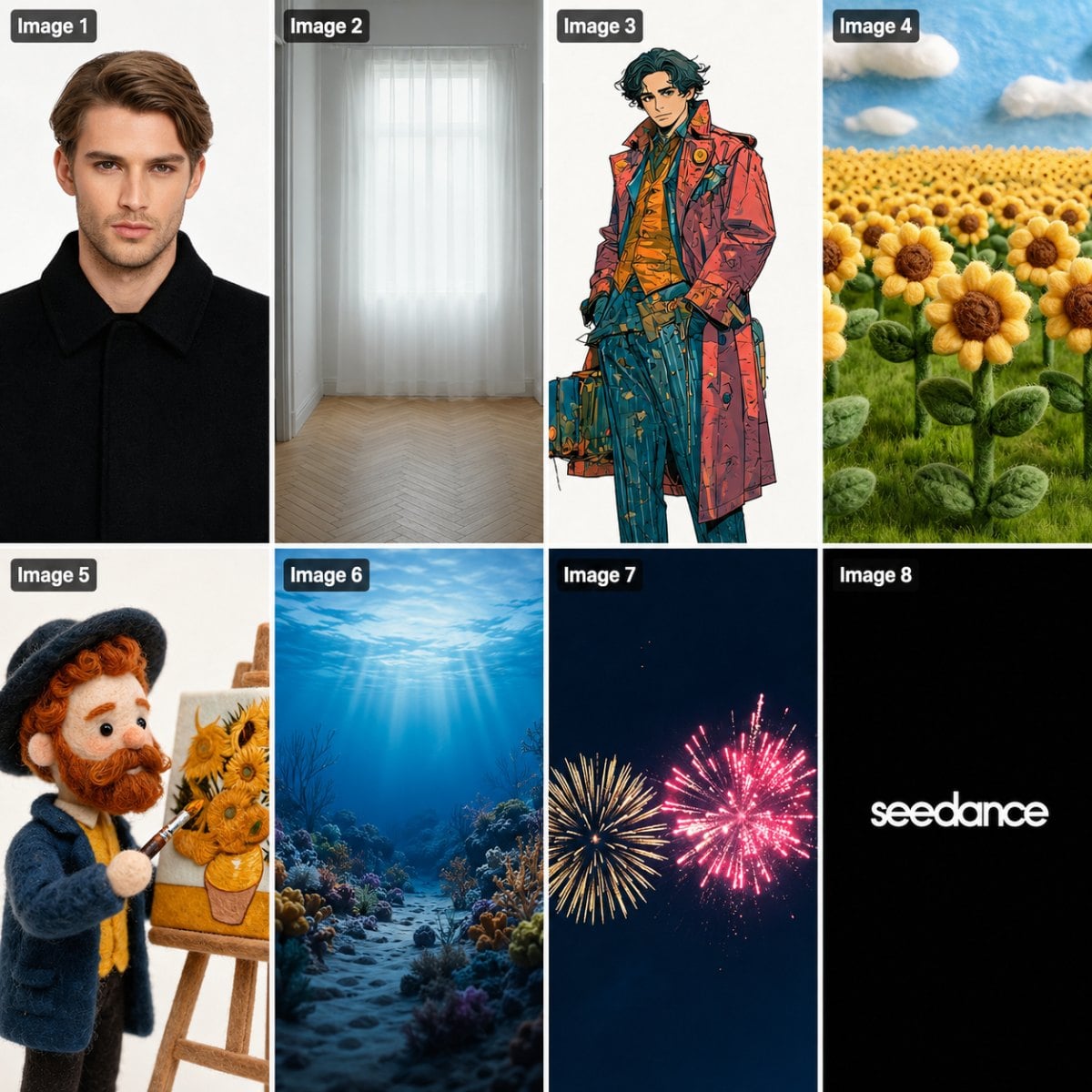 Reference Image
5. Industry Applications
What separates Seedance 2.5 from a consumer demo is real enterprise adoption. XCMG Group is using it for industrial operation training and SOP video generation, replacing traditional high-cost live shoots and 3D animation. XPeng Motors integrated the model into its internal AI design platform for rapid visualization and batch multilingual user manual videos, accelerating global product launches. In embodied AI, companies like Congche Robotics, Lingchu Robotics, and Weifen Zhifei are generating diverse robot interaction training data — obstacle avoidance, autonomous navigation, target locking — without expensive manual scene modeling.
In autonomous driving, the model synthesizes edge-case footage: heavy rain, fog, rare road conditions, sudden accidents — scenarios that are difficult or dangerous to capture in the real world. Education is another frontier: textbook content becomes immersive video, abstract science principles become dynamic demonstrations.
As Wang Shuai, associate professor at HKUST's Department of Computer Science and Engineering, noted: the new generation of video models is no longer just "generating a pretty clip" — it's shifting from an assistive creative tool to a core productivity force that significantly boosts industrial efficiency.
6. Pros & Cons
Pros:
- 30-second native generation with real multi-shot narrative structure (industry-first)
- Multi-modal reference with up to 50 mixed assets
- Sub-1-second timestamp editing precision
- Green screen and white model reference support
- Maya/Blender plugin integration
- 10+ native language support
- Real enterprise adoption — not just demo ware
Cons:
- Complex motion physics still has gaps (fabric, liquid, particle effects)
- Multi-subject interaction stability needs improvement
- API not yet publicly available
- Reference overload (15+ assets) can cause style bleed
- Audio layer editing is limited vs. dedicated NLE
- Extreme close-ups still show AI tells
7. Limitations: Where It Still Falls Short
No model is perfect, and the Seed team themselves acknowledge two key gaps. First, complex physical motion — fast multi-body interactions, fluid dynamics, and particle effects — isn't fully physically accurate yet. Second, in scenes with many interacting characters, individual identity can drift in peripheral frames.
Additionally, the Volcano Engine API isn't live yet, which limits batch and automated workflows to web-only access. And while audio generation is strong, granular audio editing — isolating layers, replacing individual sound effects — is still behind the precision of visual editing.
These are real limitations. But the gap between Seedance 2.5 and a dedicated production pipeline is narrower than anything I've tested.
8. Seedance 2.0 vs 2.5
| Dimension | Seedance 2.0 | Seedance 2.5 |
|---|---|---|
| Positioning | Creative tool — visual wow | Production tool — enters the pipeline |
| Max generation | 15 seconds | 30 seconds native, 3min extended |
| Controllability | Gacha-based (regenerate) | Timestamp editing, local modification |
| Reference | Limited | 30 images + 10 videos + 10 audio |
| Workflow | Standalone | Maya/Blender plugin, green screen |
| Industry | Content creation | Manufacturing, auto, robotics, AV, education |
The core shift: creators no longer burn time on regeneration and fixing — they redirect energy to narrative, aesthetics, and creative judgment.
9. My Verdict
My verdict is simple. Seedance 2.5 is the first AI video model I've used where I stopped thinking "this is impressive for AI" and started thinking "this saves me real production hours." The 30-second native generation, timestamp editing, and multi-modal reference support aren't incremental upgrades — they collectively move AI video from the "cool demo" shelf to the "actual workflow" shelf.
Is it ready to replace your production pipeline? Not entirely. Complex physics, multi-subject stability, and the missing API are real gaps. Is it ready to be part of your production pipeline? Absolutely. For pre-viz, ad variants, training content, and any scenario where speed and iteration matter more than pixel-perfect final delivery, Seedance 2.5 earns its place.
If you've been sitting on the AI video sidelines because 5-second clips and gacha workflows weren't cutting it — this is your entry point.