Qwen-Image-3.0 Review: I Checked Its Features, Use Cases, and Real Limits
- What Is Qwen-Image-3.0?
- Qwen-Image-3.0 Key Specifications
- What Is New in Qwen-Image-3.0?
- Complex Layout Generation
- How Well Does Qwen-Image-3.0 Perform?
- Qwen-Image-3.0 Strengths
- Qwen-Image-3.0 Limitations
- Best Use Cases for Qwen-Image-3.0
- How to Use Qwen-Image-3.0
- How to Write Better Qwen-Image-3.0 Prompts
- Qwen-Image-3.0 vs Qwen-Image-2.0
- Final Verdict: Is Qwen-Image-3.0 Worth Using?
- Qwen-Image-3.0 FAQs
- What is Qwen-Image-3.0?
- Is Qwen-Image-3.0 free?
- Where can I use Qwen-Image-3.0?
- How long can a Qwen-Image-3.0 prompt be?
- Can Qwen-Image-3.0 generate accurate text?
- Which languages does Qwen-Image-3.0 support?
- Can Qwen-Image-3.0 create infographics?
- Can Qwen-Image-3.0 maintain character consistency?
- Is Qwen-Image-3.0 suitable for UI design?
- Can Qwen-Image-3.0 generate usable QR codes?
Most AI image models can make a good-looking picture. That is no longer the hard part.
The harder part is making an image that carries real information. Text needs to be readable. Layouts need to stay organized. Posters, infographics, product boards, UI mockups, and multilingual visuals need more than a pretty background.
That is why Qwen-Image-3.0 is interesting.
I checked Qwen-Image-3.0 to see what actually changed, where it looks useful, and where I would still be careful. My quick take: this model is not only about better-looking images. It is trying to make AI image generation more useful for real design work.
If you want to try a Qwen-style image workflow directly in a creator tool, you can start from Qwen-Image-3.0 on GoEnhance AI.
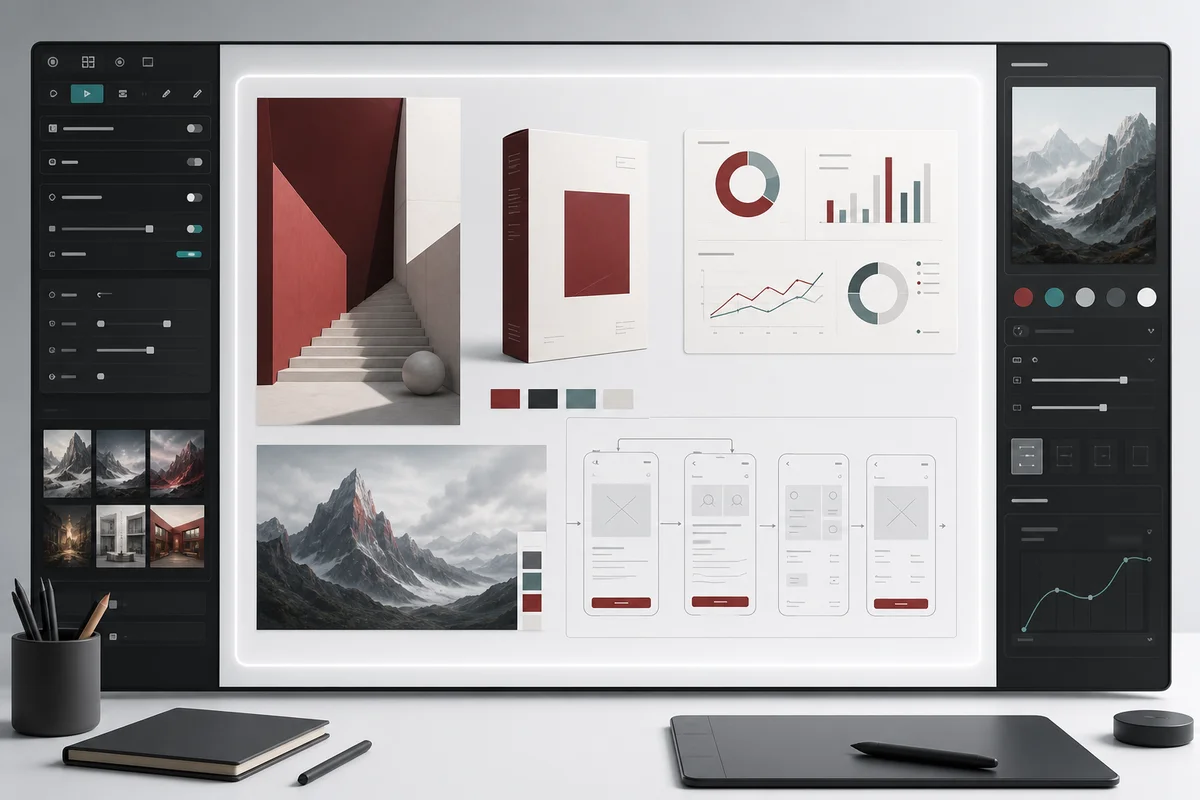
Qwen-Image-3.0 Review: Quick Verdict
Qwen-Image-3.0 is best for information-rich image generation. It looks especially useful for posters, product visuals, multi-panel images, multilingual marketing assets, infographics, and layout-heavy design drafts.
It is not perfect. Very small text can still fail. Technical diagrams still need human checking. UI images are still concepts, not editable Figma files.
But compared with ordinary image models, Qwen-Image-3.0 is clearly aimed at more practical creative work.
| Review Point | My Take |
|---|---|
| Best for | Text-heavy images, infographics, posters, product visuals, and multi-panel layouts |
| Biggest upgrade | Longer prompts and stronger layout understanding |
| Strongest use case | Information-dense commercial visuals |
| Main limitation | Small text, formulas, QR codes, and technical details still need review |
| My verdict | Worth trying if you need AI images that communicate, not just decorate |
What Is Qwen-Image-3.0?
Qwen-Image-3.0 is the third-generation foundational image generation model in the Qwen-Image series. The official Qwen launch page describes it around three ideas: richer content, more authentic details, and deeper knowledge. You can check the original launch page here: Qwen-Image-3.0 official blog.
The most important shift is simple: Qwen-Image-3.0 is not just trying to make images more beautiful. It is trying to make them more usable.
That matters for creators who need layout, text, labels, charts, product information, and multilingual content inside one image. A model that only makes a nice scene is useful. A model that can organize information is much more useful for real work.
The earlier Qwen-Image models were already known for text rendering and image editing. Alibaba Cloud's Qwen-Image API docs describe Qwen-Image as a general-purpose image generation model that supports artistic styles and complex text rendering: Alibaba Cloud Qwen-Image API reference.
Qwen-Image-3.0 pushes that direction further. It is designed for longer instructions, denser layouts, multilingual text, and more practical visual outputs.
| Version | Main Focus |
|---|---|
| Qwen-Image-1.0 | Prompt accuracy and text-aware image generation |
| Qwen-Image-2.0 | Quality, consistency, and realism |
| Qwen-Image-3.0 | Practical, information-dense image creation |
I would not describe it as "the best image model" without benchmark proof. A safer way to say it is this: Qwen-Image-3.0 looks like one of the more practical models for complex visual communication.
Qwen-Image-3.0 Key Specifications
Here are the main specs and capabilities worth knowing.
| Feature | Qwen-Image-3.0 |
|---|---|
| Maximum prompt length | Up to 4.5K tokens |
| Previous generation | Around 1K tokens |
| Text rendering | Small text down to around 10px in selected examples |
| Language support | 12 languages |
| Art styles | 100+ styles |
| Complex layouts | Multi-panel, six-grid, and nine-grid layouts |
| UI generation | Supports layered and nested interface concepts |
| Editing | Restoration, completion, and image-based editing |
| Typical uses | Posters, infographics, PPTs, packaging, and social media assets |
Two details need careful wording.
First, "10px text" should be treated as a capability shown in selected examples. It does not mean every tiny text block will be correct in every image.
Second, complex layout support does not mean the output is ready for printing or development. It can get closer to a usable draft, but small text, formulas, and diagrams still need manual checking.
What Is New in Qwen-Image-3.0?
1. Richer Content: Up to 4.5K-Token Prompts
The 4.5K-token prompt length is more than a number. It changes how you can write prompts.
With many image models, you have to compress your idea into a short prompt. That works for simple scenes. It does not work well for a poster, infographic, product board, or multi-panel layout.
Qwen-Image-3.0 gives you more room to describe the actual design brief.
You can specify:
- Layout
- Exact text
- Font style
- Colors
- Character details
- Product position
- Materials
- Lighting
- Panel order
- What should not appear
That makes it more useful for design-heavy prompts.
For example, you can ask for a nine-grid knowledge image, a six-panel brand application board, a math teaching slide, or a product design sheet. These are not just image prompts. They are closer to creative briefs.
If you want a simpler place to draft this kind of prompt, GoEnhance also has an AI image generator workflow for text-to-image creation.
2. More Realistic Details and Better Text Rendering
Qwen-Image-3.0 also focuses on small visual details.
That includes text, mixed Chinese-English layouts, formulas, tables, pores, hair strands, packaging materials, fabrics, metal, ceramic, paper texture, and damaged-image restoration.
The part I care about most is text rendering.
Many image models still fail when you ask for exact words. They turn letters into shapes. They miss punctuation. They make slogans look almost correct but not quite usable.
Qwen-Image-3.0 appears stronger in short and medium-length text scenarios. Titles, labels, multilingual poster text, and structured short copy are where it looks most useful.
I would still check every output. Long paragraphs, tiny body text, and dense formulas can still break.
3. Deeper Knowledge and Multilingual Rendering
The other big upgrade is knowledge-aware rendering.
Qwen-Image-3.0 is not only placing words into an image. It also needs to understand where those words should go.
That matters for:
- Scientific diagrams
- Product labels
- Technical UI
- Academic-style infographics
- Multilingual launch posters
- Software interfaces
- Chat windows
- Livestream layouts
The model supports 12 languages, so it is more useful for cross-border marketing and global product visuals. Short multilingual titles and poster copy are likely the most practical use cases.
Long small-font body text is a different story. I would still check it line by line before publishing.
Complex Layout Generation
This is the most recognizable part of Qwen-Image-3.0.
Multi-Panel and Nine-Grid Images
Qwen-Image-3.0 can generate multi-panel images such as 2x3 boards and 3x3 grids. That is useful because each section can show a different idea while keeping the overall style consistent.
This makes sense for:
- Brand application boards
- Social media nine-grid images
- Knowledge cards
- IP character scenes
- Product feature boards
The important part is not only that the image has multiple panels. The important part is whether the panels stay organized.
In good cases, Qwen-Image-3.0 can keep the layout cleaner than a normal image model. In harder cases, small text and repeated brand elements may still drift.
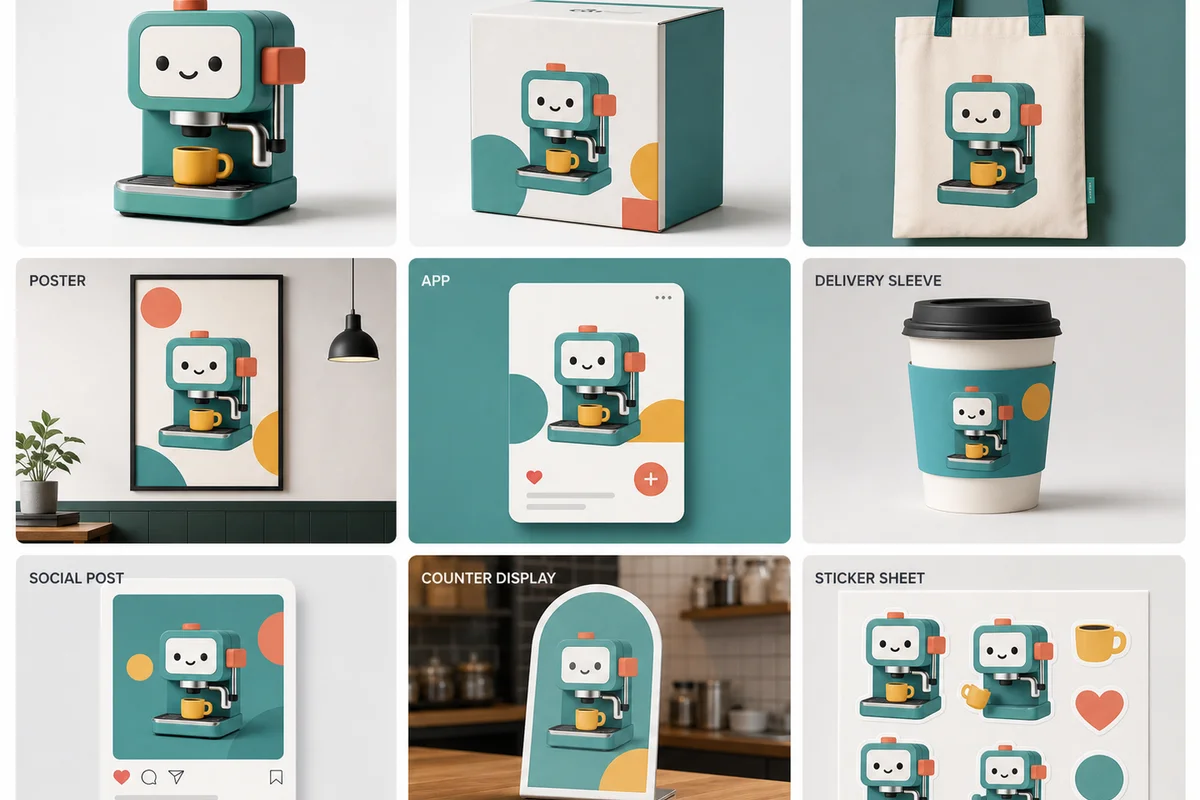
Prompt case: “Create a 3x3 brand application board. Keep the same geometric coffee-machine mascot consistent across a product close-up, packaging box, tote bag, cafe poster, mobile app card, delivery sleeve, social post, countertop display, and sticker sheet. Use a clean white canvas with muted teal, coral, yellow, and graphite accents.”
The useful part of this prompt is the structure. It names the panel count, gives every panel a job, and tells the model which visual identity must stay consistent. I would still check repeated accessories, small labels, and logo-like details panel by panel.
Nested Interfaces and Visual Depth
Qwen-Image-3.0 also seems designed for nested interfaces.
A normal multi-panel image spreads content horizontally. A nested interface goes deeper. For example, one screen may contain a chat window, and that chat window may contain a poster preview.
That is useful for software mockups, product concepts, and presentation visuals.
But I would not use it as a direct UI design replacement.
It can help you create a concept image. It cannot replace Figma layers, precise spacing, clickable states, or developer-ready components.
How Well Does Qwen-Image-3.0 Perform?
I have not run a private full test set yet. So I am not going to pretend I have hands-on generation results from my own account.
This section is based on the official examples, public feature claims, and the kinds of outputs Qwen-Image-3.0 is designed for.
Character and IP Consistency
Qwen-Image-3.0 should be useful for character design boards, expression sheets, multi-scene character images, and IP brand applications.
The likely strength is preserving the main visual identity: head shape, color palette, outfit direction, and overall character style.
The likely weakness is fine detail locking. Small accessories, body proportions, logo marks, and repeated character features may still shift across generations.
My take: good for concept boards and social visuals. Still not enough for final brand asset locking without human cleanup.
Brand Design and Marketing Materials
This is one of the best use cases.
Qwen-Image-3.0 should work well for posters, product launch images, business cards, employee badges, mugs, tote bags, packaging concepts, and social media materials.
It is especially useful when you need one image to show multiple brand applications.
Still, brand work has a low tolerance for mistakes. Logos, slogans, trademark shapes, QR codes, and product details need checking.
Use it for draft visuals, concept exploration, and fast campaign directions. Do not blindly send the first output to print.
Infographics and Technical Diagrams
Qwen-Image-3.0 looks much better suited to infographics than many general image models.
It can help with Transformer architecture diagrams, biology knowledge cards, product explainer graphics, academic-style diagrams, and classroom visuals.
But this is also where mistakes can be serious.
Check:
- Arrow direction
- Missing steps
- Formula accuracy
- Table rows
- Unit labels
- Diagram relationships
- Whether the content is invented
My take: useful for infographic drafts. Not safe for final academic or technical diagrams without review.
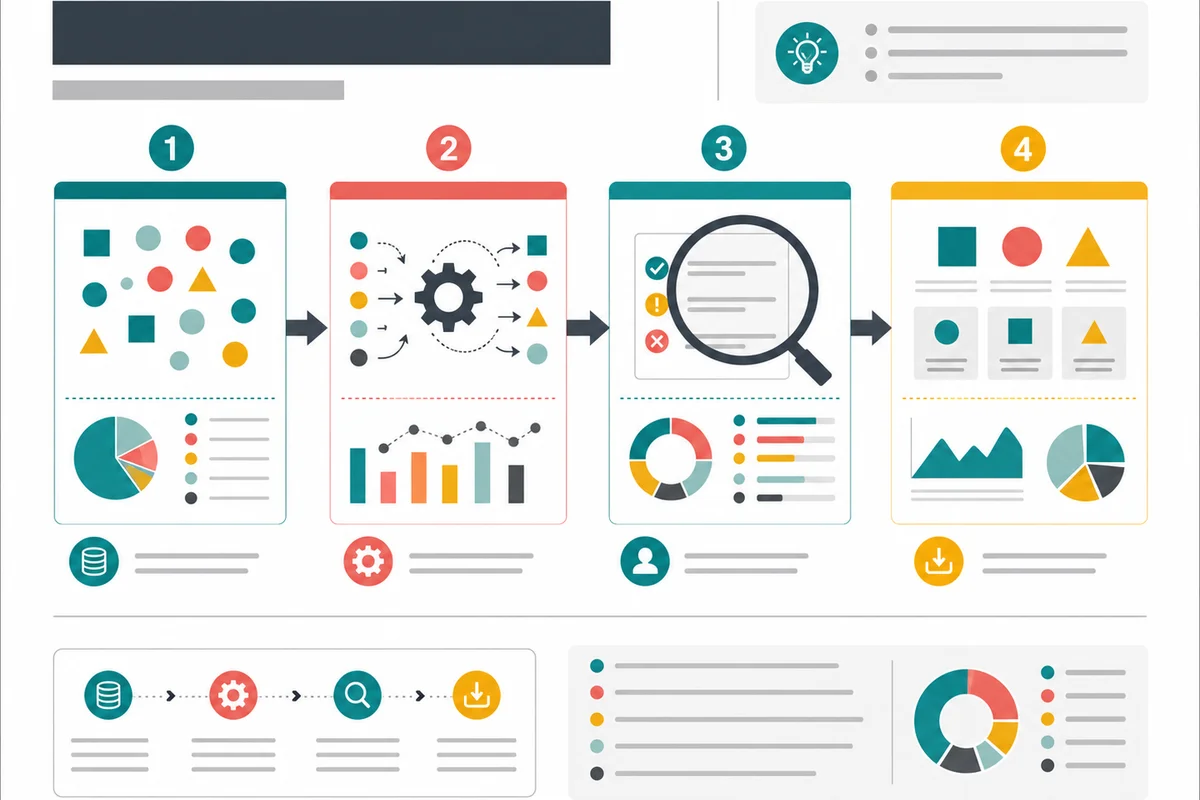
Prompt case: “Create a four-stage educational infographic on a white canvas. Arrange input, transformation, review, and output from left to right. Connect the stages with clear arrows, use simple geometric icons, and keep spacing and hierarchy precise. Do not add factual claims or dense text.”
This kind of prompt is useful when you want to test structure before asking for detailed copy. Generate the visual flow first, then add or correct the final labels manually.
Product Packaging and 3D Presentation
Packaging is a strong fit because it combines layout, text, material, lighting, and product presentation.
Qwen-Image-3.0 can help with box mockups, three-side packaging displays, product posters, and premium material previews.
This is where the model's realistic detail matters. Paper, ceramic, metal, fabric, gloss, shadow, and product photography effects can make a concept look closer to a real campaign asset.
The risk is still text and logo accuracy. The packaging may look great, but small copy may not be clean enough for delivery.
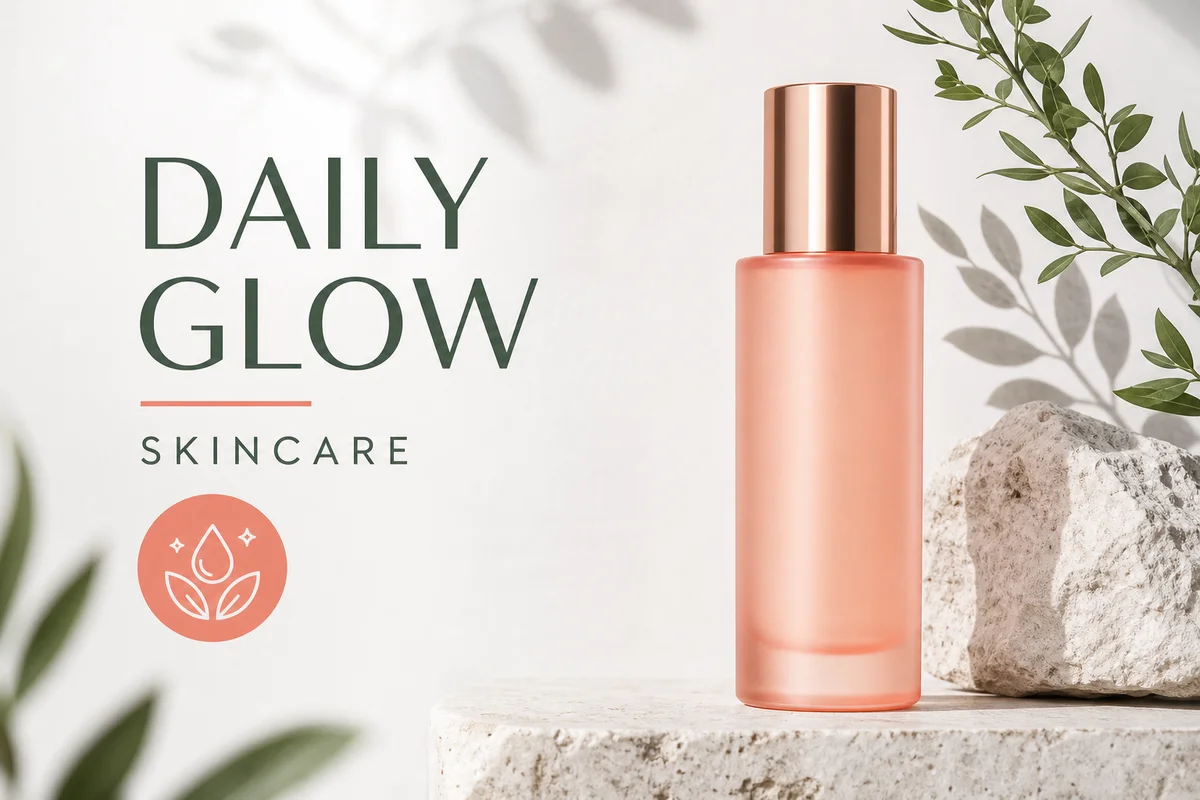 Illustrative fictional skincare product launch poster for a structured commercial prompt
Prompt case: “Create a premium skincare product launch poster. Place one matte bottle on a pale background with soft botanical shadows. Use the short headline ‘DAILY GLOW’ and the label ‘SKINCARE’. Keep the layout clean, with muted coral, sage green, white, and graphite.”
This is a better test than asking for “a beautiful product image.” It checks the subject, text, position, palette, lighting, and intended use in one pass. The short headline is easier to verify than a full paragraph, but it should still be checked before publishing.
Multilingual Poster Generation
Multilingual posters are another strong use case.
Qwen-Image-3.0 can be useful for launch event posters, international product announcements, and global campaign mockups.
Short text is the safer zone. Titles, labels, and short descriptions are more likely to work than long paragraphs.
If you are making a poster with Chinese, English, Japanese, and Korean text, I would check each language manually before publishing.
UI and Nested Interface Generation
Qwen-Image-3.0 can create UI concept images with layered windows, chat panels, app pages, and dashboard-like layouts.
This is good for product storytelling.
It is not good for final UI production.
The model may understand hierarchy, but icons, spacing, state bars, and tiny labels can still be inconsistent. Treat UI outputs as concept art, not design files.
If you need to improve or restyle an existing visual instead of generating from scratch, a tool like GoEnhance Image to Image AI can be a better next step for controlled revisions.
Qwen-Image-3.0 Strengths
Long and Detailed Prompt Understanding
You can write a more complete design request instead of relying on a few keywords.
That makes Qwen-Image-3.0 easier to use for real creative briefs.
Strong Complex-Layout Control
Six-grid, nine-grid, information cards, and multi-page composition are where the model stands out.
It is better suited to structured images than a model that only focuses on style.
Better Text Rendering
Qwen-Image-3.0 looks stronger for titles, labels, short multilingual copy, and medium-size text.
That does not remove the need for checking. It just makes text-heavy image generation more realistic.
Multilingual Design Support
The 12-language support makes it useful for global campaigns, cross-border e-commerce, and international launch visuals.
Practical Commercial Use Cases
This is the biggest point.
Qwen-Image-3.0 is not only for art images. It fits brand, e-commerce, education, product design, social media, and content operations.
Qwen-Image-3.0 Limitations
Small Text Is Not Always Accurate
Tiny text is still risky.
The model may show impressive small-text examples, but that does not mean every 8pt or 10px text block will be correct.
Long paragraphs are even harder. Check them manually.
Dense Technical Content Can Still Fail
Technical diagrams are useful, but dangerous if you do not check them.
Formulas may be wrong. Flow nodes may be missing. Tables may shift. Expert content may contain invented details.
Use it for drafts, not final technical truth.
UI Images Are Concepts, Not Editable Designs
Qwen-Image-3.0 can make an app screen look convincing.
But it will not give you editable layers, exact component spacing, or real design-system logic.
Use it for inspiration, pitch visuals, and product storytelling.
Character Consistency Is Not Perfect
The main character may stay recognizable, but smaller details can change.
Accessories, logos, hand shapes, and body proportions are still things to watch.
Generated QR Codes May Not Work
Do not trust generated QR codes.
Use them as visual placeholders only. Replace them with real QR codes before publishing or printing.
Best Use Cases for Qwen-Image-3.0
Brand and Marketing
Qwen-Image-3.0 is useful for brand boards, product posters, social media assets, multilingual ads, and merchandise concepts.
Education and Infographics
It can help create teaching diagrams, knowledge cards, simple formula explainers, classroom visuals, and course-note drafts.
E-Commerce and Product Design
It is a good fit for packaging concepts, product detail images, parameter posters, product scenes, and studio-style presentation images.
Character and IP Design
It can help with character views, expression sheets, multi-scene visuals, and IP application concepts.
UI and Presentation Concepts
It can create app concept pages, software promo visuals, PPT-style drafts, nested windows, and product feature diagrams.
If you want to browse more model options for different creative tasks, GoEnhance also has an AI image models page.
How to Use Qwen-Image-3.0
The exact access path may change, so check the current Qwen or platform page before writing fixed instructions into a live article.
In general, the workflow should look like this.
Step 1: Open the Current Qwen Image Entry
Open Qwen Studio, Qwen Chat, Alibaba Cloud Model Studio, or the platform where Qwen-Image-3.0 is currently available.
Step 2: Choose Image Generation
Select the image generation tool. If there are multiple models, choose Qwen-Image-3.0 when it is available.
Step 3: Write a Structured Prompt
Do not write one vague sentence.
Break the prompt into sections:
- Subject
- Layout
- Text
- Colors
- Style
- Position
- Materials
- Lighting
- Restrictions
Step 4: Generate and Inspect the Details
Check the parts that usually fail:
- Text
- Numbers
- Formulas
- Logo shapes
- Character details
- Tables
- QR codes
- Small labels
Step 5: Revise or Edit
If the image is close but not final, edit it instead of starting over.
Alibaba Cloud's Qwen-Image Edit API docs describe image editing features such as editing text within images, adding or removing objects, changing poses, transferring styles, and enhancing details: Qwen-Image Edit API reference.
How to Write Better Qwen-Image-3.0 Prompts
Qwen-Image-3.0 works best when the prompt reads like a design brief.
Here is a practical structure:
Create [image type].

Subject:
Describe the main subject.

Layout:
Define the number of panels, hierarchy, spacing, and positions.

Text:
Provide the exact text that must appear.

Visual style:
Specify colors, typography, lighting, and materials.

Consistency:
State which character, brand, or product details must remain unchanged.

Output requirements:
Specify aspect ratio, clarity, background, and intended use.

Avoid:
List unwanted text, distorted logos, duplicated objects, unreadable small text, and inconsistent layouts.
My prompt tips:
- Put required text in quotation marks.
- Number each panel or content area.
- Limit the amount of tiny text in one image.
- Describe hierarchy, not just style.
- Tell the model what must stay consistent.
- Do not rely on AI-generated QR codes.
- For technical diagrams, generate the structure first and manually correct details later.
Qwen-Image-3.0 vs Qwen-Image-2.0
| Feature | Qwen-Image-2.0 | Qwen-Image-3.0 |
|---|---|---|
| Prompt length | Around 1K tokens | Up to 4.5K tokens |
| Complex layouts | More limited | Stronger multi-panel control |
| Small text | More likely to distort | Improved text rendering |
| Multilingual content | Supported in selected cases | 12-language native rendering |
| Nested UI | Limited | Better hierarchy understanding |
| Information density | Moderate | Much higher |
| Best use | General image generation | Commercial and information-rich visuals |
The short version: Qwen-Image-2.0 is more about quality and consistency. Qwen-Image-3.0 is more about practical image communication.
If you need an open-weight model you can run yourself, Qwen also released Qwen-Image-2.1-Turbo in October 2026: the 8-step version of Qwen-Image-2.1, built for faster generation and editing.
Final Verdict: Is Qwen-Image-3.0 Worth Using?
Yes, Qwen-Image-3.0 is worth trying if you make images that need text, structure, and information.
I would recommend it for brand posters, social media images, product concepts, packaging drafts, multilingual visuals, character IP boards, and infographic drafts.
I would treat it as a drafting tool for UI, technical diagrams, academic visuals, and print-ready files.
I would not trust it blindly for tiny text, real QR codes, formulas, legal copy, or final production artwork.
My final take is simple: Qwen-Image-3.0 is not just making AI images prettier. It is making them more useful. That is the real upgrade.
Qwen-Image-3.0 FAQs
What is Qwen-Image-3.0?
Qwen-Image-3.0 is the third-generation image generation foundation model in the Qwen-Image series. It focuses on long prompts, better text rendering, complex layouts, multilingual content, and practical image creation.
Is Qwen-Image-3.0 free?
Availability can change by platform and account. Check the current Qwen or Alibaba Cloud access page before assuming it is free or unlimited.
Where can I use Qwen-Image-3.0?
You may be able to access it through Qwen Studio, Qwen Chat, Alibaba Cloud Model Studio, API channels, or supported third-party tools as availability expands.
How long can a Qwen-Image-3.0 prompt be?
Qwen-Image-3.0 supports prompts up to around 4.5K tokens, which makes it better suited to detailed design briefs and complex layout instructions.
Can Qwen-Image-3.0 generate accurate text?
It is stronger at text rendering than many general image models, especially for titles, labels, short copy, and multilingual poster text. Very small text and long paragraphs still need manual checking.
Which languages does Qwen-Image-3.0 support?
Qwen-Image-3.0 supports 12 languages. It is especially useful for multilingual posters, international launch visuals, and cross-border marketing assets.
Can Qwen-Image-3.0 create infographics?
Yes. It is designed for information-rich visuals such as knowledge diagrams, multi-panel images, and infographic-style layouts. Technical accuracy still needs human review.
Can Qwen-Image-3.0 maintain character consistency?
It can help preserve the main look of a character across concept images, but small accessories, body proportions, and fine identity details may still shift.
Is Qwen-Image-3.0 suitable for UI design?
It is useful for UI concept images and product storytelling. It is not a replacement for Figma, design systems, or editable UI files.
Can Qwen-Image-3.0 generate usable QR codes?
I would not trust generated QR codes. Treat them as placeholders and replace them with real QR codes before publishing.