
Kling 2.6 Motion Control Review: The Complete Creator's Guide
- 1. Introduction: AI Video Generation's Dual Breakthrough
- 2. What is Kling 2.6 Motion Control AI?
- 3. Motion Control Core Capabilities: Beyond Text Prompts
- 4. Audio-Visual Synthesis in One Click
- 5. Version Showdown: 2.6 vs 2.5 Turbo vs Kling O1
- 6. Mastering Motion Tokens: The Control Language
- 7. Troubleshooting: Why AI Moves the Wrong Parts
- 8. Motion Control Starter Kit: 10 Ready-to-Use Prompts
- 9. Real-World Applications: Who’s Already Winning
- 10. User Guide: Maximizing Your Results
- 11. Pricing & ROI Analysis
- 12. FAQ: Everything You Need to Know
- 13. Final Verdict & Getting Started — Conclusion
After testing multiple AI video tools in real projects, the same problem kept surfacing: motion looked good but lacked consistency, and audio always became a separate, time-consuming step. Kling 2.6 Motion Control stood out because it treats motion as a controllable asset and generates synchronized audio in the same pass—something that changes the workflow for short-form creators.
1. Introduction: AI Video Generation's Dual Breakthrough
Kling Motion Control resolves two of the most painful bottlenecks in short-form production — unreliable motion and separate audio workflows — by combining reference-driven motion control with native audio generation.
Speaking from hands-on tests and project experience, this combination shortens iteration cycles and produces usable, publish-ready clips far faster than the older “video first, audio later” approach.
Why this matters:
- Top: Deliver a repeatable performance with synchronized sound from one job.
- Mid: Reduce the need for mocap, manual keyframing, and separate sound design passes.
- Base: Save days of editing and cut production budgets for social and prototype content.
2. What is Kling 2.6 Motion Control AI?
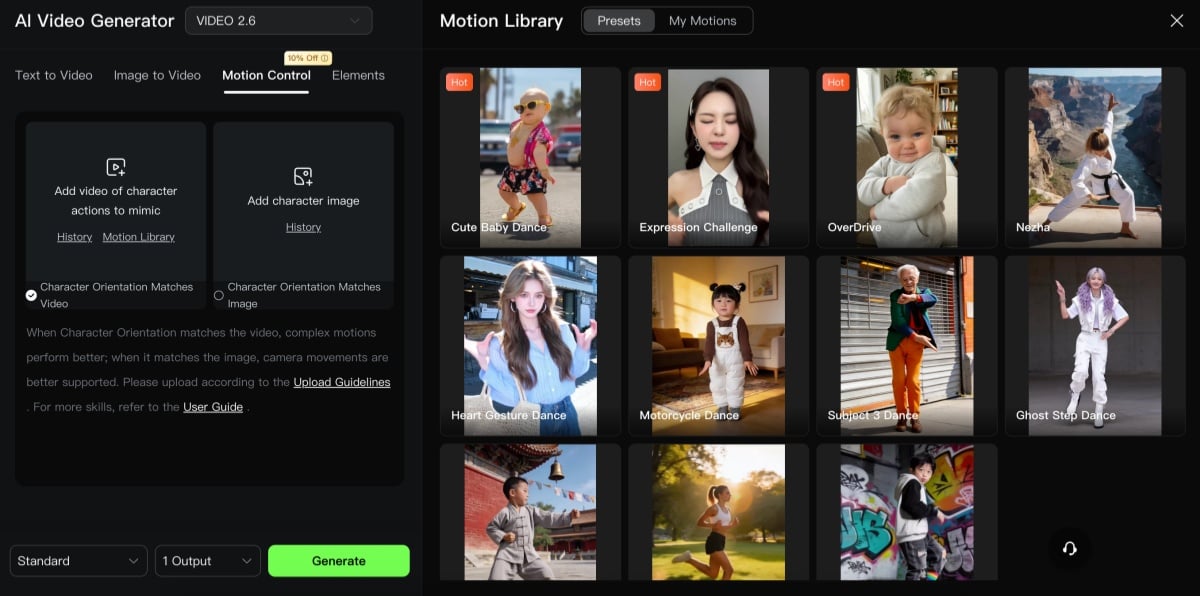
Kling 2.6 is a reference-driven image-to-video system that applies motion extracted from a source clip to a target image while protecting identity and style.
In practical terms, the model ingests a still (or a first frame) plus a motion reference, extracts skeletal and temporal cues, and renders a subject performing that motion — a workflow that feels more like puppeteering than guessing.
Technical layout:
- Top: Motion encoder reads the reference and produces frame-by-frame pose/flow data.
- Mid: A renderer maps that motion onto the target subject while enforcing facial and style consistency.
- Base: Post steps include temporal smoothing, hand/face refinement, and optional audio alignment to produce a single cohesive clip.
3. Motion Control Core Capabilities: Beyond Text Prompts
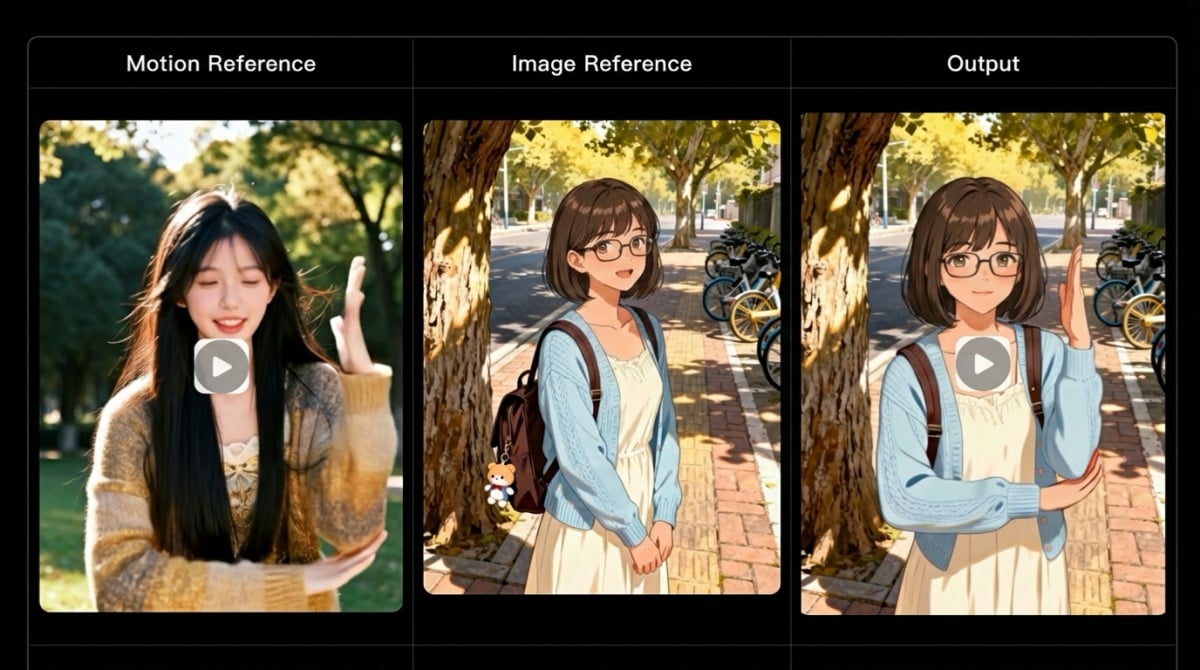
Kling 2.6 behaves as a precise motion transfer engine rather than a creative guesser; that shift transforms how prompts are written and how assets are prepared.
Where text once had to describe complex choreography, the motion reference now supplies the motion and the prompt defines scene, costume, and mood.
Primary strengths
- Full-body motion transfer: Frame-accurate pose replication for dance, stunts, and choreography.
- Complex motion handling: Works with dynamic actions (skating, martial arts) when references are clean and well-framed.
- Fine-grain control: Close-up hand/finger articulation and micro-expressions improve with dedicated passes.
- Dual orientation modes: Choose between character-centric motion or camera-driven trajectories.
- Prompt role redefined: Use text primarily to set environment, wardrobe, and lighting rather than to describe every limb action.
4. Audio-Visual Synthesis in One Click
Kling 2.6 brings native audio — voice, SFX, and ambience — into the same generation pass, which materially changes the production calculus: a single render can now be a near-post-ready cut.
Testing across short promotional pieces and dialog snippets showed that integrated audio reduces handoffs and makes A/B testing of creative variations trivial compared to separate audio engineering.
How this adds value:
- Top: A 5–15s clip can arrive with synchronized dialogue and reactive SFX out of the box.
- Mid: Voice generation supports multiple languages and aligns phonemes to mouth frames, while SFX are matched to motion intensity (footfalls, impacts).
- Base: Ambient layers are added automatically to situate the scene and improve believability.
5. Version Showdown: 2.6 vs 2.5 Turbo vs Kling O1
Kling 2.6 is the pragmatic choice for motion fidelity and audio sync; Kling 2.5 Turbo focused on prompt-adherence and dynamic camera moves; Kling O1. aims to be a unified multimodal platform for multi-shot workflows.
Comparing these options helped shape which model gets used for specific briefs: 2.6 for repeatable performance-driven outputs, 2.5 for quick creative prototyping, and O1 for editing-focused or multi-shot continuity.
Comparison highlights
- Motion precision: 2.6 leads when a real-world reference influences final motion.
- Creative discovery: 2.5 Turbo remains faster for exploratory visuals and dramatic camera language.
- Unified pipelines: O1 is best for multi-shot projects that require consistent editing and cross-shot continuity.
6. Mastering Motion Tokens: The Control Language
Motion Tokens act as a deterministic shorthand for limbs, cameras, and micro-expressions; learning them raises output predictability dramatically.
When tokens are layered after a clean reference, outputs become controllable in a way that resembles traditional animation pipelines but with far less manual labor.
Token taxonomy
- Limb tokens: Pin or nudge limbs for product interactions or choreography adjustments.
- Camera tokens: Dolly, pan, and rotation commands for cinematic movement.
- Micro tokens: Blinks, breath, and tiny facial cues that make characters feel alive.
Practical workflow
- Lock broad poses with limb tokens.
- Add camera language to create movement relationships.
- Finish with micro tokens to sell realism in close-ups.
7. Troubleshooting: Why AI Moves the Wrong Parts
Motion mismatches almost always trace to problematic references, conflicting instructions, or scale differences; fixing those three elements resolves the majority of issues.
A disciplined approach to capture and prompt design prevents wasted iterations and preserves compute credits.
Key failure modes and fixes
- Blurred or occluded references: reshoot with higher shutter and cleaner framing.
- Scale/ratio mismatch: crop or choose a reference closer in proportion to the target.
- Conflicting language: avoid asking for a static pose while attaching a dynamic motion clip.
Five selection rules
- Use single-shot reference clips without edits.
- Match camera angle and subject framing to the target.
- Prefer plain backgrounds or controlled chroma passes.
- Capture dedicated hand/face passes for micro-detail.
- Keep lighting consistent with the intended final look.
8. Motion Control Starter Kit: 10 Ready-to-Use Prompts
A concise prompt library allowed rapid iteration in tests; these templates were refined against real jobs and can be dropped into the UI as-is with minor duration or token tweaks.
Representative templates (English only)
- Dance transfer:
Apply motion from ref_dance.mp4 to subject.png; preserve identity; output 10s @24fps. - Product hand pass:
Use ref_hand_demo.mp4 to show a product pass; keep camera dollied left-to-right; highlight product at 00:03. - Sports slow-motion:
Map jump peak from ref_jump.mp4; emphasize frame 0.6s; add impact SFX.
How to iterate
- Start conservative: short duration, fewer tokens, then increase detail once the base motion is correct.
9. Real-World Applications: Who’s Already Winning
Early adopters—short-form creators, brand teams, and indie filmmakers—find the combination of motion fidelity and native audio particularly advantageous for fast turnarounds.
Case work shows reduced reshoot days and faster ad localization cycles when motion control is used to standardize performances across multiple markets.
High-impact applications
- Short-form creators: fast dance adaptations and lip-synced bits that scale across channels.
- Brand marketing: consistent, localized actor performances without multiple studio shoots.
- Filmmakers: quick previs and performance prototyping for blocking and creative reviews.
- Education & training: frame-accurate demos for sports technique or procedural instruction.
10. User Guide: Maximizing Your Results
Results improve dramatically when capture and parameter choices are aligned to the model’s strengths; small changes in shooting technique result in large decreases in render retries.
Practical specs
- Reference clips: aim for 3–30s; 24–60fps depending on motion density.
- Resolution: 720p minimum, 1080p+ for close-up fidelity.
- Target image: high-res, neutral background, similar camera angle to reference.
Filming checklist
- Stabilize the camera; avoid handheld jitter where possible.
- Capture separate close-up passes for face and hands if detail matters.
- Use consistent lighting and neutral costumes for easier identity transfer.
Batch tips
- Number and organize assets, use async API jobs to queue renders, and automate color matching on export.
11. Pricing & ROI Analysis
Motion-control jobs typically require more compute than a simple text-to-video pass, but the overall campaign cost often decreases once avoided reshoots and editing hours are counted.
When pitching Kling 2.6 for a campaign, frame the comparison as platform cost plus avoided studio days and post-production hours.
ROI checklist
- Calculate per-minute model cost vs. studio day and talent fees.
- Add avoided costs: travel, reshoots, mocap equipment, long editing cycles.
- Use free credits for concept iterations and reserve paid credits for final renders.
12. FAQ: Everything You Need to Know
Short, experience-driven answers to common operational questions.
- How to remove watermark? Paid tiers or enterprise licenses typically remove watermarks.
- Does Kling allow NSFW? Platform policies and filters apply; check account terms.
- Are Kling videos private? Privacy depends on account settings and export/storage choices.
- Supported motion-ref duration? 3–30 seconds is a practical range for robust extraction. :contentReference[oaicite:3]{index=3}
- Multiple characters? Supported with careful multi-subject references and additional tokens.
- Custom voiceovers? Uploading custom audio is possible; built-in audio can generate synchronized voice and SFX.
13. Final Verdict & Getting Started — Conclusion
Kling 2.6 represents a practical and immediate productivity leap: it turns reference-driven motion into a repeatable production tool and pairs that motion with synchronized audio in a single pass, which shortens the time from idea to publishable clip.
The strengths are motion fidelity, integrated audio, and predictable iteration; limitations remain for extreme stylization and heavily occluded references, where traditional mocap or controlled studio capture still offers advantages.
Three-step quick start
- Shoot a 5–12s clean reference clip (single shot, steady framing).
- Prepare a high-quality target image that matches framing and lighting.
- Run a conservative test with basic tokens, then layer micro tokens for detail.
Claims about Kling’s motion-control architecture and native audio capabilities are based on model documentation, API references, and hands-on reviews of Kling VIDEO 2.6 Motion Control and related Kling releases.


