How to Write AI Video Prompts That Actually Work: A 5-Dimension Framework
- What makes an AI video prompt work?
- The five dimensions of an AI video prompt
- Supporting controls: duration, format, audio, and continuity
- Text-to-video and image-to-video prompts are different
- Real AI video examples and what they teach
- Copy-ready AI video prompt templates
- Common AI video prompt mistakes and practical fixes
- Mistake 1: stacking adjectives instead of directing a shot
- Mistake 2: asking for several unrelated actions
- Mistake 3: forgetting the camera
- Mistake 4: describing only the subject, not the change
- Mistake 5: using vague negative instructions
- Mistake 6: expecting prompt text to control every technical setting
- How to revise a failed generation
- What most AI video prompt guides miss
- A simple practice plan for beginners
- Final checklist before you generate
- Frequently asked questions
- Conclusion
AI video generators can turn a short description into a moving scene, but a vague prompt often produces a vague result. The subject may look right in the first frame and then change shape, the camera may stay still, or several actions may collapse into one confusing motion.
The fix is not to fill the prompt with more adjectives. A better approach is to write a compact shot brief: define what is on screen, what changes, how the camera observes it, and which details must remain stable. This guide explains how to write prompts for AI video generation with a five-dimension framework, real video examples, copy-ready templates, and a simple revision workflow.
What makes an AI video prompt work?
A useful AI video prompt gives the model a clear visual job. It identifies the main subject, describes one visible action, places that action in a specific environment, directs the camera, and defines the look of the shot.
Weak prompt:
A beautiful woman walking in a cinematic city.
This leaves several important decisions open. What does the woman look like? Is she walking toward the camera or away from it? Is the camera static or moving? What city, time of day, and lighting should the model use?
Stronger prompt:
A young woman with short dark hair, a black leather jacket, and dark trousers walks slowly through a rain-soaked Tokyo street, then turns toward the camera. Medium side-tracking shot with a gentle forward push. Wet pavement reflects blue and pink neon, with light mist in the air. Realistic 35mm film look, low-saturation colors, soft neon side light, 8 seconds.
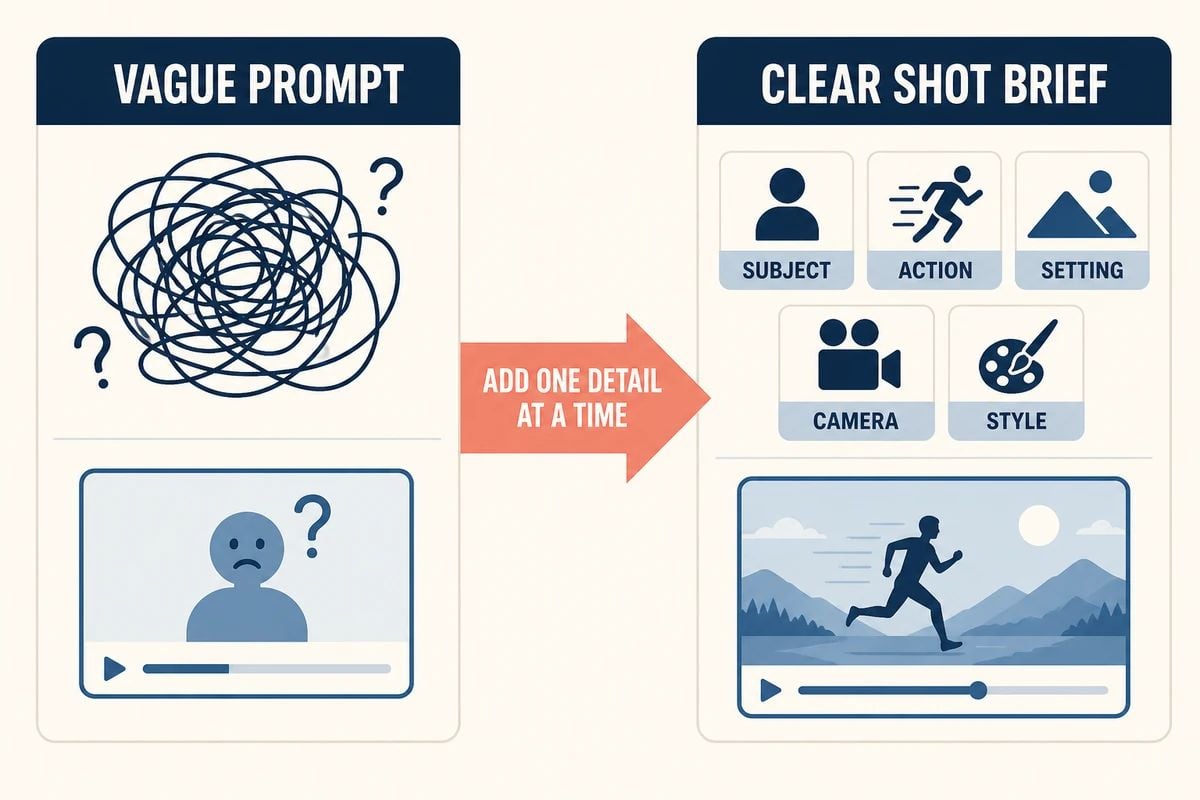
The second version gives the generator a subject, action, setting, camera direction, visual treatment, and duration. It does not guarantee a perfect result, but it reduces the amount of guessing required.
The five dimensions of an AI video prompt
Use the following order as a starting point:
[Subject] + [Action] + [Setting] + [Camera] + [Style and Lighting]
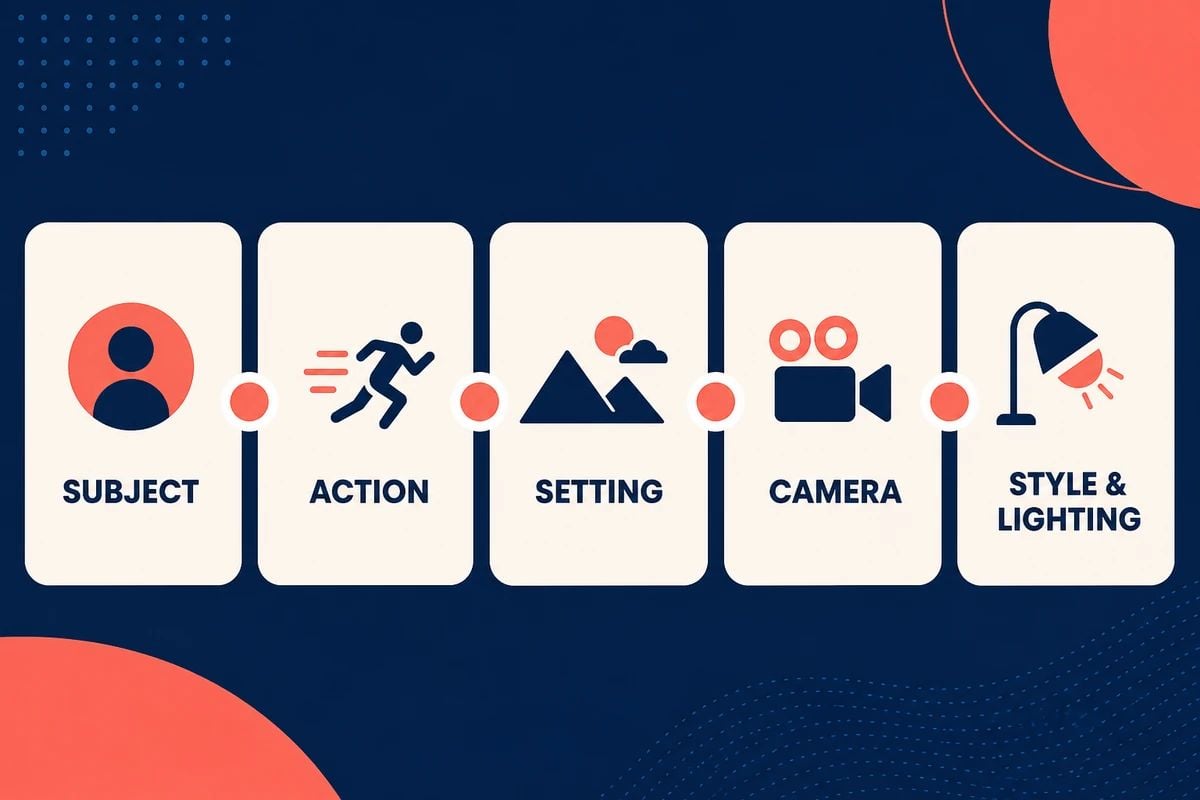
For a production-ready prompt, add the output controls afterward:
[Duration] + [Aspect Ratio] + [Audio] + [Continuity Rules]
The five dimensions describe the creative content of the shot. Duration, format, sound, and continuity are supporting constraints that help make the result easier to use.
1. Subject: define what the viewer should see
Start with the person, product, animal, or main object. Use the details that matter to the shot rather than describing everything you can imagine.
For a person, useful details may include:
- approximate age;
- hair, clothing, and accessories;
- body position or facial expression;
- identity details that should remain consistent.
For a product, describe:
- shape and material;
- color and finish;
- label or packaging placement;
- the angle from which it should be shown.
Compare these two descriptions:
A woman
A short-haired woman in a charcoal wool coat, cream scarf, and brown leather gloves
The second version gives the model a visual identity that can be repeated in later shots. For a recurring character, copy the key description word for word across prompts instead of rewriting it with new synonyms each time.
2. Action: describe one main change over time
Video needs a verb. A still-image prompt can describe a subject standing in a room, but a video prompt should explain what changes during the clip.
Good actions are physical and visible:
- pours coffee into a ceramic cup;
- turns slowly toward the window;
- lifts a paper boat onto the water;
- opens a laptop and taps one key;
- walks through falling snow.
Avoid packing a complete story into a single short clip. “She opens the door, runs across the street, gets into a car, and drives away” contains several shots. Split it into separate prompts or use a timed storyboard when the tool supports longer sequences.
You can add one small secondary movement to make the shot feel alive:
The woman walks slowly along the pier while her scarf moves gently in the wind.
The primary action is walking. The scarf movement supports it without competing for attention.
3. Setting: give the action a believable place
“An office” or “a forest” is often too broad. Add the details that influence the atmosphere and composition:
- location;
- time of day;
- weather;
- foreground and background elements;
- visible textures;
- background movement.
Example:
A quiet ceramic studio at dawn, with wooden shelves, pale clay bowls, a large north-facing window, and soft dust floating in the sunlight.
You do not need to describe every object in the room. Choose details that help the model understand the place and that the viewer can actually see.
4. Camera: explain how the shot is filmed
Camera language turns a scene into a directed shot. Include the framing, angle, movement, and speed when they matter.
Common framing terms:
- extreme close-up;
- close-up;
- medium shot;
- wide shot;
- overhead shot;
- aerial shot.
Common movement terms:
- static locked-off shot;
- slow push-in;
- pull-back;
- left-to-right pan;
- tracking shot;
- orbit shot;
- crane up;
- handheld follow.
Use one primary camera movement per short clip. For example:
Macro close-up with a slow push-in toward condensation forming on the glass bottle.
This is more actionable than “make the product shot dynamic.” If the subject moves as well, describe the two movements separately:
The cyclist moves from left to right while the camera tracks alongside at a steady pace.
5. Style and lighting: define the visual treatment
Style tells the model how the footage should look. Lighting tells it how the scene should be illuminated. These are related, but they are not the same instruction.
Useful style directions include:
- realistic documentary footage;
- clean product commercial;
- hand-made paper-cut animation;
- muted 35mm film look;
- stop-motion animation;
- cel-shaded anime;
- phone-camera UGC footage.
Useful lighting directions include:
- warm morning window light;
- cool overcast daylight;
- hard backlight at sunset;
- soft neon side light;
- a single overhead spotlight;
- candlelight with deep shadows.
Replace abstract phrases with visible qualities. Instead of “high-end cinematic atmosphere,” try “soft backlight, restrained camera movement, shallow depth of field, and muted warm colors.”
Supporting controls: duration, format, audio, and continuity
The five dimensions build the shot. The following controls help the shot fit a real project.
Duration and aspect ratio
State the intended duration when the model accepts it, and choose the aspect ratio that matches the destination:
- 16:9 for wide video and cinematic landscapes;
- 9:16 for vertical social video;
- 1:1 for square social posts.
If the tool provides duration and aspect ratio as separate controls, use those controls first and keep the prompt focused on the creative direction.
Audio and dialogue
If the model supports native audio, describe the sound you actually want:
Natural café ambience, soft cup and spoon sounds, distant conversation, no music.
For dialogue, write the exact words in quotation marks and identify the speaker. Keep the line short enough to fit the clip. If you do not want speech or subtitles, say so only when the model supports those constraints.
Continuity rules
When a character or product appears in several shots, repeat the details that must not change:
Keep the same face, hairstyle, cream sweatshirt, product shape, label position, and warm color palette throughout the sequence.
For image-to-video, concentrate on what should move and what should remain fixed. The source image already supplies much of the composition, so the prompt usually does not need to repeat every visual detail.
Text-to-video and image-to-video prompts are different
Text-to-video asks the model to build the scene from words. Include the subject, setting, action, camera, lighting, and style.
Image-to-video starts with an existing visual reference. Focus on motion, camera behavior, and stability:
Animate the supplied product image with a slow push-in. Add a subtle highlight moving across the glass and a shallow background parallax. Keep the bottle shape, label, color, and position unchanged. Avoid extra products, packaging distortion, and unreadable text.
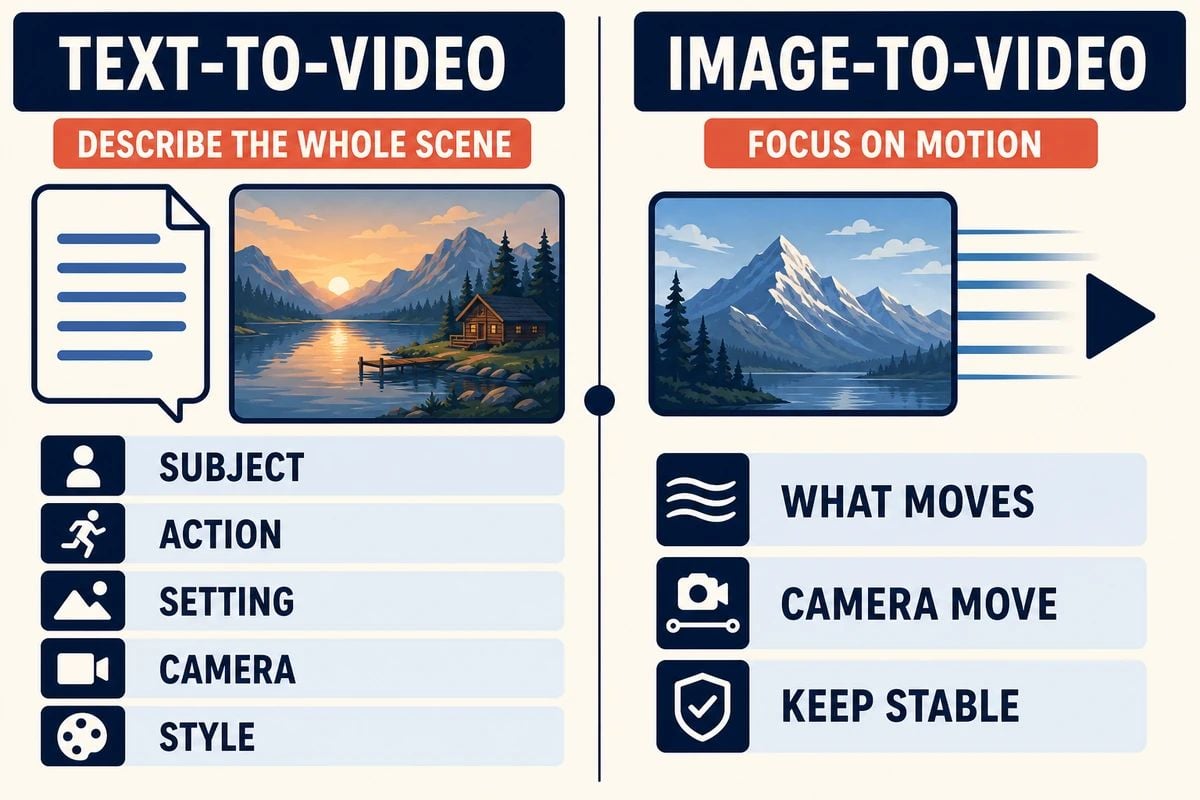
The phrase “animate this image” is usually too vague. Tell the model what changes and what does not.
Real AI video examples and what they teach
The following examples are based on featured GoEnhance prompt-library cases. The videos are included so you can compare the written direction with the resulting motion. The live source pages and video URLs were checked on August 26, 2026; source pages may change over time.
For more model-specific examples, browse Seedance 2.0 prompts, Grok Imagine prompts, and the broader collection of video prompts.
Example 1: a lo-fi rural vlog
Use case: documentary-style lifestyle video.
Seedance 2.0 slice-of-life vlog, 15 seconds, 16:9. Preserve the same woman’s face, hairstyle, skin tone, and body proportions. She wears an oversized olive linen shirt, dusty burgundy wide-leg trousers, brown sandals, and small gold hoops. Set the video in an authentic Korean rural village with mossy walls, hanok roofs, ceramic jars, roosters, cooking smoke, and overgrown paths. Use a late-2000s flip-camera look: heavy handheld shake, imperfect reframing, autofocus hunting, exposure swings, rolling shutter, motion blur, faded muddy colors, digital noise, and compression artifacts. She walks, splashes water on her face, feeds a stray dog, sips from a tin cup, then waves as the recording cuts off. No posing, glamour, stabilization, music, or modern grading. Include birds, roosters, footsteps, wind, water, and village ambience.
This prompt is deliberately specific about the visual era, camera imperfections, clothing, environment, action sequence, and sound. It shows that “realistic” does not always mean clean or polished; the desired camera language can include flaws when those flaws are part of the style.
Example 2: a sci-fi discovery shot
Use case: cinematic science-fiction storytelling.
Create a cinematic sci-fi short with a lonely, contemplative tone that gradually shifts into quiet wonder. A damaged exploration robot moves through a desaturated alien landscape of dusty earth and grey rock under overcast daylight. Use one glowing blue accent in the robot’s chest. Begin with macro close-ups of scratched metal and slow mechanical movement, then track behind the robot as it discovers a tiny living plant inside a collapsed research station. Push in slowly while dust floats through the beam of light. Use 35mm cinematography, restrained camera movement, realistic surface texture, soft atmospheric haze, and a quiet electronic score. End on the robot reaching toward the plant. No comedy, no fast cuts, no extra characters, no flicker.
The important lesson is the emotional progression. The prompt does not only list objects; it explains how the shot moves from isolation to wonder and gives the model a clear ending.
Example 3: a food commercial
Use case: product advertising and food content.
Create a premium food commercial featuring a freshly grilled burger on a dark wooden table. Begin with a macro close-up of melted cheese and crisp lettuce, then slowly orbit around the burger as steam rises from the toasted bun. Warm side lighting creates soft highlights on the ingredients, with a shallow depth of field and a rich but natural color grade. Add subtle restaurant ambience and a gentle sizzle. End with a clean hero shot centered on the burger, leaving empty space on the right for a short CTA. Keep the burger shape and ingredient layers consistent. No extra burgers, distorted food, unreadable text, or sudden cuts.
This example adds a final composition instead of allowing the clip to stop randomly. That matters in advertising because the last frame often needs to support a logo, product name, or CTA during editing.
Example 4: a product shot with controlled motion
Use case: technology or lifestyle product marketing.
Create a sleek cyberpunk product commercial featuring matte black wireless earbuds in an open charging case on a reflective metal surface. Use a slow orbital camera move while thin blue and violet light strips pass across the case. Macro close-up, shallow depth of field, crisp material texture, controlled reflections, and a dark futuristic color palette. Add a quiet electronic pulse and a soft mechanical click as the case opens. End with the earbuds centered in a clean hero composition. Keep the case shape, earbud position, and branding consistent. Avoid extra products, warped reflections, and invented text.
The product remains the priority. The moving lights add energy, but the prompt does not ask the product to spin, open, transform, and fly at the same time.
Copy-ready AI video prompt templates
Use these templates as starting points. Replace the bracketed fields and remove any instruction that does not apply to your shot.
Template 1: cinematic character scene
Create a [duration] [aspect ratio] [visual style] featuring [subject description]. The scene takes place in [location] during [time of day and weather]. [Subject] [one primary action]. Use a [shot type] with [camera movement and speed]. Add [lighting, color palette, and texture]. Include [sound or dialogue] if needed. End with [final image]. Keep [identity, outfit, and important props] consistent. Avoid [specific failure modes].
Template 2: product commercial
Create a [duration] commercial for [product]. Begin with [opening shot] that shows [material, texture, or feature]. Then [one product action or use case] with [camera movement]. Use [lighting, color, and visual style]. End with a clean hero composition of [product], leaving space for [logo or CTA]. Keep the product shape, color, label, and branding consistent. Avoid [extra objects, distorted packaging, or invented text].
Template 3: image-to-video animation
Animate the supplied image with [camera movement]. Make [specific subject or environmental element] move slowly and naturally. Add [secondary motion such as wind, light, steam, or water]. Keep [face, clothing, product shape, label, composition, and colors] unchanged. Use [style and lighting]. Duration: [duration]. Avoid [warping, flicker, extra objects, and unwanted text].
Template 4: social UGC video
Create a natural [duration] vertical UGC video featuring [creator] in [location]. 0–[x] seconds: [hook]. [x]–[y] seconds: [demonstration or transformation]. [y]–[end] seconds: [reaction and CTA]. Use phone-camera handheld movement, realistic lighting, natural speech, and authentic ambient sound. Keep [product, clothing, and creator identity] consistent. Avoid forced acting, studio polish, random subtitles, and label changes.
Template 5: animated transformation
Create a [duration] [animation style] transformation. Begin with [starting object or scene]. Gradually transform it into [final object or scene] through [specific visible steps]. Keep the transformation centered and continuous. Use [camera movement], [texture], [lighting], and [sound]. End on [final pose, product, or logo]. Avoid abrupt cuts, random characters, flicker, and style changes.
Common AI video prompt mistakes and practical fixes
Mistake 1: stacking adjectives instead of directing a shot
Words such as “beautiful,” “epic,” and “high quality” do not tell the model what to put in motion. Replace them with visible decisions about framing, movement, light, and texture.
Mistake 2: asking for several unrelated actions
Break a sequence into shots. A six-second clip is easier to control when it has one clear beat, such as “the woman turns toward the window,” rather than an entire morning routine.
Mistake 3: forgetting the camera
If the camera matters, specify it. A static locked shot can be a deliberate choice, but silence about the camera leaves the model to choose one for you.
Mistake 4: describing only the subject, not the change
“A dog in a park” describes a frame. “A golden retriever runs through wet grass while the camera tracks beside it” describes a video.
Mistake 5: using vague negative instructions
“Do not make it bad” is not useful. Name the problem you want to avoid: “Keep the label readable and the bottle shape unchanged.” Some models also respond better to positive desired states, such as “smooth stable camera movement” instead of “no camera shake.” Test the wording with the model you are using.
Mistake 6: expecting prompt text to control every technical setting
Resolution, duration, aspect ratio, seed, and camera controls may be available in the tool interface. Use those settings when possible, and keep the written prompt focused on the visual direction.
How to revise a failed generation
Treat the first generation as a diagnostic pass. Identify the most important failure, then change one variable.
- If the subject changes, repeat its visual identity and remove unnecessary details.
- If the action is unclear, reduce the clip to one primary verb.
- If the camera feels flat, add a specific movement and speed.
- If the background is chaotic, remove secondary objects and simplify the setting.
- If the product changes shape, add a continuity rule and use an image reference when available.
- If the mood is wrong, adjust the lighting and color description instead of rewriting the entire prompt.
- If the ending is unusable, describe the final composition explicitly.
Changing one variable at a time makes it easier to learn which instructions the model follows reliably. Keep the best version as your new base prompt rather than starting over after every attempt.
What most AI video prompt guides miss
A formula is useful, but a repeatable workflow is more valuable than a long list of keywords. Use these practices when you want more consistent results:
- Show the failed version and the revised version so the change is understandable.
- Separate subject motion, camera motion, and environmental motion.
- Treat one prompt as one shot, then connect several shots during editing.
- Repeat character, wardrobe, product, and color details across related prompts.
- Match the prompt to the purpose: product ads need stable packaging, while lo-fi vlogs may need intentional handheld imperfections.
- End commercial and social clips with a usable composition instead of an accidental cut.
- Keep a small prompt log with the model, settings, successful wording, and the failure you corrected.
These practices make the prompt easier to review and reuse. They also prevent a common mistake: adding more words when the real problem is that the shot has too many competing instructions.
A simple practice plan for beginners
You do not need to start with a complex story. Practice the framework with short, easy-to-judge shots.
Exercise 1: subject and action
Write five prompts using the same structure:
[Subject] performs [one visible action].
Change only the subject and action. This helps you notice whether the model understands the verb.
Exercise 2: add setting and camera
Keep the same action, then test three locations and three camera movements. Compare which combinations produce the clearest motion.
Exercise 3: add micro-motion and continuity
Add one environmental movement, such as wind, steam, water, or drifting dust. Then add one continuity rule for the face, clothing, product, or prop.
Exercise 4: revise one variable
Generate two versions of the same prompt. Change only the camera, lighting, or action. Keep notes about what improved and what became less stable.
Final checklist before you generate
Ask these questions before spending another render:
- Is the main subject specific enough to recognize?
- Does the prompt contain one clear primary action?
- Is the setting visible and specific?
- Does the camera have a clear framing or movement instruction?
- Are the lighting and visual style concrete rather than generic?
- Have you set the duration and aspect ratio where needed?
- Did you include audio or dialogue only when it matters?
- Did you state what must remain consistent?
- Does the final moment have a useful composition?
- If the prompt fails, do you know which single variable to change next?
Frequently asked questions
How long should an AI video prompt be?
Long enough to describe the shot clearly, but short enough to keep the instructions focused. A compact paragraph or a structured set of sentences is usually easier to revise than a long block of unrelated adjectives.
How many actions should one AI video prompt include?
Use one primary action for a short clip. If the subject must complete several major actions, split the idea into multiple shots or create a timed scene plan first.
Should AI video prompts be written in English?
That depends on the model. Many tools accept multiple languages, but the most important factors are specific nouns, visible verbs, clear camera instructions, and a stable structure. Test the language that gives you the most predictable results in your chosen tool.
Are negative prompts necessary for AI video generation?
They can help with specific failure modes, but their effect varies by model. Start by describing the desired result clearly, then add concrete constraints such as keeping a product label unchanged or avoiding extra objects when the tool supports that instruction.
Can I use the same prompt in every AI video tool?
The five-dimension framework transfers well, but individual models may interpret camera terms, audio instructions, duration, and negative constraints differently. Treat a cross-platform prompt as a starting point and adjust it after testing.
Is a longer prompt always better?
No. Extra detail helps only when it clarifies something visible or important to the shot. If the prompt asks for too many subjects, actions, styles, and camera moves at once, the instructions may compete with one another.
Conclusion
The most reliable way to write prompts for AI video generation is to think like a director writing a short shot brief. Define the subject, one clear action, the setting, the camera, and the visual treatment. Then add only the duration, format, sound, and continuity rules that the project actually needs.
Start with one shot, review the result, and change one variable at a time. Clear visual logic is more useful than a pile of generic keywords, and a small library of tested prompts will become more valuable with every generation.