
Prompt
Copy and customize
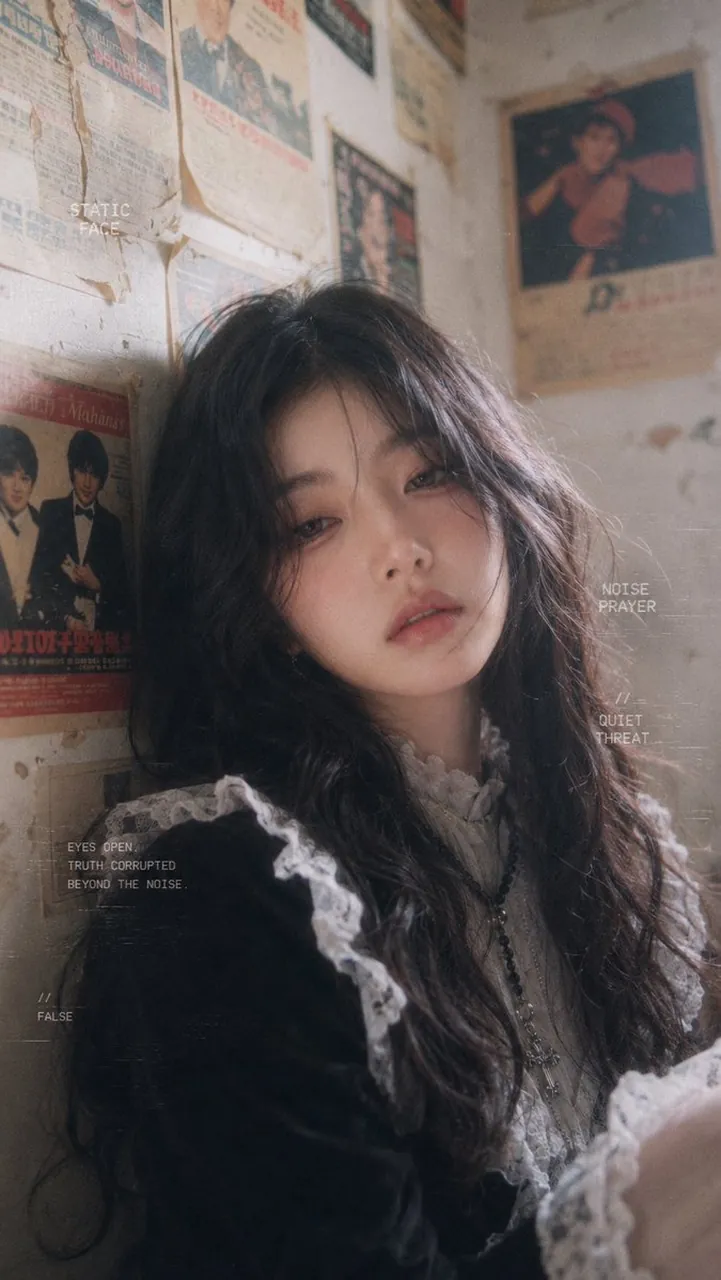
Create a vertical 2:3 cinematic retro editorial portrait of a young woman with long black wavy hair, pale skin, delicate facial features, and a cold melancholic gaze, leaning against an old corner wall covered with yellowed vintage newspaper clippings and faded retro posters. She wears a dark gothic lolita-inspired outfit: black velvet dress or jacket, white ruffled lace collar, white lace shoulder trim and cuffs, plus a long dark beaded cross necklace. Her expression is distant, tired, slightly sorrowful and untouchable, with parted lips and soft smoky eyes, looking directly at the viewer from a close three-quarter angle. Use soft-focus analog film photography, muted beige-gray tones, dusty sunlight from the upper left, shallow depth of field, visible film grain, scratches, haze, static noise, and slightly faded colors. The room should feel cramped, nostalgic, and decayed, with peeling paper texture and blurred posters in the background. Add exactly 6 small white typewriter-style English text overlays integrated into the image like avant-garde magazine typography: 1) near the upper left wall, “STATIC / FACE”; 2) mid-right, “NOISE / PRAYER”; 3) below it, “// / QUIET / THREAT”; 4) lower left near her shoulder, “EYES OPEN. / TRUTH CORRUPTED / BEYOND THE NOISE.”; 5) bottom left, “// / FALSE”; 6) faint horizontal glitch lines and tiny unreadable static marks around the frame. Keep the woman as the clear subject, crop from chest upward with one arm softly entering the lower right foreground, and avoid modern objects, bright colors, smiling expression, or clean digital sharpness. Customize the mood as do not come close, but you cannot stop looking.
Best for
Tips
Keep the main subject focused so vertical 2 3 cinematic retro editorial portrait remains recognizable after style or lighting changes.
Adjust camera angle and aspect ratio before generation when the composition needs a specific platform format.