
Prompt
Copy and customize
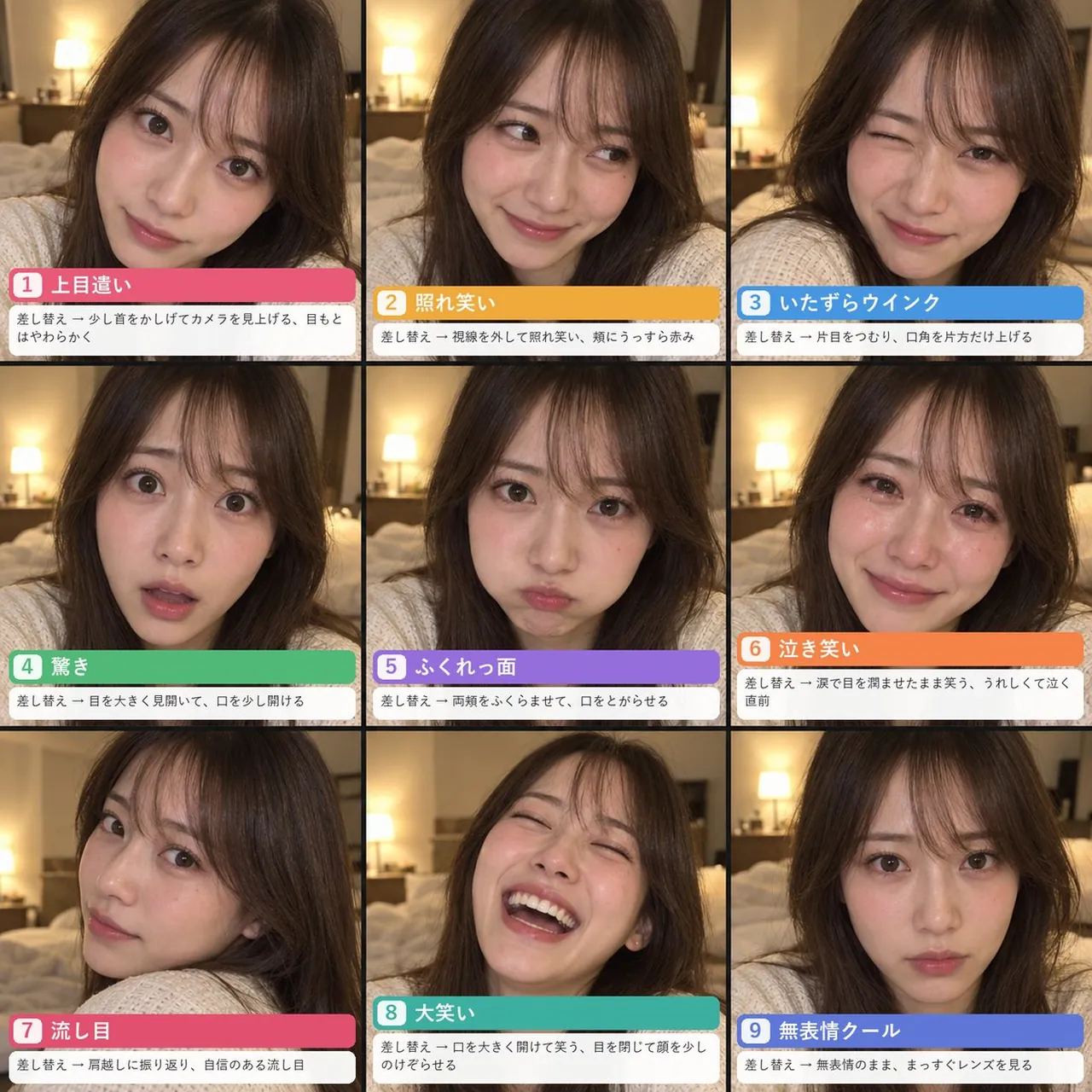
Goal: Create a square 3-by-3 expression prompt reference sheet showing the same realistic young Japanese woman in nine selfie portraits, with Japanese labels and short instruction text on each card.
Canvas: Square 1:1 collage, approximately 1024x1024, divided into exactly 9 equal panels with thin black grid lines. Each panel is a close-up smartphone selfie from face to shoulders, photographed in a warm softly lit bedroom with a blurred bed and bedside lamp in the background, shallow depth of field, realistic skin texture, cozy intimate lighting.
Subject details: The same Japanese woman in her 20s with long dark brown hair and wispy bangs, natural makeup, clear skin, wearing a cream cable-knit sweater must remain consistent across all nine panels. Use realistic photography, front-facing phone camera feel, slight wide-angle selfie perspective, warm indoor indirect lighting.
Layout: Arrange exactly 9 expression cards in three rows and three columns. In every panel, place the portrait full-bleed behind a bottom caption block. The caption block has a colored title bar with a rounded white number badge on the left, large bold Japanese title text, and a white instruction strip below with smaller Japanese text. Keep all text legible and aligned like a social-media reference guide.
Panels and text content, exactly 9: 1. Top-left, pink title bar: number “1”, title “上目遣い”; instruction “差し替え → 少し首をかしげてカメラを見上げる、目もとはやわらかく”. Expression: tilts head slightly and looks up at the camera with soft eyes. 2. Top-center, yellow-orange title bar: number “2”, title “照れ笑い”; instruction “差し替え → 視線を外して照れ笑い、頬にうっすら赤み”. Expression: shy smile while looking away, faint blush on cheeks. 3. Top-right, blue title bar: number “3”, title “いたずらウインク”; instruction “差し替え → 片目をつむり、口角を片方だけ上げる”. Expression: playful wink with one corner of the mouth raised. 4. Middle-left, green title bar: number “4”, title “驚き”; instruction “差し替え → 目を大きく見開いて、口を少し開ける”. Expression: surprised, wide eyes, mouth slightly open. 5. Middle-center, purple title bar: number “5”, title “ふくれっ面”; instruction “差し替え → 両頬をふくらませて、口をとがらせる”. Expression: puffed cheeks and pouty lips. 6. Middle-right, orange title bar: number “6”, title “泣き笑い”; instruction “差し替え → 涙で目を潤ませたまま笑う、うれしくて泣く直前”. Expression: smiling with teary glossy eyes, on the verge of happy tears. 7. Bottom-left, deep pink title bar: number “7”, title “流し目”; instruction “差し替え → 肩越しに振り返り、自信のある流し目”. Expression: turns back over her shoulder with a confident sidelong glance. 8. Bottom-center, teal title bar: number “8”, title “大笑い”; instruction “差し替え → 口を大きく開けて笑う、目を閉じて顔を少しのけぞらせる”. Expression: big open-mouth laugh, eyes closed, head leaning slightly back. 9. Bottom-right, periwinkle-blue title bar: number “9”, title “無表情クール”; instruction “差し替え → 無表情のまま、まっすぐレンズを見る”. Expression: cool neutral face, looking straight into the lens.
Visual style: Photorealistic, high-resolution smartphone selfie collage, warm beige bedroom tones, realistic hair strands and skin texture, soft bokeh lamp glow, consistent person and outfit across all panels. The title bars use saturated colors, rounded corners, bold white Japanese typography, and white lower caption strips with black Japanese text.
Constraints: Do not add extra panels, extra expressions, watermarks, logos, or unrelated objects. Keep the woman recognizably the same person in every panel; only expression and pose change. Preserve all Japanese text exactly as written.
Best for
Tips
Keep the main subject focused so Goal Create a square 3-by-3 expression prompt remains recognizable after style or lighting changes.
Adjust camera angle and aspect ratio before generation when the composition needs a specific platform format.