
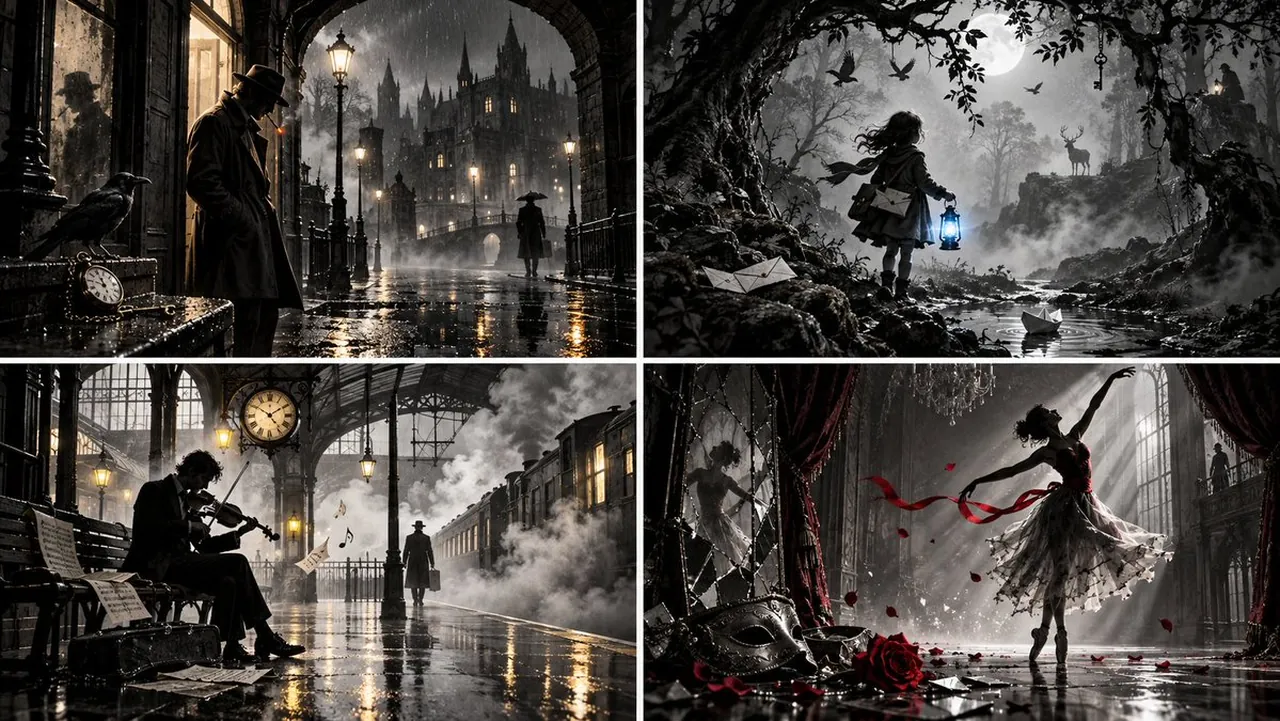
Prompt
Copy and customize
2x2 grid, 16:9, AI picks subjects: INPUT: $ SUBJECT
// ── SEMANTIC INFERENCE ──────────────────────────────────────────
ARCHETYPE = infer_subject_archetype($ SUBJECT) // detective, child, musician, dancer, animal, messenger
MOOD_KEY = infer_emotional_tone($ SUBJECT) // melancholic, defiant, whimsical, longing, solemn
STAGE = infer_storybook_setting($ SUBJECT) // rain-slick street, foggy forest, train platform, ballroom
LIGHT_SOURCE = infer_primary_light($ SUBJECT) // window slats, streetlamp, projector beam, moon
HAZE = infer_atmospheric_element($ SUBJECT) // smoke, fog, mist, dust, rain, steam
SYMBOLS = infer_symbolic_objects($ SUBJECT, 3..5) // clocks, birds, keys, doors, branches, letters
FRAME_ELEMENT = infer_framing_device($ SUBJECT) // doorway, arch, window, mirror, stage proscenium
SILHOUETTES = infer_background_figures($ SUJECT, 1..3) // distant witness, mirror-self, shadow-self
ACCENT_COLOR = infer_single_accent($ SUBJECT) // red, blue, yellow, ember orange, none
PALETTE = { black, deep charcoal, graphite, silver-gray, paper white, one accent }
TEXTURE_MIX = { film_grain, ink_wash, paper_fiber, smoke_haze, wet_reflection }
// ── COMPOSITION FIELD ──────────────────────────────────────────
// Subject anchors the center; light rays and reflections radiate outward.
P(x,y) = subject_gravity(ARCHETYPE) + beam_pressure(LIGHT_SOURCE)
F = ∇P // primary light ray direction, floor reflection angle
Curl = ∇×P // smoke curls, water ripples, cloud shape, decorative scrollwork
Div = ∇·F // density of symbolic objects, background figures, poster elements
// ── SUBJECT LAYER ──────────────────────────────────────────────
SUBJECT_RENDER = monochrome_figure(
archetype := ARCHETYPE,
pose := staged_contrapposto or dramatic_gesture,
silhouette := clean, readable, theatrical,
facial_tone := partial shadow — features half-lit, half-dissolved
)
// Subject faces a light source; one side is silver-gray, the other black.
// No full-face realism — expression implied through silhouette and gesture.
// ── LIGHTING SYSTEM ────────────────────────────────────────────
KEY : single directional beam from LIGHT_SOURCE
— window slats casting parallel shadows
— streetlamp halo pooling on wet floor
— projector cone slicing through haze
— moonburst through foliage
FILL : minimal, deep shadow dominant
RIM : reflective highlight on the floor, silver edge on subject's silhouette
BEAMS : volumetric light shafts through haze; sharp or diffuse depending on genre
REFLECTIONS: wet floor, mirrored pool, polished surface, glass
// ── ATMOSPHERE ─────────────────────────────────────────────────
HAZE_LAYER = volumetric field from HAZE:
density : gradient from subject outward
motion : drifting, curling, thinning
interaction: haze brightens in beam, darkens in shadow
treatment: silver streaks, mist ribbons, ink-wash blots
// ── STORYBOOK FRAMING ──────────────────────────────────────────
FRAME_DEVICE = FRAME_ELEMENT rendered in strong graphic style
— arch, doorway, window, mirror: purely architectural silhouette
— acts as a threshold the subject either stands within, moves through, or faces
DECORATIVE_DETAILS around edges:
— scrollwork corners, hanging vines, tiny stars, floating leaves
— restrained, not cluttering; each traces to $ SUBJECT's world
// ── SYMBOLIC OBJECTS ───────────────────────────────────────────
for each symbol in SYMBOLS:
placed at a Div-maximum point
rendered as silhouette or outlined icon
some act as foreground depth cues (feet of a statue, top of a clock)
some act as background narrative cues (distant figure, hanging sign)
none compete with subject silhouette
// ── STAGED BACKGROUND ──────────────────────────────────────────
BACKGROUND = layered stage geometry
LAYER 1 (nearest): frame element + foreground props
LAYER 2 (mid): subject + symbolic objects
LAYER 3 (far): distant architecture, silhouettes, glowing windows
LAYER 4 (deepest): fog banks, moon, horizon haze
Every layer separated by tone and haze; no layer fully resolved.
// ── ACCENT COLOR ───────────────────────────────────────────────
ACCENT = single hue applied to one element only:
— a scarf, a lit window, an eye highlight, a blossom, a lantern
— maximum 3% of frame area
— if subject suggests no accent, palette stays pure monochrome
// ── TEXTURE PASS ───────────────────────────────────────────────
Composite pass: film grain overlay (subtle, organic)
Ink wash diffusion on flat tone regions
Paper fiber visible in highlights
Wet reflections rendered with sharp silver streak highlights
Smoke rendered as soft diffusion, no hard edges
// ── CAMERA & FINISH ────────────────────────────────────────────
Framing : subject slightly off-center, framed by stage geometry
Format : 4:5 or 2:3
Resolution: 8K
Finish : filmic black-and-white, no color, no bloom, no vignette beyond natural falloff
Text : none
// ── VALIDATION ─────────────────────────────────────────────────
verify: subject silhouette reads at 200px thumbnail
verify: primary light source creates consistent shadows across all layers
verify: accent color (if present) appears on exactly one element
verify: no color beyond palette + single accent
verify: no logos, no watermarks, no captions
verify: image reads as a poster, not a photograph
Output: one 8K monochrome noir storybook poster.
Best for
Tips
Keep the main subject focused so 2x2 grid 16 9 AI picks subjects remains recognizable after style or lighting changes.
Adjust camera angle and aspect ratio before generation when the composition needs a specific platform format.