
Prompt
Copy and customize
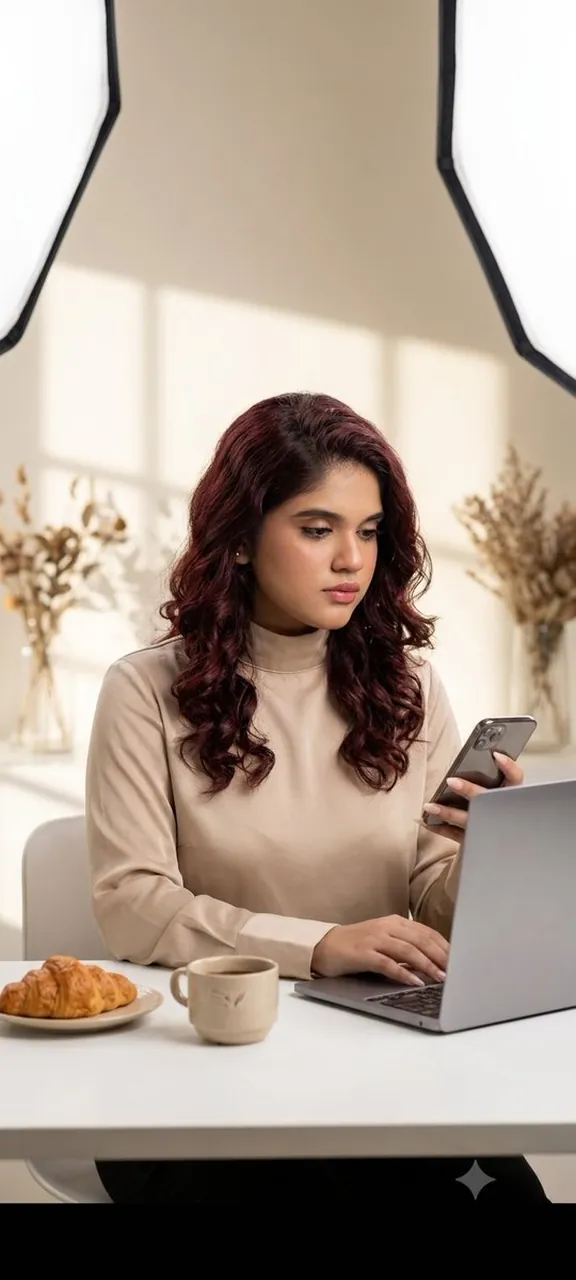
Use the uploaded reference photo as the model for the face, hairstyle, skin texture, facial proportions, and overall identity, preserving every distinctive facial feature with maximum accuracy. Keep the same facial expression as the person in the reference. Create a premium editorial studio portrait designed to resemble a naturally lit workspace, featuring a seamless warm off-white background with realistic window light shadows projected across the wall.
Position the subject seated at a minimalist white desk, interacting naturally with an open laptop while holding a smartphone and looking toward its screen. Include a small coffee cup, a subtle pastry on a plate, and softly blurred dried botanical arrangements in the background to enhance the refined editorial atmosphere.
Capture the image from a slightly frontal eye-level perspective with a medium portrait composition, emphasizing elegant posture, clean negative space, and a sophisticated commercial aesthetic. Use professional studio photography with large diffused softboxes carefully shaped to imitate soft natural daylight entering through a window, producing gentle shadow transitions, realistic skin tones, natural catchlights, exceptional facial detail, and refined depth.
Photorealistic luxury commercial photography, ultra-sharp focus on the face, shallow depth of field, smooth tonal transitions, premium color grading, captured on a full-frame camera with an 85mm prime lens at f/2.8, ultra-high resolution, clean minimalist composition, high-end editorial studio photography.
Best for
Tips
Keep the main subject focused so Use the uploaded reference photo as the remains recognizable after style or lighting changes.
Adjust camera angle and aspect ratio before generation when the composition needs a specific platform format.