
Prompt
Copy and customize
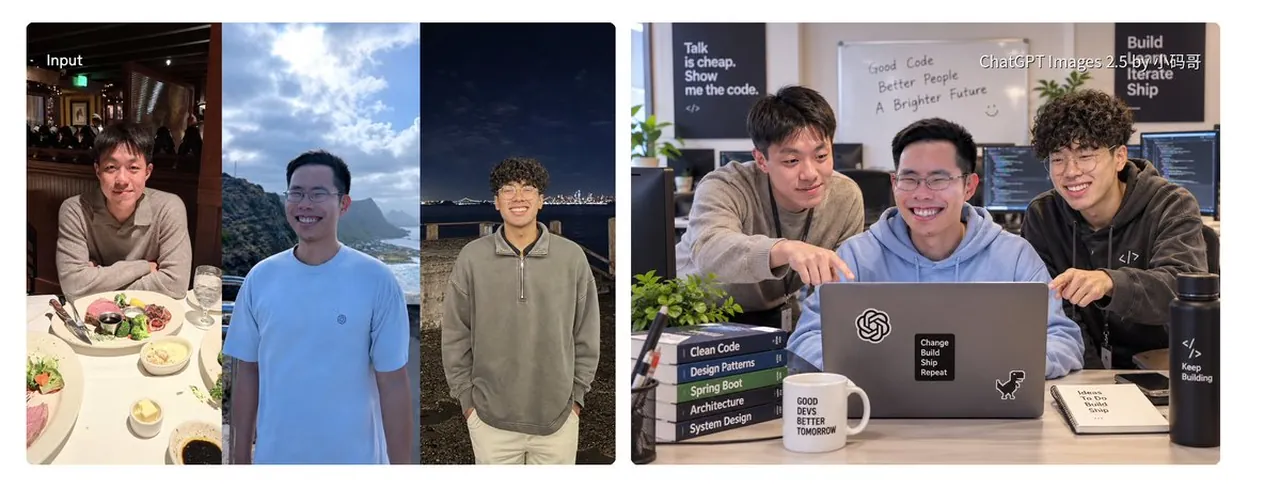
Goal: Create a wide side-by-side comparison collage showing three input portrait photos on the left and a polished GPT-Image-style generated group photo on the right, demonstrating image-to-image character consistency for three young East Asian men.
Canvas: Extra-wide horizontal image, approximately 2.6:1 aspect ratio, white background with two rounded-rectangle panels separated by a narrow vertical gap. Use realistic photography, crisp details, natural lighting, and a clean social-media demo aesthetic.
Left panel: A rounded-corner collage labeled “Input” in small white text at the top left. It contains exactly 3 vertical portrait photos placed edge-to-edge: 1) a young East Asian man seated at a restaurant table in warm dim lighting, wearing a beige polo, with plates, salad, steak, sauce dishes, and glasses visible; 2) a young East Asian man outdoors by mountains and ocean under a bright cloudy sky, wearing a pale blue T-shirt and glasses, smiling; 3) a young East Asian man with curly hair and glasses standing at night near a waterfront city skyline, wearing a gray quarter-zip sweatshirt and light pants, smiling.
Right panel: A single realistic generated office photo with rounded corners, showing exactly 3 young East Asian men matching the three input identities gathered around a laptop at a desk. The man from the restaurant photo stands on the left in a beige hoodie, leaning forward and pointing at the laptop screen. The man from the outdoor photo sits in the center wearing glasses and a light blue hoodie, smiling broadly. The curly-haired man from the night photo stands on the right wearing a dark hoodie, laughing and leaning in. The mood is collaborative, friendly, and energetic, like software developers working together.
Office environment and objects: Modern developer workspace with computer monitors, plants, desk accessories, and warm daylight. Include exactly 1 laptop centered on the desk with an OpenAI knot logo sticker, 1 black square sticker reading “Change Build Ship Repeat,” and 1 small dinosaur sticker. Include exactly 5 stacked programming books to the left of the laptop labeled “Clean Code,” “Design Patterns,” “Spring Boot,” “Architecture,” and “System Design.” Include exactly 1 white mug labeled “GOOD DEVS BETTER TOMORROW.” Include exactly 1 black water bottle on the right labeled with code symbols and “Keep Building.” Include exactly 1 notebook on the right labeled “Ideas To Do Build Ship.”
Wall text: Add exactly 3 visible motivational/code text areas in the background: left poster reading “Talk is cheap. Show me the code.”; center whiteboard reading “Good Code Better People A Brighter Future” with a small smiley face; right poster reading “Build Learn Iterate Ship.” Add a small watermark-like overlay near the top right reading “ChatGPT Images 2.5 by 小马哥”.
Style: Photorealistic, high-resolution, convincing skin texture, natural smiles, accurate face consistency across the left input photos and right generated scene, shallow depth of field, soft office lighting, neutral modern colors.
Customizable details: Use three young East Asian male software developers as the people being depicted, keep the main generated scene focused on collaborating around a laptop, use Input as the label on the source-photo panel, and keep the overall theme as developer collaboration demo.
Constraints: Preserve the exact count of 3 input photos and 3 people in the generated office scene. Keep all visible English text legible. Do not add extra people, extra panels, or unrelated decorative elements. No surreal effects; the image should look like a clean before-and-after AI image generation showcase.
Best for
Tips
Keep the main subject focused so Goal Create a wide side-by-side comparison collage remains recognizable after style or lighting changes.
Adjust camera angle and aspect ratio before generation when the composition needs a specific platform format.