
Prompt
Copy and customize
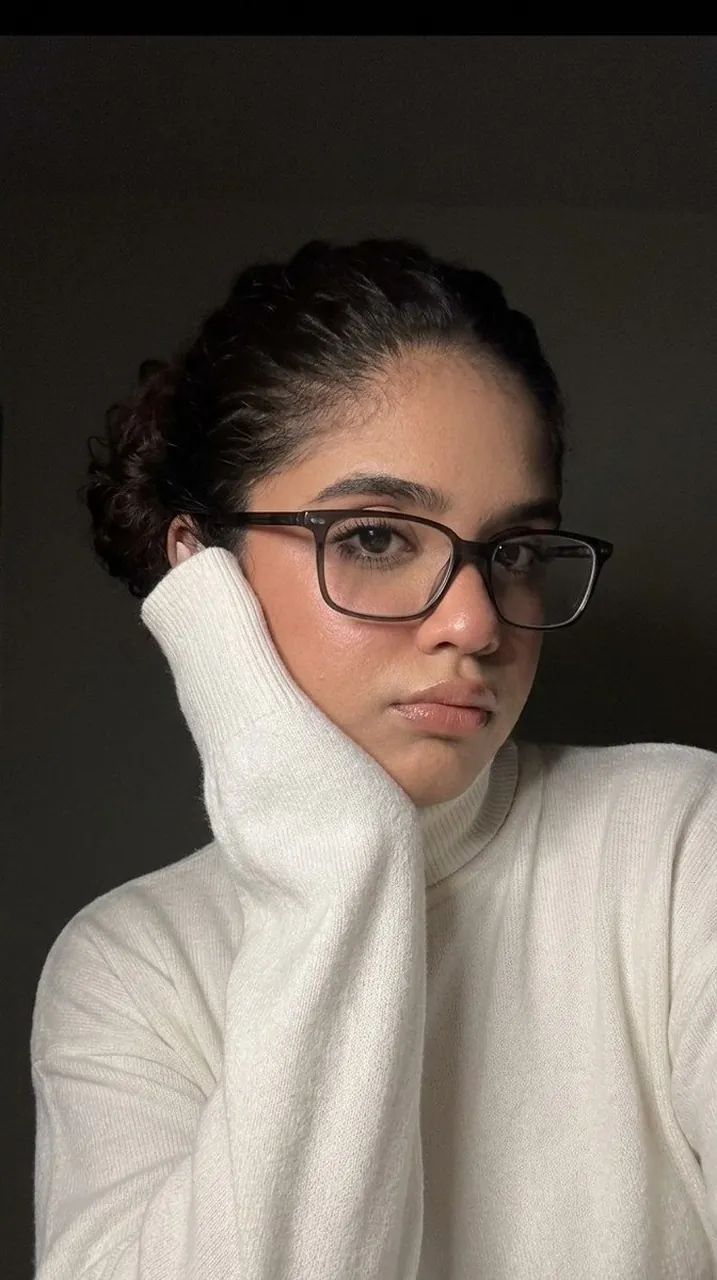
THE GIRL HAS A PETITE FIGURE, A NARROW WAIST, AND A LARGE RIB CAGE. MAKEUP: LINED EYES WITH BLACK EYELINER, LUSH EYELASHES AND LIPSTICK IN A NATURAL SHADE. HAIRSTYLE: VERY LONG HAIR, VOLUMINOUS CURLS. THE HAIR IS THICK. THE SELFIE IS FROM THE FIRST PERSON, THE PHONE IS NOT VISIBLE IN THE FRAME. IT SHOWS A CLOSE-UP OF A YOUNG GIRL POSING IN THE SEMI-DARKNESS. THE GIRL TILTS HER HEAD TO THE SIDE AND LIGHTLY RESTS HER CHEEK ON HER HAND, WHICH IS WEARING A LONG WHITE SLEEVE THAT HIDES HER PALM. STRANDS OF HAIR ARE SLIGHTLY DISHEVELED AND FALL CARELESSLY OVER THE FACE, PARTIALLY COVERING THE EYES AND NOSE, WHICH CREATES A MYSTERIOUS OR RELAXED IMAGE. THE GIRL IS WEARING GLASSES WITH DARK RECTANGULAR OR SLIGHTLY ROUNDED FRAMES. DUE TO THE HAIR FALLING ON THE FACE AND THE ANGLE OF THE EYES, THEY ARE ONLY PARTIALLY VISIBLE. SHE IS WEARING LOOSE WHITE CLOTHES. THE FABRIC LOOKS SOFT. THE PICTURE WAS TAKEN IN LOW LIGHT CONDITIONS. THE LIGHT SOURCE IS DIRECTED FROM THE SIDE, GENTLY ILLUMINATING THE SKIN OF THE FACE AND HIGHLIGHTING THE CONTOURS OF THE LIPS, CHIN AND CHEEKBONES. THE BACKGROUND IS COMPLETELY DARK AND NOT DETAILED, WHICH FOCUSES ALL THE ATTENTION ON THE GIRL HERSELF. THE EARS ARE NOT VISIBLE ON THE GIRL HERSELF. SOFT COLOR CORRECTION, IMAGE QUALITY LIKE THE IPHONE 17, PRONOUNCED GRAIN, MUTED COLORS. DETAILED STUDY OF LEATHER, FABRIC AND PROPS.
Best for
Portrait photographySocial media contentMoody aestheticFashion style studies
Tips
Adjust the lighting intensity to control the depth of shadows and highlight the texture of the knitwear fabric.
Experiment with different aspect ratios to better suit your specific social media platform or digital display requirements.