
Prompt
Copy and customize
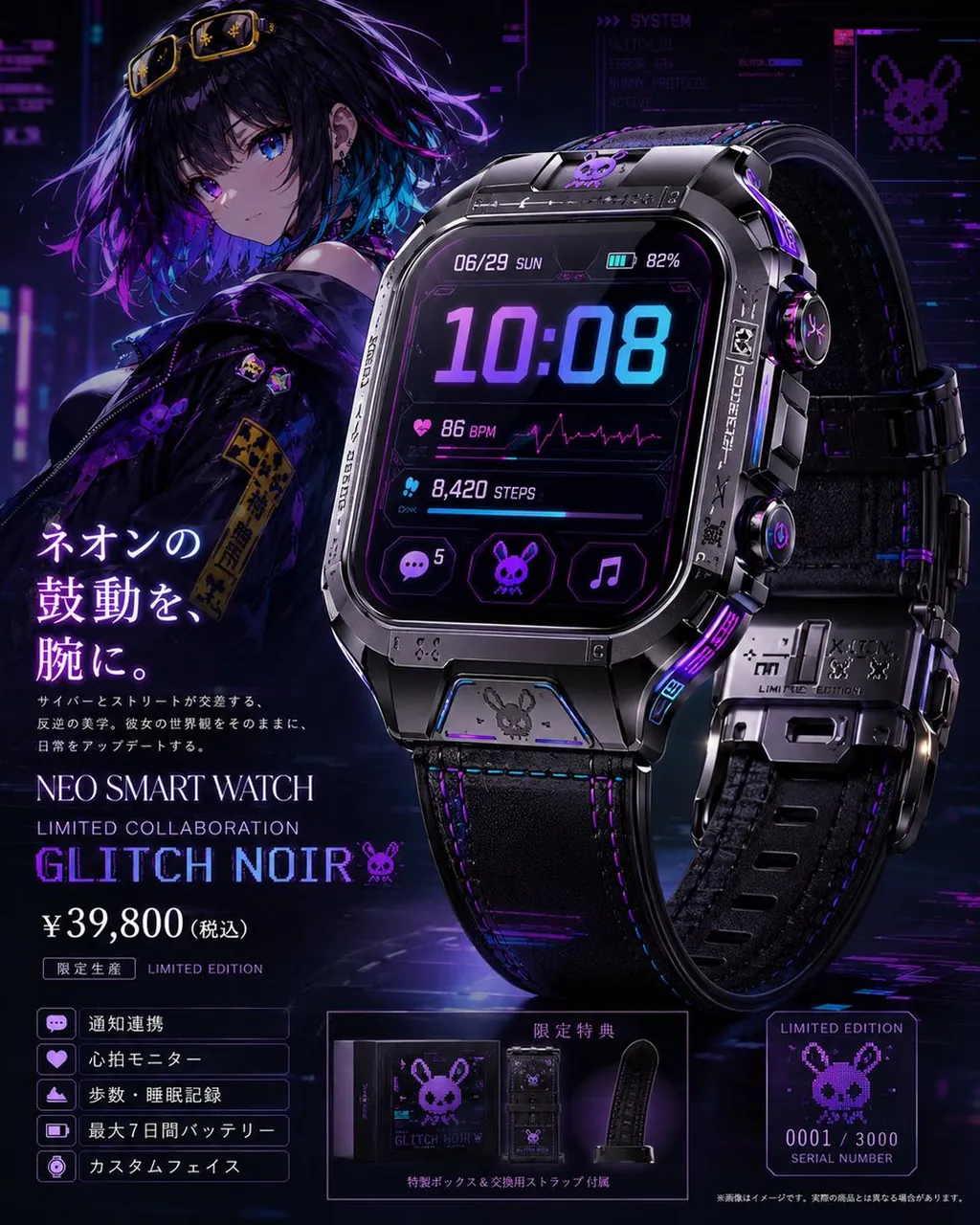
Goal: Create a premium official-looking product page visual for a limited collaboration smartwatch themed around Glitch Noir, mixing cyberpunk anime fashion, black metal hardware, purple/blue neon lighting, and luxury gadget advertising.
Canvas: Square 1:1 promotional poster, high-resolution, dark futuristic city background with holographic UI panels, magenta-purple-blue glow, glossy reflections, and a dramatic studio-product lighting setup.
Main layout: Place a large hero smartwatch on the right side, occupying about half the image, angled slightly toward the viewer with a second rear/side strap view behind it. Place an anime girl mascot on the upper left behind the product, shoulder-up to half-body, looking toward the viewer. Use a left-column product headline and price block, a bottom-left feature list, a bottom-center bonus/package panel, and a bottom-right limited serial-number card.
Subject details: The anime girl has short messy black hair with purple and cyan highlights, bright violet-blue eyes, small earrings, yellow goggles resting on her head, and a black streetwear jacket with purple glitch-bunny patches and yellow caution-style tags. She should feel cool, quiet, and cyberpunk, not overly cheerful. The smartwatch is bulky and premium, with a rounded-square black metal case, beveled industrial edges, screws, engraved markings, side buttons, a black leather or rubber strap with purple stitching, metallic clasp pieces, and tiny bunny/skull/glitch emblems. Add purple neon accents on the case, crown, strap, and edges.
Watch face UI: Show a futuristic digital display with exactly these main elements: date “06/29 SUN”, battery “82%”, large time “10:08”, heart-rate row “86 BPM” with a magenta ECG line, steps row “8,420 STEPS”, and three bottom app icons: chat bubble with badge “5”, bunny/skull icon, and music note. Use cyan and violet glowing typography on a black glass screen.
Text content: Use Japanese product-page copy on the left. Large vertical-style headline: “ネオンの鼓動を、腕に。” Small description underneath: “サイバーとストリートが交差する、反逆の美学。彼女の世界観をそのままに、日常をアップデートする。” Product title: “NEO SMART WATCH”. Subtitle: “LIMITED COLLABORATION”. Large model name: “GLITCH NOIR” followed by a small bunny icon. Price: “¥39,800(税込)”. Label: “限定生産 LIMITED EDITION”.
Feature list: Include exactly 5 boxed feature rows with small icons: 1) “通知連携” with chat icon, 2) “心拍モニター” with heart icon, 3) “歩数・睡眠記録” with activity/sleep icon, 4) “最大7日間バッテリー” with battery icon, 5) “カスタムフェイス” with watch-face icon.
Bottom panels: Bottom center panel shows a luxury black special box and an extra replacement strap, labeled “限定特典” and “特製ボックス&交換用ストラップ付属”. Bottom right card shows pixel-art bunny logo, “LIMITED EDITION”, “0001 / 3000”, and “SERIAL NUMBER”. Add a tiny disclaimer along the bottom edge in Japanese, like an official product mockup.
Visual style: Ultra-detailed anime x photoreal product advertising, cinematic cyberpunk noir, sharp reflections, realistic metal and leather materials, clean commercial composition, neon purple and electric blue palette, subtle glitch effects, holographic tech overlays, premium limited-edition feel.
Constraints: Keep the image as a single polished product-page poster. Make all visible text crisp and legible. Use exactly one main character, exactly two visible watch views, exactly three watch-face app icons, exactly five feature rows, exactly one bonus/package panel, and exactly one serial-number card. Do not add extra products, extra characters, watermarks, or random unreadable branding.
Best for
Tips
Keep the main subject focused so Goal Create a premium official-looking product page remains recognizable after style or lighting changes.
Adjust camera angle and aspect ratio before generation when the composition needs a specific platform format.