
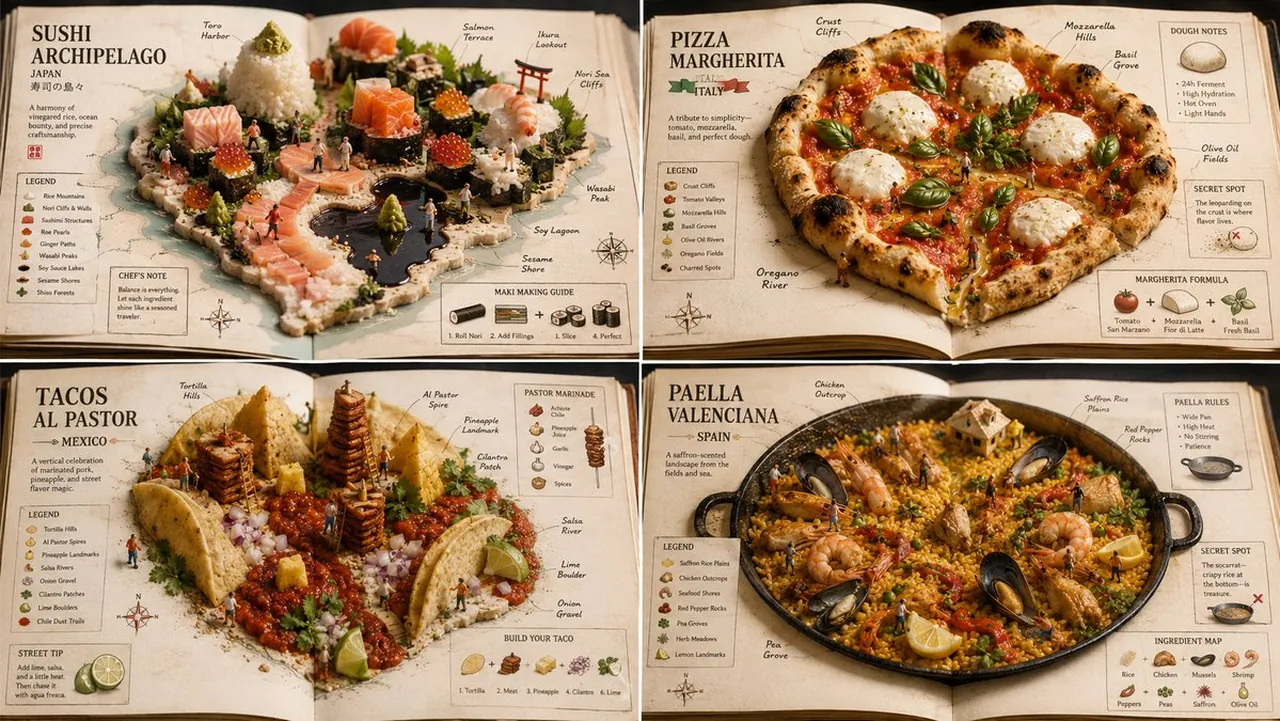
Prompt
Copy and customize
for GPT Image 2. It should work for any kind of food but I went popular dishes.
2x2 grid, 16:9, do this for 4 famous international dishes: CONCEPT ANCHOR 1: "Sushi miniature world — rice terrain, sashimi architecture, nori panels, roe beads, sesame debris, plated macro craftsmanship"
::
CONCEPT ANCHOR 2: "Open food atlas — ingredients arranged as geographic terrain, edible map relief, cookbook page layout, culinary cartography, warm tabletop realism"
::
CONCEPT ANCHOR 3: "Annotated miniature diorama guide — tiny figures, object callouts, side labels, ingredient diagrams, secret-spot markers, collectible educational layout"
INSTRUCTION:
Find the exact visual center of these three concepts.
Ignore the literal astronaut, national flag, named foods, and specific maps.
Capture only the reusable style DNA.
Render $ SUBJECT as an edible miniature world presented inside an open atlas or cookbook.
STYLE RULES:
- Convert the subject into a tiny handcrafted scene built from edible materials.
- Broad landforms become rice, grains, noodles, bread, pastry, sauce, puree, or layered ingredients.
- Important structures become sashimi blocks, vegetable cuts, nori sheets, grilled pieces, dumplings, cubes, or carved food components.
- Small repeated details become roe pearls, sesame seeds, herbs, spices, crumbs, seeds, or garnish clusters.
- Present the subject on an open book, plate, tray, or cookbook spread.
- Add map-like labels, ingredient callouts, tiny arrows, region markers, recipe notes, and small explanatory diagrams.
- Use warm macro photography, shallow depth of field, tactile food texture, and precise miniature staging.
OUTPUT:
A culinary atlas-diorama where $ SUBJECT becomes a tiny edible world that is both delicious and educational.
Best for
Tips
Keep the main subject focused so for GPT Image 2 It should work remains recognizable after style or lighting changes.
Adjust camera angle and aspect ratio before generation when the composition needs a specific platform format.