
Runway AI Review 2026: My Honest Take After Stress-Testing
- Runway AI Overview: Core Facts and Capabilities
- Runway AI Review: What to Know Before Jumping In
- Runway Review: Features That Matter Most
- Pros of Runway AI: Where It Really Shines
- Cons of Runway AI: The Trade-Offs to Expect
- Who Should Use Runway AI (Best-Fit Use Cases)
- Who Shouldn’t Use Runway AI (When to Skip It)
- Runway AI Pricing: Plans, Limits, and What You Actually Get
- How to Use Runway AI: A Simple Step-by-Step Workflow
- 6 Notable Runway AI Features and What They Do
- 1) Gen-4.5 (Text-to-Video direction and prompt adherence)
- 2) Gen-4 Video (fast 5–10 second controllable clips)
- 3) Keyframes (for intentional transitions)
- 4) Director-Style Camera Control
- 5) Act One / Act Two (where character performance leads the scene)
- 6) Lip Sync + practical cleanup (Inpainting / Remove Background)
- Runway AI Alternatives: Similar Tools to Compare
- Runway AI FAQs: Quick Answers for New Users
- Bottom Line: Is Runway Worth It?
If you want the short version, this Runway AI review comes down to one thing: Runway is at its best when you treat it like a controllable “shot machine” (plus a handy AI toolbox), not a one-click movie studio. Its latest video models emphasize motion quality and prompt adherence, and the platform’s strongest value is the mix of generation + control + practical editing utilities in one workflow.
I’m writing this in first person because most “Runway reviews” read like feature lists—and that’s not how creators decide. I’ll walk through what I’d tell a teammate before we spend credits, what I’d test first, what surprised me, and where Runway still asks you to compromise.
Runway AI Overview: Core Facts and Capabilities
 Runway is a credit-based, browser-first creative suite where the “real cost” is measured in seconds generated and iterations—not the monthly fee alone.
Here’s the snapshot I wish someone handed me before I clicked “subscribe”:
| Category | What I’d remember | Why it matters |
|---|---|---|
| Core focus | Generative video + controllable motion + creator workflows | It’s not just text-to-video; controls and workflows are the point |
| Pricing model | Monthly plans with monthly credits (Free gives one-time credits) | You budget in credits, not vibes |
| Strongest “wow” | Newer models push motion quality + prompt adherence | Less drift, better continuity (still not perfect) |
| Best use | Short shots, ad creatives, scene tests, stylized sequences | You stitch results into a final edit elsewhere |
| Common friction | Iteration cost, learning curve on controls, occasional weirdness | The best results come from intentional prompting |
Runway AI Review: What to Know Before Jumping In
If you’re expecting Runway to reliably nail a complex scene in one generation, you’ll burn credits fast—but if you approach it like a shot-by-shot pipeline, it becomes extremely productive.
The mental model that helped me most: Runway is a system for producing “usable shots” in volume, not a system that guarantees “the final film.” The platform keeps adding more controls (keyframes, camera control terms, video-to-video styling, performance tools like Act-One/Act-Two, etc.), which makes it more predictable—but also makes it less “one button.”
One more expectation reset: the newest model positioning is very explicit about what it’s trying to win on—motion quality, prompt adherence, temporal consistency, and controllability. That’s exactly the stuff that matters for creators trying to make believable clips instead of “AI mush.”
Runway Review: Features That Matter Most
The features that actually change your outcomes are the control layers (camera, keyframes, performance driving) and the “fix-it tools” (expand, remove background, inpainting), not the basic prompt box.
When I judge Runway, I don’t start with “text-to-video.” I start with: Can I steer the shot? Can I iterate efficiently? Can I fix mistakes without restarting?
The features that consistently move the needle for me:
- Model choice for the job: faster “turbo” for exploration vs higher-fidelity for hero shots
- Keyframes & camera control: for transitions, pacing, and intentional motion
- Video-to-video styling: when you already have footage and need a cohesive look
- Expand Video: when you need aspect ratio changes without “re-editing your life”
- Performance tools (Act-One/Act-Two) + Lip Sync: when character acting matters more than pure motion
- Utility tools (Remove Background / Inpainting): when you just need production work done quickly
Pros of Runway AI: Where It Really Shines
Runway shines when you want cinematic-feeling motion with real creative control, especially for short-form content and shot ideation.
1) Control is a first-class feature (not an afterthought)
A lot of tools generate motion; fewer tools give you a growing set of ways to direct it. Runway has been explicit about pairing motion controls (like camera terms and keyframe-style workflows) with model improvements.
2) Strong “workflow glue”
Runway is not only about generation; it’s also about getting from idea → draft shots → usable assets without juggling too many tabs. Even basic things like export flows and asset organization matter when you’re doing lots of iterations.
3) Everyday edits, done faster
Expand Video and background removal are the type of features that don’t sound sexy in a demo, but they’re the difference between “I can ship this” and “I’m stuck.”
4) The model direction is aligned with what creators complain about
Runway’s Gen-4.5 positioning emphasizes motion realism, temporal consistency, and prompt adherence—basically the pain points that make AI video feel fake.
Cons of Runway AI: The Trade-Offs to Expect
The trade-offs are predictable: cost can creep via iterations, advanced controls take practice, and edge-case visual glitches still happen.
If a friend asked me first, I’d point out these things:
- Credits punish “prompt thrashing.” If you iterate without a plan, you’ll pay for it—literally. Credits power image, video, and audio generation.
- The best results require “director brain.” Once you start using camera terms, keyframes, and performance tools, you get better output—but you also spend time learning the system.
- Not every tool is “modern editor-level.” Some legacy editor concepts exist, but Runway’s focus has clearly shifted toward generative workflows over maintaining a full traditional editor.
- Model limitations still exist. Even with big progress, object permanence and causal consistency can wobble in complex scenes (that’s an industry-wide issue, not only Runway).
Who Should Use Runway AI (Best-Fit Use Cases)
You should use Runway if you produce short-form video, ads, or creative experiments where “fast shot iteration” beats “perfect long takes.”
I’d put Runway in the hands of:
- Social content teams making punchy visuals, transitions, and stylized clips
- Indie filmmakers / music video creators building sequences from short shots
- Designers who want motion prototypes and brand-style experiments
- Marketing teams producing variant creatives at scale (especially when you need multiple looks quickly)
If you specifically want to explore a simpler pipeline that’s focused on converting stills into motion for marketing or storytelling, you’ll probably also care about image to video workflows as a category—Runway plays strongly there when your first frame is good.
Who Shouldn’t Use Runway AI (When to Skip It)
If you need long, consistent character scenes with zero drift (or you hate iteration), Runway can feel expensive and frustrating.
I’d skip (or delay buying) Runway if:
- You need long-form, dialogue-heavy scenes where performance and continuity must remain locked for minutes
- Your workflow depends on precise, frame-accurate editing inside one tool (you may prefer a dedicated NLE)
- You don’t have time to learn prompt structure, camera terms, and control features
- You’re allergic to credit math
Runway AI Pricing: Plans, Limits, and What You Actually Get
Runway’s plans are straightforward on paper, but the real question is how many “usable seconds” you can afford per month for your workflow.
Runway publishes plan tiers and “credits → seconds” conversions right on its pricing page, which I appreciate because it helps you plan realistically.
Here’s the clean summary (annual billing numbers shown on the page I referenced):
| Plan | Price (annual) | Credits | What I think it’s for |
|---|---|---|---|
| Free | $0 | 125 one-time | Taste-test only (you’ll run out fast) |
| Standard | $12/user/mo | 625/mo | Consistent creators doing short shots |
| Pro | $28/user/mo | 2250/mo | Heavy iteration, teams, more production needs |
A few credit realities I keep in mind:
- Credits apply across media types (image, video, audio), so your usage mix matters.
- The conversions differ by model (Gen-4.5 vs Gen-4 vs Turbo variants), so don’t assume “seconds are equal.”
- If your process is “generate 30 times to get one good take,” your budget will balloon.
If you want the official pricing reference, here’s an authority link:
Runway pricing page (official)
How to Use Runway AI: A Simple Step-by-Step Workflow
The simplest way to get good results is to lock your first frame, write prompts like a shot list, then add controls only after you like the base motion.
This is the workflow I recommend to beginners (and I still use a version of it myself):
- Start with a strong first frame
Use a clean image with readable subjects and lighting. Gen-4 supports image-to-video workflows and prompt guidance stresses image + text for control. - Describe the shot directly—skip the poetry Treat it like: subject + action + camera + environment + style + constraints.
- Generate short clips first (5–10s)
Especially when testing motion behavior and camera choices. - Add Keyframes or Camera Control once the base is promising
Keyframes help smooth transitions; camera control helps you define motion direction/intensity. - Use Expand Video / Video-to-Video for polish and repurposing
Expand Video for aspect ratio changes; video-to-video when you want coherent style across clips. - Fix practical issues with utility tools
Remove Background and Inpainting are there to save you from redoing everything. - Export and finish in your main editor
If you’re doing a lot of sequencing, I still prefer a dedicated NLE for final assembly.
6 Notable Runway AI Features and What They Do
These six features give you the fastest “signal” on whether Runway fits your workflow—because they cover generation, control, character performance, and real production cleanup.
1) Gen-4.5 (Text-to-Video direction and prompt adherence)
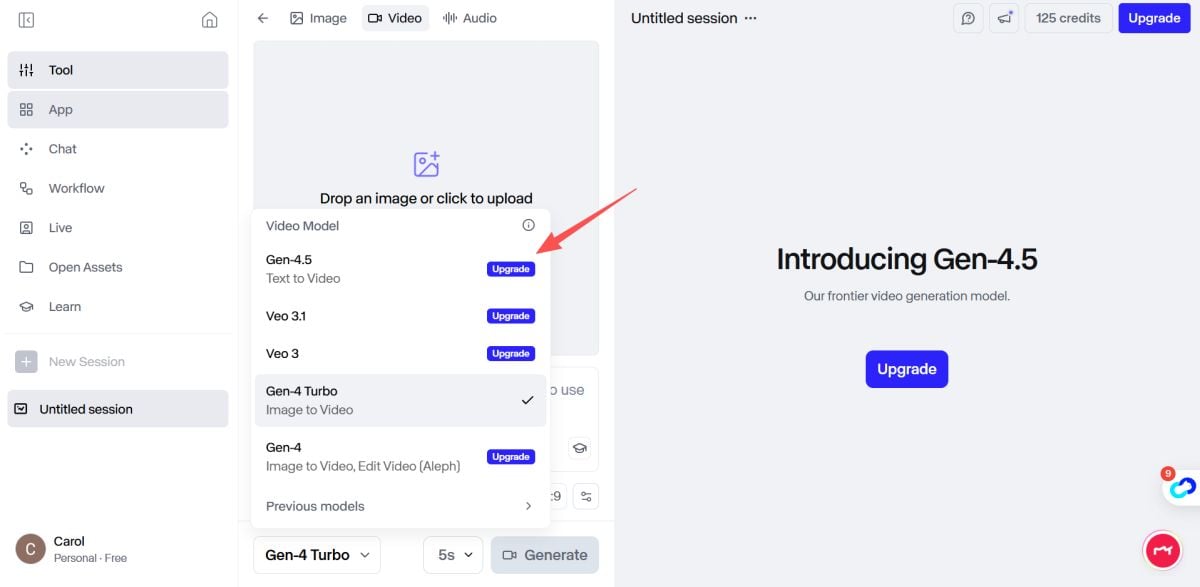 If your priority is “does it follow instructions and keep motion coherent,” this is the model direction to evaluate first. Runway frames Gen-4.5 as state-of-the-art on motion quality and prompt adherence, and also references benchmark positioning.
Internal reference: Runway Gen 4.5
Authority context:
Runway’s Gen-4.5 research announcement
2) Gen-4 Video (fast 5–10 second controllable clips)
This is the “bread and butter” test: can you generate short, controllable clips that feel usable? Runway’s Gen-4 documentation describes the 5 or 10 second durations from an input image + text prompt.
3) Keyframes (for intentional transitions)
Keyframes are one of the quickest ways to reduce randomness—especially if you’re trying to move from one visual state to another. Runway’s Gen-3 keyframes guide explicitly positions them for smooth transitions.
4) Director-Style Camera Control
If you care about cinematic motion, test camera control early. Runway has a dedicated camera control workflow for Gen-3 Alpha Turbo, designed to specify movement direction and intensity.
Authority overview:
No Film School on Runway Director Mode (overview)
5) Act One / Act Two (where character performance leads the scene)
This is where Runway starts feeling like a “performance tool,” not just a generator. Runway introduced Act-One as a way to generate expressive character performances using video inputs inside Gen-3 Alpha, and the same page notes Act-Two availability for paid plans.
6) Lip Sync + practical cleanup (Inpainting / Remove Background)
For talking-head content, Lip Sync is straightforward: it synchronizes text-to-speech or uploaded audio, supports multiple faces, and has clearly stated constraints (like face type and dialogue limits).
For production cleanup, Inpainting removes unwanted objects across a clip, and Remove Background provides a green-screen-style workflow in Runway’s tools.
Runway AI Alternatives: Similar Tools to Compare
If Runway is too expensive or too “shot-based,” you’ll likely want alternatives that optimize for longer scenes, simpler templates, or cheaper iteration.
I like comparing alternatives by what problem they solve better:
- Longer narrative coherence / different model strengths
- Template-driven marketing video pipelines
- All-in-one creator hubs that prioritize different workflows
If you’re comparing platforms for your own audience, you might position Runway AI as the “cinematic control” pick, and then contrast it with a simpler creator-first hub like GoEnhance AI.
Runway AI FAQs: Quick Answers for New Users
Most beginner questions in Runway AI reviews come down to three things: which model to pick, how credits work, and how to get more control without overcomplicating prompts.
Is Runway free?
Yes, there’s a Free plan, but it’s best treated as a demo because it includes 125 one-time credits (not monthly).
How do credits work in practice?
Credits are used to generate images, videos, and audio—so your total creative workload shares one budget.
What’s the fastest way to improve results?
Use a strong first frame, keep prompts structured like a shot list, then add keyframes/camera control only after you like the base generation.
Does Runway support lip sync and character dialogue?
Yes—Lip Sync supports text-to-speech or uploaded audio, can handle multiple faces (up to four), and has clear constraints around face type and framing.
Where does “Runway reviews” consensus usually land?
In my reading of Runway reviews and Runway AI reviews, the consistent theme is: excellent creative control for short shots, but you need to manage iteration costs and expectations.
Bottom Line: Is Runway Worth It?
*Runway is worth it if your work benefits from controllable, cinematic-feeling short shots—and not worth it if you need long scenes, predictable one-pass results, or you dislike credit-based iteration.
If I had to summarize my purchase decision rule: Runway pays for itself when it replaces hours of motion experiments, cleanup tasks, and “what if” storyboarding with fast iterations you can actually use. But you have to approach it intentionally: plan your shots, test controls early, and keep an eye on credits.


