
Midjourney V8 vs V7: What's Actually Different
- 2. Quick Comparison: V7 vs V8 at a Glance
- 3. What Changed in V8: The 4 Things That Actually Matter for Beginners
- 4. The Aesthetic Difference: Why V8 Looks "Colder" Than V7
- 5. What the Critics Got Wrong (And What They Got Right)
- 6. V7 vs V8: Which One to Use and When
- 7. The Beginner's Two-Phase Roadmap
- 8. What to Do with Your Midjourney Images Next
- 9. Pricing: What You're Actually Paying For
- 10. FAQ
- 11. Conclusion
If you just heard that Midjourney dropped V8 and you're not sure whether to care — this is for you.
Not for people who've spent a year building personalization profiles. For people who are trying to figure out what any of this even means. Whether to bother. Where to even start.
Short answer: yes, bother. But the reason isn't what most reviews are telling you.
2. Quick Comparison: V7 vs V8 at a Glance
Before anything else — here's the full picture in one place.
| Midjourney V7 | Midjourney V8 Alpha | |
|---|---|---|
| Default look | Artistic, warm, painterly | Photographic, cinematic, cooler |
| How it handles prompts | Fills in gaps creatively | Follows your words more literally |
| Generation speed | Baseline | ~5x faster |
| Max resolution | 1024×1024 (upscaled) | Native 2K with --hd |
| Text in images | Unreliable | Much improved (use "quotes") |
| Anatomy (hands, faces) | Good | Noticeably better |
| Draft Mode | Available | Not yet |
Personalization (--p) | Strong, mature | Early stage |
| Current status | Stable, default model | Alpha — opt-in only |
| Best for beginners? | Great starting point | Worth trying from day one |
Neither version is objectively better. They make different images for different purposes. The rest of this article helps you figure out which one serves what you're actually trying to make.
3. What Changed in V8: The 4 Things That Actually Matter for Beginners
V8 launched on March 17, 2026. Midjourney's official announcement described it as an entirely new model — not a refinement of V7. A ground-up rebuild.
There are a lot of changes. Most of them you don't need to think about yet.
Here are the four that will actually affect your first week.
1. It's roughly 5x faster.
What used to take 30–60 seconds now finishes in under 10. The Decoder confirmed this tracks in real usage, not just benchmarks. I ran the same prompt back-to-back in V7 and V8. V7: about 45 seconds. V8: under 8. That's not a small thing when you're on your 30th iteration trying to get a prompt right.
2. Text in images actually works now.
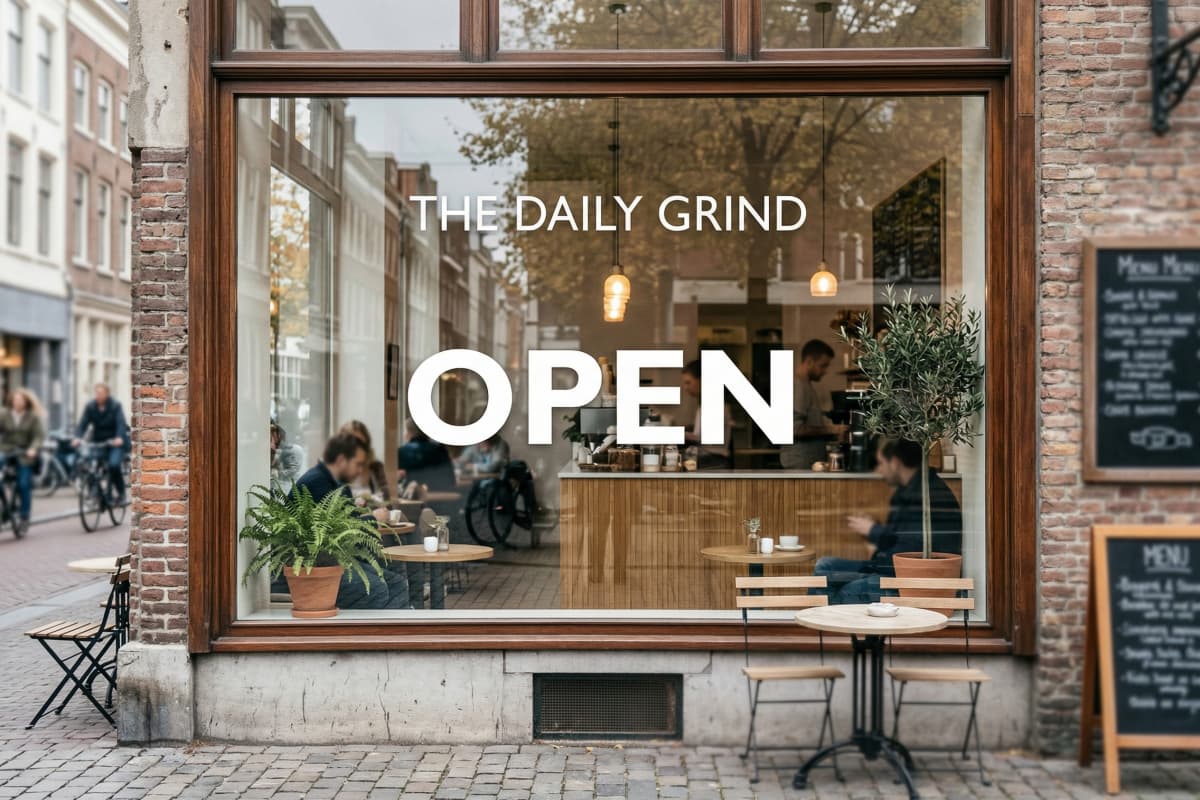
Put your text in "double quotes" inside the prompt. Keep it short — two to four words. V8 renders it readably. Street signs, poster headlines, product labels. Things V7 would turn into decorative nonsense. I tried "a cafe window sign saying 'OPEN'" in both models. V7 gave me something that looked like letters had a disagreement. V8 gave me a legible sign. Not perfect — it's still alpha — but usable in a way V7 never was.
3. Prompts land closer to what you described.
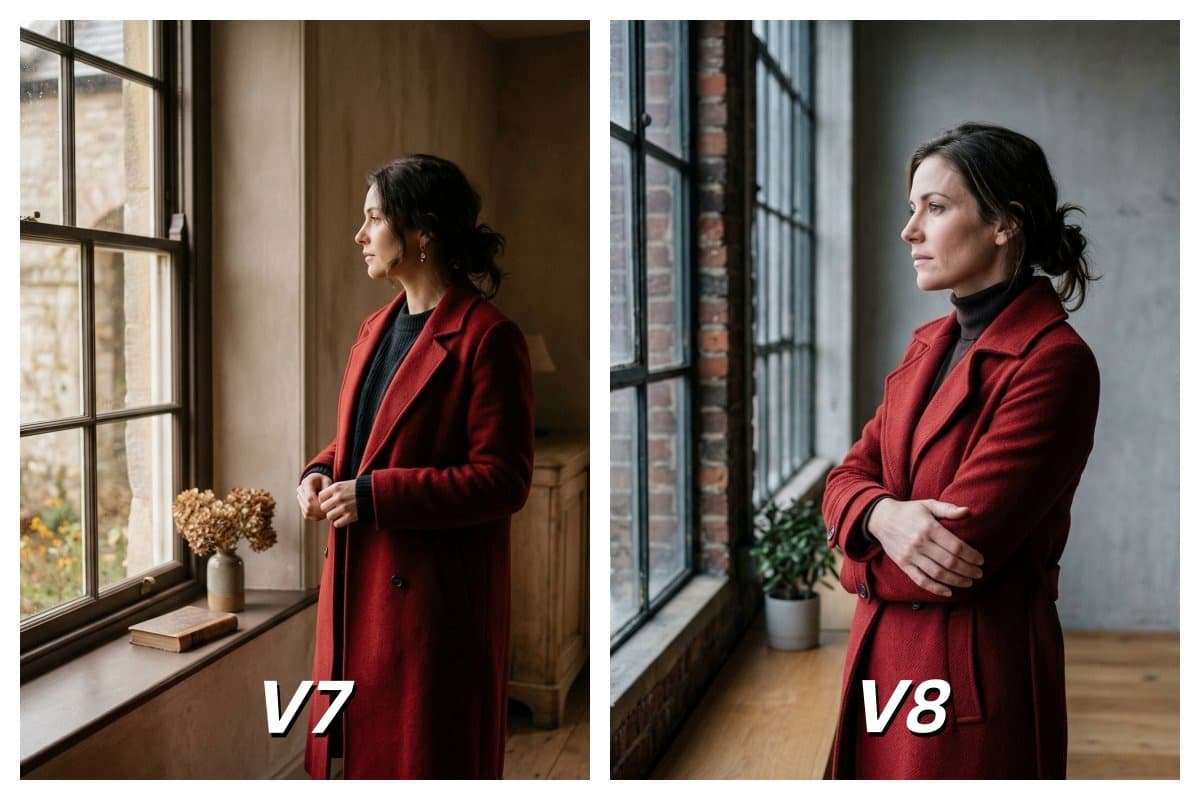
V7 interprets your prompt and adds its own creative layer on top. V8 takes your words more literally. Write "a woman in a red coat standing by a window" and V8 gives you that. V7 gives you something evocative of that. For beginners who want their actual idea to show up on screen, V8 is more forgiving of vague or imprecise prompting.
4. Native 2K with --hd.
Add --hd to any prompt and V8 renders at full 2K resolution from the start. No separate upscaling step. No artifacts introduced in post. The catch: --hd costs 4x more per generation and runs 4x slower. Don't use it while you're exploring. Save it for the images worth keeping.
Bottom line: V8's four biggest upgrades — speed, text, prompt accuracy, and native 2K — all point in the same direction. More control, faster feedback, less wasted time. That's exactly what beginners need.
4. The Aesthetic Difference: Why V8 Looks "Colder" Than V7
V7 and V8 don't just generate differently — they feel different. And if you go in expecting one to simply be "better," you'll be confused by what you actually get.
V7 has a personality. Warm colors, soft atmospheric light, a slight texture that makes even "photorealistic" outputs feel like they were shot by someone with a deliberate eye. I ran "a woman reading by a rainy window" in both versions. V7 came back with something that felt like a film still — muted greens, golden interior light bleeding in at the edges. I would have posted it as-is. V8 gave me an accurate, well-lit photograph of the same scene. Technically better in every measurable way. Harder to feel anything about.
That's not a flaw. It depends entirely on what you need.
V8 defaults to something closer to a controlled studio shot. Neutral color temperature, precise shadows, clean edges. Less mood, more documentation. For product mockups, architectural renders, portraits with accurate skin tones — V8's visual approach is exactly right. For something cinematic or emotionally charged, V7 often gets there with less effort.
Trying to make V8 look like V7 — or vice versa — is usually more work than just picking the right model to begin with.
Bottom line: V7 adds feeling. V8 adds precision. Neither is the wrong answer — it depends on whether you're making art or making assets.
5. What the Critics Got Wrong (And What They Got Right)
The harshest V8 reviews are coming from experienced users — and they're not wrong, exactly. They're just not talking about your situation.
@EugenioFierro3: "wrong hands, broken proportions — in many cases feels worse than V7." Curious Refuge: "roughly on par with V7, and in some cases actually worse." @umesh_ai ran the same prompts through both models and concluded V8 was "more realistic, but less artistic and creative."
These are real, honest reactions. I don't think any of them are wrong.
But here's what none of them said: every one of these critics came into V8 carrying something you don't have yet. A V7 personalization profile built over months of rating images. That profile is what makes V7 feel so dialed-in for experienced users. It's learned their taste. When they switch to V8, they're comparing a brand-new model to a tool that already knows exactly what they like. Of course it feels worse right now.
You don't have that problem.
No V7 habits to unlearn. No profile to leave behind. No workflow to disrupt. You're starting from zero on both models, which means V8's rough edges cost you much less than they cost someone who's been on MJ since V5.
I spent a week reading every negative review I could find. The underlying complaint was almost always the same: "my V7 results were better." That's a migration problem, not a quality problem. It matters a lot if you're switching. It barely matters if you're starting.
Bottom line: The critics are right about V8 being different. They're not describing your situation. You have no old workflow to lose — that's actually an advantage.
6. V7 vs V8: Which One to Use and When
The fastest way to make the wrong choice here is to ask "which is better." Better for what?
Use V7 when:
- You want images that feel artistic, atmospheric, or painterly — concept art, fantasy, editorial illustration
- You're writing short, impressionistic prompts and want the model to fill in the aesthetic gaps creatively
- You need a stable, consistent model for anything you're showing someone else
Use V8 when:
- You need accurate human figures — portraits, character sheets, anything with hands
- You're writing detailed, specific prompts and want your instructions to land precisely
- Text in the image matters — signage, labels, headlines
- You want to experiment with native 2K for final renders
If you genuinely have no idea where to start: go with V8. It's faster, so you get more attempts in the same amount of time. More attempts means faster learning. Explore what V8 produces for a week, then run the same prompts through V7 and compare. The difference will be immediately obvious, and you'll know which aesthetic fits what you're making.
Bottom line: Match the model to the output, not to the hype. V7 for art. V8 for accuracy. When in doubt, start with V8 and let the speed work in your favor.
7. The Beginner's Two-Phase Roadmap
Most tutorials tell you what V8 can do. Nobody tells you what to actually do first. This is the section I wish existed when I started.
The single biggest mistake beginners make: jumping straight into prompt experimentation without building a personalization profile. It's like trying to tune a radio without knowing which station you want. The model has no reference for your taste, so every output feels like a lottery.
Here's the two-phase approach that fixes this.
Phase 1 — First Two Weeks: Use V7 and Rate Everything
Your only job in Phase 1 is not generating great images. It's rating them.
Every time you generate, click thumbs up or thumbs down on the results. Like it or hate it — both answers teach the model something. Do this consistently. Get to 200 ratings.
I didn't do this when I started. I spent weeks wondering why my prompts weren't producing anything coherent, changing keywords, adding parameters, trying every tip I found on Reddit. None of it worked as well as simply rating 200 images. The rating system is how both V7 and V8 build a picture of your aesthetic preferences. Skip it and you're running either model at maybe 40% of its actual capability.
Why V7 first? Because V7 is more forgiving with short prompts. You don't need to write a paragraph to get something interesting back. That makes it easier to generate enough variety to rate meaningfully. The goal isn't to fall in love with V7. The goal is to build the profile you'll bring into V8.
What 200 ratings actually gets you:
- The model starts steering toward images with your preferred color palette
- Composition style, lighting mood, and level of detail all start trending toward what you've selected
- Prompts that felt random start producing results that feel intentional
40 ratings unlocks the system. 200 ratings is where it starts to feel like yours. Keep going past 200 — the improvements continue up to around 2,000, but returns diminish. For most beginners, 200 is the threshold where everything clicks.
Phase 2 — After 200 Ratings: Bring Your Profile to V8
Your V7 profile carries over to V8 automatically. No setup required.
Switch to V8, add --p to activate personalization, and start with --stylize 500. Now watch what happens. The same prompts that felt generic before start producing results that trend toward your taste. Less random. More coherent. More "yours."
This is the part most beginners never reach — because nobody told them to do the rating work first.
The prompting shift in Phase 2: In Phase 1, you were learning what MJ can produce. In Phase 2, you're directing it toward what you want. The prompt handles subject and context. The profile handles aesthetic direction. They do different jobs. Once you understand that split, prompting stops feeling like guessing.
The compound effect nobody mentions: Every image you rate in Phase 1 makes Phase 2 better. Every image you rate in Phase 2 makes your next session better. The model is not static — it keeps learning your preferences as long as you keep rating. Most users who feel stuck with MJ simply stopped rating after the first week.
Why This Works (The Part Most Reviews Skip)
V8's single biggest upgrade over V7 isn't speed or resolution. It's that personalization has become more central to how the model operates, not less. Midjourney's own guidance for V8: lean heavily on personalization and crank --stylize to 1000.
That means the two-phase roadmap isn't a workaround. It's exactly how V8 is designed to be used.
Bottom line: Two weeks of rating in V7, then move to V8 with your profile. This one habit separates beginners who feel stuck from beginners who feel in control — and it costs nothing except consistency.
8. What to Do with Your Midjourney Images Next
Generating a great image is step one. Most tutorials stop there. Here's what actually happens next.
If you're creating for social media — Reels, TikTok, YouTube Shorts — a static image gets significantly less reach than the same content in motion. I learned this the hard way: posted the same visual as a still and as a video clip in the same week. The clip pulled 11x the plays. Same image, same caption, different format.
I started running Midjourney outputs through GoEnhance's image to video tool after that. The workflow is: generate in MJ, download the image, upload to GoEnhance, pick a motion style, done. I did it for the first time with a V8 portrait — one prompt, first try, nothing fancy — and had a postable clip in under a minute. No video editing software. No timeline. No keyframes. That genuinely surprised me. I was expecting to spend another hour in post.
Upload your first Midjourney image and see what it becomes — free
The Animate a Picture tool works similarly and handles character art well — it figures out which elements should move and applies motion that reads as intentional rather than random. I've tested it with fantasy portraits, product mockups, and abstract compositions from MJ. The consistency is better than I expected on a first attempt. Not every output is perfect, but the hit rate is high enough that it's become a default step in my workflow after MJ generation.
One thing to be clear about: GoEnhance is a next step, not a replacement. If you want to iterate on the image itself — refine composition, change lighting, try different aesthetics — that work stays in Midjourney. GoEnhance picks up where MJ leaves off. You can also browse the AI Image Generator to see everything available before you start generating.
Bottom line: The image is the starting point, not the finish line. Adding motion to your best MJ outputs is the fastest way to turn a static asset into something publishable — and it takes less than a minute.
9. Pricing: What You're Actually Paying For
Both V7 and V8 are included in your existing Midjourney subscription — but the cost traps are easy to fall into if you don't know where they are.
| Plan | Monthly Price | Fast GPU Hours |
|---|---|---|
| Basic | $10/month | 3.3 hours |
| Standard | $30/month | 15 hours |
| Pro | $60/month | 30 hours |
| Mega | $120/month | 60 hours |
The trap most beginners fall into: using --hd and --q 4 on every generation. Both cost 4x the standard rate and run 4x slower. Stack them and you're at 16x per image. That burns through a Basic plan's GPU hours fast. One afternoon of enthusiastic testing, and suddenly you're out.
The practical fix is simple. Standard resolution for everything while you're exploring. Apply --hd only to images you've decided are worth keeping. V8's standard output is genuinely good — you don't need native 2K for anything going to a phone screen or social feed.
One more thing worth knowing: V8 currently has no Relax mode. Every V8 generation costs fast GPU hours. V7's Relax mode lets you generate without additional cost, just with a slower queue. On a Basic plan, that difference matters more than most reviews acknowledge.
Bottom line: V7 and V8 cost the same at standard settings. The budget pressure lives entirely in --hd, --q 4, and the missing Relax mode. Explore at standard, upscale selectively, and your GPU hours will last.
10. FAQ
Should I start with Midjourney V7 or V8 as a complete beginner? Start with V7 for your first two weeks while you build your personalization profile through image ratings — aim for 200. Then switch to V8 and carry the profile with you. You'll get stronger results from both models this way than jumping into either one without any rated preferences built up first.
Is Midjourney V8 available to all users? Yes. V8 Alpha is available to all Midjourney subscribers on any plan. Go to alpha.midjourney.com, log in with your existing account, and select V8 from the model menu. It's still in alpha, so behavior can shift as Midjourney continues refining it.
Why do some creators say V8 looks worse than V7? They're comparing V8 to a version of V7 that's been shaped by months of personalization ratings tuned to their specific taste. That's a migration problem, not a quality problem. For beginners starting fresh on both models, the gap is much smaller.
Does Midjourney V8 cost more than V7?
Not directly — both models draw from the same GPU-minute pool. The cost difference comes from V8's premium features. The --hd, --q 4, style references, and moodboards all cost 4x more per generation. V7 also has Relax mode, which is essentially free generations with a slower queue. V8 doesn't support that yet.
What's the best way to use Midjourney images for social media? Generate in Midjourney, then use a tool like GoEnhance to turn static images into short video clips. The image to video tool takes a still and produces motion content ready for Reels or TikTok — no editing experience needed. In my experience the first attempt is usually good enough to post.
When will Midjourney V8 become the default model? No official timeline announced. Previous model transitions each had variable alpha periods. V7 remains the stable option for any production work until V8 reaches general availability.
11. Conclusion
V8 and V7 aren't competing for the same job.
V8 is faster, more literal, better at anatomy and text, and suited for photorealistic and commercial work. V7 is warmer, more interpretive, and still the stronger choice for artistic and stylized output. You don't have to pick one permanently — both are available to every subscriber.
If you're starting out: build your personalization profile in V7, migrate it to V8, and see which aesthetic matches what you're making. That two-phase approach gets you to useful results faster than any amount of prompt optimization on either model alone.
One honest caveat: if your primary goal is layout-based work — branded decks, print collateral, precise typography — Canva or Adobe Express are still better tools for that specific job. Midjourney generates. It doesn't let you compose by hand.
Once you have images you're genuinely happy with, the next question is what to do with them. GoEnhance takes Midjourney outputs and turns them into motion content — the step most tutorials skip entirely. It's where a static generation becomes something you can actually publish.


