
Kling 2.6: I Tried Native Audio — Here’s What Actually Holds Up
- Kling 2.6 Review: A Quick Verdict — and Where It Really Excels
- What’s actually new: Native Audio as the real upgrade
- The core structure that makes Kling 2.6 behave better
- Feature review: the six functions that decide output quality
- 1) Native Audio Design (Voice, Ambience, and SFX) — Why It Matters in Practice
- 2) Multi-speaker dialogue (labeling and turn-taking)
- 3) Camera motion language (creator-friendly “director cues”)
- 4) Reference Images and Stable Descriptors: Where Consistency Comes From
- 5) Variation workflow (6s draft → 15s build → final polish)
- 6) Cost/credits strategy (cheap drafts first, full audio last)
- The Prompt Framework I Keep Coming Back To (Copy Already)
- Demo Slot #1 (Dialogue):
- Demo Slot #2 (Product):
- Where Kling 2.6 Still Trips Me Up (and How I Work Around It)
- A practical decision table: when to use Kling 2.6 vs other approaches
- Quick Quality Checklist (before you generate)
- My One-Paragraph Verdict on Kling 2.6
This Kling 2.6 review is based on how the model behaves in practical creator workflows: short social clips, product-style scenes, and dialogue/narration where sound is half the “believability.” The headline upgrade is simple—native audio generation—but the real value is what it unlocks: fewer handoffs, fewer exports, and faster iteration to something you can actually post. If you’re evaluating Kling 2.6 inside the broader Kling AI ecosystem, the right question isn’t “Is it perfect?” but “Does it reduce my time-to-publish?”
Kling 2.6 Review: A Quick Verdict — and Where It Really Excels
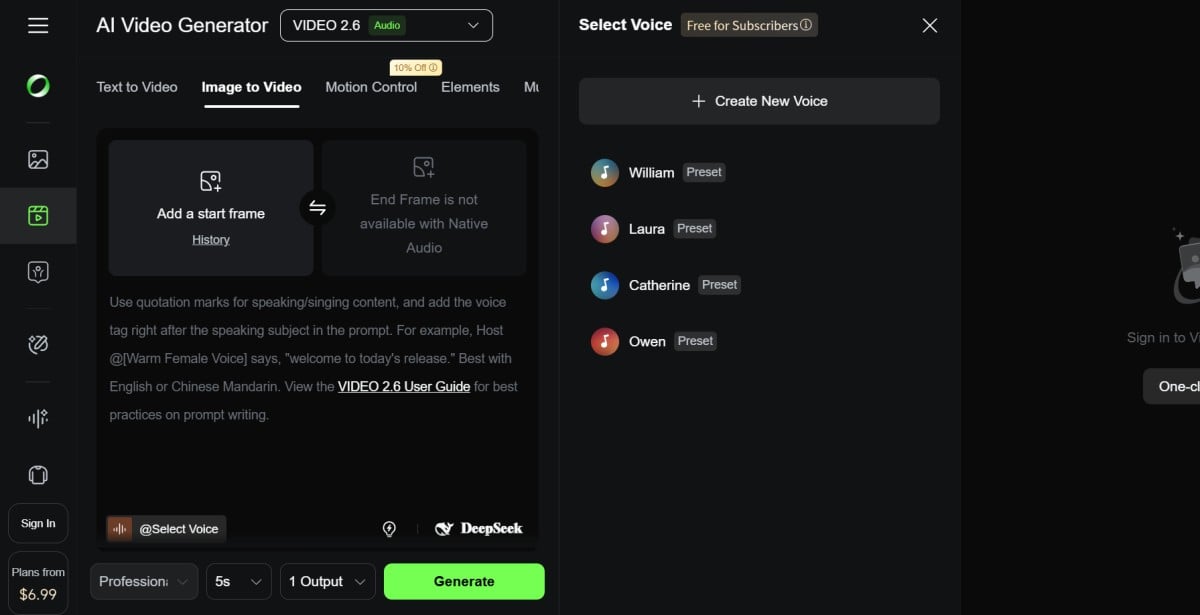 Kling 2.6 is most useful when you want a postable first cut—video plus voice/ambience/SFX—without rebuilding sound in a separate editor.
If you mainly generate silent clips and then spend time layering audio later, Kling 2.6 can change your rhythm. It’s not only about convenience; audio is often what makes a generated clip feel “shot” rather than “rendered.” In my experience, the model’s strengths show up fastest in:
- Dialogue shorts (two speakers, simple turn-taking)
- Narrated scenes (voiceover + ambience)
- Product and tabletop shots (clean SFX timing adds realism)
- Creator POV / handheld realism (subtle camera motion helps)
A quick snapshot:
| Category | What feels strong | Where you still need discipline |
|---|---|---|
| Native audio | Voice + ambience + SFX in one generation | Pronunciation, acronyms, overly long scripts |
| Prompt adherence | Clear structure tends to follow well | Overstuffed prompts invite randomness |
| Camera language | Push-in, handheld, POV, drone-like cues | Complex optical tricks vary run to run |
| Workflow speed | Fewer tools and exports | You still redo takes to nail timing |
What’s actually new: Native Audio as the real upgrade
Native audio is the single feature that most changes output value, because it turns “silent demo footage” into a clip with presence.
Earlier model workflows usually looked like this: generate visuals → export → voice/music → SFX → mix → re-export. Kling 2.6 compresses those middle steps into generation, which changes how you write prompts. You’re no longer describing only images in motion; you’re describing a scene direction with sound.
If you want a quick anchor for how professionals think about broadcast-style loudness and intelligibility, these references are useful background (you don’t need to memorize them):
Where native audio helps most:
- Room tone makes scenes believable.
- Action-synced SFX (clink, rustle, tap) makes motion feel grounded.
- Voice + ambience can make a 6–10 second clip feel complete.
Where native audio can still fail:
- Pronouncing abbreviations or brand-like terms.
- Matching long dialogue to short duration.
- Getting “too many sounds” right if you list a whole soundscape.
The core structure that makes Kling 2.6 behave better
Kling 2.6 performs best when you treat prompts like a director’s brief: scene → subject → motion → audio → constraints.
This is the prompt order I keep coming back to, because it reduces ambiguity:
- Scene: location, time, lighting, mood
- Subject: who/what is on screen, stable descriptors
- Motion + Camera: what changes over time, camera cues
- Audio: dialogue/voice, SFX, ambience
- Constraints: realism, pacing, “no surreal elements,” etc.
Two practical lanes:
- Text-to-Video (T2V): everything described in text
- Image + Text (I2V with reference): reference image anchors identity and style, text drives motion/audio
If consistency matters (same character across variations), reference images and stable descriptors matter more than fancy adjectives.
Feature review: the six functions that decide output quality
The features that matter most are the ones that reduce retries: native audio control, simple camera language, and consistency practices.
1) Native Audio Design (Voice, Ambience, and SFX) — Why It Matters in Practice
You get the most reliable results when you keep the audio direction minimal and timed to visible action.
What helps:
- Keep voice lines short for short clips.
- Use plain words for tricky names.
- Describe tone + pace (“calm, low voice, slow pace”).
- Limit ambience to 1–2 cues (“soft rain + café room tone”).
A good mental model is “audio as proof.” If the audience can hear the room and the object, they believe the scene.
2) Multi-speaker dialogue (labeling and turn-taking)
Multi-speaker dialogue works when you label speakers clearly and avoid overlap.
A reliable format:
SPEAKER A (tone): "line"SPEAKER B (tone): "line"- Add sequencing: “right after that,” “then,” “no overlap.”
When it fails, it’s usually because the prompt asks for too much: too many speakers, too much emotion switching, or too many lines for the duration.
3) Camera motion language (creator-friendly “director cues”)
Kling 2.6 responds well to straightforward camera cues that creators actually use.
Cues that commonly work:
- “slow push-in”
- “subtle handheld documentary feel”
- “POV walking shot”
- “gentle camera shake, natural lighting”
- “drone-like forward glide”
Cues that can vary:
- precise optical effects (for example, a textbook dolly zoom)
- long multi-step camera choreography in one clip
If you want cinematic feel, keep it simple: one main camera move + one stabilizing constraint (“smooth movement,” “no sudden jumps”).
4) Reference Images and Stable Descriptors: Where Consistency Comes From
Identity drift is usually a prompt problem, not a “model mood” problem.
If you want the same person/product across variations:
- Use a reference image when possible.
- Keep the subject block unchanged across runs.
- Avoid swapping wardrobe or facial descriptors between versions.
Tiny changes (“brown jacket” → “dark coat”) can become “new character” to the model.
5) Variation workflow (6s draft → 15s build → final polish)
Kling 2.6 becomes much more productive when you treat output as a set of variations, not a single perfect render.
A clean iteration strategy:
- Generate a 6–8 second version first to test visuals.
- Generate a 10–15 second version with improved audio notes.
- Only then attempt longer scripted scenes.
This saves credits and keeps you from wasting “expensive generations” on an unproven direction.
6) Cost/credits strategy (cheap drafts first, full audio last)
If native audio generations cost more, the best approach is: lock the visual direction first, then pay for the sound-rich take.
A practical pattern:
- Draft: minimal audio (“room tone only” or “no music, no dialogue”)
- Final: add voice lines, timed SFX, and ambience
The Prompt Framework I Keep Coming Back To (Copy Already)
A structured prompt beats “poetic prompts” almost every time.
Template
- Scene:
- Subject:
- Motion + Camera:
- Audio (dialogue + ambience + SFX):
- Style/Constraints:
Example (generic)
- Scene: modern studio desk, soft daylight
- Subject: hands opening a product box
- Motion + Camera: gentle camera drift, close-up
- Audio: cardboard rustle + soft click
- Constraints: realistic, clean details, no text overlay
Demo Slot #1 (Dialogue):
Dialogue scenes are where native audio earns its keep, because voice plus room tone instantly makes the clip feel real.
Prompt (paste-ready)
Scene: cozy coffee shop in the evening, warm practical lights, shallow depth of field, soft background bokeh
Subject: two friends at a small table, one holding a cup, the other leaning forward, natural facial expressions
Motion + Camera: slow push-in, subtle handheld, natural micro-movements, no sudden jumps
Audio: low café room tone with faint chatter; SPEAKER A (calm, friendly): "I tested a new workflow today—one prompt and the whole scene came out." right after that SPEAKER B (amused, surprised): "With sound too? That’s the part that always slows me down." include a light cup clink sound when the cup touches the table
Style/Constraints: cinematic realism, grounded, no surreal elements, keep it natural
What to judge:
- Can you understand the dialogue without subtitles?
- Does the ambience match the location?
- Do SFX land at believable moments?
Demo Slot #2 (Product):
Product scenes benefit from native audio because small SFX create “tactile proof” that the action is real.
Prompt (paste-ready)
Scene: clean desk setup in a modern studio, daylight through a window, minimal background, soft shadows
Subject: a hand places a small product box on the desk, opens it, lifts the item carefully, holds it for a close look
Motion + Camera: top-down to slight angle shift, gentle camera drift, smooth movement, steady framing
Audio: quiet studio room tone; soft cardboard rustle when opening; a subtle click when the item is lifted; no voice, no music
Style/Constraints: realistic, crisp texture detail, neutral color tone, no text overlays, no surreal motion
What to judge:
- Are the SFX synchronized with visible actions?
- Does the camera motion stay stable and believable?
- Are hand/object interactions clean (no warping)?
Where Kling 2.6 Still Trips Me Up (and How I Work Around It)
Kling 2.6 is easier to use than many models, but it still punishes messy inputs and unrealistic expectations.
Common failure modes:
- Overloaded prompts: too many instructions, too many “vibes,” too many audio elements.
- Dialogue too long for duration: speech becomes rushed or unclear.
- Hard words and acronyms: brand-like terms can mispronounce.
- Over-precise camera demands: if you ask for three camera moves plus perfect optical effects, results vary.
A simple fix list:
- Reduce prompt to one main idea.
- Cut dialogue lines in half.
- Replace acronyms with full words (or phonetic hints).
- Choose one camera move and commit to it.
A practical decision table: when to use Kling 2.6 vs other approaches
Kling 2.6 fits best when audio is part of the creative intent, not a post-production afterthought.
| Your goal | Kling 2.6 is a good pick when… | Use another approach when… |
|---|---|---|
| Dialogue short | You want voice + ambience quickly | You need perfect pronunciation every time |
| Product demo | You want clean action + timed SFX | You need frame-perfect product text rendering |
| Cinematic feel | You want simple camera cues | You need highly repeatable complex optics |
| Scale output | You need variations fast | You only need one “hero” clip and will edit heavily |
Quick Quality Checklist (before you generate)
A short checklist prevents most “why did it do that?” moments.
- Is the prompt structured (scene → subject → motion → audio → constraints)?
- Is dialogue short enough for the clip length?
- Are speaker labels consistent and simple?
- Did you limit ambience cues to 1–2?
- Is camera motion described in plain language?
- Are you doing a cheaper draft before full audio?
- Are subject descriptors stable across versions?
My One-Paragraph Verdict on Kling 2.6
My Kling 2.6 review takeaway is that Kling 2.6 is best judged as a workflow upgrade, not a magic trick: native audio makes a first cut feel complete, and the model’s creator-friendly camera language plus structured prompting can produce usable short clips with less friction. If your biggest bottleneck is turning ideas into publishable variations—especially dialogue, narration, or product scenes—then Kling 2.6 inside the Kling AI lineup is worth serious testing, because it reduces the handoffs that usually slow production. That’s the real reason this Kling 2.6 review lands positively: it’s not perfect, but it gets you to “good enough to ship” faster.


