
How to Create A Baby AI Dance Video? 2026 Best Guide
- What You Need (Only 2 Things)
- Step-by-Step Guide (4 Simple Steps)
- Tips to Make It Look More Natural
- If the Result Looks “Off”: Common Issues & Quick Fixes
- Copy-and-Paste Creative Ideas (Easy to Recreate)
- FAQ (Quick Answers)
- Notes & Ethical Reminders
- Start Now
You’ve got a baby photo. You’ve got a dance clip. Put them together and you get a short video that feels made for TikTok, YouTube Shorts, and Reels—no timeline editing, no keyframes, no learning curve.
If you just want to test the idea fast, use an AI baby dance video generator free. And if you end up enjoying the workflow and want more dance styles beyond “baby dance,” the AI dance video generator page is a handy place to browse other templates.
What You Need (Only 2 Things)
1) A baby image
Any style works: realistic, cartoon, illustrated, even an AI-made character. The main thing is clarity. If the baby’s body shape is easy to see (half-body or full-body), the dance tends to land better than a tight close-up.
2) A short dance video as motion reference
Grab a short dance clip (TikTok/YouTube) or pick a built-in dance template in your tool. If you’re choosing between two references, go with the one that’s centered and steady—less camera shake, fewer weird angles.
Step-by-Step Guide (4 Simple Steps)
Step 1: Open the animation feature
Find the “Animate” (or animation) section inside your tool.
Step 2: Upload the baby image
Upload your baby photo/character image.
Step 3: Add the motion reference
Upload a dance clip or choose a template.
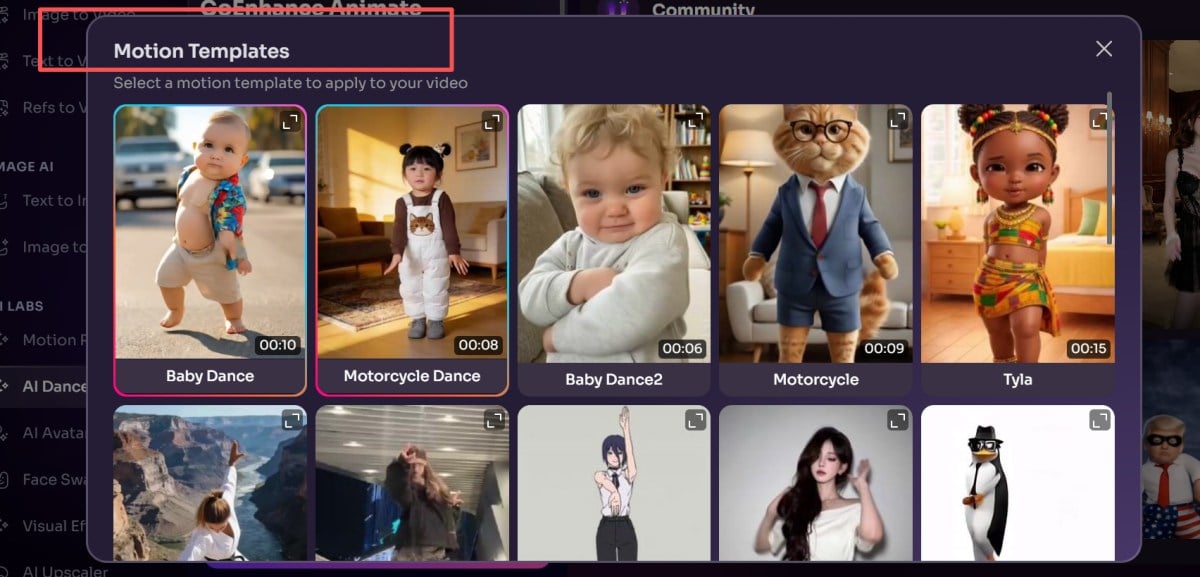
Step 4: Generate
Click generate. Short loops render faster; longer clips will naturally take more time.
Tips to Make It Look More Natural
Use a simple image:
If the background is busy or the lighting is messy, the result gets “floaty.” A cleaner background helps a lot (plain wall, simple room, soft blur).
Match the view:
Front-facing baby image → front-facing dance clip. Side view + front view is where things start to look awkward.
Start with an easy dance:
The first run should be boring-on-purpose: slower moves, fewer fast arm swings. Once it looks stable, switch to trendier choreography.
Finish it like a real short:
Mute the original sound and drop in a trending track. Add a short caption. Keep it vertical if you’re posting to Shorts/Reels/TikTok.
If the Result Looks “Off”: Common Issues & Quick Fixes
Sometimes the first version looks a bit strange. That’s normal. Most “weird” results come from either the image (hard to read) or the reference clip (hard to track).
1) The body looks wobbly or “melts”
What’s going on: The baby is too small in the frame, slightly blurry, or the pose isn’t clear.
Fix: Use a sharper image and zoom in a bit so the baby takes up more space. Half-body/full-body with visible arms and legs is your safest bet.
2) Hands/feet warp or vanish
What’s going on: Hands/feet are cropped, covered, or blended into the background.
Fix: Pick an image where limbs aren’t hidden by blankets, long sleeves, big props, or heavy shadows. Clean edges matter more than a “pretty” background.”
3) The dance looks “wrong” for the character
What’s going on: The camera angle doesn’t match, or the dance is too fast/too complex.
Fix: Match the angle first (front/front). If it still feels off, swap to a simpler dance loop and try again.
4) The background jitters
What’s going on: Busy background + camera shake = messy tracking.
Fix: Use a calmer background and a steadier reference clip. Even a small amount of camera wobble can make the whole frame twitch.
5) The baby drifts across the frame instead of dancing in place.
What’s going on: The reference clip includes traveling steps or the dancer moves across the floor.
Fix: Choose a reference where the dancer stays roughly centered and the camera stays put.
6) The face changes between frames
What’s going on: Low-res image or big head turns can cause drift.
Fix: Start with a higher-resolution image. Avoid references with dramatic head swings. If your tool has “face preserve / identity lock,” turn it on.
Copy-and-Paste Creative Ideas (Easy to Recreate)
If you want this to perform like a creator post (not a one-off test), make it repeatable. One character. A few formats. Small variations.
1) “Same Baby, 5 Dance Styles”
Keep the same baby image. Only change the dance:
- K-pop chorus move
- Hip-hop bounce
- Shuffle loop
- Disco groove
- Whatever meme dance is trending this week
Why it works: Same “character,” new vibe every time.
2) Outfit Remix (Same Dance, New Look)
Make 3 versions of the baby image, then apply the same dance:
- Pajamas
- Tiny suit
- Sporty streetwear
- Cartoon version vs realistic version
Why it works: People love the contrast—same motion, different personality.
3) Beat-Drop Trick (Feels Edited, Takes 30 Seconds)
Make a 6–10s clip:
- First 1–2s: still/neutral pose
- Dance starts exactly on the beat drop
Why it works: It instantly feels “native” to short-form platforms.
4) “Two Babies, Two Moods” (Duet Style)
Generate two clips:
- Baby A: clean, confident dance
- Baby B: goofy, chaotic dance
Put them side-by-side and caption it: “Which one are you today?”
Why it works: Easy comments. Easy shares.
5) “Tiny Idol Debut” (Quick 3-Part Mini Story)
Three short clips:
- Audition (small groove)
- Training (faster dance)
- Debut stage (best dance + best look)
Why it works: People expect part 2 and part 3. Series content wins.
FAQ (Quick Answers)
How long should the dance reference clip be?
Keep it short. Around 5–10 seconds is plenty for a clean loop and stable motion.
What kind of baby photo works best?
Front-facing, clear outline, visible arms/legs. Half-body or full-body is easier than a close-up.
Can I use an AI-made baby image instead of a real photo?
Yes—and many creators prefer it because it’s easier to reuse the same character and avoid privacy headaches.
Why does it look shaky sometimes?
Most common causes: camera shake in the reference clip, mismatched angle, or a photo with unclear limbs. Swap the reference or use a cleaner image and it usually improves quickly.
Do I need the original audio from the reference dance video?
No. Most short-form posts use trending music anyway, so muting the original is normal.
Can I post these clips publicly?
If it’s a real child’s photo, get permission and avoid sharing identifying details. If you want less risk, use an AI-generated character image.
Notes & Ethical Reminders
- Use images you have the rights to use. Don’t upload or share other people’s children’s photos without permission.
- Don’t use these clips to impersonate, mislead, scam, or invade privacy.
Start Now
One image + one dance reference + one click. After that, it’s just swapping dances and styles until you hit a combo that makes you laugh—and those are usually the ones that do best.


