
HappyHorse 1.1 Review: I Tested Alibaba’s AI Video Model
- 2. What Is HappyHorse 1.1?
- 3. HappyHorse 1.1 Key Specs
- 4. What I Tested
- 5. Motion Quality: The Biggest Visible Improvement
- 6. Prompt Following: Better With Long, Visual Descriptions
- 7. Multi-Reference Video: Probably the Most Useful Upgrade for Commercial Work
- 8. Visual Quality: Less Oily, More Natural
- 9. Audio: Useful, but Still Needs Review
- 10. Best Use Cases for HappyHorse 1.1
- 11. Where HappyHorse 1.1 Still Falls Short
- 12. Pricing: Lower Cost Makes Testing Easier
- 13. HappyHorse 1.1 vs HappyHorse 1.0
- 14. Who Should Try HappyHorse 1.1?
- 15. Final Verdict
- FAQ
HappyHorse 1.1 feels like a practical upgrade, not a dramatic marketing stunt. After testing it with fast action scenes, fantasy prompts, multi-reference video ideas, and short-drama style descriptions, my impression is simple: it does not solve every AI video problem, but it does make short AI video generation feel more usable than HappyHorse 1.0.
I was mainly interested in three things before testing it: whether the motion looked less slow and floaty, whether it could follow longer prompts, and whether it could keep subjects stable when the prompt included more than one visual idea. Those are the areas where many AI video models still break down. A still image can look beautiful, but once the character starts moving, the weakness becomes obvious.
HappyHorse 1.1 improves in the right places. The movement is stronger, the visual texture is cleaner, and complex prompts are easier to control. At the same time, I would not call it perfect. It still struggles with some crowded scenes, complicated physics, and very precise audio synchronization. For short video concepts, product ideas, fantasy shots, and social clips, though, it is much more useful than I expected.
For reference, I checked the official HappyHorse website while preparing this review, and I also looked at Alibaba’s related model ecosystem pages such as Alibaba Cloud Bailian and Qianwen model pages to understand how the model is being positioned.
2. What Is HappyHorse 1.1?
HappyHorse 1.1 is Alibaba’s upgraded AI video generation model for creating short clips from text, images, and reference materials. It supports 3–15 second videos, 720p and 1080p output, flexible aspect ratios, and audio generation.
In normal creator language, that means you can describe a scene, give it reference images, and ask it to generate a short video with motion, camera movement, and sound. It is not only trying to make a pretty frame. It is trying to understand action, characters, camera rhythm, and scene atmosphere.
The model is especially interesting because HappyHorse has always leaned into audio-video generation. Instead of treating sound as a completely separate afterthought, HappyHorse 1.1 is designed to generate the video and audio together. That matters for short drama, dialogue clips, music-driven social videos, and ads where voice, ambience, and camera movement need to feel connected.
For this review, I tested it less like a researcher and more like a creator. I wanted to see whether I could actually use the output in real content planning: a fantasy action shot, a futuristic market scene, product-style video ideas, and short-drama prompts.
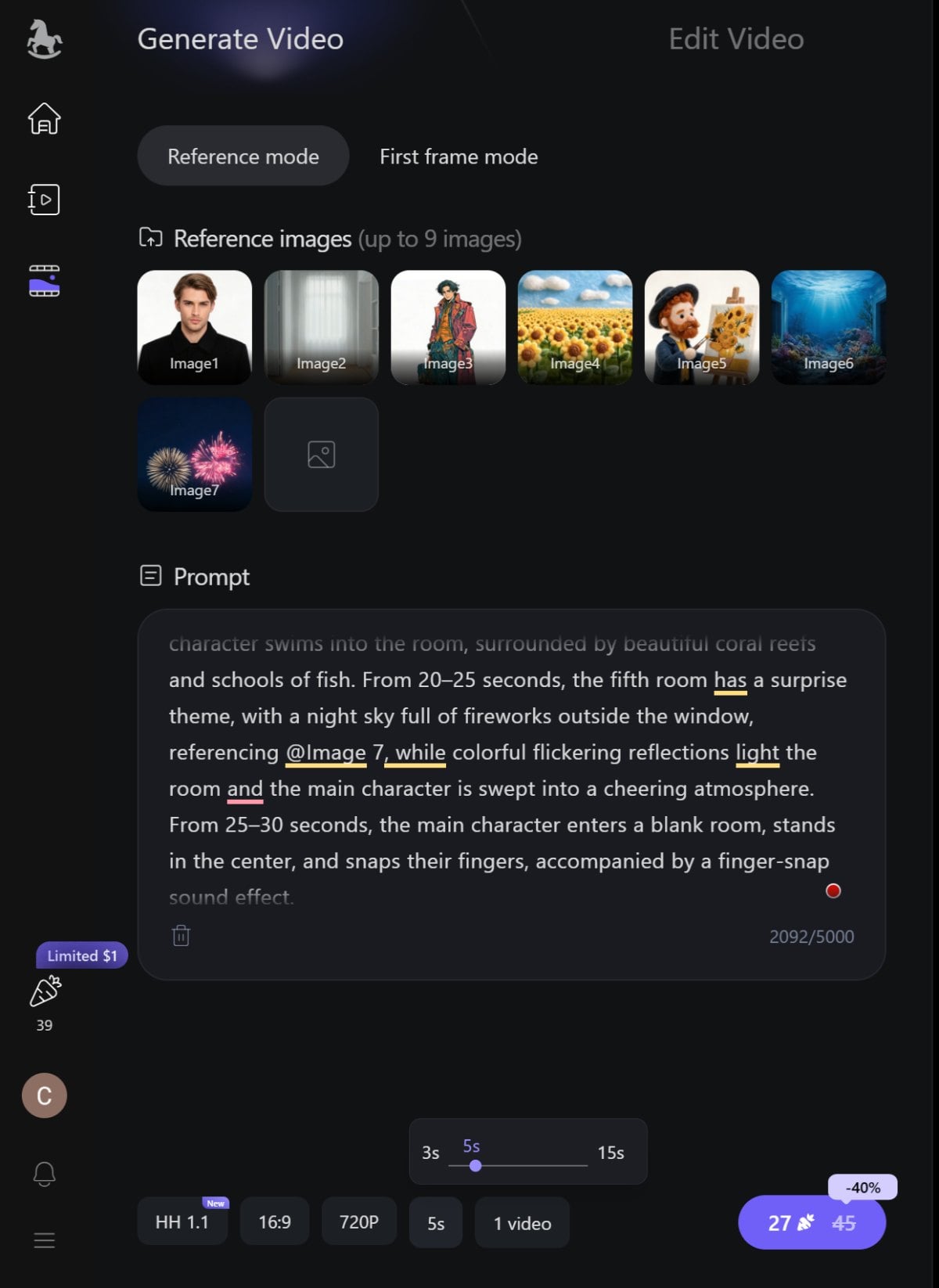
3. HappyHorse 1.1 Key Specs
| Item | HappyHorse 1.1 |
|---|---|
| Model size | 15B parameters |
| Video length | 3–15 seconds |
| Resolution | 720p / 1080p |
| Frame rate | 24fps |
| Aspect ratio | Flexible |
| Reference images | Up to 9 images |
| Audio | Supported |
| Main modes | Text-to-video, image-to-video, reference-to-video, video editing |
| 720p price | Around 0.9 RMB/sec list price, promo as low as 0.54 RMB/sec |
| 1080p price | Around 1.2 RMB/sec list price, promo as low as 0.72 RMB/sec |
The numbers are useful, but the most important part for me was not the resolution. Many models can claim 1080p. What matters more is whether the generated video survives motion, whether the subject stays consistent, and whether the model understands the prompt instead of only grabbing a few keywords.
On that side, HappyHorse 1.1 is clearly more focused on usability.
4. What I Tested
I tested HappyHorse 1.1 with several types of prompts instead of only one easy scene.
The first one was a fantasy action prompt: a ferocious red elemental dragon erupting from the sea, circling above a ship, creating huge waves, and flying through a storm while the camera follows it. I chose this because it puts pressure on motion, scale, water, camera movement, and energy effects at the same time.
The second one was a futuristic market on another planet. The prompt included alien merchants, glowing fruit, roaming robots, floating holographic ads, colorful lights, and a cinematic handheld camera style. This was mainly a prompt-following test. I wanted to see whether the model could hold many visual elements in one scene without making it feel like a random collage.
I also tested a simple text-to-video workflow because I wanted to see how far the model could go with prompts alone. For fast creative testing, this is usually the first place where I judge an AI video model. If the text-only result already feels confused, the rest of the workflow usually needs much more correction.
I also looked at multi-reference style use cases, especially e-commerce and livestream-style product videos. A typical example would be a woman selling lipstick in a home livestream room, while the model needs to keep the person, product, outfit, and room consistent. This is the kind of task where “almost correct” is not enough. If the lipstick shade changes, the product packaging disappears, or the host’s face shifts too much, the clip becomes hard to use.
The last category was short-drama and brand-story scenes. I wanted to know whether HappyHorse 1.1 could handle emotional dialogue, camera cuts, close-ups, warm indoor lighting, and character positioning. These are not always visually explosive, but they are difficult because the model has to understand relationships and timing.
5. Motion Quality: The Biggest Visible Improvement
HappyHorse 1.1 is noticeably better when the scene needs real movement. This was the first thing I noticed in the dragon and storm test.
In older AI video outputs, fast movement often feels like fake slow motion. A character may appear to be moving, but the body has no weight. A creature may fly, but the wings and camera do not feel connected. Water may move, but waves do not react naturally to the subject. HappyHorse 1.1 still has AI artifacts here and there, but the overall motion feels stronger and more continuous.
In the dragon scene, the model did a decent job of making the action feel like one connected event: the dragon rises, the sea reacts, the camera follows, and the storm gives the shot more energy. It did not feel like isolated frames stitched together. That is important because fantasy and action videos fall apart quickly if the motion has no force.
I would not say the physics are perfect. In complex water and storm scenes, you can still spot moments where the wave behavior or object relationships feel exaggerated. But compared with the slow, floaty motion I often see in AI video, HappyHorse 1.1 feels more confident.
For creators making action clips, fantasy teasers, game-style scenes, or dynamic social videos, this is one of the strongest reasons to try it.
6. Prompt Following: Better With Long, Visual Descriptions
HappyHorse 1.1 is better at following longer prompts than I expected. The futuristic market test made this clear.
My prompt had a lot going on: alien merchants, glowing fruits, robots, floating holographic ads, colorful lights, and a handheld cinematic camera style. A weaker model would usually pick two or three details and ignore the rest. Sometimes it would include robots but forget the aliens. Sometimes it would create neon lights but lose the market feeling. Sometimes the scene would look futuristic but not alive.
HappyHorse 1.1 did a better job of keeping the scene concept together. The result felt like a busy market rather than just a sci-fi background. The model understood the atmosphere: colorful, crowded, alien, commercial, and cinematic.
This matters because real prompts are rarely just “a woman walking” or “a car on a road.” When people create content, they describe mood, environment, camera, action, and subject relationships in one prompt. HappyHorse 1.1 is not perfect, but it seems more capable of handling that kind of layered instruction.
My advice is to write prompts with a clear order. Put the main subject first, then the scene, then action, then camera style, then lighting or mood. HappyHorse 1.1 can handle long prompts, but it still performs better when the prompt has structure.
7. Multi-Reference Video: Probably the Most Useful Upgrade for Commercial Work
The multi-reference workflow is where HappyHorse 1.1 starts to feel more practical for real projects.
For e-commerce videos, product ads, and brand content, consistency matters more than people think. If you give the model a product, a person, a room, and an outfit, the output has to respect all of them. It is not enough to make something that looks generally similar.
A lipstick livestream example is a good test case. You may want one reference image for the host, one for the lipstick, one for the outfit, and one for the livestream room. The model needs to know what each reference means. The person should stay recognizable. The lipstick color should stay close. The outfit should not randomly change. The room should feel like the same space.
I also tried thinking through it from an image-to-video angle, because many creators already start with one strong still image and only need controlled motion afterward. HappyHorse 1.1 feels more useful when the starting image has clear subject, lighting, and composition, instead of asking the model to invent everything from scratch.
HappyHorse 1.1 supports up to 9 reference images, and this is a real advantage for use cases where you need to lock multiple visual elements. In my view, this is more commercially valuable than simply generating a flashy scene from text.
It is useful for:
| Use Case | Why It Helps |
|---|---|
| Product ads | Keeps product appearance more stable |
| Livestream-style videos | Combines host, product, outfit, and room references |
| Brand videos | Preserves style, color, and product mood |
| Character videos | Helps the same person or character stay consistent |
| Short drama | Supports repeated visual identity across shots |
There are still limits. If you overload the model with too many detailed references, small details can compete with each other. But compared with basic image-to-video workflows, HappyHorse 1.1 gives creators more control.
8. Visual Quality: Less Oily, More Natural
One issue I had with some AI video models is the “AI shine” problem. Faces can look too polished. Skin can look like plastic. Hair can flicker. Details can feel over-sharpened in one frame and soft in the next.
HappyHorse 1.1 seems to reduce that problem. In portrait-style and short-drama scenes, the skin texture looks more natural, and the lighting sits better on the face. The model is not only making the image sharper; it is trying to make the image feel less artificial.
This is especially important for short drama, dialogue, and product videos. In these scenes, viewers look closely at faces and small gestures. A fantasy monster can survive a few strange details, but a human face cannot. If the eyes, mouth, skin, or hair look wrong, the whole clip feels fake.
I also noticed that cinematic lighting prompts work quite well. Warm indoor light, shallow depth of field, neon market light, storm lighting, and product spotlight scenes all seem to fit the model’s strengths.
That said, background faces and crowded scenes are still weaker. If the scene includes many people in the distance, some faces may look soft or incomplete. This is not unique to HappyHorse 1.1, but it is still something to watch for.
9. Audio: Useful, but Still Needs Review
HappyHorse 1.1 supports audio generation, and that makes it more interesting than models that only focus on visuals.
For short scenes, built-in sound can make the output feel more complete. Dialogue, ambience, background music, and environmental sound help the clip feel less like a silent animation test. In a market scene, sound can sell the crowd and atmosphere. In a short-drama scene, voice rhythm and pauses matter. In an action scene, sound effects add energy.
HappyHorse 1.1 improves the feeling of audio matching the scene, but I would still review the output before using it publicly. Speech rhythm can be good, but it may not always match the exact emotion you imagined. Instrument-performance scenes are still difficult because the visual action and sound changes need to sync very precisely.
For concept testing, social clips, and quick drafts, the audio feature is useful. For polished commercial delivery, I would still expect some manual editing or replacement.
10. Best Use Cases for HappyHorse 1.1
HappyHorse 1.1 is strongest when the video is short, visual, and concept-driven.
| Use Case | My Take |
|---|---|
| E-commerce product videos | One of the best fits because reference consistency matters |
| Livestream-style ads | Useful for combining a person, product, outfit, and room |
| Short drama clips | Better than before for emotion, close-ups, and camera changes |
| Brand story videos | Good for cinematic product moods and polished visuals |
| Game CG concepts | Strong for fantasy, action, and stylized environments |
| Social media teasers | Works well for 3–15 second visual hooks |
| AI video drafts | Useful for testing ideas before production |
I would especially recommend it for creators who need to test visual directions quickly. If you are planning a product ad, short-drama scene, or fantasy concept, HappyHorse 1.1 can help you see the idea in motion before spending more time on production.
11. Where HappyHorse 1.1 Still Falls Short
HappyHorse 1.1 is improved, but it is not magic.
The biggest limitation is still control. You can guide the model, but you cannot control every object, every frame, or every small detail. Complex physical scenes can still break. Crowded backgrounds can still produce weak faces. Detailed product shots may still need several generations before the result is clean enough.
Here are the main weaknesses I noticed:
- Complex physics can still look strange.
- Background characters are not always clean.
- Too many reference details can confuse the result.
- Musical instrument sync is still hard.
- Long story continuity is not solved.
- Commercial outputs still need human review.
I actually see this as normal for the current stage of AI video. HappyHorse 1.1 is better for generating short usable clips, but it is not yet a fully controlled production pipeline.
12. Pricing: Lower Cost Makes Testing Easier
The pricing is one of the more practical improvements. HappyHorse 1.1 reportedly keeps 720p around 0.9 RMB per second as the list price, with promotional pricing as low as 0.54 RMB per second. For 1080p, the list price is around 1.2 RMB per second, with promo pricing as low as 0.72 RMB per second.
The important part is the 1080p price drop. HappyHorse 1.0 was around 1.6 RMB per second for 1080p, so 1.1 brings the list price down by about 25%.
This matters because AI video generation usually requires trial and error. You rarely get the perfect result in one attempt. If the price per second is too high, people stop experimenting. Lower pricing makes it easier to test prompts, compare styles, and refine scenes.
13. HappyHorse 1.1 vs HappyHorse 1.0
HappyHorse 1.1 is not a completely different product from 1.0. It feels more like a focused repair of the problems that made 1.0 less reliable.
| Area | HappyHorse 1.0 | HappyHorse 1.1 |
|---|---|---|
| Motion | Could feel slow or disconnected | More continuous and energetic |
| Subject consistency | Easier to lose details | More stable with references |
| Prompt following | Could miss parts of long prompts | Better scene and relationship understanding |
| Visual texture | Sometimes oily or over-processed | More natural skin and lighting |
| Audio | Useful but less refined | Better rhythm and ambience |
| 1080p pricing | Around 1.6 RMB/sec | Around 1.2 RMB/sec list price |
The upgrade is not only about making better demo videos. It makes the model feel more useful for practical content creation.
14. Who Should Try HappyHorse 1.1?
HappyHorse 1.1 is worth trying if you create short-form visual content and need quick video concepts.
It is a good fit for:
- AI video creators
- E-commerce marketers
- Product advertisers
- Short-drama teams
- Social media editors
- Brand content teams
- Game concept creators
- Creative agencies testing ideas
It is probably not the best fit if you need a long film, exact physical simulation, perfect product accuracy, or frame-level control. For those use cases, you will still need editing, compositing, and human review.
15. Final Verdict
After testing HappyHorse 1.1, I would describe it as a useful and noticeable upgrade over HappyHorse 1.0. The biggest improvements are motion, subject consistency, prompt following, and visual texture. The output feels less slow, less oily, and less random.
My personal rating would be:
| Category | Rating |
|---|---|
| Motion quality | 8/10 |
| Subject consistency | 8/10 |
| Prompt following | 7.5/10 |
| Visual quality | 8/10 |
| Audio | 7/10 |
| Value | 8/10 |
The model still has weaknesses, especially in complex physics, background faces, crowded scenes, and precise audio sync. But for short AI video creation, HappyHorse 1.1 feels much closer to something I would actually use for creative testing.
My final take: HappyHorse 1.1 does not make AI video generation perfect, but it does make it more practical. If you care about short drama, product ads, brand visuals, fantasy clips, or social video concepts, it is definitely worth testing.
FAQ
Is HappyHorse 1.1 free?
HappyHorse 1.1 may have promotional pricing or trial access depending on where you use it, but the reported pricing is generally calculated per second for 720p and 1080p videos.
How long can HappyHorse 1.1 videos be?
HappyHorse 1.1 supports 3–15 second video clips.
Does HappyHorse 1.1 support audio?
Yes. It supports audio generation, including speech, ambience, music, and sound effects.
Can HappyHorse 1.1 use reference images?
Yes. HappyHorse 1.1 supports up to 9 reference images, which is useful for keeping characters, products, outfits, and scenes consistent.
What is HappyHorse 1.1 best for?
It is best for short drama clips, e-commerce product videos, livestream-style ads, brand story videos, game CG concepts, and short social media teasers.
What are the main weaknesses of HappyHorse 1.1?
It can still struggle with complex physics, crowded background faces, detailed multi-subject scenes, and precise audio synchronization.


