Domo AI Review: I Tested Its Video Tools, and Control Was the Tradeoff
- DomoAI Review
- What Is DomoAI?
- How I Tested DomoAI
- Key DomoAI Features I Tested
- Real Use Cases for DomoAI
- DomoAI Pricing
- DomoAI Pros and Cons
- Where DomoAI Falls Short
- DomoAI vs GoEnhance AI
- Why I Would Use GoEnhance AI Instead
- My Personal Take
- Final Verdict: Is DomoAI Worth It?
- DomoAI Review FAQs
AI video tools often promise an easy route from a photo or ordinary clip to polished animation. The difficult part is not getting a result. It is getting one that follows the requested motion, keeps the subject consistent, and needs little correction afterward.
Domo AI caught my attention because it combines AI video generation, animation, style transfer, talking avatars, and enhancement tools in one browser-based platform. For this DomoAI review, I tested its Video to Video and Image to Video tools with real source material. I also ran the same inputs through GoEnhance AI so I could compare the results under similar conditions.
My short verdict: DomoAI is good at producing lively, detailed, and visually dramatic clips. However, it sometimes adds creative changes or stronger motion than requested. GoEnhance AI gave me more controlled results in my image-to-video test and a cleaner flat-anime style in my video transformation test.
DomoAI Review
DomoAI works best when you want expressive animation, rich anime detail, and a fast way to experiment with existing images or videos. I would be more careful when the shot needs exact prompt adherence, restrained movement, or an unobstructed subject for brand content.
| Review Point | My Take |
|---|---|
| Best for | Anime transformations, creative social clips, and visually dramatic motion |
| Strongest result | Detailed Video to Video anime styling |
| Less ideal for | Controlled presenter shots and prompts requiring subtle movement |
| Biggest limitation | The model may make creative choices beyond the requested action |
| My verdict | Capable and fun, but not always predictable |
What Is DomoAI?
DomoAI is an AI content creation platform focused on image and video generation. Its current toolkit includes Image to Video, Video to Video, Text to Video, Character to Video, Talking Avatar, image generation, and upscaling.
The appeal is easy to understand. A creator can start with a photo, illustration, or existing clip and turn it into animated content without using a traditional animation program. The interface is visual, and the main generation settings are presented in one panel.
That convenience does not mean every output is ready to publish. In my tests, the platform was strongest when I allowed it some creative freedom. It was less dependable when I needed a very specific movement and composition.
How I Tested DomoAI
I completed two controlled tests:
- Video to Video: I transformed the same vertical dance clip into a flat anime style in DomoAI and GoEnhance AI.
- Image to Video: I uploaded the same square portrait, entered the same prompt, and compared how each platform handled a gentle wave and slow camera movement.
I compared motion, prompt adherence, character consistency, background stability, output resolution, frame rate, and visible watermarks. I did not include generation speed or credit cost because I did not have reliable matching records for both platforms.
I also did not test DomoAI's Character to Video, Talking Avatar, or Video Upscaler. Any references to those features below describe their availability, not hands-on results.
Key DomoAI Features I Tested
DomoAI Video to Video Test
For my first test, I uploaded a 10-second vertical dance video and selected DomoAI's Flat Color Anime V6 style. I left the prompt blank so the comparison focused on motion preservation and visual transformation.
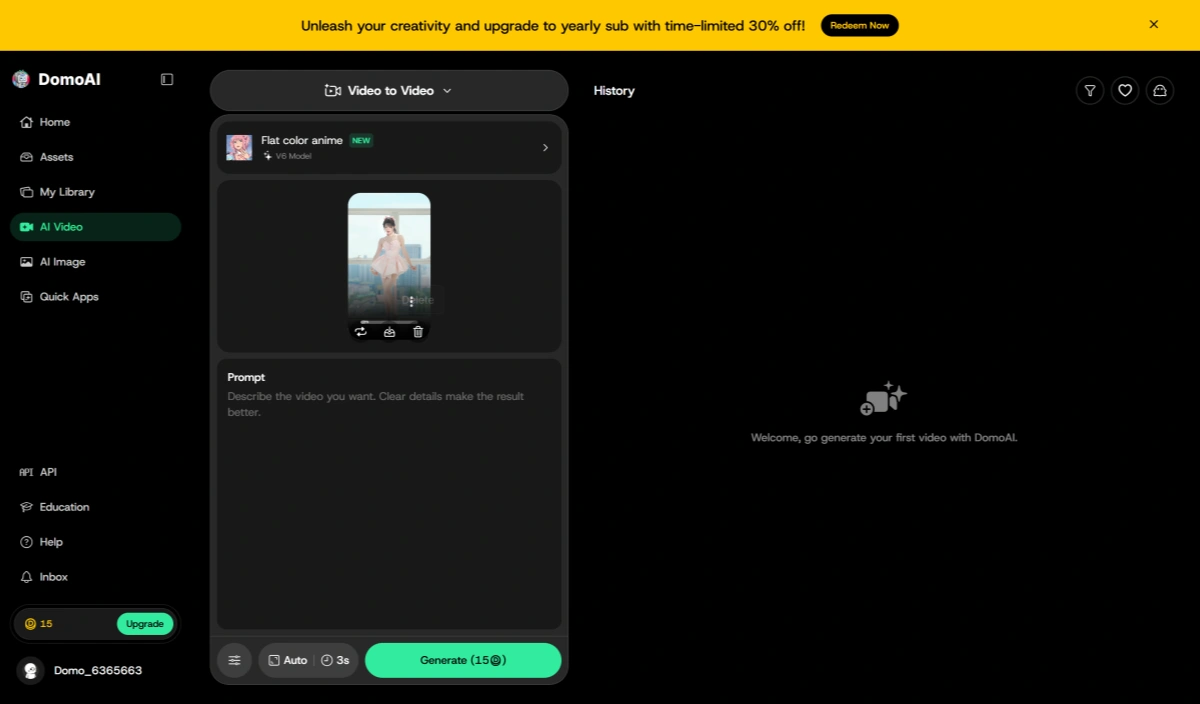
My DomoAI Video to Video setup with the source dance clip and Flat Color Anime V6 style.
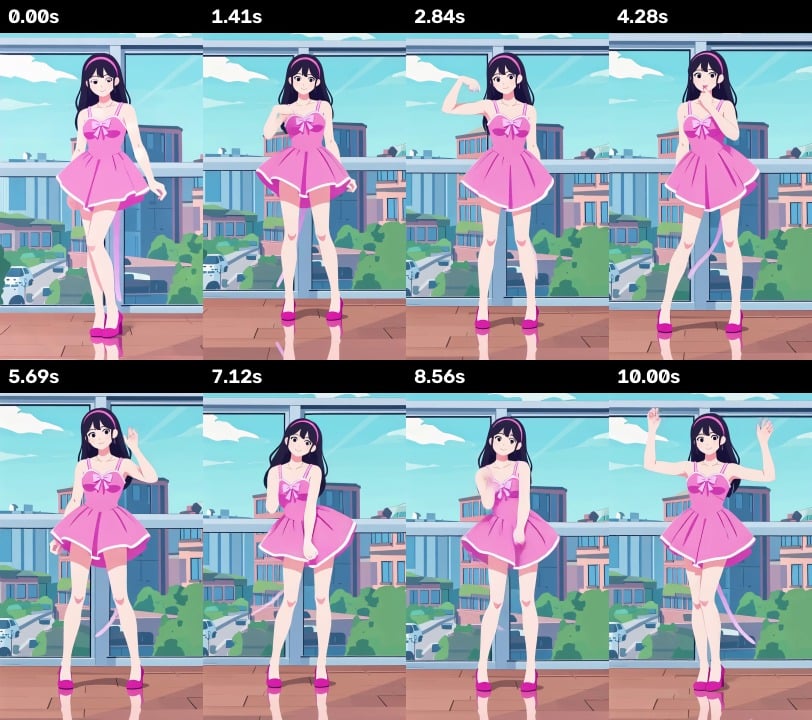
The result kept the original choreography surprisingly well. Major arm movements, body positioning, and the order of the dance remained recognizable throughout the clip. The character also stayed centered without obvious body disappearance or large positional jumps.
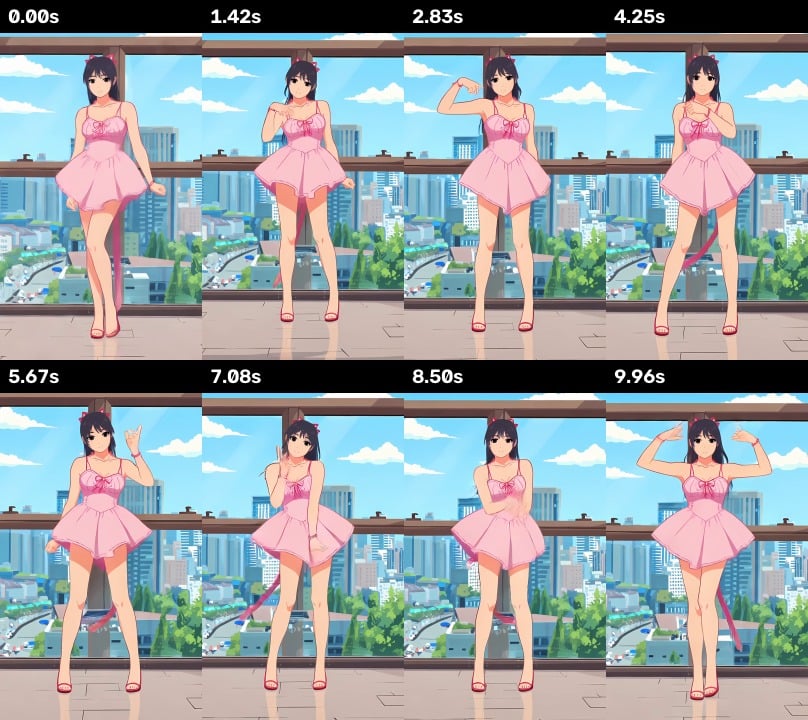 DomoAI Video to Video result across sampled frames
What stood out most was the visual detail. DomoAI added richer shading to the dress, more texture to the city background, and a stronger illustrated-anime feel. It produced the more layered and decorative result of the two.
The tradeoff was identity preservation. DomoAI introduced cat-like ears and a tail that were not in the source video. Some fingers were also simplified during faster movements. These changes were not necessarily unattractive, but they showed that the tool was interpreting the subject rather than preserving every detail.
The final DomoAI video was exported at 720 x 1280 and 24 fps.
I ran the same source through GoEnhance AI using Flat Anime Style V6. Its result used cleaner outlines, flatter colors, and a simpler background. The face, outfit silhouette, and scene structure appeared slightly more stable across the sampled frames, although it also changed the original hairstyle.
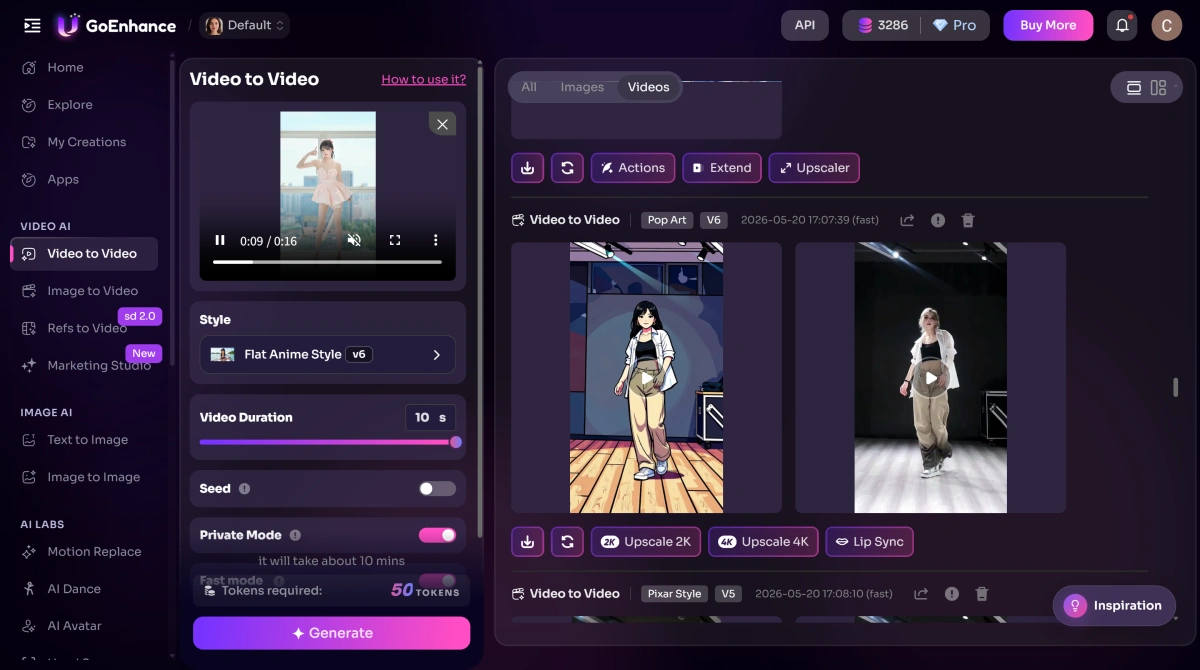 GoEnhance AI Video to Video interface with Flat Anime Style V6 selected
My GoEnhance AI setup for the matching Video to Video comparison.
GoEnhance AI exported the clip at 960 x 1696 and 32 fps. For this test, I preferred DomoAI for rich anime illustration detail and GoEnhance AI for a cleaner flat-anime look, steadier visual structure, and higher output specifications.
DomoAI Image to Video Test
For the second test, I used a square portrait of a woman standing in a park. She was already facing the camera with both hands inside her coat pockets.
 Original portrait used for the Image to Video test
I entered this identical prompt in DomoAI 2.4.1 Fast and GoEnhance AI 1.5:
The woman slowly turns toward the camera, smiles naturally, and raises her right hand in a gentle wave. Her hair and dress move softly in the breeze. The camera slowly pushes in. Keep her face, outfit, and background consistent.
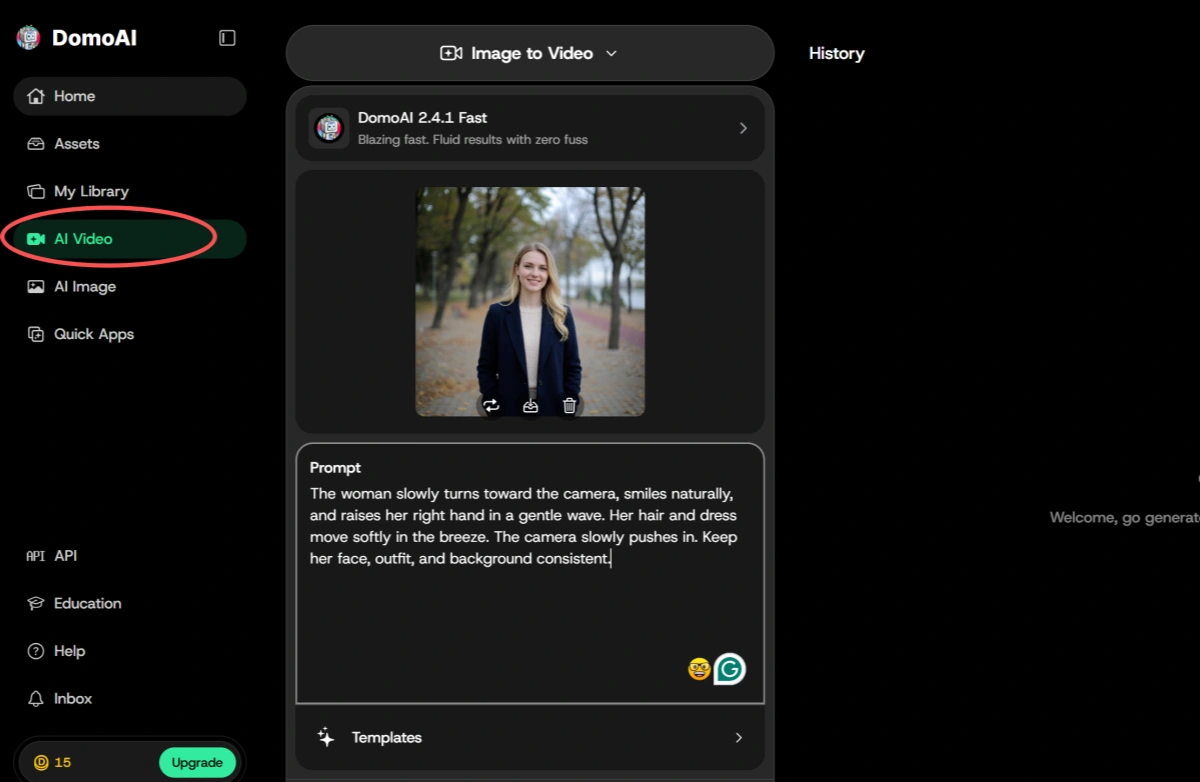 DomoAI Image to Video interface showing the source portrait, DomoAI 2.4.1 Fast model, and test prompt
The DomoAI Image to Video setup used for my portrait animation test.
DomoAI created the more dramatic shot. The woman raised her hand smoothly, but her palm moved rapidly toward the camera while the camera also pushed closer. This produced stronger depth and energy than I requested.
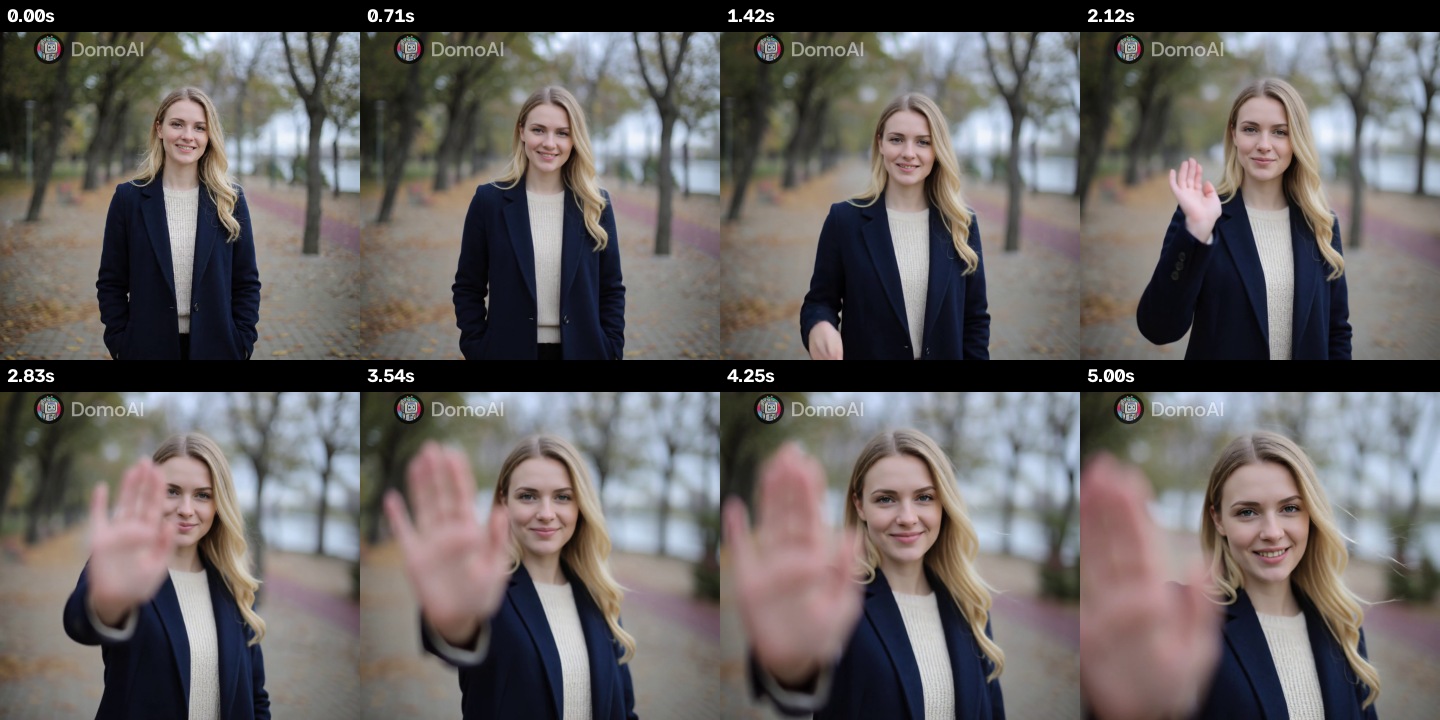 DomoAI Image to Video result across sampled frames
The face, navy coat, and park background remained generally recognizable. However, the hand covered a large part of the subject's face during the second half of the clip. That made the result less suitable for a presenter video, profile introduction, or brand asset where the person needs to remain clearly visible.
DomoAI exported the five-second clip at 1024 x 1024 and 24 fps. The file from this test contained a visible DomoAI watermark. Watermark behavior may depend on the account or plan, so I would not assume that every export has the same restriction.
GoEnhance AI followed the wording more literally. The woman lifted her right hand from her pocket, held it near shoulder level, and made a smaller wave. The camera movement was restrained, and her face remained visible throughout the clip.
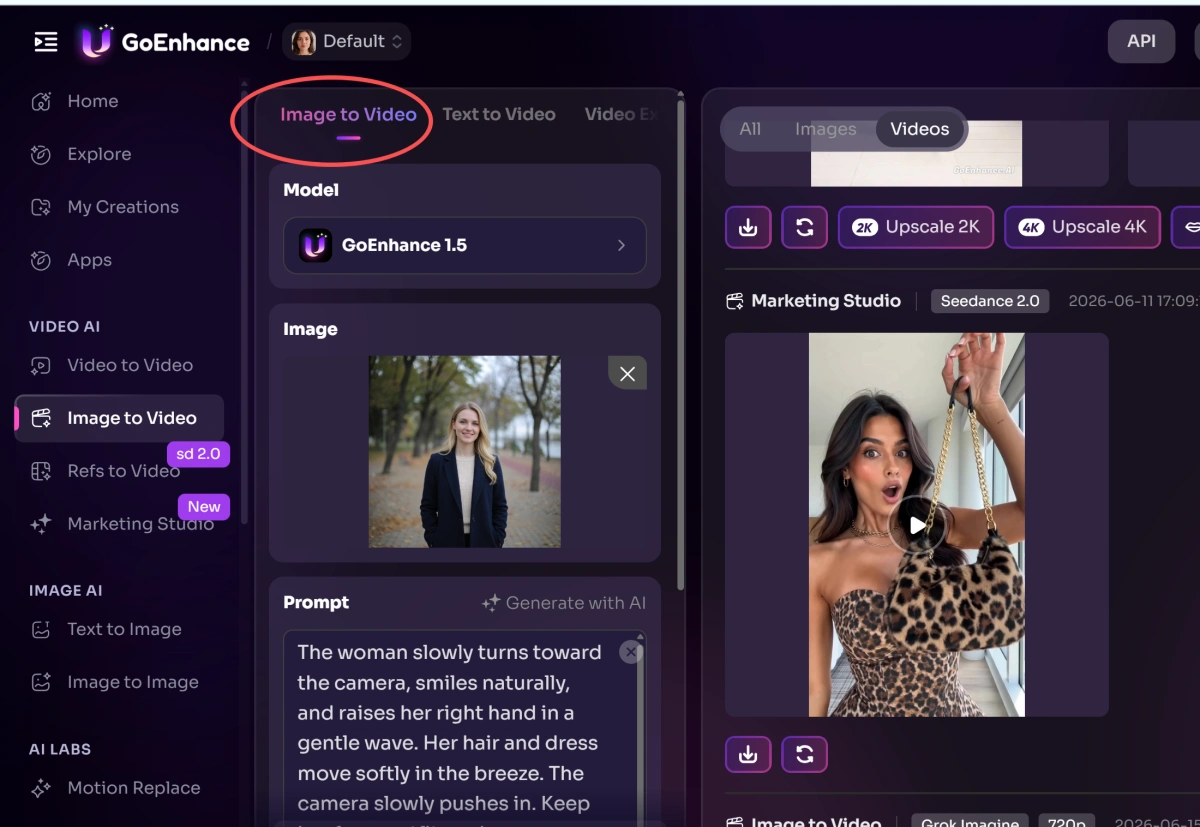 GoEnhance AI Image to Video interface showing the source portrait, model, and matching prompt
My GoEnhance AI setup using the same portrait and prompt as the DomoAI test.
Its output was 720 x 720 and 32 fps. DomoAI delivered the higher resolution and the more cinematic movement, while GoEnhance AI did better with prompt adherence, controlled composition, and keeping the subject unobstructed.
For this particular prompt, I preferred the GoEnhance AI result.
Real Use Cases for DomoAI
| Use Case | How DomoAI Fits |
|---|---|
| Anime dance clips | Preserves recognizable choreography while applying a more illustrated character style |
| Social media transformations | Creates visually obvious before-and-after content from existing footage |
| Dramatic photo animation | Adds energetic foreground movement and camera motion |
| Character experiments | Useful when creative reinterpretation is acceptable |
| Presenter or brand clips | Possible, but outputs should be checked carefully for unwanted motion or face obstruction |
DomoAI feels most convincing as a creative transformation tool. If I were producing anime edits, fan-style clips, or short-form content where surprise is part of the appeal, its visual choices could be an advantage.
For controlled commercial content, I would generate more than one version and inspect the full clip before approving it. A single unexpected hand movement or added character feature can change whether the output is usable.
DomoAI Pricing
DomoAI uses a subscription and credit system. I checked its official pricing page on July 9, 2026.
| Plan | Price Shown for Annual Billing | Monthly Credits |
|---|---|---|
| Basic | $6.99/month | 500 |
| Standard | $19.59/month | 1,500 |
| Pro | $48.99/month | 4,000 |
The Standard and Pro plans list unlimited generations in Relax Mode for supported models, while Fast Mode consumes credits. Longer generations and some advanced duration options are limited by plan.
These details can change, and the real number of clips depends on the selected model, duration, and mode. I recommend checking the live pricing page before subscribing rather than judging the plans only by the estimated video count.
DomoAI Pros and Cons
Pros
- Preserved the main dance choreography well in my Video to Video test
- Produced rich anime shading, clothing detail, and background texture
- Created dynamic camera movement with a strong sense of depth
- Offers several image, video, character, and enhancement tools in one interface
- Supports short creative workflows without traditional animation software
Cons
- Added character details that were not present in the source video
- Interpreted a gentle movement prompt more dramatically than requested
- Allowed the subject's hand to cover her face in the Image to Video test
- Uses a credit system that can limit continued testing
- The tested Image to Video export contained a visible watermark
Where DomoAI Falls Short
Creative Changes Can Reduce Source Fidelity
DomoAI's anime transformation looked detailed, but it also added ears and a tail. This works when the goal is character reinterpretation. It is a problem when a client expects the transformed subject to retain specific clothing, hair, or identity details.
I would treat the output as a new creative version rather than a frame-by-frame restyle of the original person.
Subtle Prompts May Become More Dramatic
My Image to Video prompt asked for a gentle wave and slow camera push-in. DomoAI combined a stronger push-in with a hand reaching toward the lens.
The result was visually engaging, but it changed the purpose of the shot. Instead of a calm introduction, it felt like a dramatic social-media transition.
More Detail Does Not Always Mean More Control
DomoAI won on output resolution in my Image to Video test and on visual richness in my anime test. Those strengths did not automatically make it the better result.
For practical content, composition and prompt accuracy can matter more than extra detail. That is especially true when a face, product, or presenter must stay visible.
DomoAI vs GoEnhance AI
| Factor | DomoAI | GoEnhance AI |
|---|---|---|
| Video to Video motion | Preserved the main dance well | Preserved the main dance well |
| Anime appearance | Richer shading and decorative detail | Cleaner, flatter, more uniform styling |
| Source fidelity | Added more new character features | Also changed some appearance details, but kept a steadier silhouette |
| Image to Video prompt adherence | More dramatic than requested | Followed the gentle wave more closely |
| Subject visibility | Hand covered the face in the test | Face remained visible |
| Tested Image to Video resolution | 1024 x 1024 | 720 x 720 |
| Tested Video to Video resolution | 720 x 1280 | 960 x 1696 |
| Tested frame rate | 24 fps | 32 fps |
| Best fit from my tests | Expressive, detailed creative animation | Controlled movement and clean style transformation |
This was not a one-sided comparison. DomoAI produced more texture in the anime clip and a higher-resolution Image to Video export. GoEnhance AI was stronger when I needed closer prompt adherence and a stable, unobstructed subject.
Why I Would Use GoEnhance AI Instead
I would choose GoEnhance AI when the result needs to follow a clear production direction rather than maximize surprise.
For Cleaner Video Style Transformation
Open GoEnhance AI Video to Video, upload a short clip with one clearly visible subject, and select a style such as Flat Anime. Generate a short preview first, then check the face, hands, outfit outline, and background across the full timeline before exporting.
In my dance test, this workflow produced the cleaner flat-anime treatment and the higher-resolution, higher-frame-rate file.
For More Controlled Image Animation
Open GoEnhance AI Image to Video, upload a clear portrait, and describe the subject action and camera movement separately. Keep the first prompt simple, generate one version, and adjust only the movement that needs correction.
That approach worked better for my portrait test. The wave stayed near the subject's shoulder, the camera push-in remained gentle, and the face was visible for the entire clip.
My Personal Take
DomoAI is more interesting than a basic one-click animation tool. It can preserve motion, create substantial visual changes, and produce clips with real energy. I particularly liked the richer clothing and background detail in its anime transformation.
At the same time, I would not call it predictable. Both of my tests showed a willingness to reinterpret the input. In one case, that meant new character features. In the other, it meant a much stronger hand and camera movement than the prompt requested.
That creative behavior is the reason to use DomoAI and the reason to check its results carefully.
Final Verdict: Is DomoAI Worth It?
DomoAI is worth considering for anime transformations, social content, and experiments where expressive results matter more than exact preservation. Its Video to Video tool handled the source choreography well, and its richer visual detail gave the output a distinctive look.
For presenter clips, brand visuals, or prompts that require restrained motion, I would use GoEnhance AI first. It gave me better prompt adherence in the portrait test and a cleaner, more consistent flat-anime result in the dance test.
My final verdict is simple: use DomoAI for creative energy and detailed reinterpretation; use GoEnhance AI when control and a clearer production workflow matter more.
DomoAI Review FAQs
Is DomoAI free?
DomoAI uses credits for generation, and its paid plans include a monthly credit allowance. Once the available credits are exhausted, continued Fast Mode generation requires more credits or a subscription. Check the current pricing page because plan conditions can change.
Is DomoAI good for anime videos?
Yes, anime transformation was the strongest part of my test. It preserved the main dance and added rich shading and background detail. However, it also introduced new character features, so source fidelity was not perfect.
Does DomoAI follow prompts accurately?
It understood the overall action in my Image to Video prompt, but it made the movement more dramatic than requested. The gentle wave became a hand reaching toward the camera while the shot pushed in.
Does DomoAI add a watermark?
The DomoAI Image to Video file used in my test had a visible watermark. The official paid plans advertise watermark-free exports, so the result may depend on the account and plan.
What is the best DomoAI alternative?
GoEnhance AI is a practical alternative for video style transformation and image animation. In my tests, it produced the cleaner flat-anime result and followed a subtle movement prompt more closely.
Which is better, DomoAI or GoEnhance AI?
It depends on the goal. DomoAI was better for rich anime detail and dramatic movement. GoEnhance AI was better for controlled motion, prompt adherence, and keeping the subject clearly visible.