
Prompt
Copy and customize
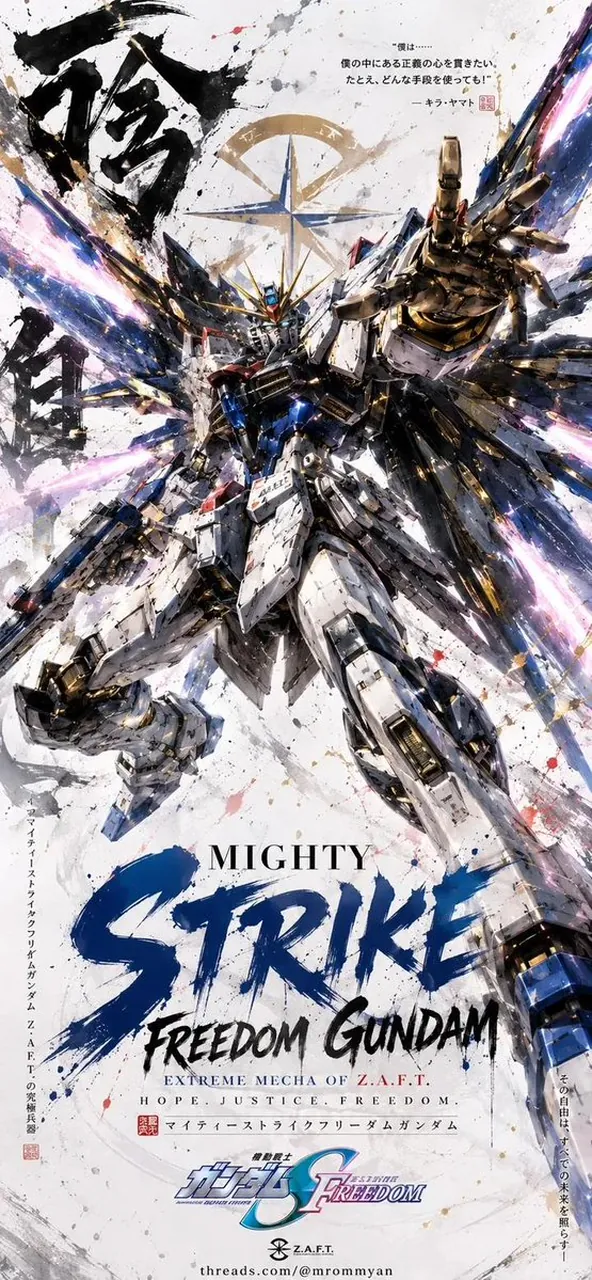
A legendary anime mecha poster featuring a powerful mobile suit as the sole subject, viewed from a dramatic low-angle heroic perspective, one hand reaching directly toward the viewer with extreme foreshortening while the other hand holds a glowing beam saber. Massive mechanical wings fully deployed behind the mobile suit, explosive high-energy particle effects bursting outward in vibrant crimson and white, dynamic paint splatter and ink brush textures covering the background, cinematic battle atmosphere, highly detailed armor plating with realistic scratches, chipped paint, battle damage, intricate mechanical panel lines, metallic reflections, glowing eyes, premium hard-surface design, masterpiece mecha illustration.
White textured paper background with Japanese sumi-e ink calligraphy on the left side, large stylized brush lettering displaying the mobile suit name across the lower third, Japanese typography, official anime key visual composition, elegant logo placement, dramatic energy streaks, flying debris, sparks, volumetric lighting, high contrast, painterly brush strokes mixed with hyper-detailed mechanical rendering, centered composition, vertical movie poster layout, collectible art print style, ultra detailed, 8K, insanely detailed, sharp focus, trending on ArtStation, concept art by WLOP, Ilya Kuvshinov, Maciej Kuciara, Yoji Shinkawa, Studio Sunrise promotional illustration style.
Color palette: white, black, metallic silver, gold accents, vivid crimson energy effects.
Aspect ratio 9:16
Best for
Character designCinematic postersDigital illustrationConcept artMecha fan art
Tips
Replace the bracketed placeholders with your specific mecha name and primary color to customize the character and energy effects.
Adjust the aspect ratio parameter if you need a horizontal layout instead of the default vertical movie poster format.