
What Is Grok Imagine Video 1.5? My Hands-On Review
- 1. The Short Answer: What Is Grok Imagine Video 1.5?
- 2. Why Grok Imagine Video 1.5 Became So Popular
- 3. Core Features of Grok Imagine Video 1.5
- 4. How Grok Imagine Video 1.5 Works in a Real Creative Workflow
- 5. Grok Imagine Video 1.5 vs Seedance 2.0
- 6. Where I Would Use Grok Imagine Video 1.5
- 7. Where Grok Imagine Video 1.5 Still Has Limits
- 8. Pricing and Access: Why Cost Is Part of the Story
- 9. Prompt Tips for Better Grok Imagine Video 1.5 Results
- 10. FAQ About Grok Imagine Video 1.5
- 10.1 What is Grok Imagine Video 1.5?
- 10.2 Does Grok Imagine Video 1.5 support text-to-video?
- 10.3 Can Grok Imagine Video 1.5 generate audio?
- 10.4 Is Grok Imagine Video 1.5 better than Seedance 2.0?
- 10.5 What is Grok Imagine Video 1.5 best for?
- 10.6 Is Grok Imagine Video 1.5 good enough for commercial use?
- 10.7 How should I write prompts for Grok Imagine Video 1.5?
- 11. Conclusion: My Final Take on Grok Imagine Video 1.5
Grok Imagine Video 1.5 is best understood as xAI’s newer preview image-to-video model for turning a still image into a short video with motion and audio. I would not call it a full filmmaking system yet, and I would not describe it as a clean replacement for every other AI video model. What makes it interesting is simpler: it is fast, visually punchy, API-ready, and practical enough for creators who want to turn images into short clips without building a heavy production workflow.
In my view, Grok Imagine Video 1.5 matters because it moves AI video closer to the kind of tool people can actually use every day. It is not just about one pretty demo. It is about whether a model can take a product photo, portrait, poster, or concept image and quickly turn it into a usable social video, ad test, or moving visual asset.
I also want to be careful with the wording here. Based on xAI’s current documentation, Grok Imagine Video 1.5 Preview is listed as an Image → Video model, and the official page says it currently does not support text-to-video. So when I write about it, I treat it mainly as an image-to-video model, not as a general text-to-video model.
For reference, I checked the official xAI model page, xAI pricing page, Arena leaderboard, fal.ai model page, and Seedance 2.0 research paper while preparing this guide:
- xAI Grok Imagine Video 1.5 Preview documentation
- xAI official pricing page
- Image-to-Video Arena leaderboard
- fal.ai Grok Imagine Video 1.5 API page
- Seedance 2.0 paper on arXiv
1. The Short Answer: What Is Grok Imagine Video 1.5?
Grok Imagine Video 1.5 is a preview image-to-video model from xAI that generates short videos from image inputs. The way I would explain it to a creator is simple: give it a strong image, describe the motion or scene direction, and it can create a moving video clip with native audio.
That makes it different from a normal AI image generator. An image generator gives you a still result. Grok Imagine Video 1.5 tries to turn that still frame into a small piece of motion: a person turning, a camera pushing in, a product rotating, a scene breathing, or a poster becoming a short cinematic clip.
The important part is the starting point. The image does a lot of the heavy lifting. If the source image already has a clear subject, good lighting, and a strong composition, the output is usually easier to control. If the source image is messy, vague, or overloaded, the video may also become unstable.
Here is my practical definition:
Grok Imagine Video 1.5 is an xAI image-to-video preview model built for fast, short-form video generation with motion and audio from a still image.
That definition is less flashy than “Seedance killer” or “next-generation AI filmmaker,” but it is more accurate.
2. Why Grok Imagine Video 1.5 Became So Popular
Grok Imagine Video 1.5 became popular because it combined leaderboard attention with real product access. A lot of AI video models look exciting in demos, but the moment you ask how to use them, how much they cost, or whether they have API access, the story becomes less clear. Grok 1.5 got attention because those questions are easier to answer.
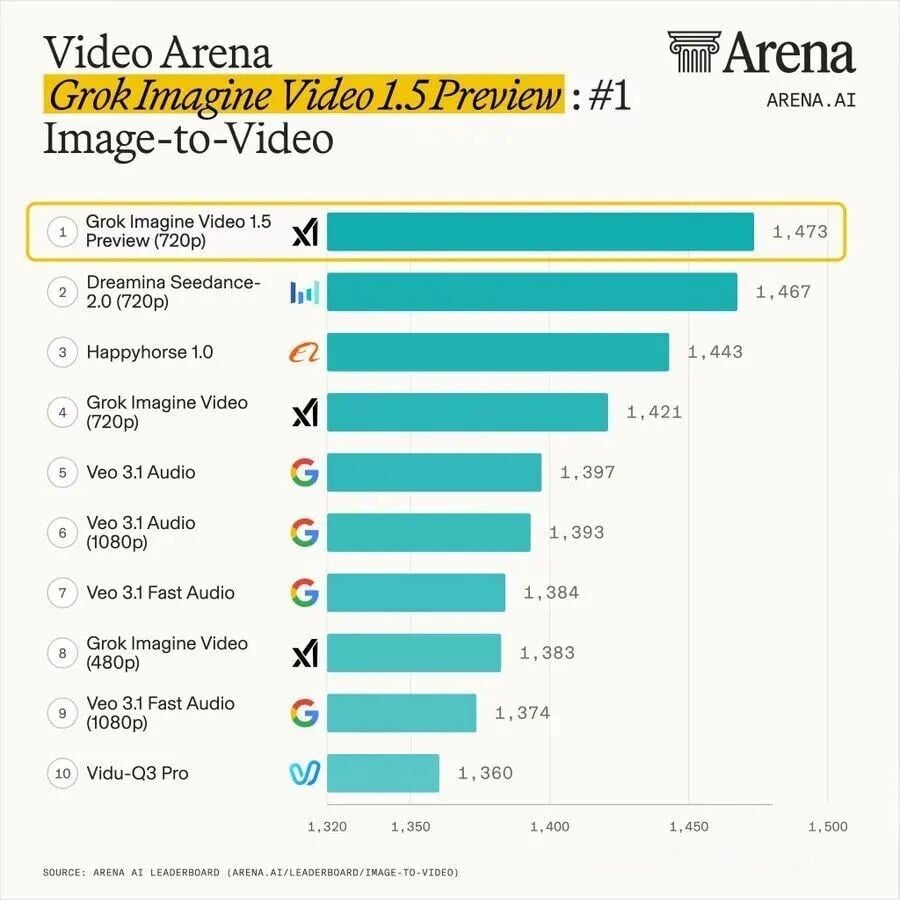
The first reason is the Arena result. On the Image-to-Video Arena leaderboard I checked, grok-imagine-video-1.5-preview-720p ranked first with a preliminary score of 1473±9, slightly ahead of dreamina-seedance-2.0-720p at 1467±11. The same leaderboard also showed the earlier Grok Imagine Video 720p model at 1421±6, which explains the widely shared “+52 point improvement” claim.
The second reason is native audio. For short video creators, audio is not a small detail. If a model can generate a clip with matching sound, even imperfectly, it removes one extra production step. That matters for TikTok-style content, ads, product demos, character clips, and quick creative testing.
The third reason is productization. Grok 1.5 is not only a name on a chart. It is documented, priced, and available through developer or third-party API routes. That gives it a different kind of weight. It becomes something a creator, tool builder, or marketing team can actually test inside a workflow.
I would summarize the hype this way:
| Reason | Why It Matters |
|---|---|
| High Arena ranking | It creates public attention and comparison with top video models |
| Image-to-video focus | It fits a common creator workflow: image first, motion second |
| Native audio | It reduces post-production friction |
| API access | It can be integrated into tools and batch workflows |
| Clear pricing | It makes cost planning easier for developers and teams |
The leaderboard made people notice it. The pricing and access made people take it more seriously.
3. Core Features of Grok Imagine Video 1.5
Grok Imagine Video 1.5 is useful because it focuses on a small but valuable workflow: turning one image into a short moving clip. I do not see it as a giant all-in-one video studio. I see it as a fast creative engine for image-based video production.
| Feature | What It Means | My Practical Take |
|---|---|---|
| Image-to-video generation | It creates video from a still image input | Best when the input image already has a clear subject and visual direction |
| Native audio | It can generate video with sound | Helpful for social clips, ads, and quick demos |
| 480p / 720p output | Official pricing separates output resolution | 720p is more useful for polished tests, while 480p may work for rough drafts |
| API access | Developers can connect it to apps or workflows | Useful for batch generation, creative tools, and automated content pipelines |
| Prompt-driven motion | The prompt guides action, camera movement, and mood | Better prompts usually describe motion, not facial details |
The main feature is still image to video. That is the workflow I would build the entire article around. Users should not come away thinking this is mainly a text-to-video model if the official 1.5 preview page says otherwise.
The audio part is also important, but I would not overpromise it. Native audio can make a clip feel more complete, but it does not automatically mean every scene will have perfect sound design, perfect dialogue, or professional mixing. It is a useful shortcut, not a replacement for careful audio work in serious production.
4. How Grok Imagine Video 1.5 Works in a Real Creative Workflow
The best way to use Grok Imagine Video 1.5 is to start with a strong image and write the prompt around motion, not identity. This is the biggest practical point I would stress because many users will make the same mistake: they will describe the character’s face again and accidentally fight against the reference image.
My usual mental workflow would look like this:
- Choose a clean source image.
- Decide what should move.
- Describe the camera direction.
- Add mood or audio cues.
- Generate a short clip.
- Keep the good result or regenerate.
- Stitch multiple short clips if the project needs more length.
For example, if I have a product image, I would not write a long prompt about the exact material again if the image already shows it. I would write something like:
A slow cinematic push-in toward the product, soft studio lighting, subtle reflections, gentle background movement, premium commercial mood, clean sound design.
If I have a portrait image, I would avoid describing the face, makeup, and hairstyle in detail. I would focus on action:
The subject slowly turns toward the camera, natural eye movement, soft wind in the background, subtle handheld camera motion, warm evening atmosphere.
That approach keeps the image as the identity anchor and uses the prompt as the motion director. It is a small difference, but it can affect the final result a lot.
5. Grok Imagine Video 1.5 vs Seedance 2.0
Grok Imagine Video 1.5 is better for fast image-based short clips, while Seedance 2.0 is still stronger as a broader multimodal video production system. I would not frame this comparison as “one kills the other.” They are strong in different ways.
Grok 1.5 feels like a fast, sharp tool for turning images into short videos. It is good when you already have a strong visual and want quick motion. Seedance 2.0, based on its paper and public positioning, is closer to a more complete audio-video generation system with text, image, audio, and video inputs.
| Comparison Point | Grok Imagine Video 1.5 | Seedance 2.0 |
|---|---|---|
| Best workflow | Image-to-video short clips | Multimodal video generation and production |
| Main strength | Fast visual impact from still images | Broader control across text, image, audio, and video |
| Audio | Native audio is a key selling point | Native audio-video generation is part of the system |
| Use case fit | Social clips, ads, product animation, poster-to-video | More complex stories, reference-driven workflows, production pipelines |
| My view | Better for quick tests and batch creative output | Better for deeper control and more complex projects |
The simplest metaphor I can use is this:
Grok 1.5 is like a fast camera trick that makes a still image feel alive. Seedance 2.0 is closer to a video production machine with more knobs and more production logic.
That does not make Grok weak. In real marketing work, speed and cost matter. A model that makes good-enough clips quickly can be more valuable than a stronger model that is slower, more expensive, or harder to access.
6. Where I Would Use Grok Imagine Video 1.5
I would use Grok Imagine Video 1.5 for fast visual production, not for complex long-form storytelling. Its sweet spot is short, image-anchored content where the first frame already carries the design.
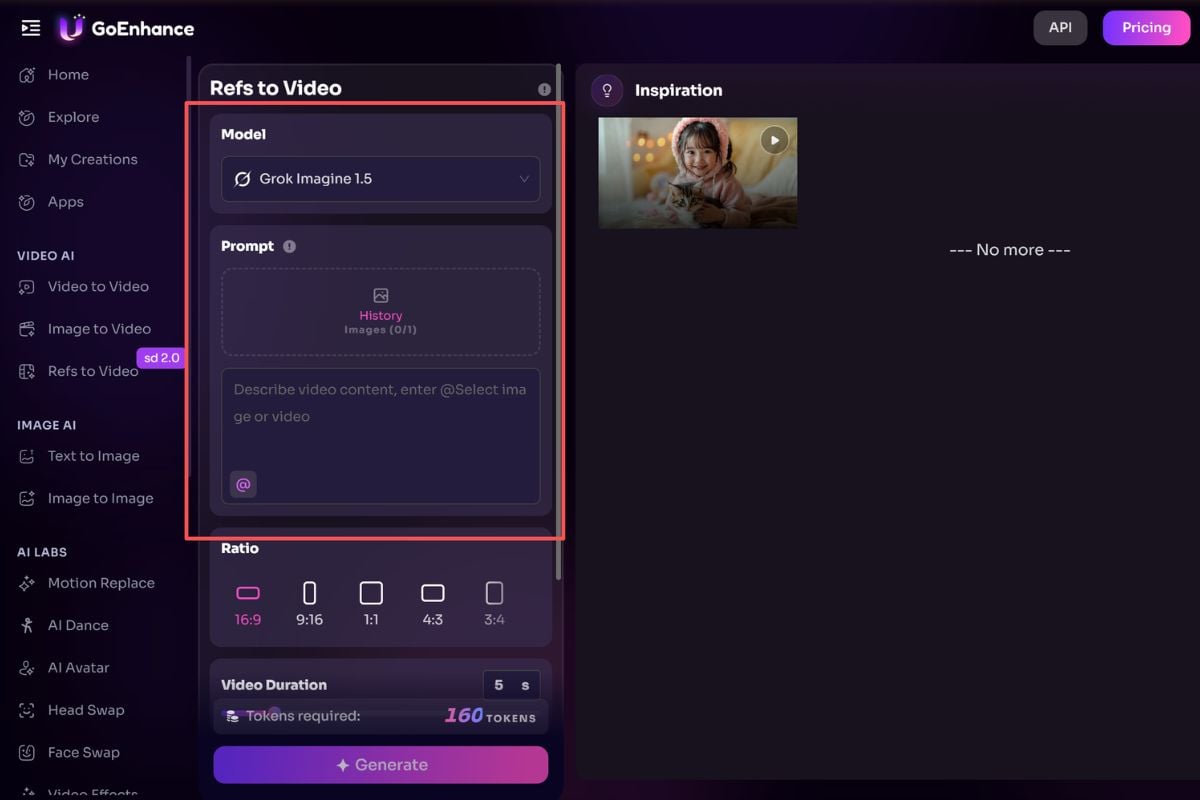
Good use cases include:
- Product photo animation
- E-commerce product showcases
- Poster-to-video clips
- Social media short videos
- AI ad testing
- Character portrait animation
- Thumbnail or cover animation
- Mood clips for pitch decks
- Quick creative tests before a larger campaign
- Batch video variations for marketing teams
For example, if I had 20 product images and wanted to test which visual style works best for short ads, I would consider Grok 1.5. The goal would not be to make a perfect brand film. The goal would be to quickly generate motion versions, compare the results, and decide which direction is worth polishing.
That is where this model feels practical. It is not only about beauty. It is about iteration speed.
7. Where Grok Imagine Video 1.5 Still Has Limits
Grok Imagine Video 1.5 is not the model I would choose first for complex multi-shot storytelling. This is where I think some of the hype goes too far. A high Arena score does not automatically mean a model can handle every production problem.
The main limits I would watch are:
-
Character consistency If the prompt fights the reference image, the face or identity may drift.
-
Complex camera cuts Multi-shot scenes are harder than single-shot motion.
-
Action choreography Fast fights, complex body movement, and object interactions can still break.
-
Longer narrative structure A good single clip is not the same as a coherent story.
-
Audio quality control Native audio is useful, but not always equal to professional sound design.
-
Preview-model uncertainty Pricing, access, model behavior, and rankings may change quickly.
This is why I would describe Grok 1.5 as a very useful short-form production tool, not a complete director. It can help a creator move faster. It does not remove the need for judgment, editing, selection, and sometimes regeneration.
8. Pricing and Access: Why Cost Is Part of the Story
Pricing is one of the biggest reasons Grok Imagine Video 1.5 deserves attention. In AI video, price is not just a small operational detail. Price decides how many times a creator can fail, retry, compare, and scale.
According to the xAI pricing page I checked, grok-imagine-video-1.5-preview is listed as Image → Video with image input pricing and resolution-based output pricing:
| Item | Official xAI Pricing Shown |
|---|---|
| Image input | $0.01 / image |
| 480p output | $0.08 / second |
| 720p output | $0.14 / second |
This matters because AI video is usually not one-and-done. In a real workflow, I expect to generate several versions, reject the broken ones, keep the best ones, and sometimes stitch short clips together. A lower or clearer unit cost makes that process less painful.
There are also third-party platforms and workflow tools that may offer different pricing or credit systems. I would treat those as channel-specific prices, not official xAI pricing. If I were writing a commercial guide, I would separate them clearly:
- Official xAI API pricing
- Third-party API pricing
- Browser tool credit pricing
- Workflow marketplace pricing
That distinction helps avoid a common SEO content problem: mixing official pricing with unofficial platform pricing and making the article look unreliable.
9. Prompt Tips for Better Grok Imagine Video 1.5 Results
The best prompt strategy is to let the image define the subject and let the text define the motion. This is the most useful practical rule I would give to a beginner.
A weak prompt often repeats what is already in the image:
A beautiful woman with brown hair, red lipstick, sharp eyes, soft skin, wearing a black dress, looking cinematic.
That kind of prompt may sound detailed, but it can create conflict if the image already defines the person. A better prompt tells the model what should happen:
The woman slowly turns toward the camera, soft wind moves her hair, the camera pushes in gently, warm cinematic lighting, quiet ambient sound, natural expression.
Here is how I would structure prompts:
| Prompt Element | What to Write | What to Avoid |
|---|---|---|
| Subject | Keep it simple if the image is clear | Re-describing the face too much |
| Motion | Describe body movement or object movement | Vague words like “make it cool” |
| Camera | Push-in, pan, orbit, handheld, close-up | Too many camera moves in one clip |
| Mood | Cinematic, warm, tense, dreamy, commercial | Mixing too many styles |
| Audio | Ambient sound, soft music, crowd noise, product sound | Overloading with detailed dialogue unless needed |
My simple formula is:
Subject action + camera movement + scene atmosphere + audio cue.
Example:
The product slowly rotates on a glossy surface, camera pushes in from a medium shot to a close-up, soft studio reflections, premium commercial mood, subtle electronic ambient sound.
This kind of prompt is easier to control because it does not fight the input image.
10. FAQ About Grok Imagine Video 1.5
10.1 What is Grok Imagine Video 1.5?
Grok Imagine Video 1.5 is xAI’s preview image-to-video model for generating short videos from image inputs. It can add motion and audio to a still image, making it useful for short-form creative work.
10.2 Does Grok Imagine Video 1.5 support text-to-video?
Grok Imagine Video 1.5 Preview should be described mainly as an image-to-video model. The official xAI model page I checked says this model currently does not support text-to-video, so I would avoid making text-to-video the main claim unless xAI updates the documentation.
10.3 Can Grok Imagine Video 1.5 generate audio?
Yes, audio is one of the key reasons creators are paying attention to it. On fal.ai, the model is described as generating videos from images with audio, and xAI’s Imagine ecosystem also positions video generation around motion and sound.
10.4 Is Grok Imagine Video 1.5 better than Seedance 2.0?
Grok Imagine Video 1.5 may be better for quick image-to-video clips, while Seedance 2.0 is better for broader multimodal production. I would choose Grok for fast visual tests and Seedance for more complex workflows.
10.5 What is Grok Imagine Video 1.5 best for?
Grok Imagine Video 1.5 is best for product animation, social videos, ad testing, poster-to-video clips, character portrait animation, and quick creative demos. It works especially well when the source image is already strong.
10.6 Is Grok Imagine Video 1.5 good enough for commercial use?
Grok Imagine Video 1.5 can be useful for commercial workflows, especially for testing and batch generation. Before using it in a final campaign, I would still check the platform’s usage rights, output quality, pricing, and brand-safety requirements.
10.7 How should I write prompts for Grok Imagine Video 1.5?
The best prompt should focus on action, camera movement, atmosphere, and audio. I would avoid over-describing the face, hairstyle, or makeup when using a reference image, because the image should stay as the main identity anchor.
11. Conclusion: My Final Take on Grok Imagine Video 1.5
Grok Imagine Video 1.5 is important because it makes short-form image-to-video generation feel more practical, not because it magically solves every AI video problem. I see it as a fast, accessible, visually strong model for creators, marketers, and developers who need quick motion from still images.
The real shift is not only the Arena ranking. The real shift is that AI video is moving from “look at this amazing demo” to “how fast can I generate, test, reject, and scale usable clips?”
That is why Grok 1.5 deserves attention. It may not be the best choice for complex storytelling or strict multi-shot consistency, but for quick image-based video, product animation, social content, and low-friction creative testing, it is one of the most interesting models to watch right now.


