
Kling AI Review 2026: Great Motion, But Can You Trust the Workflow?
- 1. Quick Verdict: Is Kling AI Worth It in 2026?
- 2. What Kling AI Actually Does
- 3. The One-Great-Clip Trap
- 4. Kling AI Image-to-Video Review: This Is Where It Feels Strongest
- 5. Kling AI Text-to-Video Review: Better for Ideas Than Final Shots
- 6. Kling AI Works Better as a Shot Generator Than a Full Video Tool
- 7. The Real Test: How Many Kling AI Clips Are Actually Usable?
- 8. Kling AI Pricing: The Plan Price Is Not the Whole Cost
- 9. Kling AI vs Runway, Sora, Veo, and Seedance: The Better Question
- 10. Who Should Use Kling AI?
- 11. FAQ: Kling AI Review Questions Creators Actually Ask
- 12. Final Verdict: Use Kling AI for Motion, Not for Your Whole Workflow
Kling AI is easy to like at first glance. The motion looks strong, the image-to-video results can feel polished, and some clips really do have that “wait, AI made this?” effect.
But this Kling AI review is not about one perfect demo.
The real question is harder: can Kling AI give creators enough usable clips without wasting too much time, credits, and patience?
That matters more in 2026 because AI video is no longer a side experiment. HubSpot’s 2026 State of Marketing report says 61% of marketers believe AI is causing the biggest marketing disruption in 20 years. IAB also reported that half of advertisers are already using GenAI to build video ads. In other words, the question is not “Can AI video work?” anymore.
It can.
The question is whether a tool can survive real production pressure.
This review looks at Kling AI as a working creator tool: image-to-video, text-to-video, pricing, credits, failed attempts, and where it fits against a broader AI video workflow.
Bottom line: Kling AI can produce beautiful short motion clips, but it is safest when treated as a shot generator — not your entire video production system.
1. Quick Verdict: Is Kling AI Worth It in 2026?
Kling AI is worth testing if you care about short motion clips, but it is risky if you expect predictable finished videos every time.
| Question | Verdict |
|---|---|
| Best for | Short motion clips, image-to-video, character movement, product B-roll |
| Weak for | Long dialogue scenes, full ads, exact editing control |
| Biggest strength | Motion realism |
| Biggest risk | Time and credits spent on clips you cannot use |
| Best user | Creator who can test, reject, and rerun |
| Worst user | Team that needs reliable same-day delivery |
| Smartest use | Use Kling as a shot generator, then edit or refine elsewhere |
That is the main point. Kling AI is not a bad tool. Far from it. When it hits, it can look excellent.
But I would not judge it by one good clip. That is the trap.
A real creator does not need one pretty output. A creator needs several clips that can survive posting, editing, client review, or campaign testing. That is where Kling becomes more complicated.
If your starting point is a still image and you want to test motion without asking the model to invent everything from scratch, GoEnhance’s image-to-video tool is a cleaner place to begin that workflow.
Bottom line: Kling AI is worth trying for motion, but not worth trusting blindly as your only video workflow.
2. What Kling AI Actually Does
Kling AI is mainly an AI video generator for turning text prompts or still images into short video clips.
That sounds simple. It is not.
The tool is strongest when the task is narrow: make this person move, animate this product shot, add camera motion, create a short cinematic moment, or test a visual idea. It is weaker when you expect it to behave like a full video editor.
Think of Kling AI less like Premiere Pro and more like a clip generator.
A rough breakdown:
| Feature | What it is useful for | Where it can struggle |
|---|---|---|
| Text-to-video | Testing visual ideas from prompts | Prompt drift, unclear details |
| Image-to-video | Animating a controlled still image | Hands, faces, logos, text |
| Motion control | Guiding movement direction | Complex action scenes |
| Short video generation | Social clips, B-roll, concept shots | Full edited ads or long scenes |
| Character motion | Portraits, fashion, cinematic shots | Multi-shot consistency |
Kling has also become a serious commercial player. SCMP reported that Kling AI recorded a US$240 million annual revenue run rate in December. So this is not a random toy app. It has real traction.
Still, traction does not automatically mean reliability for your workflow.
Bottom line: Kling AI is a serious AI video model, but you should evaluate it by workflow fit, not hype.
3. The One-Great-Clip Trap
Kling AI can impress you with one great clip, and that is exactly why you need to be careful.
This is the mistake I see a lot of creators make with AI video tools. They generate one clip that looks fantastic, share it, save it, maybe even think, “Okay, this is the tool.”
Then the second clip is weird.
The third one has a hand issue.
The fourth one changes the character’s face.
The fifth one has the right motion but the wrong mood.
That does not mean Kling is useless. It means the review standard has to be stricter. One great video is not a workflow.
For short-form creators, UGC ad teams, and indie filmmakers, consistency matters more than a single wow moment. If you are building a product ad, you may need five short variations. If you are making a character clip, you need the face and outfit to stay close enough. If you are testing a campaign, the clips need to feel like they belong together.
This is where Kling AI can feel both exciting and frustrating.
The ceiling is high. The repeatability is the real question.
That is also why I would not call Kling a full replacement for a broader AI video generator workflow. It is better as one strong model inside a larger process.
Bottom line: Do not ask whether Kling AI can make one amazing clip. Ask whether it can make enough usable clips for your actual project.
4. Kling AI Image-to-Video Review: This Is Where It Feels Strongest
Kling AI is usually more convincing with image-to-video than with pure text-to-video because the model starts with a controlled visual.
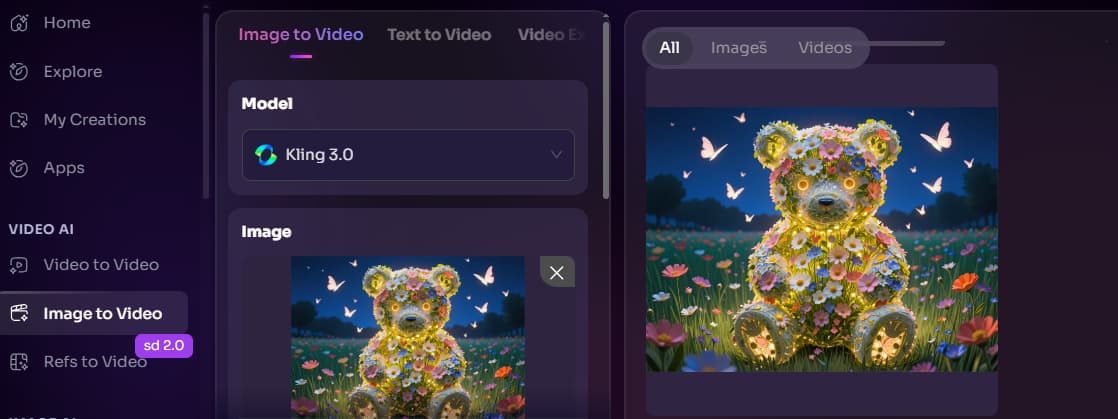
That is the biggest practical advantage.
With text-to-video, you are asking the model to invent the subject, scene, camera, style, lighting, and motion. With image-to-video, you already give it the subject. The model can focus more on movement. If you are comparing Kling mainly for motion quality, GoEnhance’s Kling AI model page is a useful next read before you start testing image-to-video clips. Not because every shot should use Kling, but because motion-heavy scenes are exactly where this model deserves a fair test.
That makes Kling useful for:
- portrait animation;
- fashion shots;
- product motion;
- cinematic B-roll;
- character clips;
- social media visual tests;
- short ad openings.
This is also where Kling feels most “creator-friendly.” You can start with a strong image, add a motion prompt, and see whether the clip has life. When it works, the result can feel much more controlled than a prompt-only generation.
But there are still limits.
Faces can shift. Hands can break. Product labels can distort. Fast movement can create strange body physics. If your original image contains important text, small logos, or detailed packaging, you need to check the output closely.
I would use Kling image-to-video for motion tests and short shots, not final brand-safe product footage without review.
That distinction matters.
Bottom line: Kling AI image-to-video is the strongest part of the tool, but controlled input does not remove the need for human review.
5. Kling AI Text-to-Video Review: Better for Ideas Than Final Shots
Kling AI text-to-video is useful for exploring ideas, but I would not rely on it as the fastest route to a clean final clip.
Text-to-video gives you freedom. That is the fun part. You can type a scene, style, mood, movement, and camera direction, then let the model interpret it.
The problem is the same freedom also creates drift.
A prompt can sound clear to you and still produce a scene that misses the detail you cared about most. Maybe the camera moves correctly, but the character looks wrong. Maybe the mood is right, but the product disappears. Maybe the first second looks great, then the motion starts to wobble.
For idea testing, that is fine.
For production, it gets expensive.
Here is how I would think about it:
| Text-to-video task | Kling fit | Risk |
|---|---|---|
| Cinematic concept test | Good | Scene may drift |
| Product ad from text only | Mixed | Brand details can break |
| Dialogue-style scene | Risky | Lip-sync and timing issues |
| Abstract visual idea | Good | Hard to control precisely |
| Fast action sequence | Mixed | Body motion may fail |
The best use of Kling text-to-video is not “make my finished ad.” It is more like: “Show me what this idea could feel like.”
That is valuable. Just do not confuse idea generation with delivery.
Bottom line: Kling AI text-to-video is good for creative exploration, but image-to-video is usually the safer starting point for usable clips.
6. Kling AI Works Better as a Shot Generator Than a Full Video Tool
Kling AI makes more sense when you treat it as a shot generator, not a complete video production system.
This is probably the most important mental shift.
If you expect Kling to create a full ad, with exact timing, captions, brand layout, dialogue, scene rhythm, and final polish, you will probably end up frustrated. That is not really what it is best at.
A better workflow looks like this:
- Start with a strong image or a tight prompt.
- Generate a short shot.
- Pick the usable version.
- Edit, caption, crop, or polish elsewhere.
- Rerun only the part that fails.
That is how AI video feels more practical.
Kling can give you the raw motion shot. The rest still needs judgment. Sometimes that means editing in another tool. Sometimes it means changing the source image. Sometimes it means switching models when the scene type is wrong for Kling.
This is where creators should stop asking, “Is Kling better than every other AI video tool?”
Better question:
“Is Kling the right model for this shot?”
That framing is much more useful.
If the shot fails because the movement is too complex, you do not need to abandon the whole project. You need a different route. For example, a video-to-video workflow may make more sense when you already have motion reference material and want to restyle or transform it instead of inventing motion from zero.
Bottom line: Kling AI is strongest when it generates short shots that can be reviewed, selected, and edited — not when it is forced to carry the whole video alone.
7. The Real Test: How Many Kling AI Clips Are Actually Usable?
The real Kling AI review metric is not peak quality. It is usable clip rate.
That sounds less exciting than “cinematic AI video,” but it is what creators actually feel.
A clip is usable only if:
- the subject still looks right;
- the face or product does not distort badly;
- the motion feels intentional;
- hands and limbs are acceptable;
- camera movement helps the scene;
- the clip can be posted, edited, or shown to a client without heavy excuses.
A beautiful failed clip is still a failed clip.
This is where AI video gets tricky. The model may generate something technically impressive that still does not fit your job. Maybe the lighting is beautiful, but the product shape changes. Maybe the character movement is smooth, but the face no longer matches. Maybe the clip looks good at first, then breaks in the last second.
For a hobby test, that is annoying.
For client work, it is a cost.
For daily content production, it is a workflow risk.
That is why I like judging Kling AI by “how many usable clips did I get?” rather than “how good was the best one?”
The best clip shows the ceiling. The average usable clip shows the product.
Bottom line: Kling AI has a high ceiling, but your real decision should be based on how many attempts it takes to get something you can actually use.
8. Kling AI Pricing: The Plan Price Is Not the Whole Cost
Kling AI pricing is only useful if you also think about credits, retries, and failed generations.
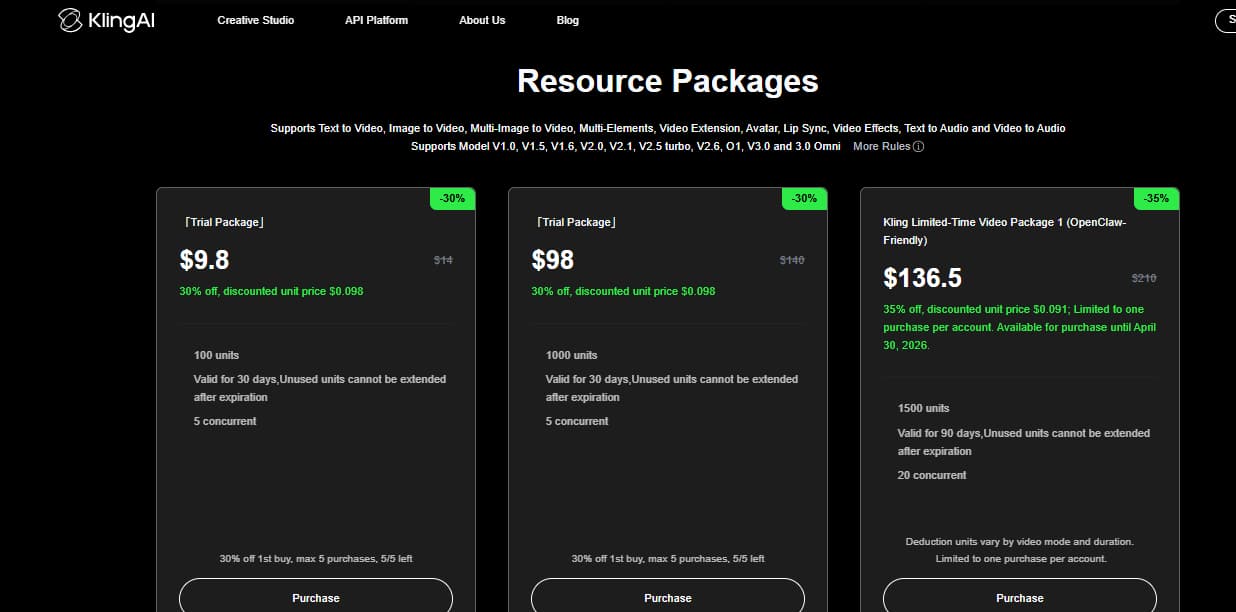
This is where a lot of review articles get too shallow. They list the plan price, maybe mention credits, then move on.
That is not enough.
AI video pricing has a hidden layer: the cost per usable clip.
If one generation works on the first try, great. Cheap. Fast. Easy.
But if you need four attempts to get one usable five-second clip, the real cost has changed. Not just in credits. In time. In attention. In the mental drain of checking outputs over and over.
For creators, these costs matter:
| Cost factor | Why it matters |
|---|---|
| Monthly plan | Sets your available generation budget |
| Credits | Limits how many attempts you can make |
| Failed generations | Raise the real cost per usable clip |
| Waiting time | Slows content calendars |
| Cleanup/editing | Adds hidden labor after generation |
| Commercial pressure | Makes failed attempts more painful |
This does not mean Kling AI is overpriced. Compared with hiring motion designers or shooting every piece of footage manually, AI video can still be cheap.
But cheap per attempt is not the same as cheap per result.
That is the part buyers should watch.
Bottom line: Do not judge Kling AI pricing by the subscription page alone. Judge it by how many usable clips you can get from your credits.
9. Kling AI vs Runway, Sora, Veo, and Seedance: The Better Question
The best AI video tool depends on the job, not the brand name.
This is where many “Kling AI vs Runway” comparisons get lazy. They try to pick one winner. That is not how creators actually work anymore.
Some tools are better for control. Some are better for cinematic realism. Some are better for speed. Some are better for short social clips. Some are better when your starting point is an image. Some are better when you need a rough concept fast.
Kling AI’s strength is motion. Especially short, visually strong motion.
But if you need exact editing control, a timeline editor still matters. If you need long dialogue scenes, you may need a more specialized workflow. If you need a full ad with captions, pacing, brand graphics, and multiple scenes, Kling alone is not enough.
Here is the practical way to compare:
| Tool direction | Best for | Weak spot |
|---|---|---|
| Kling AI | Short motion, image-to-video, character movement | Repeatability and full workflow control |
| Runway-style tools | More editing and control features | Can feel less automatic |
| Sora-style models | Cinematic realism and concept scenes | Access, cost, workflow limits |
| Veo-style models | High-end visual quality | Cost and availability |
| Seedance-style models | Fast social video and motion variants | Depends heavily on implementation |
| Multi-model workflow | Testing different routes for different shots | Requires judgment, not just prompting |
The smarter move is not “pick one AI video model forever.”
Bad idea.
The smarter move is to know what each model is good at and choose based on the shot. That is how working creators already think.
The Verge has also pointed out a growing risk in AI advertising: AI-made content can feel polished but unnatural, and audiences may react badly when the output feels like low-effort “slop” rather than a real creative decision. The article describes how brands are embracing AI for speed while facing pushback around authenticity and creative sameness: AI ads can trigger audience mistrust when they feel polished but unnatural.
That is exactly why model choice is not enough. Human taste still matters.
Bottom line: Kling AI is not the universal winner. It is a strong motion model that works best when you know when to use it — and when not to.
10. Who Should Use Kling AI?
Kling AI is best for creators who can tolerate iteration and judge motion quality quickly.
That includes:
- short-form creators testing visual hooks;
- UGC ad creators making quick product motion;
- indie filmmakers building visual references;
- character creators animating portraits;
- marketers who need lightweight B-roll;
- creative teams testing concepts before production.
It is not ideal for everyone.
I would be careful if you need:
- exact brand typography;
- clean logo preservation;
- long dialogue scenes;
- multi-shot story continuity;
- same-day client delivery;
- predictable output every time.
If your workflow is mainly layout-based — decks, flyers, brand templates, typography-heavy ads — a design editor is still the better tool for that job.
Kling is not bad because it cannot do everything.
It is useful because it can do one thing very well: generate short motion shots that may be hard, slow, or expensive to create manually.
Just keep it in that lane.
Bottom line: Use Kling AI when motion is the point. Avoid relying on it when precision, layout, or delivery reliability matters more.
11. FAQ: Kling AI Review Questions Creators Actually Ask
Is Kling AI worth it in 2026?
Yes, Kling AI is worth testing if you create short videos, motion clips, product B-roll, or image-to-video content. It is less ideal if you need finished multi-scene videos with exact editing control.
Is Kling AI good for image-to-video?
Yes. Image-to-video is one of Kling AI’s strongest use cases because the model starts from a controlled visual. This usually gives better direction than pure text-to-video.
Is Kling AI good for text-to-video?
Kling AI text-to-video is useful for idea testing and cinematic concepts. For final production clips, it can require more retries because the model has to invent more of the scene.
How much does Kling AI really cost?
The real cost depends on more than the plan price. You need to consider credits, failed generations, waiting time, and how many attempts it takes to get one usable clip.
What is the best Kling AI alternative for creators?
The best alternative depends on the task. Some creators need more editing control, some need cinematic realism, and some need a multi-model workflow where Kling-style motion is only one option.
Why does Kling AI sometimes feel frustrating?
Because the best output can look excellent, but repeated usable output is harder. That gap between “one great clip” and “reliable workflow” is the main frustration.
Bottom line: Kling AI is strongest when you use it with realistic expectations: short motion, image-to-video, and controlled creative testing.
12. Final Verdict: Use Kling AI for Motion, Not for Your Whole Workflow
Kling AI is one of the more interesting AI video tools because its best clips really can look impressive.
But I would not build a whole workflow around peak quality alone.
For creators, the real question is not whether Kling can make a beautiful clip. It can. The real question is whether it can give you usable clips often enough, fast enough, and cheaply enough for the way you actually work.
That is why I would use Kling AI as a shot generator.
Give it a controlled image. Ask for a short motion clip. Review the output hard. Keep the good version. Rerun or switch workflows when the shot breaks.
That is a healthier way to use AI video in 2026.
Not magic.
Not useless.
A tool. A strong one, when used in the right place.
If your workflow starts with images, product shots, characters, or visual concepts, GoEnhance is a practical next step because it lets you work from that starting point instead of forcing every idea through a single model path.


