
My ImageFX Review After Testing It for Real Image Ideas
- 1. What Is ImageFX?
- 2. ImageFX Review Verdict: Is It Worth Using?
- 3. How ImageFX Works
- 4. ImageFX Features
- 5. My Experience With ImageFX
- 6. Image Quality Review: What Results Can You Expect?
- 7. ImageFX Pricing: Is ImageFX Free?
- 8. ImageFX Limits and Availability
- 9. Can You Use ImageFX Images Commercially?
- 10. ImageFX vs Gemini Image Generation
- 11. ImageFX vs Other AI Image Generators
- 12. Best ImageFX Prompting Tips
- 13. Pros and Cons of ImageFX
- 14. Where GoEnhance AI Fits in the Workflow
- 15. Who Should Use ImageFX?
- 16. ImageFX FAQ
- 16.1 Is ImageFX free?
- 16.2 Is ImageFX made by Google?
- 16.3 What model does ImageFX use?
- 16.4 Do ImageFX images have a watermark?
- 16.5 Can I use ImageFX images commercially?
- 16.6 Is ImageFX better than Midjourney?
- 16.7 Is ImageFX the same as Gemini image generation?
- 16.8 Why can’t I access ImageFX?
- 16.9 Does ImageFX support image editing?
- 16.10 What are the best ImageFX alternatives?
- 17. Final Verdict: Should You Use ImageFX?
ImageFX is Google’s AI image generator inside Labs.google/fx. I use it as a quick way to turn text prompts into visual ideas, test different creative directions, and download or share image results from a simple browser interface. The official tool is available on the Google Labs ImageFX page, and I would start there instead of relying on third-party copies or older tutorials.
After testing it, my view is straightforward: ImageFX is useful for fast visual ideation, but I would not treat it as a full production design tool. It works best when I need a static image concept, moodboard direction, blog visual draft, or early creative reference. It becomes less reliable when the project needs exact typography, strict brand control, product accuracy, advanced editing, batch output, or clearly documented commercial-use terms.
Before using ImageFX seriously, check the current product page, account access, region availability, output limits, watermark or metadata behavior, and Google’s official terms.
1. What Is ImageFX?
ImageFX is an experimental AI image generation tool from Google Labs. The official version is available through Google’s Labs.google/fx interface, where users can sign in with a Google account and generate images from text prompts.
Google introduced ImageFX as a Labs tool for image generation. In Google’s original ImageFX launch post, the company described the tool as being powered by Imagen 2 and highlighted its expressive chips feature. I would still verify the current model before publishing that as a live product detail, because Google’s image generation products have continued to evolve through Gemini and newer image models.
I see ImageFX as a prompt-testing workspace rather than a complete design product. It is not Photoshop. It is not Midjourney’s community-driven image platform. It is also not exactly the same as generating images inside Gemini chat. Its strength is narrower: it helps you move from a rough prompt to a visual direction quickly.
2. ImageFX Review Verdict: Is It Worth Using?
ImageFX is worth trying if you need a simple text-to-image tool for concept exploration, blog visuals, moodboards, reference images, and early creative drafts. The interface is easy to understand, and the expressive chips make prompt variation feel faster than rewriting the same idea again and again.
The limitation appears when the project needs precision. If you need exact brand control, readable text, reliable product packaging, advanced editing, batch generation, API automation, or clear commercial-use documentation, ImageFX may not be enough on its own.
| Review Area | My Verdict | What I Checked |
|---|---|---|
| Ease of use | Strong | Google sign-in, prompt box, output cards, download and share controls |
| Prompt exploration | Strong | Expressive chips for quick variation testing |
| Image quality | Good for ideation | Faces, lighting, texture, background, prompt following |
| Text rendering | Mixed | Posters, labels, headlines, exact wording |
| Product visuals | Useful as drafts | Edges, materials, fake labels, brand safety |
| Production control | Limited | Editing options, consistency, repeatability |
| Commercial readiness | Use caution | Google Labs terms, usage policy, third-party rights |
My short verdict: ImageFX is a useful idea generator. It is strongest when I need visual directions quickly and weakest when I need predictable production controls.
3. How ImageFX Works
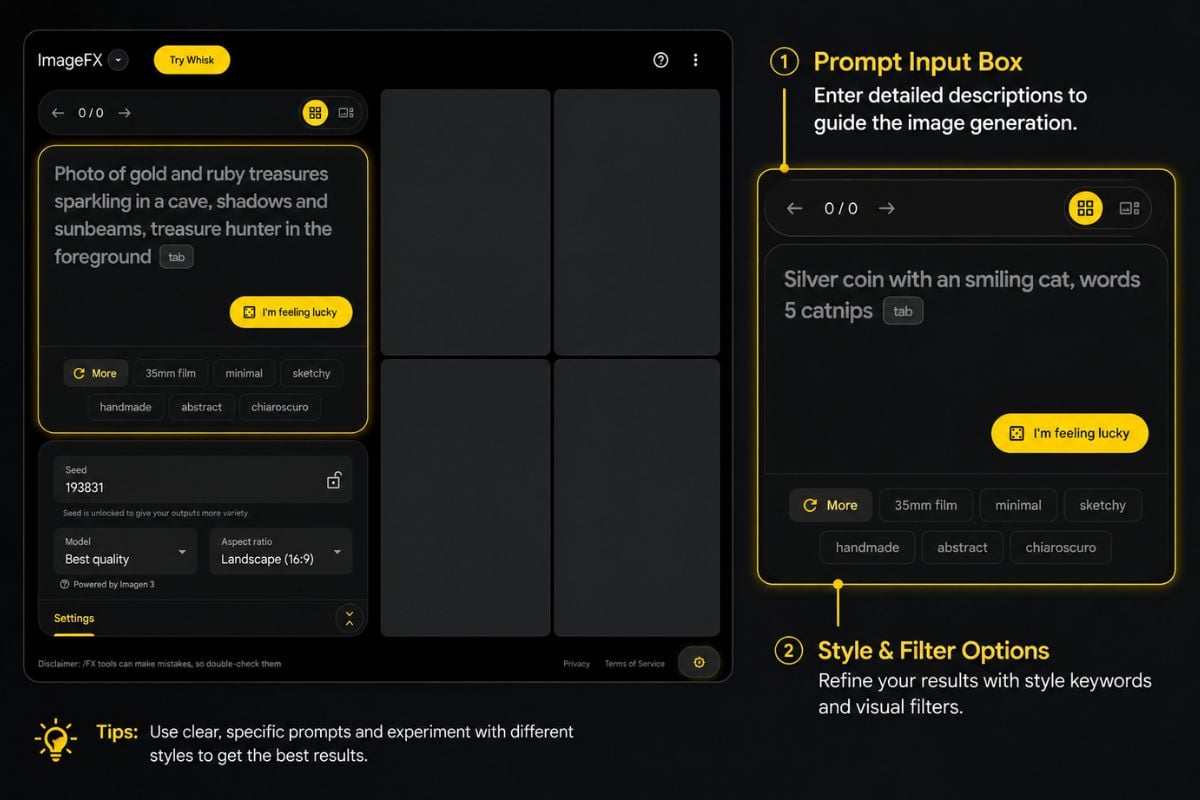
ImageFX works through a browser-based prompt interface. The basic flow is simple: open the official ImageFX page, sign in with a Google account, enter a prompt, review the generated outputs, then download, share, or revise the result.
The public interface shows useful controls such as prompt input, generated image cards, copy options, a visible seed value, download, sharing, feedback, and report options. These details make it easy to test ideas and compare outputs without a complicated setup.
3.1 Start From the Official ImageFX Page
I would start from the official ImageFX page rather than third-party tutorials. Many articles mention ImageFX, but the live Google Labs product page is the better source for current access, features, limits, and policy links.
This matters for reviews, pricing checks, and commercial-use questions because Labs products can change over time. If the page, model, output options, or account rules change, older screenshots may no longer describe the current product experience accurately.
3.2 Enter a Text Prompt
ImageFX generates images from text prompts. A strong prompt usually includes the subject, setting, visual style, lighting, camera angle, and mood.
For example, instead of writing:
a robot in a city
I would use something more specific:
a small service robot crossing a rainy neon street at night, cinematic lighting, low-angle camera, realistic reflections, detailed background
The second prompt gives the model a clearer image target.
3.3 Use Expressive Chips
Expressive chips are one of the most useful parts of ImageFX. They help you explore nearby visual ideas without starting over from a blank prompt.
In practice, I found them helpful when the first image was close but not quite right. I could test different lighting, moods, materials, locations, or visual styles while keeping the main subject mostly intact.
3.4 Download, Share, and Save Prompts
After generation, ImageFX lets users download results and copy or share output information. The visible seed value is also helpful when documenting test results.
I would still treat seed behavior carefully. A visible seed is useful for tracking a result, but it does not always mean a production workflow will be fully repeatable across time, model updates, or interface changes.
4. ImageFX Features
ImageFX focuses on text-to-image generation and prompt exploration. The features I pay closest attention to are the prompt box, expressive chips, output cards, seed display, copy controls, download, sharing, and AI-content transparency measures.
Because ImageFX is a Google Labs product, the interface may change. Before writing a final review or building it into a workflow, check the current product page.
4.1 Text-to-Image Generation
Text-to-image generation is the core feature. You describe a visual idea in text, and ImageFX generates images based on that prompt.
This makes it useful for concept art, moodboards, blog visuals, social post drafts, campaign ideas, and rough product scenes. I would be more careful with tasks that require exact labels, brand packaging, or typography.
4.2 Expressive Chips for Prompt Iteration
Expressive chips make ImageFX feel different from a plain prompt box. They are useful when you want to adjust a selected part of an image idea instead of rewriting the entire prompt.
For early ideation, this is genuinely helpful. If I am testing a blog hero image, I can move between “minimal studio,” “warm natural light,” “futuristic workspace,” or “editorial photography” without rebuilding everything from scratch.
4.3 Seed and Prompt Copy
The seed and copy controls are useful for testing. They help me record which prompt created which image and compare several outputs more clearly.
For serious production work, I would still save the prompt, seed, generation date, tool name, and any later editing steps. That makes the asset easier to review later.
4.4 Download and Sharing Options
ImageFX supports downloading generated images and sharing results from the interface. For casual use and team feedback, that is usually enough.
For publishing, I would check file format, image dimensions, metadata behavior, and compression. These details matter when the image moves into a CMS, ad platform, client deck, or asset library.
4.5 Safety, SynthID, and IPTC Metadata
Google has said ImageFX-generated images are marked with SynthID, Google DeepMind’s digital watermarking technology. Google has also said ImageFX images include IPTC metadata that can provide information about AI-generated media.
That is useful for transparency, but it also means the output should be treated as AI-generated content in a publishing workflow. If you edit the image later in another tool, check whether the metadata remains, changes, or disappears after export. For current policy details, I would check Google’s own product pages and Google’s Generative AI Prohibited Use Policy rather than relying only on older reviews.
5. My Experience With ImageFX
I tested ImageFX as a practical creative tool, not as a formal benchmark. I wanted to know whether it could help me move from a rough idea to a usable visual direction without spending too much time fighting the interface.
The tool felt strongest when the prompt had one clear subject. Simple scenes were easy to shape, and expressive chips made small creative changes feel quick. Once the scene became crowded or involved exact text, the output became less predictable. That is where ImageFX felt more like an idea generator than a production tool.
I used three test scenarios: a simple realistic image, a product-style creative visual, and a harder prompt involving poster text and multiple details.
5.1 Simple Realistic Image Test
I started with a simple realistic image because this is where image generators often look impressive at first, then reveal small flaws after zooming in.
Prompt I used:
A ceramic coffee cup on a wooden desk, morning window light, editorial product photography, shallow depth of field, calm warm mood.

The first result looked polished at a glance. The cup was clearly the main subject, the lighting direction made sense, and the shallow depth of field helped the scene feel closer to a real editorial photo than a flat AI render. The warm tone also matched the prompt well.
The smaller details were less reliable. I would still inspect the cup rim, contact shadow, wood texture, and background pattern before using the image in a published article. It was clean enough for a blog draft or moodboard, but I would not treat it as a final hero image without review.
What worked: clear subject, natural lighting, strong composition.
Where it struggled: fine material detail and close-up realism.
My score: 8.5/10 for ideation, lower for production use.
5.2 Product or Creative Visual Test
Next, I tested a product-style visual because marketing images are more demanding. A product scene needs clean edges, believable materials, and a background that supports the object without distracting from it.
Prompt I used:
A minimalist skincare bottle on a stone surface, soft studio lighting, neutral beige background, premium editorial product photography, no visible text.

The result was useful as a creative direction. The composition felt close to a product ad draft: centered object, soft lighting, neutral background, and a clean surface. I could use this kind of output to discuss mood, color palette, or art direction with a designer.
The weak point was product reliability. AI-generated packaging can look convincing while still getting small details wrong. Even when the prompt says “no visible text,” the model may still create label-like marks or decorative shapes that look like broken typography. Product edges also need close review, especially if the image is meant to represent a real item.
This test showed me that ImageFX is useful for early product moodboards and campaign concepts. I would not send this straight into a paid campaign or ecommerce page.
What worked: clean composition, premium mood, useful ad-style direction.
Where it struggled: product accuracy, fake label details, final commercial reliability.
My score: 7.5/10 for marketing concept work, not final commercial assets.
5.3 Complex Scene / Text / Multi-Subject Test
The third test was intentionally harder. I wanted to see how ImageFX handled layout, exact text, color direction, and multiple background details.
Prompt I used:
A simple poster for a weekend coffee festival, clean modern layout, large readable headline saying COFFEE WEEKEND, warm brown and cream color palette, small coffee cups and people in the background.
 This was where the limitations became more obvious. The overall poster direction could still be useful: warm colors, coffee theme, and a basic layout were easy enough for the model to understand. At a glance, the image could work as a rough design reference.
The text was the problem. AI image generators often struggle with exact lettering, and this prompt depended on the headline being readable. If the words are misspelled, warped, or inconsistent, the output cannot be used as a final poster. The background figures and small objects also made the composition less stable.
This test is why I see ImageFX as an idea tool first. It can help explore poster mood, color, and layout, but I would rebuild the typography in a design editor and simplify the background before publishing.
What worked: overall mood, color palette, rough poster direction.
Where it struggled: exact text, small figures, complex composition.
My score: 6/10 for finished poster design, 7/10 for rough visual direction.
6. Image Quality Review: What Results Can You Expect?
ImageFX quality depends heavily on the task. I would not judge it from one good sample. It performs better with clear subjects and visual styles than with crowded scenes, exact wording, or product-specific accuracy.
| Test Type | What I Check | My Take |
|---|---|---|
| Photorealistic image | Lighting, texture, shadows, background | Strong for simple subjects |
| Illustration | Style, composition, consistency | Good for concept exploration |
| Product scene | Edges, labels, reflections, brand safety | Useful for drafts, risky for final assets |
| Poster or label | Exact text and layout | Needs caution |
| Complex scene | Multi-object relationships | Less predictable |
6.1 Photorealistic Images
For photorealistic prompts, ImageFX can produce clean results quickly. Lighting, background blur, and composition are often convincing at first glance.
The details still need review. Faces, hands, reflective surfaces, fabric, shadows, and repeated background textures are the areas I would inspect closely before publishing.
6.2 Illustration and Concept Art
ImageFX is a good fit for illustration and concept exploration. It can test styles such as watercolor, editorial illustration, cinematic concept art, 3D render, or anime-inspired visuals.
The main thing to watch is consistency. If you need several related images, check whether the character details, color palette, and style remain stable enough.
6.3 Product and Marketing Visuals
ImageFX can help with early product scenes, campaign ideas, and blog hero concepts. It works well when the goal is to choose a mood or composition before building the final asset.
I would be careful with final branded product visuals. Generated packaging may look polished but still contain inaccurate labels, fake marks, or shapes that resemble broken text.
6.4 Text Rendering and Typography
Text rendering is one of the weaker areas. Posters, labels, book covers, UI screens, and ad headlines need exact wording, and ImageFX may not handle that reliably.
If readable text is central to the image, I would use ImageFX for background or layout inspiration, then rebuild the typography manually in a design editor.
7. ImageFX Pricing: Is ImageFX Free?
I would avoid calling ImageFX “unlimited free software.” It appears as a Google Labs tool rather than a conventional SaaS product with a public pricing table, but that does not mean every user gets unlimited generation.
The safer description is: ImageFX may be available to eligible users through Google Labs, but access, limits, output options, and regional availability should be checked in the live product interface.
7.1 Does ImageFX Have Credits?
ImageFX is not presented with a standard public credit table like some AI image platforms. If limits apply, they may appear after sign-in, during generation, or when an account reaches a quota.
For a practical review, I would check how many images can be generated in one run, whether a daily cap appears, whether there is a cooldown, and whether limits differ by account or region.
7.2 Is ImageFX Included in Gemini Advanced?
I would not treat ImageFX and Gemini image generation as the same product unless Google clearly says so in current documentation. ImageFX is a Google Labs image generation interface, while Gemini image generation belongs to the Gemini product experience.
That difference matters for pricing and access. Check ImageFX and Gemini separately before making any subscription decision.
7.3 Pricing Compared With Other AI Image Generators
| Tool | Pricing Model to Check | Strongest Fit |
|---|---|---|
| ImageFX | Google Labs access and in-product limits | Fast prompt exploration |
| Gemini image generation | Gemini product access and plan rules | Chat-based creation and editing |
| Midjourney | Subscription plans and usage limits | Stylized image generation |
| Adobe Firefly | Generative credits and Creative Cloud integration | Design workflows |
| Ideogram | Free/paid credits and priority generation | Text-heavy images |
| DALL·E / ChatGPT image generation | ChatGPT plan and image limits | Conversational image creation |
If cost clarity matters, check the current pricing or quota inside the tool you plan to use.
8. ImageFX Limits and Availability
ImageFX availability may depend on Google Labs rules, user account eligibility, age requirements, region, and product changes. If ImageFX does not load, the issue could be country availability, age eligibility, account type, browser settings, or a temporary product update.
The Labs.google/fx FAQ is the first place I would check for current eligibility details. Availability can change, so I would not write a fixed country list unless it has been verified close to publication.
8.1 Age and Country Availability
Google Labs tools may require users to meet age and region requirements. Managed Google accounts, school accounts, or Workspace accounts may behave differently from personal accounts.
Because availability can change, check the current Labs.google/fx FAQ before assuming ImageFX is available in a specific country.
8.2 Output and Generation Limits
Output limits should be checked in the live interface. The details that matter are image count per generation, output resolution, aspect ratio choices, file format, daily quota, cooldowns, and metadata behavior.
These limits affect real workflows. ImageFX may be fine for testing visual directions but inefficient for large batches of website, ad, or ecommerce images.
8.3 Content and Safety Restrictions
ImageFX is subject to Google’s AI safety rules and product policies. These may restrict harmful, illegal, abusive, deceptive, explicit, or rights-violating uses.
I treat those restrictions as part of the workflow, especially when testing prompts involving people, public figures, brands, or sensitive subjects.
9. Can You Use ImageFX Images Commercially?
I would not assume ImageFX images are automatically cleared for commercial use. Commercial use depends on Google’s current terms, your account, the output, and whether the image includes third-party intellectual property.
Before using ImageFX images in ads, client work, paid products, or commercial media, review the official terms and policies linked from the product. Also inspect the output for trademarks, recognizable people, copyrighted characters, brand packaging, or other protected elements.
9.1 Terms to Check Before Commercial Use
For commercial use, the safest source is always the official terms attached to the product. Use the terms and policy links inside ImageFX or Labs.google/fx rather than relying only on older tutorials or third-party summaries.
Before using ImageFX images in ads, client work, paid products, or commercial media, I would review the Google Terms of Service, the product-specific Labs links, and Google’s generative AI policy pages. I would also inspect the image itself for trademarks, recognizable people, copyrighted characters, brand packaging, or other protected elements.
9.2 Rights, Trademarks, and Likeness Risks
Even if a platform allows you to generate an image, you are still responsible for how you use it. Prompts involving real people, celebrities, brand logos, copyrighted characters, or trademarked packaging can create legal and policy issues.
For commercial assets, I stick to original prompts, avoid protected brands or characters, and review outputs manually.
9.3 SynthID and Metadata Implications
ImageFX-generated images may include AI-related watermarking or metadata. I see that as useful for transparency, but it also means generated content should be documented properly.
For publishing workflows, I prefer to save the tool name, prompt, seed, generation date, and editing steps rather than relying only on embedded metadata.
10. ImageFX vs Gemini Image Generation
ImageFX and Gemini image generation serve different workflows. ImageFX is a focused Google Labs image tool. Gemini image generation is part of a broader conversational AI product.
| Area | ImageFX | Gemini Image Generation |
|---|---|---|
| Interface | Dedicated image tool | Chat-based interface |
| Best for | Prompt exploration | Conversational creation and revision |
| Iteration style | Expressive chips | Follow-up instructions |
| Access | Google Labs eligibility | Gemini product and plan rules |
| Workflow | Static visual ideation | Broader assistant-style creation |
I use ImageFX when I want a dedicated prompt-to-image interface. I use Gemini image generation when I want to create, discuss, and revise images through a chat workflow.
11. ImageFX vs Other AI Image Generators
The right alternative depends on the job. ImageFX is not automatically better or worse than other tools. It is strongest as a simple visual ideation tool.
11.1 ImageFX vs Midjourney
Midjourney is usually stronger when the goal is stylized, polished, art-directed imagery. It also has a large community around prompting and visual experimentation.
ImageFX is easier to approach if you want a simple Google Labs experience and quick prompt testing.
11.2 ImageFX vs DALL·E / ChatGPT Image Generation
DALL·E or ChatGPT image generation makes sense when you want a conversational process. You can ask for an image, critique the result, and request changes in natural language.
ImageFX makes more sense when you want a focused image generation interface and faster prompt variation through chips.
11.3 ImageFX vs Adobe Firefly
Adobe Firefly is more relevant when the project is close to a design production workflow, especially for users already working inside Adobe tools.
ImageFX is simpler and more experimental. I would use it for ideas and early directions, not as a complete design pipeline.
11.4 ImageFX vs Ideogram
Ideogram is worth comparing when readable text is central to the image. Posters, logos, social graphics, and typography-heavy visuals need stronger text handling.
ImageFX can still help with backgrounds, mood, and visual concepts, but I would not rely on it alone for final typography.
12. Best ImageFX Prompting Tips
ImageFX works better when the prompt gives clear visual direction. A useful prompt describes what should appear in the image, how it should look, and what style or camera treatment should guide the result. If you need a broader workflow after the first draft, you can also compare it with an AI image generator or a dedicated text-to-image workflow that fits your publishing process.
12.1 Start With Subject, Style, and Scene
A practical prompt structure is:
subject + setting + style + lighting + camera/framing + mood
For example:
a ceramic coffee cup on a wooden desk, morning window light, editorial product photography, shallow depth of field, calm warm mood
This gives ImageFX a clearer target than a short generic prompt.
12.2 Use One Clear Visual Goal
ImageFX works better when the prompt has one main goal. If the prompt includes too many subjects, styles, camera angles, symbols, and text elements, the model may ignore some details.
For complex projects, I would generate the main scene first, then create separate variations for product shots, backgrounds, or social graphics.
12.3 Iterate With Expressive Chips
Expressive chips are useful when the first result is close but not final. They help test lighting, mood, material, setting, or style without rewriting the full prompt.
This is where ImageFX feels most practical for early creative work.
12.4 Save Prompts and Seeds
Save the prompt and seed when a result is useful. For team workflows, I would also save the date, tool name, and any editing steps.
This makes it easier to compare ImageFX with other tools or explain where an image came from later.
13. Pros and Cons of ImageFX
| Pros | Cons |
|---|---|
| Simple Google Labs interface | Availability may depend on region and account |
| Fast text-to-image workflow | Public pricing and quota details may be unclear |
| Expressive chips help prompt iteration | Advanced editing controls are limited |
| Good for early visual ideation | Not ideal for exact typography |
| Download and share options | Product and brand accuracy need review |
| SynthID and IPTC metadata support transparency | Commercial-use terms require careful checking |
My main takeaway is that ImageFX is good at generating directions, not necessarily final assets. I would still apply design review, rights review, and manual editing before publishing commercial visuals.
14. Where GoEnhance AI Fits in the Workflow
ImageFX works best when the task starts and ends with a static image concept. That is enough for moodboards, visual directions, and early blog or marketing ideas. The gap appears when the image is only the first step.
GoEnhance AI is an online image and video generation and editing platform, so it becomes more relevant when a project needs to move beyond one generated image. I would not describe it as a universal replacement for ImageFX. A better way to think about it is as a workflow extension.
For example, a blog hero image might need to become a short video teaser for social media. A static product concept might need to turn into an ad-style visual or promotional clip. A character idea might need an animated version, a style variation, or a video effect. In those cases, GoEnhance AI is more useful because the workflow continues across image and video outputs.
This is the practical difference. ImageFX helps me find the first visual direction. GoEnhance AI is worth considering when that direction needs to become something more flexible: an edited image, an image-to-video asset, a short-form video, a style-transformed visual, or a multi-format social media creative.
I would still keep the same review standards. Check the output carefully, confirm usage rights, and do not assume every generated asset is ready for commercial use. GoEnhance AI makes the most sense when the project needs more than one output type and the next step involves image editing, video generation, effects, or social content production.
15. Who Should Use ImageFX?
ImageFX is a good fit for users who need fast visual ideas and do not need heavy production controls. Beginners, bloggers, marketers, educators, and designers exploring early concepts are likely to get the most value from it.
I would not recommend it as the only tool for users who need guaranteed brand consistency, exact typography, bulk production, API access, or clearly documented commercial licensing.
| User Type | Would I Recommend ImageFX? | Reason |
|---|---|---|
| Beginner | Yes | Easy prompt workflow |
| Blogger | Yes, with review | Useful for hero concepts and visual ideas |
| Marketer | Sometimes | Good for ideation, not final campaign assets |
| Designer | Sometimes | Helpful for concept discovery |
| Brand team | Cautiously | Needs rights, consistency, and approval workflow |
| Developer | Not primary | API-focused tools may be more relevant |
16. ImageFX FAQ
16.1 Is ImageFX free?
ImageFX appears as a Google Labs tool rather than a conventional paid product page, but I would not assume unlimited free usage. Check the current interface for account limits, generation caps, regional access, and output restrictions.
16.2 Is ImageFX made by Google?
Yes. ImageFX is part of Google Labs and is available through the official Labs.google/fx interface.
16.3 What model does ImageFX use?
Google’s original launch post described ImageFX as being powered by Imagen 2. Because Google’s image models have changed since then, check the live product page or current documentation before citing a current model name.
16.4 Do ImageFX images have a watermark?
Google has said ImageFX-generated images are marked with SynthID and include IPTC metadata. Check the current product documentation for the latest details.
16.5 Can I use ImageFX images commercially?
It depends on Google’s current terms, your account, the output, and the intended use. Before using ImageFX images in ads, client work, paid products, or commercial media, review the official terms and policies.
16.6 Is ImageFX better than Midjourney?
Not in every case. ImageFX is easier for simple Google Labs image generation, while Midjourney may be stronger for stylized image quality, art direction, and community workflows.
16.7 Is ImageFX the same as Gemini image generation?
No. ImageFX is a dedicated Google Labs image generation tool, while Gemini image generation is part of the Gemini product experience. They may share Google image model technology, but the interface, access rules, and workflow are different.
16.8 Why can’t I access ImageFX?
Access issues may come from country availability, age requirements, account type, browser settings, or product changes. Check the current Labs.google/fx FAQ for eligibility details.
16.9 Does ImageFX support image editing?
Check the live interface for current editing support. ImageFX is mainly useful for text-to-image generation and prompt exploration. If you need advanced editing, compare it with Gemini image generation, Adobe Firefly, Photoshop, or another editing-focused tool.
16.10 What are the best ImageFX alternatives?
Good alternatives include Gemini image generation for chat-based creation, Midjourney for stylized visuals, Adobe Firefly for design workflows, Ideogram for text-heavy images, and DALL·E or ChatGPT image generation for conversational image creation. If the project needs to extend a static image into editing, video, effects, or multi-format social content, GoEnhance AI is also worth comparing.
17. Final Verdict: Should You Use ImageFX?
ImageFX is worth trying if you want a simple Google-backed image generator for fast visual ideation. It works best when the task starts with a clear prompt and ends with a static image concept, such as a blog visual direction, moodboard, product-style draft, or illustration reference.
It is less reliable when the project depends on exact typography, brand-controlled assets, complex scenes, product accuracy, or continued editing after generation. My tests showed the same pattern: simple subjects and clean visual directions worked best, while poster text, crowded scenes, and product-specific details needed more caution.
The biggest advantage is speed. ImageFX makes it easy to move from a rough idea to a visual direction without a complicated setup. The biggest limitation is production control. A polished-looking result still needs close review before it becomes a client asset, ad creative, ecommerce image, or commercial design.
Before using ImageFX seriously, confirm the current model information, account and region access, output limits, watermark or metadata behavior, and commercial-use terms. Access and limits may vary by account or region, and for commercial use, the safest source is always the official terms.
GoEnhance AI becomes more relevant when the work does not stop at one generated image. If the next step is image editing, image-to-video, video effects, style transformation, or multi-format social content, it is a practical option to compare. ImageFX is good for finding the first visual direction. GoEnhance AI is more useful when that direction needs to continue into a broader image and video workflow.


