
I Tested Ideogram 4.0: A Strong Design Model with a Messy Open-Weight Story
- Quick verdict
- What is Ideogram 4.0?
- Why I think Ideogram 4.0 feels different
- Where Ideogram 4.0 works best
- Where Ideogram 4.0 falls short
- Ideogram 4.0 vs Nano Banana / Nano Banana Pro
- Ideogram 4.0 vs Flux
- Ideogram 4.0 vs Qwen Image
- Ideogram 4.0 vs Gemini and GPT Image
- How I would actually use Ideogram 4.0
- Community feedback: what Reddit got right
- Final verdict
Quick verdict
My take on Ideogram 4.0 is simple: it is one of the more interesting image models for text-heavy design work, but I would not treat it as a clean “open source” breakthrough or a safe default for every creator workflow.
The strongest reason to care about Ideogram 4.0 is its design focus. Ideogram’s own model page presents Ideogram 4.0 around image generation, text rendering, design control, and creative workflows, which fits the company’s long-standing reputation for typography-heavy image generation. Ideogram
But the community reaction is more complicated. Reddit discussions around the release repeatedly focused on licensing, safety filters, JSON prompts, and whether “open source” was the right phrase for the release. r/StableDiffusion
So my review is mixed but not dismissive.
Ideogram 4.0 is worth testing if you care about text, logos, multilingual typography, or structured design generation. It is harder to recommend if you need commercial certainty, low-friction local workflows, or an uncensored open model.
What is Ideogram 4.0?
Ideogram 4.0 is the latest generation of Ideogram’s image model family, and it is especially relevant for creators who need readable text inside images. The official Ideogram 4.0 page emphasizes model capabilities around image generation and design-oriented output. Ideogram
That matters because text rendering is still one of the harder problems in image generation. A model that can handle typography well is useful for:
- logo concepts
- poster mockups
- social media graphics
- brand visuals
- packaging ideas
- signs and labels
- multilingual typography
- graphic design exploration
This is why I would not frame Ideogram 4.0 as just another text-to-image model. It is better understood as a design-oriented image model.
The tricky part is the release framing. The model weights are available on Hugging Face, which makes Ideogram 4.0 interesting for local experimentation and open-weight workflows. Hugging Face
But open weights are not automatically the same thing as open source. The Open Source Initiative defines open source through criteria such as free redistribution, source availability, derived works, and non-discrimination. Open Source Initiative
That distinction matters because Ideogram’s downloadable model license includes non-commercial restrictions. Ideogram license
So I would describe Ideogram 4.0 carefully:
It is an open-weight or downloadable model release, not a fully open-source model in the strict OSI sense.
Why I think Ideogram 4.0 feels different
Most image models still behave like prompt interpreters. You write a prompt, maybe add style terms, maybe add a negative prompt, and hope the model follows the instruction.
Ideogram 4.0 feels more design-oriented. Community discussion around JSON prompts and prompt crafters suggests that the model may perform best when the prompt is less like a casual sentence and more like a structured design brief. r/StableDiffusion
That can be powerful.
For design work, structure is not a bad thing. A poster, logo, or ad creative usually has explicit parts:
- subject
- text
- layout
- background
- style
- hierarchy
- placement
- typography
- color palette

If Ideogram 4.0 can use structured prompts to control those elements more reliably, that is a meaningful advantage.
But there is a tradeoff. A structured prompt workflow is only worth it if the model gives you a clear payoff. If users feel they must run every prompt through a slow JSON generator just to avoid poor results or safety blocks, the workflow starts to feel like friction rather than power.
That is where my view becomes cautious: Ideogram 4.0’s structured prompting may be its most interesting feature, but it also makes the model less casual than many people expect.
Where Ideogram 4.0 works best
Text-heavy images
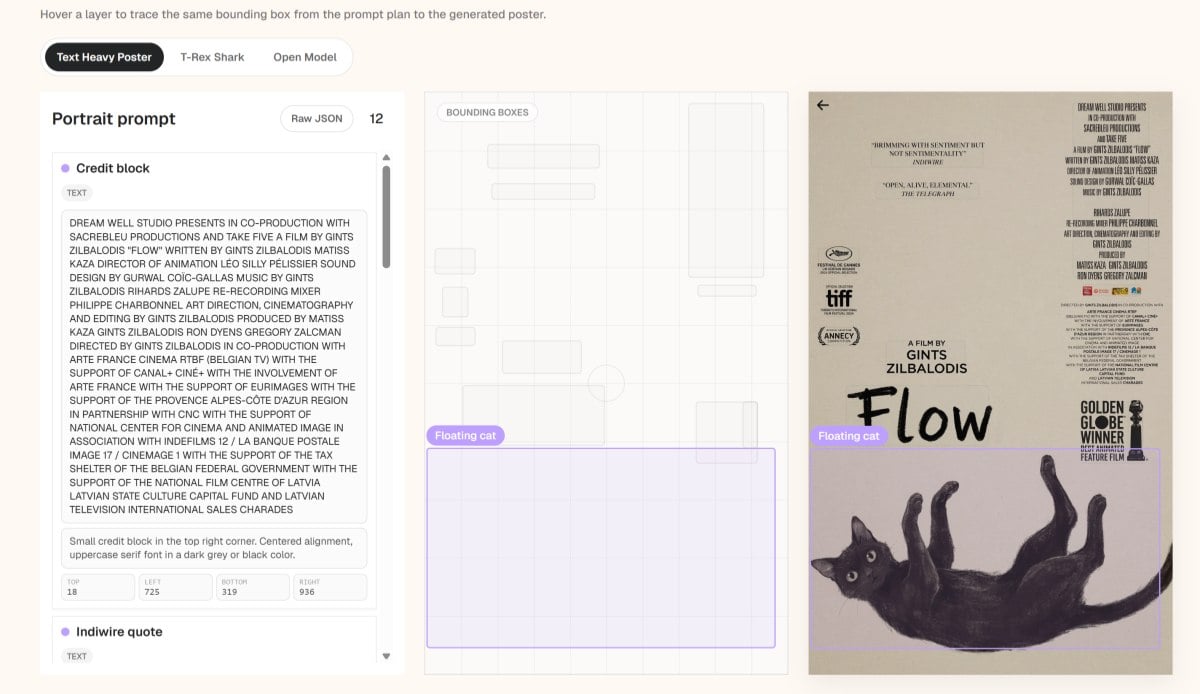 This is the obvious use case. Ideogram has long been associated with readable text generation, and the official Ideogram 4.0 page continues to position the model around visual generation use cases where text and design quality matter. Ideogram
If I needed to generate an image with readable words, I would put Ideogram 4.0 on the shortlist much faster than I would for a generic cinematic portrait or fantasy landscape. Many image models can create beautiful visuals. Fewer can place legible text into those visuals without mangling letters.
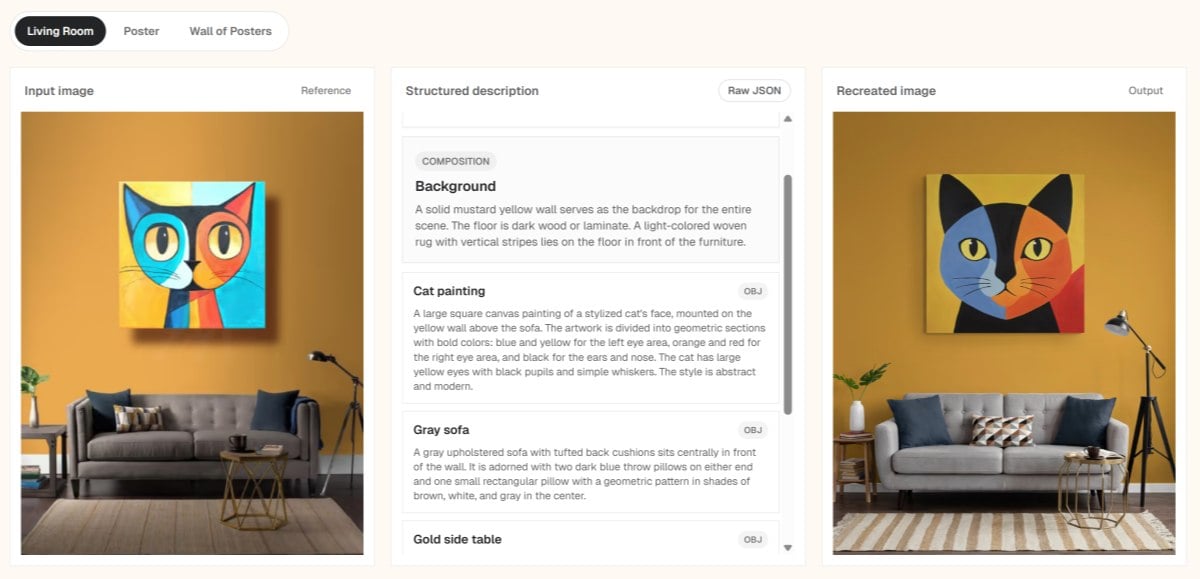 That makes Ideogram 4.0 useful for:
- posters
- title cards
- mock ads
- product labels
- event flyers
- quote graphics
- logo explorations
- typography-heavy social posts
I would still test carefully before using the output in production, but as an ideation model, this is one of its strongest areas.
Logo and graphic design exploration
One Reddit comment defended the model by saying people were missing the point: Ideogram is for graphic design, not just general image generation. That framing matches the way Ideogram presents the model: the value is less about being a universal image generator and more about design control, text, and visual composition. Ideogram
Ideogram 4.0 makes more sense when I think of it as a visual concepting tool. I would use it to explore directions, generate logo ideas, test typographic compositions, or create early visual drafts before refining them elsewhere.
I would not expect it to replace a designer. But I can see it being useful in the messy first stage of design work, where the goal is not perfection but direction.
Multilingual text rendering
One of the more interesting positive signals from Reddit was about multilingual text, especially Spanish. A LocalLLaMA commenter claimed Ideogram 4.0 handled Spanish text rendering better than many other open-weight image models. r/LocalLLaMA
I would treat that as community feedback, not as a benchmark. But it is still a useful testing angle.
If Ideogram 4.0 can handle non-English typography more reliably, it has a real use case for international creators, localization teams, and marketers working outside English-first design.
If I were evaluating Ideogram 4.0 seriously, I would run multilingual prompts early instead of only checking English examples.
Layout control and structured design prompts
The JSON prompt discussion sounds annoying at first, but I do think there is a useful idea underneath it.
For design generation, natural language prompts can be too vague. A structured prompt can define elements more clearly. If Ideogram 4.0 can use that structure to place text, subjects, and background elements more predictably, it could be genuinely valuable.
The question is whether the model rewards the extra effort.
For now, I would treat JSON prompting as an advanced workflow rather than a beginner-friendly feature. It is interesting for power users, but it may make the model feel heavy for casual generation.
Where Ideogram 4.0 falls short
The “open source” controversy is not just semantics
The biggest issue in the community reaction was not image quality. It was trust.
Many Reddit users objected to the way Ideogram 4.0 was described as open source while the downloadable model license appears to limit commercial use. r/LocalLLaMA
That distinction matters because open source has a specific meaning. The Open Source Initiative’s definition includes conditions such as free redistribution and non-discrimination against fields of endeavor. Open Source Initiative
My view: Ideogram 4.0 should be described as open-weight or downloadable, not casually as open source.
That does not make the release useless. Open weights are still valuable. Researchers, hobbyists, and local workflow builders can still experiment with the model. But the license changes the business story completely.
If I were writing documentation, product copy, or a comparison page, I would be careful with the wording:
- safer: “open-weight Ideogram 4.0 model”
- safer: “downloadable model weights”
- risky: “fully open source”
- risky: “free for commercial use” unless verified from the exact license and terms
The license makes commercial workflows uncertain
The license discussion matters because Ideogram 4.0 is especially attractive for commercial-looking tasks: logos, ads, branding, marketing graphics, product visuals, and social posts.
That is exactly where a non-commercial license becomes a problem. Ideogram’s Hugging Face license defines allowed non-commercial purposes and includes restrictions that creators should read before using the downloadable model in commercial or production contexts. Ideogram license
If I am making hobby designs, fine. If I am testing internally, maybe fine depending on the terms. But if I am building a SaaS product, generating customer-facing assets, training LoRAs on brand materials, or producing revenue-generating marketing content, I would not touch it without a legal review.
That makes Ideogram 4.0 awkward. Its best use cases look commercial, but its downloadable model license appears to restrict commercial usage.
For creators, the practical advice is simple: check the exact license before using Ideogram 4.0 outputs or weights in any paid, client, or production context.
Safety filters are a major community blocker
The second big issue is censorship and safety behavior.
Some Reddit users reported heavy filtering, false positives, or refusal behavior after the release. r/StableDiffusion
Whether every report is technically accurate is less important than the pattern: the local image generation community strongly dislikes models that feel restricted after download.
This is not only about NSFW. It is about control.
A local model with aggressive safety behavior creates several problems:
- normal prompts may be blocked
- creative testing becomes unpredictable
- workflows break unexpectedly
- users feel they are spending local VRAM on a model they do not fully control
- comparisons with more flexible models become unfavorable
I understand why a company wants safety layers. But for Stable Diffusion and ComfyUI users, “safety filter on a local model” is almost guaranteed to trigger backlash.
My take is that Ideogram 4.0’s safety behavior may be acceptable for brand-safe design ideation, but it weakens the model’s appeal for local power users.
The JSON workflow may be too much for casual users
The JSON prompt crafter discussion is one of the most important practical signals. In one Reddit thread, users argued that the model may require structured JSON-style prompting or prompt crafting to work reliably. r/StableDiffusion
If a model needs structured JSON prompts to perform well, that can be fine for professional workflows. But if users feel forced to use JSON just to get acceptable results, many will leave.
A model can ask users for extra structure if the reward is obvious. If the reward is inconsistent, the structure feels like busywork.
So I would frame Ideogram 4.0 like this:
JSON prompting is a power feature, not a universal advantage. It helps if you are doing deliberate design composition. It hurts if you just want fast, casual image generation.
ComfyUI performance still needs maturity
The ComfyUI discussion was more practical than ideological. Users talked about VRAM, speed, workflow issues, API keys, buffer problems, and whether the official workflow was optimized. r/comfyui
That is exactly what I would expect from a day-one local model release.
Some users reported slow generation times. Others questioned whether there were faster workflows. Some asked whether character/reference features from the Ideogram website were available locally.
This means I would not judge Ideogram 4.0 only by polished examples. I would judge it by the local experience:
- How hard is setup?
- Does it run on common GPUs?
- How much VRAM does it need?
- Is the official ComfyUI workflow efficient?
- Can users avoid hosted APIs?
- Does structured prompting work locally?
- Can it produce reliable text without too much trial and error?
Until those answers are clearer, I would call Ideogram 4.0 promising but not frictionless.
Ideogram 4.0 vs Nano Banana / Nano Banana Pro
This is one of the most interesting comparisons because community comments repeatedly brought up Nano Banana and Nano Banana Pro.
My read is this: Nano Banana Pro is seen by some users as stronger for high-end reasoning, grounding, or general image capability, while Ideogram 4.0 is more interesting as a downloadable design-focused model.
I would treat that as community perception rather than a benchmark claim, because the Reddit comments are not controlled tests. r/StableDiffusion
That makes the comparison less about “which model is better” and more about workflow.
I would frame it this way:
- Nano Banana / Nano Banana Pro: better fit if you want a hosted, high-capability model and do not need local weights.
- Ideogram 4.0: better fit if you want to experiment locally with a model known for text, logos, and graphic design structure.
If I were making polished production visuals through an API, I would compare Nano Banana Pro seriously. If I were building a local design workflow or testing open-weight text rendering, I would test Ideogram 4.0.
Ideogram 4.0 vs Flux
Flux is the comparison I would use for local image generation flexibility.
Black Forest Labs distributes Flux models through Hugging Face, and Flux has become part of the broader local image-generation ecosystem. Black Forest Labs
Ideogram 4.0 has a more specialized value proposition around text and design layout.
So I would not say Ideogram 4.0 replaces Flux. I would say it competes in a narrower lane.
- Flux: better fit for a mature local generation ecosystem and broad creative workflows.
- Ideogram 4.0: better fit for text-heavy design experiments, assuming the license and safety behavior are acceptable.
If I needed general local image generation, I would still keep Flux in the toolkit. If I needed poster text or logo ideation, I would test Ideogram 4.0 alongside it.
Ideogram 4.0 vs Qwen Image
Qwen Image is another useful comparison point because it is also part of the open-weight image model conversation. The Qwen Image model page on Hugging Face gives users a direct reference point for its availability and model details. Qwen
The key difference is flexibility.
Community users often care about whether they can fine-tune, train LoRAs, build products, and adapt a model freely. If Ideogram 4.0’s license limits commercial use or derivative workflows, Qwen Image may look more appealing to developers even if Ideogram performs better in certain design tasks.
My practical view:
- Qwen Image: attractive if flexibility and ecosystem matter.
- Ideogram 4.0: attractive if text rendering and graphic design quality are the priority.
The better choice depends on whether you are evaluating creative output or long-term workflow ownership.
Ideogram 4.0 vs Gemini and GPT Image
Gemini and GPT Image are not the same category as a downloadable local model, but users compare them because they compete for the same creative jobs.
If I need a model for a commercial product, API-based tools may actually be easier to justify than a non-commercial open-weight model. That sounds backward, but it is true. A paid API with clear commercial terms can be safer than local weights with ambiguous restrictions.
Google’s Gemini product ecosystem is officially documented by Google, which makes it a more straightforward hosted-platform reference point than scattered community claims. Google
That is why some users ask: why build around a restricted downloadable model when strong commercial APIs already exist?
My answer:
- Use Gemini or GPT Image when you want a hosted commercial workflow with less local setup.
- Use Ideogram 4.0 when you specifically want local experimentation around text, layout, and design-oriented generation.
Ideogram 4.0’s advantage is not convenience. Its advantage is control and specialization. But if the license and safety layer reduce that control, the hosted alternatives become more attractive.
How I would actually use Ideogram 4.0
I would not start with Ideogram 4.0 for every image.
I would use it in a targeted way:
-
Start with a design-heavy task
- logo ideas
- poster layouts
- product label mockups
- title graphics
- typography tests
-
Use structured prompts only when structure matters
- If I care about placement, hierarchy, or exact text, JSON prompting may be worth it.
- If I just want a quick visual mood, I would not force a complex JSON workflow.
-
Test text rendering early
- I would include difficult text, multiple words, and non-English examples.
- If the model fails there, its main advantage weakens.
-
Check safety behavior
- I would test normal brand-safe prompts and edge cases.
- False positives would be a serious workflow problem.
-
Check license before using anything commercially
- For personal experiments, I would be more relaxed.
- For client work, SaaS, paid assets, ads, or brand projects, I would verify the exact terms first. Ideogram license
-
Compare against alternatives
- Flux for local flexibility
- Qwen Image for open ecosystem potential
- Gemini / GPT Image for hosted commercial workflows
- Nano Banana Pro for high-end output comparisons
That is the realistic workflow. Ideogram 4.0 is not a one-model answer. It is a specialized tool that needs the right use case.
Community feedback: what Reddit got right
The Reddit reaction was noisy, but the underlying concerns were useful.
The community was right to question the “open source” framing. If a model has non-commercial restrictions, that should be stated clearly. Creators and developers do not want to discover licensing limits after building a workflow. r/LocalLLaMA
The community was also right to focus on safety filters. For local generation users, control is part of the value proposition. If the model refuses too often or blocks harmless prompts, it becomes frustrating no matter how good the best examples look. r/StableDiffusion
And the community was right to question the JSON workflow. Structured prompting is powerful, but only if the model earns the extra effort.
Where I think some criticism may be too harsh is in treating Ideogram 4.0 like it should be a general-purpose uncensored Stable Diffusion replacement. I do not think that is the right lens. Ideogram 4.0 should be judged as a graphic design and text-rendering model first.
When I judge it that way, the model becomes more interesting.
Final verdict
My final take is this:
Ideogram 4.0 is strongest as a design-focused image model for text, logos, typography, and structured layouts. It is weaker as a general-purpose local model for users who want full freedom, simple prompts, commercial certainty, or fast ComfyUI workflows.
I would recommend Ideogram 4.0 to creators who want to test open-weight text rendering and design composition. I would not recommend it as a default production model until the license, safety behavior, and local workflow maturity are clear.
If you are a hobbyist, researcher, or design experimenter, it is worth trying.
If you are building a SaaS product, creating client branding assets, or generating commercial marketing materials, I would pause and read the license first.
If you hate safety filters or do not want to deal with JSON prompts, I would compare alternatives before investing time.
The best way to understand Ideogram 4.0 is not as “the new open source image model.” That framing creates the wrong expectations.
I would describe it more carefully:
Ideogram 4.0 is an open-weight, design-oriented image model with impressive text potential, real workflow friction, and serious licensing caveats.
That is still interesting. It is just not the clean win some people hoped for.


