
Grok Imagine Review 2026: What Is and How to Use?
- Grok Imagine review: my quick verdict after hands-on testing
- 1. Quick facts: what you get and what you don’t
- 2. What is grok imagine?
- 3. The features that mattered once I actually used it
- 4. How to use grok imagine?
- 5. Is grok imagine free?
- 6. What Grok Imagine is best for (and what I avoid using it for)
- 7. Privacy + safety: the part people skip until it matters
- 8. Faqs
- 9. The “structure” that makes it feel mainstream
- 10. Conclusion: my honest take after using Grok Imagine
This Grok Imagine review is based on how I actually used it: not as a “one perfect render” machine, but as a rapid loop for producing lots of short-form visuals.
The main value is speed—Grok Imagine is built to move from prompt to image to a short clip in a few taps, which makes it feel less like editing and more like browsing. That speed changes how you work: you try more ideas, discard faster, and ship more variants. But it also means you should be intentional about privacy and what you upload, because the same frictionless flow that makes it fun can also make mistakes travel fast.
Grok Imagine review: my quick verdict after hands-on testing
Grok Imagine is best when you need quick social-native visuals, and it’s weaker when you need precise motion control or consistent multi-shot storytelling.
Here’s the truth I’d tell a friend: if you want to test hooks, styles, and “will this concept land?” quickly, Grok Imagine is one of the fastest ways to do it. If you want camera language, continuity, and fine-grain control, you’ll feel the ceiling pretty quickly.
What I’ll cover in this review:
- The product structure (what it’s designed to do)
- Key features that actually matter in real workflows
- How I use it to get repeatable results
- Cost/limits and what “free” really means
- Privacy and deletion workflows (because you’ll ask sooner or later)
- FAQs you can bookmark
1. Quick facts: what you get and what you don’t
Grok Imagine is designed as an “idea → asset” generator, not a full editor, and that explains most of its strengths and weaknesses.
| Category | What I observed in real use |
|---|---|
| Core workflow | Text → image → short video (reference-image-first) |
| Best outputs | Short clips that look “post-ready” fast |
| Weak spot | Fine motion control, consistent cinematic direction |
| Iteration style | Mode-switching + prompt nudges, lots of reruns |
| Risk area | Privacy expectations and sensitive content handling |
2. What is grok imagine?
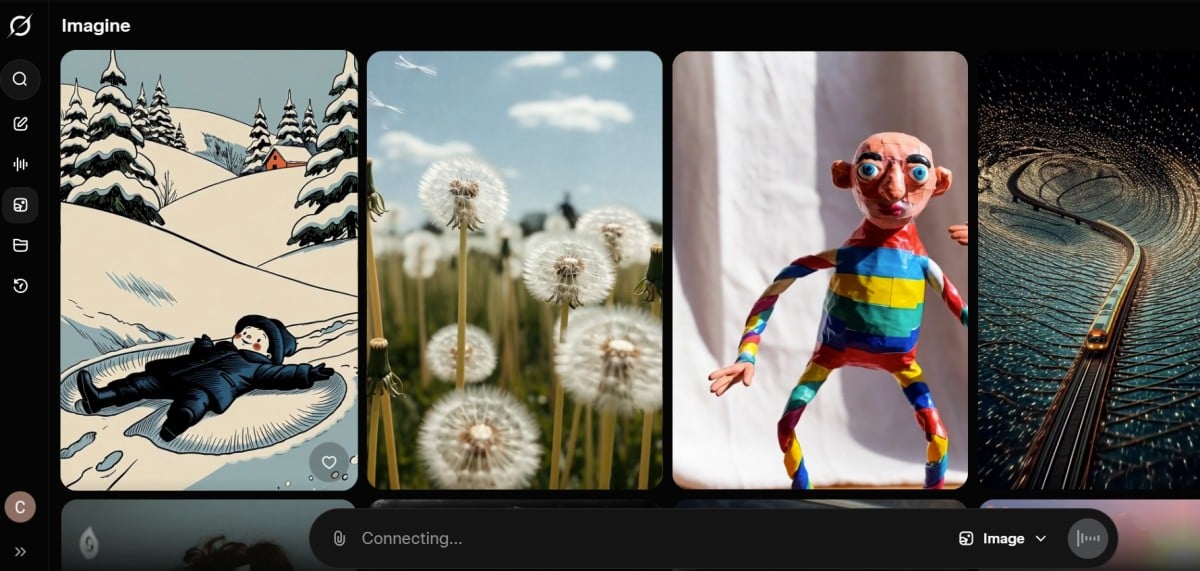
Grok Imagine is a fast image-and-video generation layer inside the Grok ecosystem, built around a simple loop: generate an image, then animate it into a short clip.
Instead of asking you to think like an editor, it asks you to think like a creator on a deadline. You’re not building a timeline. You’re generating assets. That’s why it feels so fast and why it fits short-form content well.
The structure is basically:
- Text-to-image (or upload a reference image)
- One-tap “make video” from that image
- Mode selection that changes style/limits quickly
- Download/share and iterate
If you want a clean internal reference for your own setup, this page is the natural starting point: Grok Imagine
What you’re really buying into is the modes, not a configuration option.
Grok Imagine doesn’t just have styles—it has modes that meaningfully change what you get:
- Normal: safest, most predictable
- Fun: playful, often exaggerates vibe
- Custom: better when you want tighter prompt steering
- Spicy: adult-oriented, boundary-pushing, and easiest to misuse
I’ll mention this once here because people search for it: Grok Imagine Spicy
And yes—some interfaces surface “Spicy” more explicitly than others, but regardless of UI, you should treat it as a separate content category with separate risk.
3. The features that mattered once I actually used it
Grok Imagine is useful because its features map to real creator behaviors: speed, variation, and low friction.
3.1 Text-to-image: quick outputs, stronger results with minimal input
The images I got were strongest when I aimed for clarity over complexity:
- one subject
- clear lighting
- simple background
- limited tiny textures
When I tried to cram in too many elements, the still could look interesting, but the animation step often turned “busy” into “wobbly.” So I treat the image stage like a casting call: I want a clean base the motion can respect.
Practical note: if your still image has messy fingers, hair artifacts, or weird small text, the video step usually doesn’t fix it—it amplifies it.
3.2 Image-to-video: the real reason people stick around
The core experience is essentially image to video with a mode-driven wrapper, so you can spin variations quickly.
What I liked:
- I can generate multiple options fast and choose the one that “reads” best on a phone.
- Motion is often subtle but enough for social: micro head turns, gentle camera push-ins, light parallax, small environmental movement.
What I didn’t like:
- When I need specific camera choreography (“pan left, then rack focus, then tilt”), it’s not reliable.
- It’s hard to keep a character perfectly consistent across many runs without babysitting the inputs.
3.3 Mode switching: the fastest A/B test mechanic
Switching modes is how I test concepts without rewriting the whole prompt.
I typically run:
- Normal as my baseline
- Fun to see if it gets a better “scroll-stopping” vibe
- Custom if I need it to obey the prompt more literally
The main lesson: Grok Imagine rewards small, controlled changes. Big prompt swings create chaos.
3.4 “Post-ready” output: designed in, not a happy accident
A lot of outputs feel like they were designed to be posted quickly: short duration, punchy motion, sometimes audio that makes it feel like a clip rather than a GIF.
This is where Grok Imagine wins: it’s not chasing perfection, it’s chasing “good enough to publish.”
4. How to use grok imagine?
The fastest way to use Grok Imagine is to treat it like a repeatable production loop: strong still → simple motion plan → run three modes → select → refine.
4.1 My workflow (the one that gave me consistent wins)
-
Start with a clean still
- If I’m doing a person, I use a portrait with clean edges, no busy jewelry, no tiny patterns.
- If it’s a product, I keep the product centered and lighting clear.
-
Write a “shot note” prompt I keep it structured:
- subject + environment
- one motion cue
- one style cue
Examples I used:
- “Premium minimalist skincare product shot featuring a translucent pink cleanser bottle with a white pump, centered in frame. The bottle rests in soft pink foamy bubbles on a pastel pink gradient background. Diffused lighting creates a luminous glow through the liquid, highlighting smooth textures and realistic refraction in a luxury beauty advertising style.”

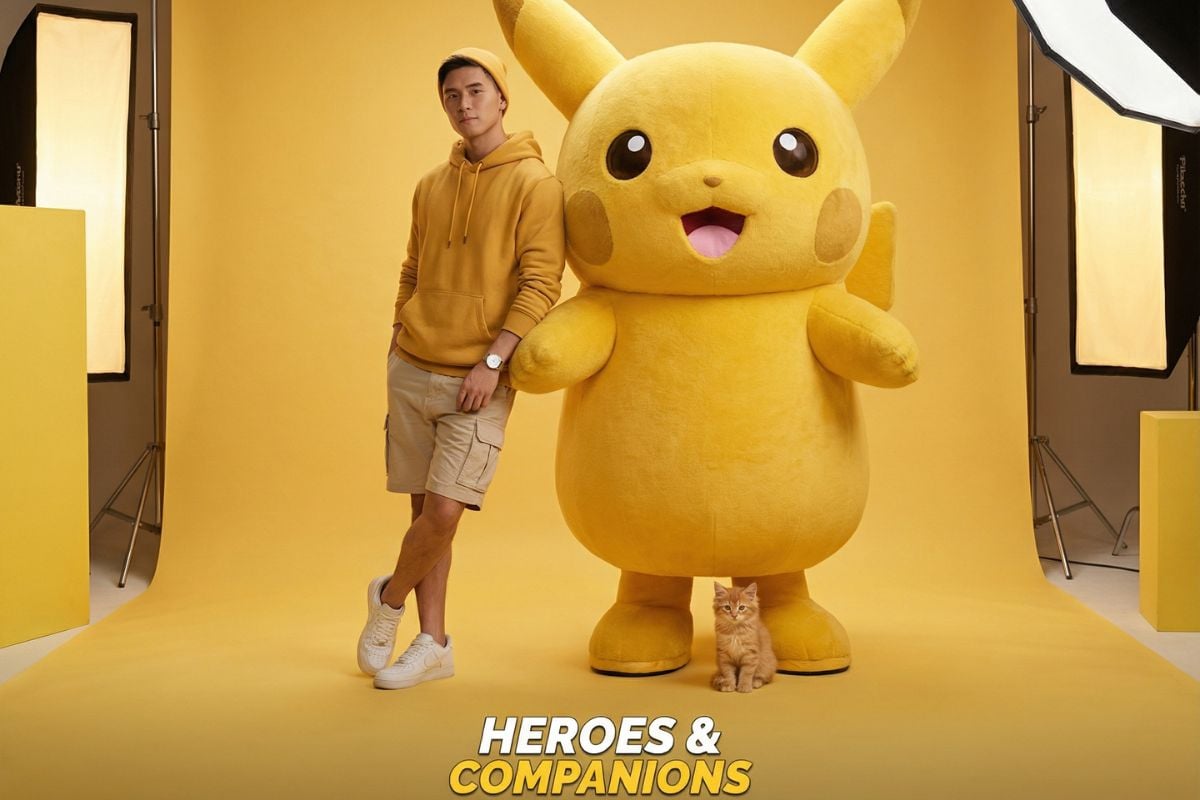
- “A stylish young man stands confidently beside a giant fluffy Pikachu in a monochromatic yellow studio. He wears a yellow hoodie, beige cargo shorts, and white sneakers. A small orange kitten sits at Pikachu’s feet. Soft studio lighting, shallow depth of field, ultra-realistic textures, vibrant colors, and polished commercial hero-shot style.”
-
Run baseline in Normal This tells me if the base concept works.
-
Run one variation in Fun This often adds energy or a more “viral” tone.
-
Use Custom for correction If it ignores something important, I re-run in Custom with fewer adjectives and more direct motion language.
-
Pick one and stop This is the underrated discipline. When I keep rerunning endlessly, quality doesn’t always improve—sometimes it just drifts.
4.2 A quick quality checklist before you export
- Does the subject stay readable the whole time?
- Do faces/hands remain stable enough?
- Does the motion match the mood (subtle vs energetic)?
- Would this work muted (social reality)?
- Is there anything sensitive in the frame you shouldn’t upload?
5. Is grok imagine free?
Grok Imagine has been presented in different ways depending on rollout and timing, so “free” is a moving target rather than a permanent promise.
Here’s how I think about it in practice:
- If you’re casually experimenting, you may find free access windows or generous limits.
- If you need it for production, assume there will be tiering, caps, or policy changes at some point.
My rule: I never build a content calendar that depends on a tool staying unlimited or free. If it becomes a key part of your pipeline, you want a backup.
6. What Grok Imagine is best for (and what I avoid using it for)
Grok Imagine is great when you need short-form momentum, and it’s a risky choice when you need strict control, compliance, or privacy guarantees.
6.1 Best use cases (where it consistently helped me)
- Social posts that need motion to stand out
- Concept testing (10 versions, pick 1 winner)
- Quick “visual hooks” for Reels/TikTok/Shorts
- Simple product motions (light parallax, subtle camera movement)
- Meme-grade visuals where speed > perfection
6.2 Where I hesitate
- Anything requiring precise, repeatable camera control
- Anything involving sensitive images or confidential client assets
- Anything where consistent character identity across many shots is mandatory
7. Privacy + safety: the part people skip until it matters
You should assume that anything you upload to a cloud tool is something you might want to delete later, and you should learn the deletion paths before you need them.
A few authority links worth keeping (nofollow):
My personal practice:
- I don’t upload anything I wouldn’t be comfortable seeing leaked.
- I keep test prompts generic when I’m exploring.
- If I’m using a real person’s image, I treat consent and context as non-negotiable.
8. Faqs
8.1 Are grok imagine videos private?
They’re private until you post or share them publicly, but your privacy depends on your account settings and how the platform treats history and data.
What I do:
- I avoid posting tests.
- I review privacy settings before running lots of generations.
- I clear history periodically if I’m experimenting heavily.
8.2 Is grok imagine unlimited?
No—expect limits in practice, even if you don’t hit them immediately.
Limits can show up as:
- daily caps
- feature gating by tier
- speed throttles at peak times
- policy changes that reduce access
If you’re producing at volume, plan for a ceiling.
8.3 How to delete grok imagine history?
You generally delete it through conversation/history controls in the Grok/X experience (and sometimes on the web interface depending on where you used it).
A simple workflow I follow:
- Open settings (in the app or web interface you used)
- Find conversation history / data / privacy controls
- Delete specific conversations or clear history
If you want the cleanest approach, do this regularly—don’t wait until you’re anxious about something you generated.
8.4 Can I remove image or video from grok imagine web?
In most cases, you can remove the record by deleting the conversation/output entry in the web history, but the exact UI and behavior can change.
My conservative approach:
- Delete the conversation where the output was created.
- If it was posted publicly, remove the post separately.
- Don’t assume deletion is instant everywhere; give it time and verify.
8.5 How is grok imagine so fast?
It’s fast because the product is optimized for short clips and rapid iteration rather than long, highly controlled renders.
My practical explanation:
- short duration outputs
- simple “reference-image-first” pipeline
- mode presets that trade precision for speed
- a UX that encourages reruns instead of deep tweaking
9. The “structure” that makes it feel mainstream
Grok Imagine feels mainstream because it matches how creators already behave: fast drafts, quick variations, post-ready outputs.
The tool is basically a three-layer system:
- Image generation (your base asset)
- Video animation (adds motion to make it social-native)
- Modes (a fast way to change tone without rethinking everything)
That design is why it can be addictive: it’s not just generating media—it’s generating momentum.
10. Conclusion: my honest take after using Grok Imagine
This Grok Imagine review comes down to a simple truth: it’s one of the fastest ways I’ve found to turn an idea into a short clip that’s good enough to post, especially when my goal is testing and iteration, not perfection.
When I treat it like a draft engine—clean stills, small motion cues, three quick mode runs—I get surprisingly usable results fast. When I ask it to behave like a precision film tool, it pushes back.
If you want speed, variants, and social-ready motion, Grok Imagine is a strong addition to a modern creator workflow.
If you plan to use boundary-pushing modes like Grok Imagine Spicy, do it responsibly and with full awareness of the risks. And if you’re building any serious pipeline, keep a backup tool in mind—because “free,” “unlimited,” and even feature availability can change faster than your content calendar.


