
Animaker Review 2026: Easy 2D Animation, But Not the AI Video Tool Everyone Thinks It Is
- Quick Verdict
- What Animaker Actually Is
- What Animaker Does Well
- Where Animaker Starts to Feel Limited
- Animaker Pricing: The Monthly Price Is Not the Whole Cost
- What Real Users Say About Animaker
- Animaker AI Review: Useful, But Not the Same as Model-Based AI Video
- Who Should Use Animaker?
- Who Should Skip Animaker?
- Best Animaker Alternatives
- Final Verdict: Is Animaker Worth It?
Animaker is easy to like in the first hour.
The templates look friendly. The editor does not feel scary. The character system gives you enough control to build a simple explainer without opening After Effects or hiring an animator.
But I would not call Animaker a direct replacement for modern AI video tools.
That is the main point of this Animaker review. Animaker is strongest when you need a simple 2D explainer, classroom video, HR training clip, or cartoon-style business animation. It becomes harder to recommend when you expect cinematic AI video, image-to-video generation, long-form production, or a smooth client revision workflow.
So the question is not only “Is Animaker good?”
A better question is:
Is Animaker the right kind of video tool for the job you actually need to finish?
Quick Verdict
| Category | Verdict |
|---|---|
| Best for | 2D explainers, classroom videos, HR training, simple business animation |
| Not best for | Cinematic AI video, image-to-video, long videos, heavy client revisions |
| Biggest strength | Beginner-friendly editor and 2D character workflow |
| Biggest concern | Export limits, browser lag, pricing friction, AI expectation gap |
| Free plan | Good for testing, not serious production |
| Worth it? | Yes for simple animated explainers. No if you mainly need modern AI video generation. |
My short verdict: Animaker is useful, but easy to misunderstand.
If you want a cartoon explainer with characters, scenes, text, icons, and voiceover, it can make sense. If you want to turn a product image, anime character, or old clip into a new AI video, I would look elsewhere.
What Animaker Actually Is

Animaker is best understood as a browser-based 2D animation and explainer video maker with AI-assisted features.
That wording matters.
A lot of people now search for Animaker because they see phrases like “AI video generator.” That can create the wrong expectation. When I look at the actual workflow, Animaker still feels closer to a scene-based animation editor than a fully generative AI video model.
You build scenes. You choose templates. You add characters. You adjust text. You place icons. You add voiceover. You export the final video.
That is not a bad thing.
In fact, it is exactly why Animaker works for teachers, HR teams, small businesses, and people who need a friendly animated explainer. But it also means Animaker should not be judged like Kling, Runway, Veo, Pika, or other model-based AI video tools.
Different job. Different tool.
What Animaker Does Well
It is genuinely beginner-friendly
This is the part I would not argue with.
Animaker is easier to approach than professional animation software. You do not need to understand keyframes deeply. You do not need to draw. You do not need to build every scene from zero.
You can start with a template, replace the text, change the character, add a few actions, and get something that looks presentable.
That is why many G2 user reviews focus on ease of use. The praise makes sense. For non-designers, a tool like this removes a lot of friction.
I would recommend Animaker faster to a teacher than to a professional video agency.
That distinction matters.
A teacher may need a two-minute classroom explainer. A small business may need a friendly onboarding clip. A student may need a simple animated project. Animaker fits those jobs better than it fits high-pressure video production.
The 2D character workflow is still its best feature
The strongest part of Animaker is not the AI label. It is the character workflow.
You can create cartoon-style characters, place them into scenes, use actions, add expressions, and build a clear visual story. For explainers, that still works.
A talking office character.
A classroom presenter.
A friendly mascot.
A simple HR training guide.
A product explainer with cartoon scenes.
That is where Animaker feels useful.
TechRadar’s Animaker review also treated its character and animation features as one of the more important parts of the product, while still noting some workflow glitches. That matches how I would frame it: good for structured 2D animation, less convincing as a modern AI video production tool.
It works well for simple explainers
If your video is short, clear, and scene-based, Animaker can do the job.
The best use cases are:
| Use case | Fit |
|---|---|
| Classroom explainer | Strong fit |
| HR onboarding video | Strong fit |
| Basic marketing explainer | Good fit |
| Cartoon business presentation | Good fit |
| Short social explainer | Good fit |
| Long client video with many revisions | Risky |
| Cinematic AI video | Weak fit |
| Image-to-video generation | Not the natural workflow |
I would not overcomplicate this.
Animaker works best when the final video is supposed to feel like an animated explainer, not a cinematic AI clip.
Where Animaker Starts to Feel Limited
The editor is not the main issue.
The editor is friendly enough. The real question is whether the workflow still feels friendly after you add eight scenes, a voiceover, subtitles, background music, and two rounds of revisions.
That is where I would test Animaker seriously.
Browser lag can matter more than the feature list
A lot of software reviews spend too much time listing features. That is not how video tools fail in real work.
They usually fail in smaller ways.
The preview lags.
The voiceover feels slightly off.
A scene becomes hard to adjust.
Export takes longer than expected.
A client asks for one small change, and suddenly you are exporting again.
TechRadar reported playback glitches during its Animaker test, including voice timing issues during preview, even though the exported result was better. That is an important detail. It means the final video may still work, but the editing process can feel less reliable than the feature page suggests.
For casual use, that may be fine.
For deadline work, it matters.
Long or revision-heavy videos are risky
I would not test Animaker with a 10-second demo clip. That makes almost every video tool look good.
A better test is this:
Create a two-minute explainer with 8 to 10 scenes. Add one custom character. Add subtitles. Add background music. Add a voiceover. Export once. Then pretend a client asks for three changes: logo, CTA text, and one scene replacement.
That is when the real workflow shows up.
Can you revise quickly?
Does the timing still work?
Does the browser stay responsive?
Does the export process feel predictable?
Do the plan limits start to matter?
That is a better review test than simply asking, “Can I make a video?”
Of course you can make a video. The harder question is whether you can finish the video without friction when it starts to look like real work.
The AI video expectation gap is real
This is the biggest strategic problem with Animaker in 2026.
A user searching for “AI video generator” may now expect something very different from a template-based animation editor. They may expect prompt-to-video, image-to-video, cinematic camera movement, realistic motion, style transfer, or anime-style video generation.
Animaker can help you make videos faster. It can support AI-assisted creation. But it should not be confused with model-based AI video tools.
That gap is where many users get disappointed.
If your starting point is a product image, anime character, poster, or visual reference, an AI image-to-video tool is usually a more natural workflow than a scene-based 2D animation editor.
That does not make Animaker bad.
It just means it is often bought for the wrong job.
Animaker Pricing: The Monthly Price Is Not the Whole Cost
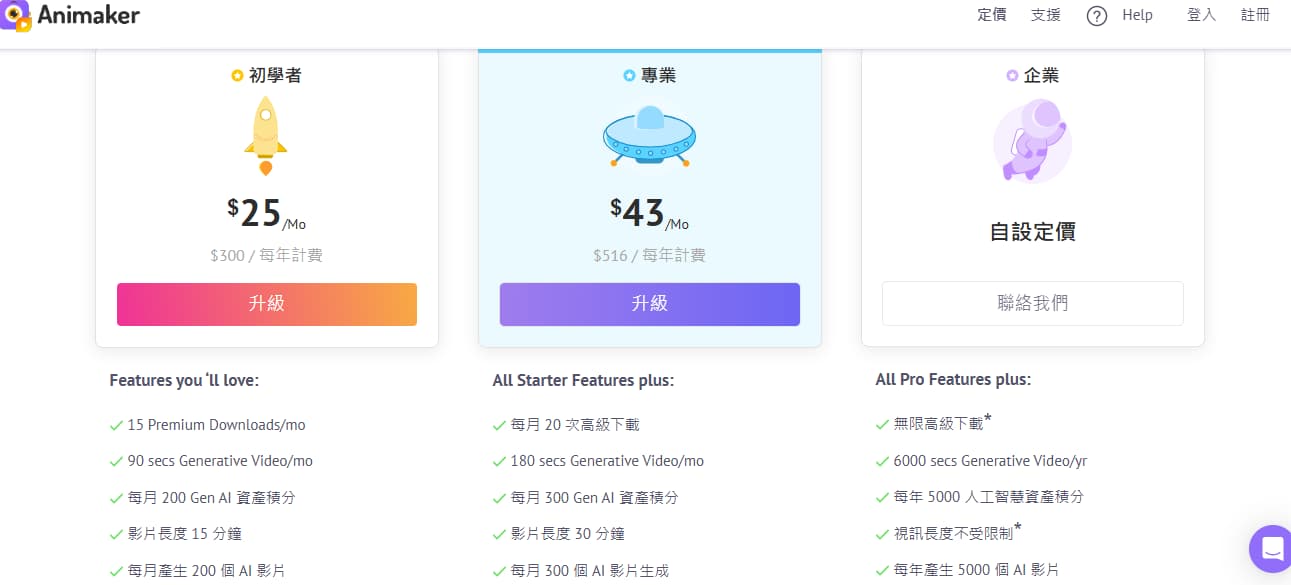
Animaker’s pricing deserves more attention than most reviews give it.
The monthly price is only one part of the cost. For a video tool, the real cost also depends on downloads, exports, quality limits, premium assets, generative video limits, and how often you need to revise.
On Animaker’s pricing page, the paid plans include limits around Premium Downloads and generative video usage. That matters because real video work rarely ends after one clean export.
A more realistic flow looks like this:
| Step | What usually happens |
|---|---|
| First export | You check timing, subtitles, and layout |
| Second export | You fix text or voiceover issues |
| Third export | Someone asks for a logo or CTA change |
| Fourth export | You adjust format or quality |
| Fifth export | You prepare the version for publishing |
That is why I do not judge Animaker only by the monthly price.
I judge it by the revision cost.
Animaker’s free plan is useful for learning the editor. It is not enough to judge whether the tool can support your real content workflow. A free test can show you the interface. It cannot fully show you how painful repeated exporting, longer videos, or premium asset limits may become.
My advice is simple:
Do not buy an annual plan after making one pretty sample.
Make the kind of video you actually plan to produce. Export it. Revise it. Export again. Then decide.
What Real Users Say About Animaker
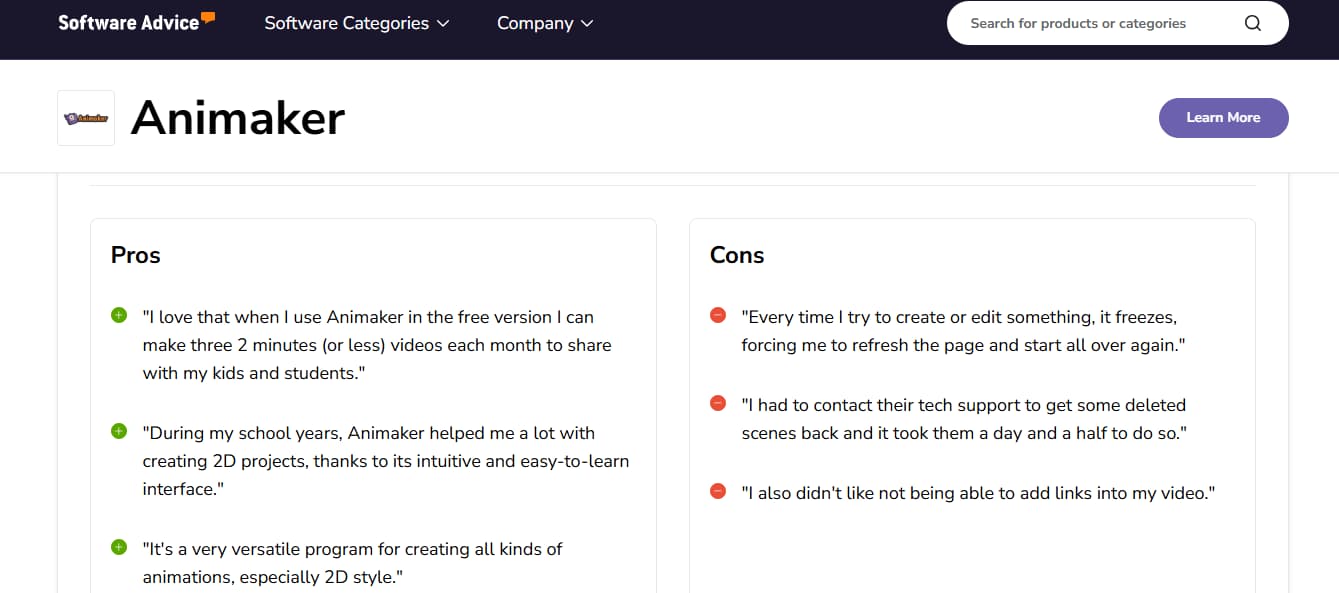
Animaker’s user feedback is not one-sided.
That is what makes the product interesting.
Many users like it because it is approachable. They can build simple animated videos without deep design or editing experience. That matches the product’s strongest use case.
But some users complain about pricing, limits, browser-based friction, support outcomes, or workflow reliability. I would not treat every negative review as universal truth. Reviews are messy. Some users misunderstand plans. Some expect features the tool was never designed to provide.
Still, patterns matter.
Beginners often like Animaker
This is the clearest positive signal.
On platforms like Software Advice, users often describe Animaker as easy to learn and useful for 2D projects, lessons, and simple animation work.
That sounds right to me.
If someone has never used a video editor before, Animaker feels less intimidating than a timeline-heavy professional tool. The visual system is friendly. The templates reduce blank-page anxiety. The character options give people something to build from.
For education and internal training, that is enough.
Production users judge it differently
A beginner asks:
“Can I make a nice video?”
A production user asks:
“Can I finish this video on time after three rounds of changes?”
Those are different questions.
This is why review scores can be misleading. A high score from a casual user and a frustrated review from a deadline-heavy user can both be honest. They are judging different jobs.
I would read Trustpilot reviews as sentiment signals, not final proof. The positive reviews show that some users are happy with support and ease of use. The negative ones are still useful because they point to the exact areas buyers should test: pricing expectations, limitations, and support outcomes.
That is the fair way to use review platforms.
Not as a scoreboard. As a risk map.
Animaker AI Review: Useful, But Not the Same as Model-Based AI Video
This is where I think many Animaker reviews are too soft.
They say Animaker has AI features, then move on.
I would rather ask a harder question:
What kind of AI video work is Animaker actually good for?
Here is the way I see it.
| Animaker AI | Model-based AI video tools |
|---|---|
| Helps build structured animated videos | Generates motion from prompts, images, or clips |
| Better for cartoon explainers | Better for cinematic, anime, or stylized motion |
| Works through scenes and templates | Works through model-driven generation |
| Manual editing still matters | Prompt control and output quality matter more |
| Good for business animation | Better for image-to-video and video-to-video workflows |
Animaker’s AI features can help speed up parts of the video-making process. That is useful.
But if the goal is to create movement from an image, restyle footage, produce anime-style motion, or test several visual video models, Animaker is not the first workflow I would choose.
I would also skip Animaker if the goal is to restyle existing footage, turn an old clip into a new visual direction, or create motion from assets you already have. That belongs closer to a video-to-video workflow than a template-based 2D animation editor.
This is not a “which tool is better” argument.
It is a workflow argument.
Animaker starts with scenes and templates. Model-based AI video tools often start with an image, clip, prompt, or visual style. If you choose the wrong starting point, the tool will feel harder than it should.
Who Should Use Animaker?
Animaker makes sense if your goal is clear, simple, and 2D.
I would consider it for:
| User type | Why Animaker may work |
|---|---|
| Teachers | Easy classroom explainers and visual lessons |
| Students | Simple animated projects without complex editing |
| HR teams | Onboarding videos and internal training clips |
| Small businesses | Friendly product explainers and promo videos |
| Non-designers | Template-based workflow with lower learning curve |
| Teams making cartoon explainers | Useful character and scene system |
If your video needs to look like a clean animated explainer, Animaker can be a practical choice.
Especially if speed matters more than cinematic quality.
Who Should Skip Animaker?
I would skip Animaker if your main need is modern AI video generation.
That includes:
| Need | Better direction |
|---|---|
| Image-to-video generation | Use a model-based AI video tool |
| Video-to-video restyling | Use a video transformation workflow |
| Cinematic AI clips | Use a generative video model |
| Anime-style movement | Use an AI video or anime-focused workflow |
| Heavy client revisions | Test export limits first |
| Long videos every week | Test stability and pricing carefully |
I would also be careful if you are an agency or freelancer producing videos for clients. The tool may still work for you, but you need to test it under revision pressure.
Not one sample.
A real project.
Best Animaker Alternatives
I would not compare every video tool as if they all do the same job.
They do not.
Here is the cleaner way to think about alternatives.
| Alternative | Better for |
|---|---|
| Vyond | Corporate training and polished business animation |
| Powtoon | Presentation-style animated videos |
| Canva Video | Fast social and design-led videos |
| Renderforest | Template-based brand videos |
| Camtasia | Screen recording and tutorial videos |
| GoEnhance | Image-to-video, video-to-video, anime-style motion, visual transformation |
Animaker sits somewhere between simple design-led video tools and more focused business animation tools.
It is easier than professional animation software. It is more animation-focused than Canva. It is usually less enterprise-heavy than Vyond. But it is not the same category as a modern AI video generation platform.
That is the key.
Final Verdict: Is Animaker Worth It?
Animaker is worth trying if you need simple 2D explainer videos, classroom content, HR training clips, or cartoon-style business videos.
I would not dismiss it.
The editor is friendly. The templates are useful. The character workflow still has value. For the right user, Animaker can save time.
But I would not buy an annual plan before testing four things:
| Test | Why it matters |
|---|---|
| Your real video length | Short demos hide workflow problems |
| Export quality | The final file matters more than preview |
| Revision workflow | Real projects rarely end after one export |
| AI video expectations | Animaker may not match model-based AI tools |
My final take:
Animaker is not a bad tool. It is just often bought for the wrong job.
Use it if you want simple animated explainers.
Be careful if you expect cinematic AI video, image-to-video generation, or a production workflow that can handle repeated revisions without friction.


