10 Best Free AI Image Enhancers & Upscalers for 4K in 2026
- 1. Quick Answer
- 2. Faithful vs Creative: The One Choice That Matters
- 3. The 10 Best AI Image Enhancers in 2026
- 4. How to Choose
- 5. FAQ
- 6. Sources
1. Quick Answer
An AI image enhancer makes a small, soft or low-resolution picture larger and sharper. Some tools stay faithful to the original and only restore detail; others are creative and paint in new detail. Pick by what you need, not by the biggest "16x" claim.
Here are the 10 tools we would look at in 2026, with what each one gives you for free. We ran our own two tools on real test images on October 20, 2026; for the other eight, every fact comes from the tool's official pages checked the same day.
| Tool | Type | Free option | Upscale | Paid from | Faithful or creative |
|---|---|---|---|---|---|
| GoEnhance Image Upscaler | Web | Free tokens at sign-up | To 1080p, 2K or 4K (short side) | 4 tokens per image | Faithful |
| GoEnhance Image Enhancer | Web | Free tokens at sign-up | Up to 2.5x, up to 4096 px | 5 tokens per image | Creative, adjustable |
| Upscayl | Desktop (Windows, macOS, Linux) | Free and open source | Up to 16x | Free (optional paid cloud) | Not stated |
| Let's Enhance | Web | 10 credits, watermarked | Up to 256 MP on personal plans | $9/month, billed yearly | Not stated |
| Topaz Gigapixel | Desktop + cloud | No free desktop trial | Large enlargements | $149/year | Both (standard and generative models) |
| Magnific | Web | None | Up to 16x | $14.50/month, billed yearly | Both (Precision and Creative modes) |
| Bigjpg | Web | 20 images/month, up to 4x, 5 MB uploads | Up to 16x on paid plans | $6 for 2 months | Not stated |
| waifu2x | Web + open source | Free | 2x per pass | Free | Not stated |
| Canva Upscale | Inside the Canva editor | Uses the free AI allowance | 4x or 16x, up to 50 MP | Included in Canva Pro | Not stated |
| Pixelcut | Web + iOS/Android | Limited upscales, no watermark | 4x | $8/month, billed yearly | Not stated |
Prices and limits change often. Check each tool's pricing page before you pay.
2. Faithful vs Creative: The One Choice That Matters
Before comparing features, decide which kind of upscaler you want.
- Faithful upscalers restore what is already in the photo. Faces stay the same person, logos keep their shape, and nothing new appears. Use them for real photos: portraits, product shots, old family pictures, screenshots.
- Creative upscalers add detail that was never there, such as skin texture, hair strands or brick patterns. They can make AI art and illustrations look richer, but they can also change a face or invent text.
Many "16x" results look impressive because the tool is quietly redrawing the image. If you need the person in the photo to still look like themselves, start with a faithful tool.
3. The 10 Best AI Image Enhancers in 2026
1. GoEnhance Image Upscaler (faithful, 1080p to 4K)
The GoEnhance Image Upscaler is our faithful upscaler, added in October 2026. You upload a JPG, PNG or WebP and choose the output resolution: 1080p, 2K or 4K sets the short side of the result to 1080, 1440 or 2160 pixels, and the long side keeps your aspect ratio. You download a PNG.
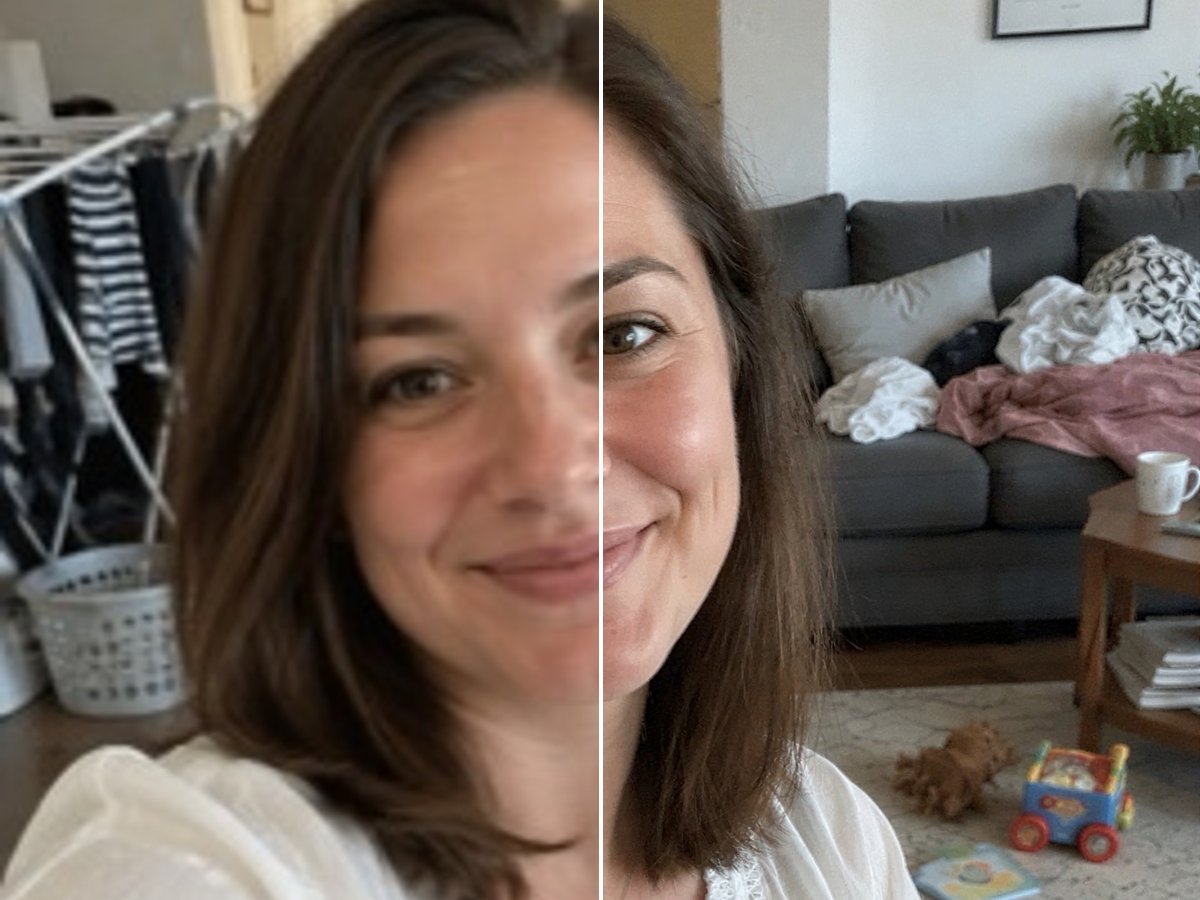
What we saw in our test on October 20, 2026:
- A 268 × 360 selfie became 1440 × 1940 at 2K and 2160 × 2912 at 4K. Eyes, skin and hair got sharper and the face stayed the same.
- A small anime illustration came out with crisp line art and unchanged colors.
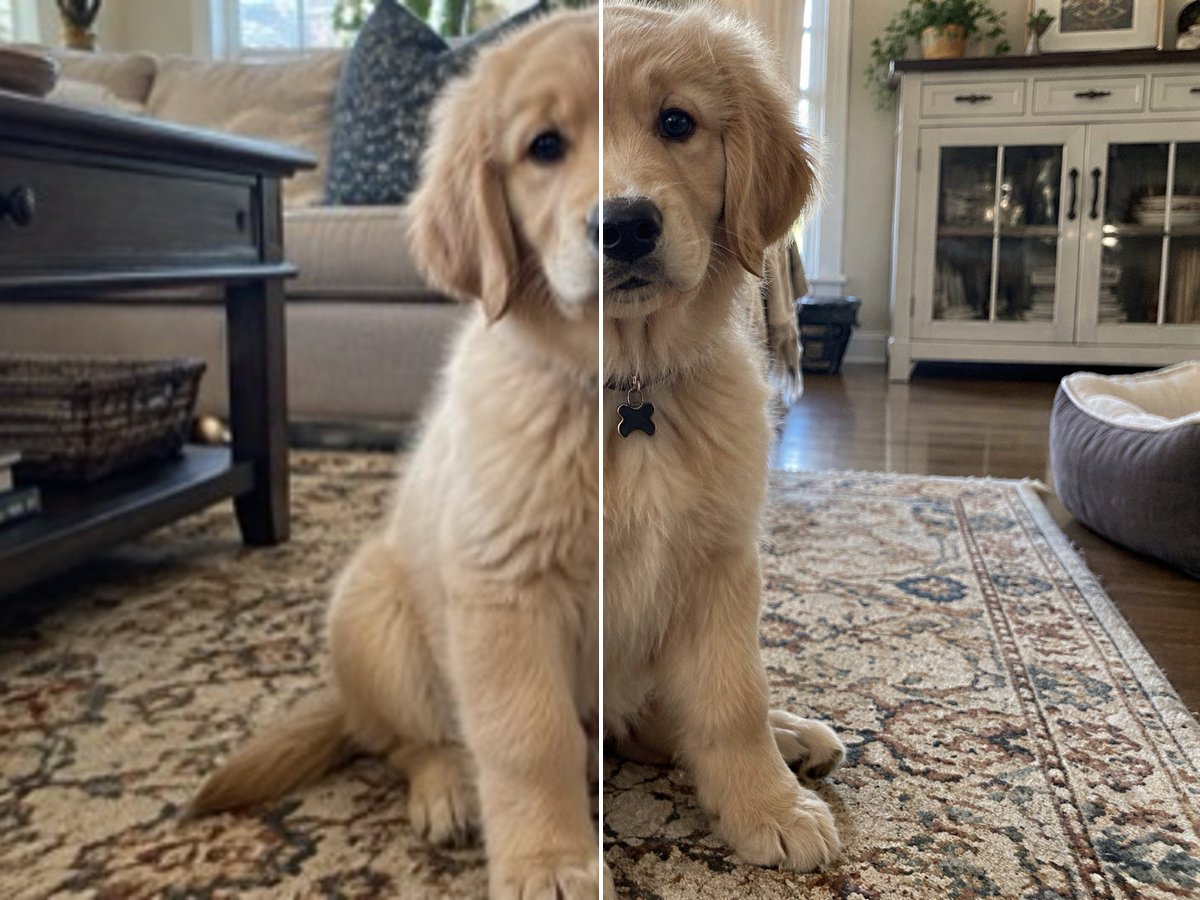
- A 360 × 267 puppy photo came back with fur strands and the rug pattern.
- Each job took about 2 to 3 minutes.
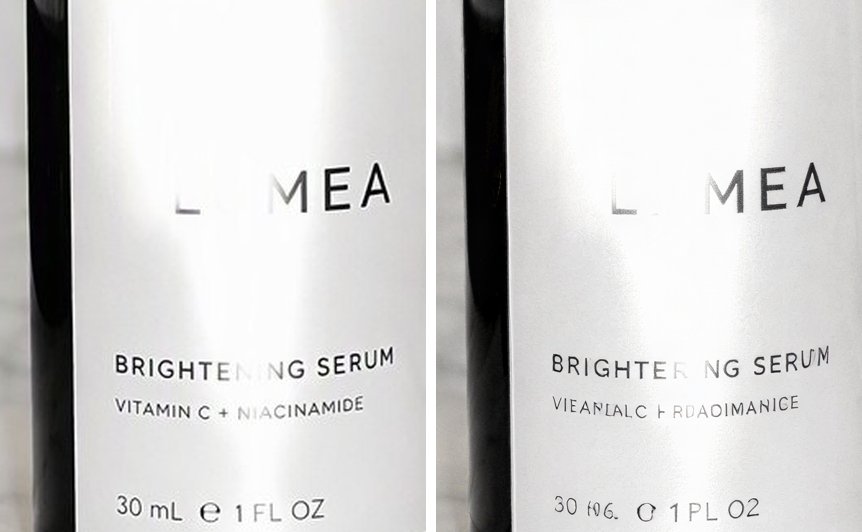
The limit: text that is too small to read in the original cannot be recovered. On a serum bottle, the brand name came out sharp and correct, but the tiny ingredient line turned into garbled letters.
- Free option: new accounts get free tokens when they sign up.
- Price: 4 tokens (1080p), 6 tokens (2K) or 10 tokens (4K) per image.
- Best for: real photos where faces, products and logos must stay accurate.
2. GoEnhance Image Enhancer (creative, adjustable)
The GoEnhance Image Enhancer is our creative upscaler. It enlarges an image up to 2.5x (output up to 4096 px on the long side) and lets you control how much the AI adds: a Creativity slider for new detail, HDR for sharpness, and Resemblance for how closely it sticks to the original. There are separate Real and Anime engines, and a batch mode for several images at once.
- Free option: free tokens at sign-up.
- Price: 5, 10 or 15 tokens per image, depending on the output size.
- Best for: AI art, illustrations and images where you want extra detail, not an exact copy.
- Watch out: high Creativity can change faces and small text. Lower it for real photos, or use the Image Upscaler above.
Fixing a specific problem instead? Try Unblur Image for blurry shots, AI Old Photo Restoration for faded prints, or Unblur Text for blurry documents.
3. Upscayl
Upscayl is a free, open-source (AGPL-3.0) desktop app for Windows, macOS and Linux. It runs on your own computer, so nothing is uploaded, and it can upscale up to 16x. There is also a paid Upscayl Cloud for people without a suitable graphics card.
- Free option: the desktop app is completely free.
- Limitation: it needs a Vulkan-compatible GPU (many integrated GPUs do not work), and it cannot fix images that are blurred or out of focus.
- Best for: people who want a free, offline tool and have a capable GPU.
4. Let's Enhance
Let's Enhance is a web upscaler with a very high ceiling: up to 256 MP on personal plans and 500 MP on business plans, which suits large prints.
- Free option: 10 credits when you sign up. Free upscales are capped at 8 MP and carry a watermark.
- Price: Starter from $9/month billed yearly ($12 month to month) for 100 credits.
- Best for: large prints and posters.
5. Topaz Gigapixel
Topaz Gigapixel is a desktop app (Windows and macOS) with cloud rendering, from Topaz Labs. It offers both standard models and generative ones, and local rendering keeps your files on your own computer.
- Free option: the pricing page shows no free desktop trial.
- Price: Personal from $149/year.
- Best for: photographers who upscale a lot and want to work offline.
6. Magnific
Magnific (now part of Freepik) is known for its Creative mode, which invents detail and accepts a prompt. It also has a Precision mode that stays closer to the original.
- Free option: none on the pricing page.
- Price: Premium from $14.50/month billed yearly ($20 month to month), excluding VAT. Upscales use credits.
- Best for: artists who want dramatic, prompt-guided detail.
7. Bigjpg
Bigjpg is a long-running web upscaler built on deep neural networks, aimed at artwork and photos.
- Free option: 20 images a month, up to 4x, with 5 MB uploads.
- Price: from $6 for 2 months (500 images a month), with up to 16x on paid plans.
- Best for: cheap, simple batch upscaling of illustrations.
8. waifu2x
waifu2x is an open-source (MIT) upscaler by nagadomi, made for anime-style art; it also has a photo model. Free web versions run at unlimited.waifu2x.net.
- Free option: completely free.
- Limitation: 2x per pass, so bigger enlargements take several rounds.
- Best for: anime screenshots and fan art.
9. Canva Upscale
Canva's Upscale feature sits inside the editor many people already use. It picks 4x or 16x automatically, accepts images from 10 × 10 px up to 25 MP, and outputs up to 50 MP.
- Free option: available on the free plan, but it uses your AI allowance.
- Limitation: each image can be upscaled only once, and Canva warns that faces and text can come out uneven.
- Best for: quick fixes inside a design you are already making in Canva.
10. Pixelcut
Pixelcut is a web and mobile editor (iOS and Android) with a 4x upscaler.
- Free option: a limited number of upscales, without a watermark.
- Price: Pro from $8/month billed yearly ($10 month to month) with unlimited upscaling.
- Best for: upscaling product photos on your phone.
4. How to Choose
- Real photo, face must stay the same: a faithful tool such as the GoEnhance Image Upscaler, or Magnific in Precision mode. For other tools, test a portrait first.
- AI art or illustration, more detail welcome: a creative tool such as the GoEnhance Image Enhancer or Magnific.
- Anime: waifu2x, Bigjpg, or the Anime engine in the GoEnhance Image Enhancer.
- Free and offline: Upscayl, if you have a supported GPU.
- Huge prints: Let's Enhance or Topaz Gigapixel.
- Tiny text or a blurred shot: no upscaler can read text that is not there. Start with the sharpest original you have; for motion blur try Unblur Image.
5. FAQ
What is the best free AI image enhancer? For real photos, a faithful upscaler gives the most trustworthy result. The GoEnhance Image Upscaler gives you free tokens at sign-up, and Upscayl is completely free if you have a supported GPU. For anime, waifu2x is free.
Can AI really make an image 4K? Yes. Choosing 4K in the GoEnhance Image Upscaler makes the short side 2160 pixels; a 268 × 360 photo became 2160 × 2912 in our test. The AI restores detail, but it cannot recover information that was never captured, such as unreadable small text.
Will an AI enhancer change my face? A faithful upscaler should not. Creative upscalers can, especially at high creativity settings. If the face matters, use a faithful tool or keep creativity low.
Is upscaling the same as unblurring? No. Upscaling adds resolution; unblurring removes motion or focus blur. A blurry photo needs a deblur tool first, then upscaling if you also need it bigger.
Do free enhancers add a watermark? Some do. Let's Enhance watermarks free outputs; Pixelcut says its free exports have no watermark. Check before you rely on a free tier.
6. Sources
- Our own test: GoEnhance Image Upscaler and Image Enhancer runs on October 20, 2026; the images in this post are unedited apart from cropping and resizing.
- Upscayl, upscayl.org and GitHub.
- Let's Enhance, pricing.
- Topaz Labs, pricing and Gigapixel.
- Magnific, pricing.
- Bigjpg, bigjpg.com.
- waifu2x, GitHub.
- Canva, Upscale an image.
- Pixelcut, pricing.
All third-party facts were checked on October 20, 2026.